
Introduction
Welcome to your new SZJHXIN Mini Karaoke Machine. This manual provides detailed instructions for setting up, operating, and maintaining your device. Please read it carefully to ensure optimal performance and longevity. This portable karaoke machine is designed for entertainment, featuring two wireless microphones and multiple connectivity options.
Package Contents
Please verify that all items listed below are included in your package:
- Mini Karaoke Machine x 1
- Wireless Microphone x 2
- USB Charging Cable x 2
- User Manual x 1
Product Overview
The SZJHXIN Mini Karaoke Machine consists of a main speaker unit and two wireless microphones, designed for ease of use and portability.

This image displays the main karaoke machine unit in beige with colorful LED lights, flanked by two matching wireless microphones.
The main unit features an integrated speaker, control buttons for power, volume, and sound effects, and ports for charging and TF card input. The wireless microphones are equipped with individual power and volume controls.
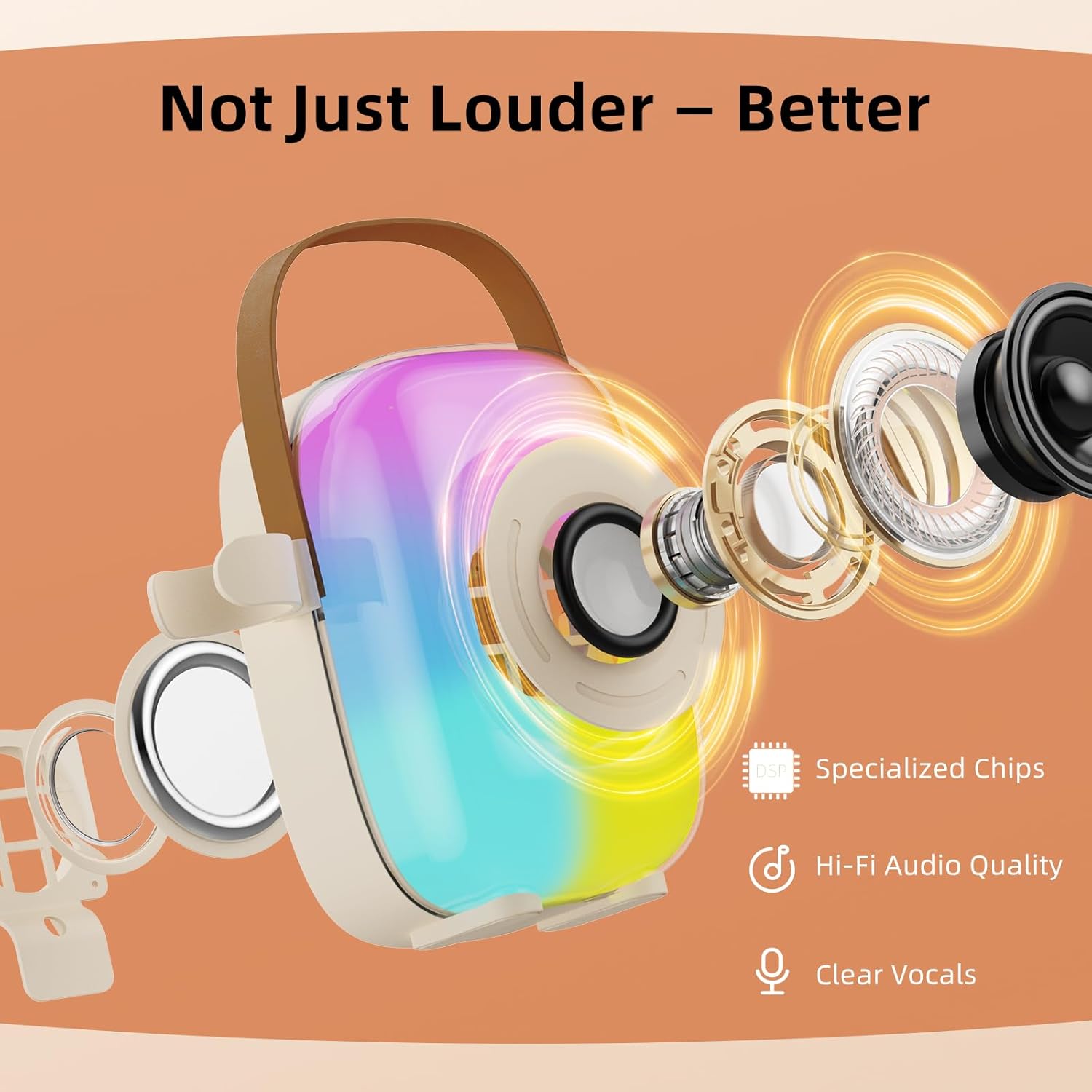
An exploded view of the karaoke machine's speaker components, highlighting specialized chips for Hi-Fi audio quality and clear vocals.
Initial Setup
Charging the Device
The main karaoke machine unit and both wireless microphones contain rechargeable Lithium-Ion batteries. Before first use, it is recommended to fully charge all components.
- Connect the provided USB charging cables to the charging ports on the main unit and each microphone.
- Plug the other end of the USB cables into a compatible USB power adapter (e.g., smartphone charger, computer USB port, power bank).
- The main unit (2000mAh battery) typically requires approximately 2 hours for a full charge, providing 8-10 hours of play time. Each microphone (500mAh battery) may take slightly longer to fully charge.
- Indicator lights will show charging status and turn off or change color when fully charged.
Powering On/Off
- Main Unit: Press and hold the power button on the main unit until the LED lights illuminate and a power-on sound is heard.
- Microphones: For each microphone, press and hold its power button until the indicator light turns on.
- To power off, repeat the process by pressing and holding the respective power buttons until the lights turn off.
Operation Guide
Bluetooth Connection
The karaoke machine supports Bluetooth 5.4 for wireless audio streaming.
- Ensure the main karaoke machine unit is powered on.
- Activate Bluetooth on your smartphone, tablet, or other compatible audio device.
- Search for "SZJHXIN Karaoke" (or a similar device name) in the list of available Bluetooth devices.
- Select the device name to pair. A confirmation sound will indicate successful pairing.
- Once connected, you can play music from your device through the karaoke machine speaker.

This diagram illustrates the various connectivity options: Bluetooth 5.4 for wireless streaming, USB for direct connection, and TF card for offline playback. It also depicts indoor and outdoor usage scenarios.
TF Card Playback
For offline music playback, you can use a TF (Micro SD) card.
- Insert a TF card (up to 32GB, formatted with MP3 audio files) into the designated slot on the main unit.
- The machine will automatically detect the card and switch to TF card playback mode.
- Use the '+' and '-' buttons on the main unit to navigate between tracks (single press).
- To adjust the volume during TF card playback, press and hold the '+' or '-' buttons.
Microphone Usage
The two wireless microphones automatically connect to the main unit when powered on.
- Ensure both the main unit and microphones are powered on.
- Adjust the microphone volume using the dedicated controls on each microphone or the main unit.
- For optimal sound pickup, hold the microphone at an appropriate distance from your mouth.

This image shows two children happily singing into the wireless microphones, demonstrating the dual microphone feature for duets.
Sound Effects
The karaoke machine offers five different voice-changing sound effects to enhance your singing experience.
- Press the dedicated sound effect button (often labeled with an icon) on the main unit or microphones to cycle through the available effects.
- The effects include: Original Sound, Female Voice, Male Voice, Baby Voice, and Monster Voice.

This graphic illustrates the five available voice changing effects: Original sound, female voice, male voice, baby voice, and monster voice, enhancing the fun of singing.
LED Lights
The main unit features colorful RGB LED lights that activate automatically when the unit is powered on and music is playing, creating a dynamic visual experience.
Care and Maintenance
- Cleaning: To clean the device, use a soft, dry cloth. Do not use liquid cleaners, solvents, or abrasive materials, as these can damage the finish and internal components.
- Storage: Store the karaoke machine and microphones in a cool, dry place away from direct sunlight, high humidity, and extreme temperatures.
- Handling: Avoid dropping the device or subjecting it to strong impacts. Keep it away from water and other liquids to prevent electrical damage.
- Battery Care: For optimal battery life, avoid fully discharging the batteries frequently. Charge the device regularly, even if not in use for extended periods.
Troubleshooting Guide
If you encounter any issues with your SZJHXIN Mini Karaoke Machine, please refer to the following common problems and solutions:
No Sound from Speaker
- Ensure the main unit is powered on and has sufficient battery charge.
- Check the volume levels on both the karaoke machine and your connected audio device (if using Bluetooth).
- Verify that the Bluetooth connection is active and properly paired, or that the TF card is correctly inserted and contains playable audio files.
- Try restarting both the karaoke machine and the connected device.
Microphone Not Working
- Ensure the microphone is powered on and fully charged.
- Check the microphone's volume level.
- Confirm that the microphone is within the operating range of the main unit.
- If multiple microphones are in use, ensure they are not interfering with each other.
Bluetooth Pairing Issues
- Make sure the karaoke machine is not already paired with another device. Disconnect any existing connections if necessary.
- Turn off and then turn on Bluetooth on both the karaoke machine and your audio device.
- Move closer to the karaoke machine to ensure a strong signal and minimize interference.
- Clear the Bluetooth pairing history on your device and attempt to pair again.
Poor Sound Quality
- Ensure the microphone is held at an appropriate distance from the mouth (not too close or too far).
- Check the quality of the audio source (e.g., song file, streaming service). Low-quality audio files will result in low-quality output.
- Reduce background noise in the environment.
- Ensure the main unit's speaker is not obstructed.
Technical Specifications
| Feature | Detail |
|---|---|
| Brand | SZJHXIN |
| Model Number | BG-K31 |
| Connectivity Technology | Bluetooth 5.4, TF Card, USB |
| Output Wattage | 8 Watts |
| Main Unit Battery | 2000mAh Lithium Ion (8-10 hours play time) |
| Microphone Battery | 500mAh Lithium Ion (each) |
| Material | Aluminum, Plastic |
| Item Weight | 650 Grams (approximately 1.43 pounds) |
| Product Dimensions (L x W x H) | 1 x 1 x 1 inches (Note: These dimensions may be generic. Refer to product packaging for exact measurements.) |
| Audio Input | Microphone |
| Number of Channels | 2 |
| Compatible Devices | Smartphones, Tablets, MP3 Players, Laptops, PA Systems, Televisions |
| Color | Beige |
| UPC | 742773504988 |
Warranty and Customer Support
No specific warranty information is provided within the product details. Please refer to your purchase documentation, the retailer's policy, or contact the seller directly for warranty details and terms.
For further assistance, technical support, or inquiries regarding your SZJHXIN Mini Karaoke Machine, please contact SZJHXIN customer service through the retailer where the product was purchased. Provide your model number (BG-K31) and purchase date for efficient service.