
1. Introduction
Thank you for choosing the ZOKOP ZK-110 Commercial Ice Maker Machine. This appliance is designed for efficient and reliable ice production in various commercial settings such as homes, restaurants, bars, hotels, and grocery stores. Constructed from durable stainless steel, it offers a large storage capacity and high ice-making efficiency.
This manual provides essential information for the safe installation, operation, maintenance, and troubleshooting of your ice maker. Please read it thoroughly before using the machine to ensure proper function and to prevent damage or injury.

This image displays the ZOKOP ZK-110 Commercial Ice Maker Machine, showcasing its stainless steel exterior and the internal ice-making components visible through the opened frosted lid.
2. Safety Instructions
Always follow basic safety precautions when using electrical appliances to reduce the risk of fire, electric shock, or injury.
- Read all instructions before operating the appliance.
- Ensure the power supply matches the specifications (120V/60Hz).
- Do not operate the machine with a damaged cord or plug.
- Keep hands and foreign objects out of the ice bin during operation.
- Do not immerse the appliance, cord, or plug in water or other liquids.
- Unplug the machine before cleaning or performing any maintenance.
- Place the ice maker on a stable, level surface away from direct sunlight or heat sources.
- Ensure adequate ventilation around the machine.
- This appliance is not intended for use by persons (including children) with reduced physical, sensory, or mental capabilities, or lack of experience and knowledge, unless they have been given supervision or instruction.
3. Product Overview
Main Features:
- Durable Construction: Made from stainless steel for extended service life.
- High Capacity: 24LBS ice storage capacity.
- Efficient Production: Produces up to 110Lbs (50kg) of ice per 24 hours with an 11 to 18 minute ice-making cycle.
- Ice Cube Size: Produces 0.9" x 0.9" x 0.9" ice cubes.
- Smart Functions: Reservation function for scheduled shutdown/startup, one-button cleaning, and NANO blue light illumination.

The ice maker is shown in a commercial environment, emphasizing its ability to produce 4x9 ice cubes. Icons illustrate features such as smart blue light illumination, energy efficiency, fast ice production, and a one-key cleaning function.
Included Accessories:
The ZK-110 ice maker comes with the following accessories to facilitate its use and maintenance:
- 1 x Ice Maker Unit
- 1 x Filter
- 1 x Drainage pipe
- 1 x Ice Shovel
- 1 x Small accessory bag
- 1 x Manual (this document)

This image showcases the main ice maker unit alongside the essential accessories provided: an ice shovel for convenient ice retrieval, a drainage pipe for water disposal, and a water filter for improved ice quality.
4. Setup
Initial Preparation:
- Upon receiving the machine, allow it to stand upright for at least 24 hours before plugging it in. This allows the refrigerant to settle.
- Ensure the machine is placed on a firm, level surface.
- Verify that the room temperature is between 50-100℉ (10-38℃) and ambient humidity is ≤90%.
Connecting Water and Power:
The ice maker requires a continuous water supply and a power connection. Refer to the diagram below for proper hook-up.

This diagram provides a clear visual guide for connecting the ice maker to its power source, water supply (via an inlet pipe), and drainage system (sewage outlet), ensuring proper installation.
- Power Connection: Plug the machine into a grounded 120V/60Hz electrical outlet.
- Water Inlet: Connect the provided water inlet pipe to a potable water source. Ensure the water supply is sufficient to allow the float to lift to the level condition before turning on the machine.
- Drainage: Connect the drainage pipe to a suitable sewage outlet to allow water to drain away from the machine.
- Filter Installation: Install the included water filter in-line with the water supply to ensure clean water for ice production. Follow the steps shown in the image below.

A four-step visual guide detailing the process of connecting the external water filter to the ice maker's water inlet, ensuring clean water supply for ice production.
5. Operation
Control Panel:
The control panel allows you to manage the ice maker's functions. Familiarize yourself with the buttons and indicators:

The control panel features buttons for ice making, reservation, cleaning, and light control, along with indicators for ice full and stoppage. Below the panel, important warm tips are provided regarding initial machine setup, water supply, and cleaning schedules for various components.
- Power Button: Turns the machine on or off.
- Ice Making Indicator: Lights up when the machine is actively making ice.
- Clean Button: Initiates the one-button cleaning cycle.
- Reservation Button: Sets a scheduled time for the machine to start or stop.
- Light Button: Controls the NANO blue light illumination inside the ice bin.
- Ice Full Indicator: Lights up when the ice storage bin is full.
- Stoppage Indicator: Indicates an error or operational pause.
- '+' and '-' Buttons: Used to adjust settings, such as ice cube thickness.
Making Ice:
- Ensure the machine is properly connected to power and water.
- Press the Power button to turn on the machine.
- The machine will automatically begin the ice-making cycle. Ice production typically takes 11 to 18 minutes per cycle.
- The NANO blue light can be turned on or off using the Light button for visibility inside the ice bin.
Adjusting Ice Cube Thickness:
The thickness of the ice cubes can be adjusted to your preference using the control panel.
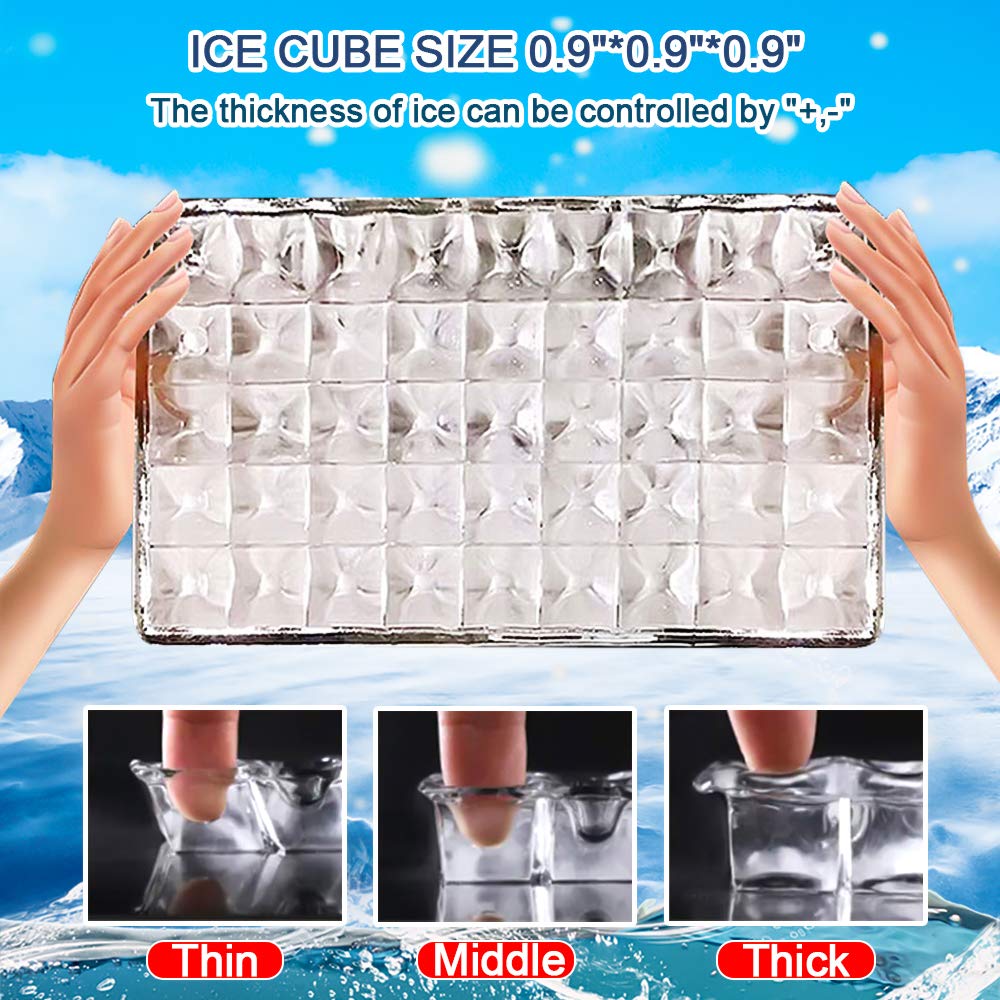
This visual explains how the ice cube thickness can be controlled using the '+' and '-' buttons on the control panel, allowing users to select between thin, middle, or thick ice cubes, each measuring 0.9"x0.9"x0.9".
Use the '+' and '-' buttons on the control panel to cycle through different ice thickness settings (Thin, Middle, Thick). The machine will then produce ice cubes according to the selected thickness.
6. Maintenance and Cleaning
Regular cleaning and maintenance are crucial for the longevity and hygienic operation of your ice maker.
One-Button Cleaning Function:
The ZK-110 features a convenient one-button cleaning function for labor-saving cleaning. Refer to your control panel for the 'Clean' button and follow the instructions in the full manual for its use.
Manual Cleaning Schedule:
- Semi-Monthly: The ice shovel, ice bin, water tank, the ice-full detecting plate, and the surface of the evaporator should be cleaned semi-monthly (every two weeks) according to an interior cleaning program.
- Every 3 Months: All components and surfaces exposed to water or ice cubes, including the ice storage bin, water tank, door, evaporator, water pump, silicone tube, and water dividing pipe, should be thoroughly cleaned every three months.
Always unplug the machine and drain any remaining water before performing manual cleaning. Use a mild detergent and warm water, and ensure all components are thoroughly rinsed and dried before reassembly.
7. Troubleshooting
This section addresses common issues you might encounter with your ice maker. If the problem persists after attempting these solutions, please contact customer support.
| Problem | Possible Cause | Solution |
|---|---|---|
| No ice production | No power; Water supply off; Water filter clogged; Low water level; Ambient temperature too high. | Check power connection; Ensure water supply is on; Replace filter; Check water level and float; Move machine to cooler area. |
| Ice production is slow | Poor ventilation; Dirty condenser; High ambient temperature; Water supply issues. | Ensure proper airflow around machine; Clean condenser coils; Reduce room temperature; Check water pressure. |
| Ice cubes are too thin/thick | Incorrect thickness setting. | Adjust ice thickness using the '+' and '-' buttons on the control panel. |
| Water leakage | Loose connections; Clogged drain pipe. | Check all water inlet and drainage pipe connections for tightness; Clear any blockages in the drain pipe. |
| Ice Full indicator stays on | Ice bin is full; Ice sensor is dirty or blocked. | Remove ice from the bin; Clean the ice-full detecting plate and sensor. |
8. Specifications
| Specification | Value |
|---|---|
| Model | ZK-110 |
| Material | Stainless Steel |
| Ice Making Power | 240W |
| Power Supply | 120V/60Hz |
| Ice Making Capacity | 110lbs / 24H (50kg / 24H) |
| Ice Storage Capacity | 24lbs |
| Number of Each Ice Tray | 36Pcs (4x9) |
| Ice Shape | Ice Cube 0.9" x 0.9" x 0.9" |
| Refrigerant | R290/43g |
| Foaming Agent | C5H10 |
| Climate Type | SN/N/ST |
| Unit Dimensions (L x W x H) | 14" x 17" x 30" (36 x 43 x 76 cm) |
| Ice Time (per cycle) | 11-18 Min |
| Weight | 41.8lb (19kg) |
| Room Temperature Range | 50-100℉ (10-38℃) |
| Ambient Humidity | ≤90% |
9. Warranty and Support
For warranty information and customer support, please refer to the warranty card included with your product or contact the seller directly. Keep your purchase receipt as proof of purchase for any warranty claims.
For further assistance or inquiries, please visit the official Shyneer store on Amazon: Shyneer Store.