
Introduction
This manual provides essential instructions for the safe and effective use, installation, and maintenance of your Peakbatt CS-ICM227TW 1800mAh Li-ion replacement battery. Please read this manual thoroughly before using the battery to ensure optimal performance and longevity.
Safety Information
Your Peakbatt battery is designed with multiple safety protections. Adhering to the following guidelines is crucial for preventing damage, injury, or fire.
- Do not disassemble: Attempting to disassemble, open, or service the battery pack is prohibited and voids the warranty.
- Use designated charger: Only replace with the battery pack designated for this product and use a compatible charger.
- Avoid physical damage: Do not crush, puncture, short external contacts, or dispose of in fire or water.
- Temperature limits: Do not store above 60°C (140°F).
- Safety Certifications: This battery is certified with ISO9001, RoHS, CE, UN38.3, and MSDS for safety protection against over-charge, over-discharge, over-heat, over-current, and short-circuit.
- Disposal: Dispose of used batteries according to local regulations. Do not dispose of in household waste.
Product Overview
The Peakbatt CS-ICM227TW is a high-capacity Li-ion replacement battery designed for various Icom two-way radios. It provides reliable power for extended operation.
Compatible Part Numbers:
- BJ-193
- BJ-265
- BP-227
- BP-227Li
- BP-227UL
Compatible Icom Radio Models:
- IC-F61V
- IC-F88
- IC-M87
- IC-M88
- IC-U80E
- IC-V80
- IC-V80E
- IC-V85
- IC-V85E
Battery Parameters:
- Type: Li-ion
- Capacity: 1800mAh
- Voltage: 7.2V
- Rate: 12.96Wh
- Dimensions: 95.10 x 59.12 x 31.10 mm (approximately 3.74 x 2.33 x 1.22 inches)
- Weight: 179.6g (approximately 6.3 ounces)

Image: Top-down view of the Peakbatt CS-ICM227TW Li-ion battery, showing its compact design.
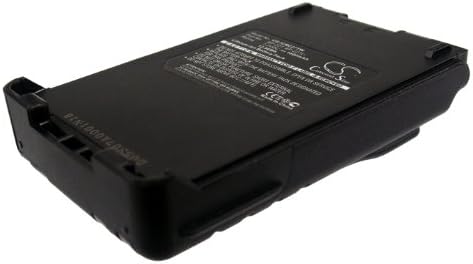
Image: Angled view of the Peakbatt CS-ICM227TW Li-ion battery, highlighting its form factor.
Setup and Installation
Follow these steps to properly install the Peakbatt CS-ICM227TW battery into your compatible Icom radio.
- Power Off Radio: Ensure your Icom radio is powered off before attempting battery installation or removal.
- Remove Old Battery (if applicable): If replacing an existing battery, unlatch and remove it from the radio.
- Align Battery: Align the Peakbatt CS-ICM227TW battery with the battery compartment on the back of your Icom radio. Ensure the contacts on the battery align with the contacts in the radio.
- Insert and Secure: Gently slide the battery into the compartment until it clicks securely into place. Verify that the battery is firmly attached and does not wobble.
- Attach Belt Clip (Optional): If your radio or battery supports a belt clip, attach it as needed.

Image: View of the Peakbatt CS-ICM227TW battery with a belt clip attached, ready for installation.
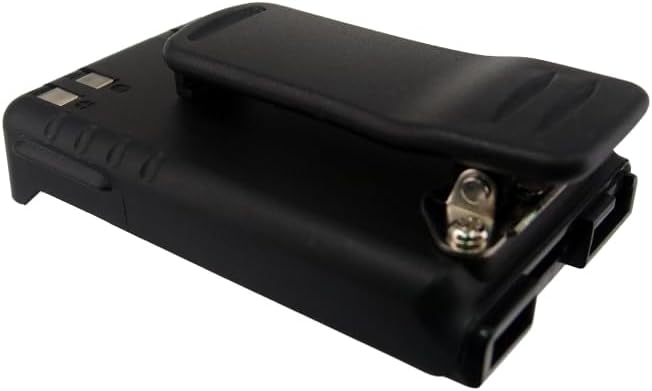
Image: Another perspective of the Peakbatt CS-ICM227TW battery, showing the belt clip mechanism.
Operating Instructions
Initial Charge:
For optimal performance and battery longevity, fully charge the battery before its first use. This process typically takes several hours depending on the charger and battery's initial state.
Charging:
- Use only chargers compatible with Icom BP-227 series batteries.
- Insert the radio with the battery attached into the charging cradle, or connect the battery directly to a compatible charger if supported.
- Observe the charger's indicator light for charging status (e.g., red for charging, green for fully charged).
- Avoid overcharging by removing the battery once fully charged, though modern Li-ion batteries have built-in protection.
Usage:
- Operate your radio as per its own instruction manual.
- Monitor the radio's battery indicator to determine remaining power.
- Recharge the battery when the radio indicates low power to prevent unexpected shutdowns.
Maintenance
Storage:
- Store the battery in a cool, dry place, away from direct sunlight and extreme temperatures.
- For long-term storage, it is recommended to store Li-ion batteries with a charge level between 40% and 60%.
- Avoid storing the battery fully charged or fully discharged for extended periods.
Cleaning:
- Wipe the battery's exterior and contacts with a clean, dry cloth.
- Do not use harsh chemicals or abrasive cleaners.
- Ensure contacts are free of dirt or corrosion for optimal connection.
Troubleshooting
If you encounter issues with your Peakbatt battery, consider the following common solutions:
- Battery not charging:
- Ensure the battery is correctly seated in the charger or radio.
- Verify the charger is properly connected to a power source.
- Check for any dirt or corrosion on the battery and charger contacts and clean if necessary.
- Confirm the charger is compatible with Li-ion batteries and the specific Icom model.
- Radio not powering on with new battery:
- Ensure the battery is fully charged.
- Verify the battery is correctly installed and securely latched.
- Confirm the battery model (CS-ICM227TW) is compatible with your specific Icom radio model.
- Shortened operating time:
- Battery performance can degrade over time with repeated charge cycles.
- Ensure the battery is being fully charged each time.
- Operating in extreme temperatures can affect battery life.
Specifications
Detailed technical specifications for the Peakbatt CS-ICM227TW battery.
| Feature | Detail |
|---|---|
| Model Number | CS-ICM227TW |
| Battery Type | Lithium Ion (Li-ion) |
| Capacity | 1800 mAh |
| Voltage | 7.2 V |
| Energy Rate | 12.96 Wh |
| Product Dimensions | 95.10 x 59.12 x 31.10 mm (3.74 x 2.33 x 1.22 inches) |
| Item Weight | 179.6 g (6.3 ounces) |
| Manufacturer | Peakbatt |
| Safety Certifications | ISO9001, RoHS, CE, UN38.3, MSDS |
| Recommended Use | Replacement Battery |

Image: The back label of the Peakbatt CS-ICM227TW battery, displaying model number, voltage, capacity, and safety warnings.
Warranty and Support
Peakbatt is committed to providing high-quality products and customer satisfaction.
- Warranty: This product comes with a 12-month warranty from the date of purchase.
- Money Back Guarantee: A 30-day money-back guarantee is offered.
- Customer Service: For any questions, concerns, or support needs, please contact Peakbatt customer service, available 7 days a week, 24 hours a day. Refer to your purchase documentation for specific contact details.