
1. Introduction
This manual provides detailed instructions for the installation, operation, and maintenance of your Motorsi 1DIN 7-inch HD Touch Screen Car MP5 Player. Please read this manual thoroughly before using the device to ensure proper functionality and safety. Keep this manual for future reference.
2. Package Contents
Before installation, verify that all items are present in the package:
- 1 x Car Player
- 1 x Power Cable
- 1 x Microphone (MIC)
- 1 x Remote Control
- 1 x User Manual
- 1 x Mounting Bracket
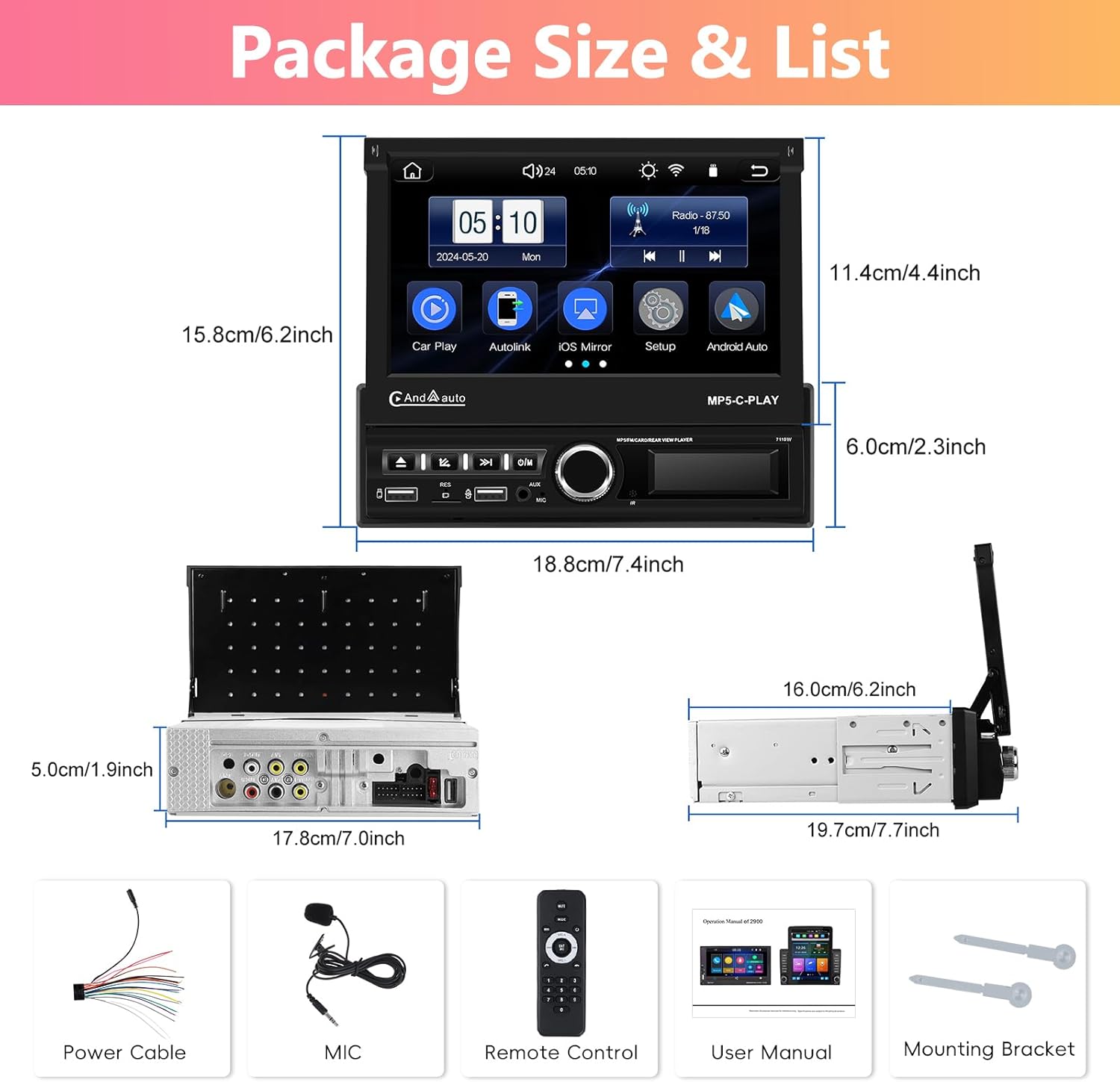
Image: Package contents of the Motorsi 1DIN 7-inch Car MP5 Player.
3. Installation and Setup
3.1 Wiring Information
Refer to the wiring diagram for correct connection of the power cable, audio outputs, video inputs, and USB ports. Incorrect wiring can damage the device or vehicle electrical system.

Image: Detailed wiring diagram for the car MP5 player.
3.2 Initial Setup
Upon first power-on or after a factory reset, you may need to configure basic settings such as language, time, and tuner region. Navigate through the setup menu using the touch screen.
Video: Overview of the main menu and basic setup options, including PhoneLink, BT Music, AUX IN, Background, EQ, Wheel, Setup, USB2, Tuner Region, Factory Set, Sound Setup, Display Settings, ScreenSave, Language, and Time Setup.
The setup menu allows adjustment of various system parameters. This includes:
- Basic Setup: Configure beep sounds, reverse mute, driving ban video, front camera settings, color lamp mode, and touch calibration.
- Tuner Region: Select your geographical region for FM radio tuning (e.g., China, America, Japanese, Russian, Middle East, Europe).
- Wheel: Configure steering wheel controls.
- Factory Set: Access advanced factory settings (requires password).
- Sound Setup: Adjust equalizer settings and balance.
- Display Settings: Modify brightness, contrast, hue, saturation, and backlight.
- Background: Choose a custom background image.
- ScreenSave: Configure screen saver settings.
- Language: Select the system language.
- Time Setup: Set the current date and time.
Video: Demonstrates navigating the setup menu, including adjusting sound settings (EQ), display settings (brightness, contrast, hue, saturation, backlight), background selection, screen saver, language, and time setup.
4. Operation
4.1 Wireless CarPlay / Android Auto
Connect your smartphone wirelessly to access features like navigation, music, calls, and messages directly on the car player's screen. This function supports voice control for hands-free operation.
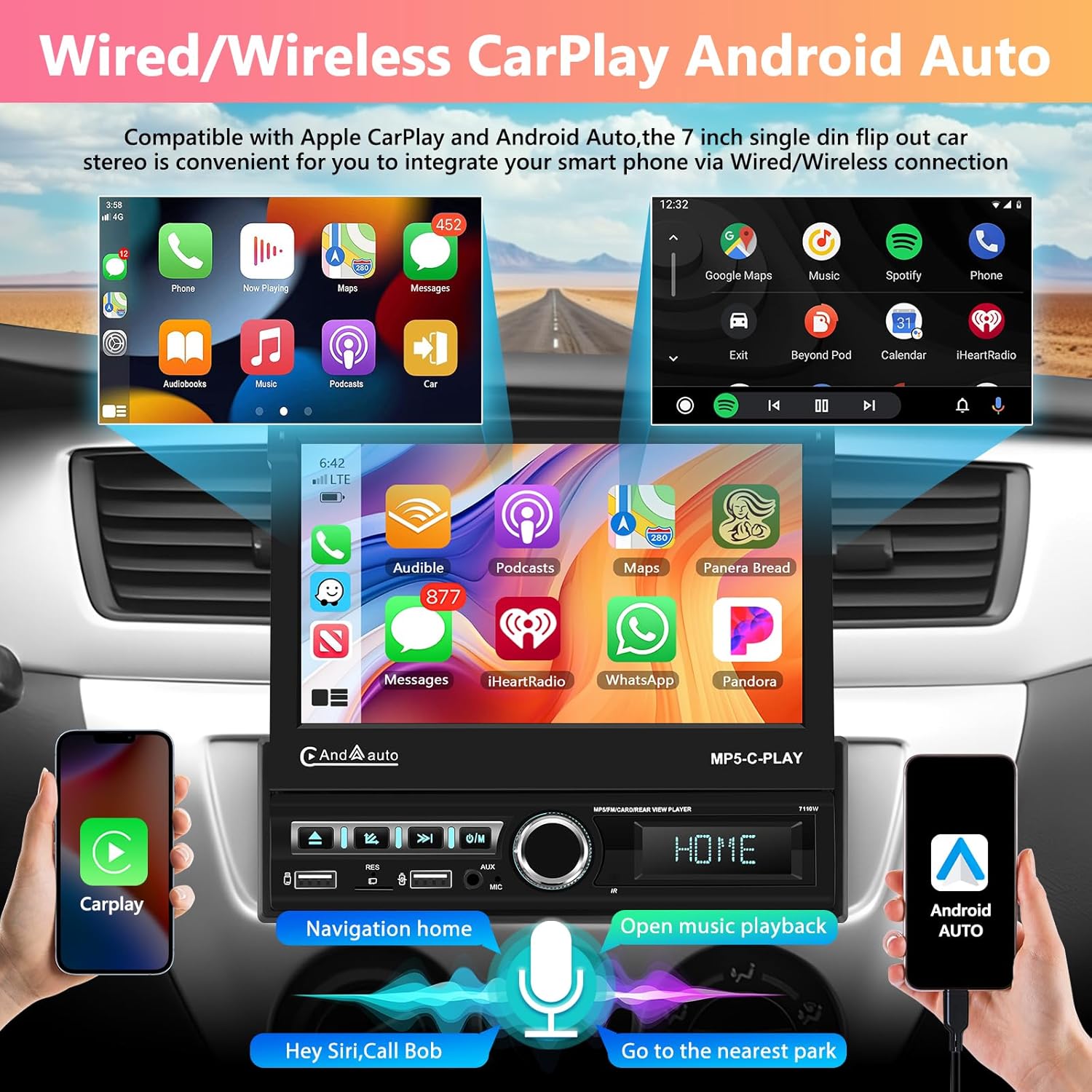
Image: Wireless CarPlay and Android Auto interface demonstration.
4.2 Mirror Link Function
Mirror Link allows you to replicate your smartphone's screen onto the car player's display. This provides seamless access to your phone's apps and media, enhancing convenience by allowing direct interaction from the car's touchscreen. Supports both wired and wireless connections for Android and iOS devices.

Image: Mirror Link functionality for iOS and Android systems.
4.3 Bluetooth Connectivity
Connect your mobile phone via Bluetooth for hands-free calling and Bluetooth music playback. This feature enhances driving safety by allowing you to manage calls and audio without handling your phone.
4.4 FM/RDS Radio
Tune into FM radio stations. The device supports RDS (Radio Data System) for displaying station information where available.
4.5 Audio Equalizer (EQ) Settings
Adjust the audio output using the built-in equalizer. Choose from preset modes like Jazz, Classic, Rock, Pop, Flat, or customize your own settings to optimize sound quality.

Image: Bluetooth, FM/RDS Radio, and EQ Sound interfaces.
4.6 Steering Wheel Control
If your vehicle supports it, configure the steering wheel controls to manage the car player's functions, such as volume, track changes, and call answering, without taking your hands off the wheel.
4.7 Backup Camera Support
The unit supports AHD & CVBS reversing input for a rear view camera. When a compatible camera is connected and the vehicle is in reverse, the display will automatically switch to the camera feed. Note: The rear view camera is not included and is an optional purchase.

Image: Steering Wheel Control and Backup Camera display.
4.8 HD Touch Screen and Backlight
The device features a 7-inch HD IPS touch screen with a resolution of 1024*600. It also includes a 7-color backlight option for customizable aesthetics.

Image: 7-inch IPS Touch Screen features and 7 Color Backlight options.
5. Maintenance
5.1 Cleaning the Screen
To clean the touch screen, use a soft, lint-free cloth. For stubborn smudges, lightly dampen the cloth with water or a screen-safe cleaning solution. Avoid abrasive materials or harsh chemicals that could damage the screen coating.
5.2 General Care
Keep the unit free from dust and debris. Ensure proper ventilation around the device to prevent overheating. Avoid exposing the unit to extreme temperatures or direct sunlight for extended periods.
6. Troubleshooting
6.1 No Power
- Check all power connections to ensure they are secure.
- Verify the vehicle's fuse for the car stereo is not blown.
- Ensure the ignition is on if the unit is wired to an accessory power source.
6.2 No Sound
- Check volume levels on the unit and your connected device (if using Bluetooth/CarPlay).
- Verify speaker wiring connections.
- Ensure the correct audio source is selected.
- Check EQ settings; reset to default if necessary.
6.3 Touch Screen Unresponsive
- Perform a soft reset by pressing the RST button (if available) or turning the vehicle ignition off and on.
- Recalibrate the touch screen via the setup menu.
6.4 CarPlay/Android Auto Not Connecting
- Ensure your smartphone's operating system is up to date.
- For wired connections, try a different USB cable.
- For wireless connections, ensure Bluetooth and Wi-Fi are enabled on your phone and the unit.
- Restart both the car player and your smartphone.
7. Specifications
| Feature | Specification |
|---|---|
| Chipset | 2900 |
| Screen Size | 7 inches |
| Screen Resolution | 1024*600 |
| Mirror Link | Wired/Wireless Android / iOS |
| Radio Chip | 8035 |
| Output Power | 4 * 45W |
| Working Temperature | -40℃ to 80℃ |
| Steering Wheel Control | Supported |
| Bluetooth Version | 4.2 |
| Power Amplifier Chip | AC7388 |
| Radio Frequency Band | FM |
| Video Output | Supported |
| Recorder | Supported (specify the recorder) |
| Reversing Input | AHD & CVBS |
| USB Ports | Double USB ports |
| AUX Input | Supported |
| CarPlay | Supported |
| Android Auto | Supported |
| External Microphone | Supported |
| Audio Formats | APE / FLAC / WAV / MP3 / WMA, etc. |
| Video Formats | MKV / RMVB / AVI / MP4 / MDV, etc. |
| Picture Formats | PNG / JPEG / JPG / GIF / WBMP / BNP, etc. |
| Languages | English, Chinese, Portuguese, Spanish, Russian, German, Italian, Polish, French, Japanese, Turkish, Czech, etc. (Default: English) |
| Package Dimensions | 8.86 x 8.86 x 3.78 inches |
| Item Weight | 3.67 pounds |
8. Warranty and Support
8.1 Product Warranty
This product comes with a standard manufacturer's warranty. Please refer to the warranty card included in your package or contact the retailer for specific terms and conditions regarding coverage and duration.
8.2 Customer Support
For technical assistance, troubleshooting, or any questions regarding your Motorsi Car MP5 Player, please contact our customer support team. Contact details can typically be found on the product packaging, warranty card, or the retailer's website.