
Introduction
This manual provides essential information for the safe and effective use of your Peakbatt 680mAh Li-ion replacement battery. This battery is designed to replace the original battery in various Panasonic shaver models, including ES-LA62, ES-LA63, ES-LA83, ES-LA90, ES-LA92, ES-LA93, ES-LC20, ES-LC60, ES-LF20, ES-LF50, ESLF51, ES-LF51, and ES-LF71. Please read this manual thoroughly before installation and use.
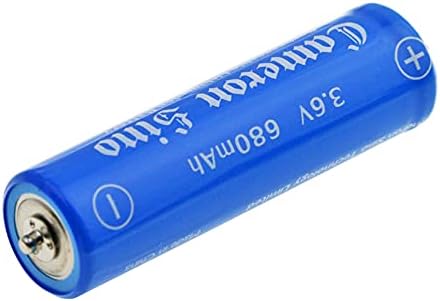
Image: A blue cylindrical Peakbatt 680mAh Li-ion replacement battery, showing its general appearance and branding.
Safety Information
To ensure safe operation and prevent damage, please observe the following precautions:
- Do not disassemble, open, or shred the battery.
- Do not expose the battery to heat or fire. Avoid storage in direct sunlight.
- Do not short-circuit the battery.
- Do not expose the battery to mechanical shock.
- In case of battery leakage, do not allow the liquid to come into contact with skin or eyes. If contact has been made, wash the affected area with copious amounts of water and seek medical advice.
- Keep the battery out of reach of children.
- Use only with the specified charger and device for which it was intended.
- Dispose of used batteries promptly and according to local regulations.
This battery is certificated with ISO9001, RoHS, CE, UN38.3, and MSDS, ensuring safety protection against over-charge, over-discharge, over-heat, over-current, and short-circuit.
Setup and Installation
Before installing the new battery, ensure your device is powered off and unplugged from any power source. It is recommended to consult your device's original instruction manual for specific battery replacement procedures, as steps may vary.
- Verify Compatibility: Confirm that the part number of this battery (CS-PVL958SL) matches the requirements for your specific Panasonic shaver model.
- Access Battery Compartment: Carefully open your shaver's casing or battery compartment. This may require small tools (e.g., a screwdriver).
- Remove Old Battery: Gently disconnect and remove the old battery. Note its orientation and connection points.
- Insert New Battery: Place the Peakbatt replacement battery into the compartment, ensuring correct polarity (+ and - terminals) as indicated on the battery and within the device.
- Secure and Close: Reconnect any terminals and carefully close the battery compartment or shaver casing.
- Initial Charge: After installation, fully charge the device using its original charger before the first use.

Image: The Peakbatt replacement battery positioned next to a Panasonic electric shaver, illustrating the context for which the battery is intended.
Operating Instructions
Once the Peakbatt replacement battery is correctly installed and fully charged, your device will operate as intended. The battery is designed to provide reliable power for your compatible Panasonic shaver.
- Charging: Always use the original charger supplied with your Panasonic shaver to charge the battery.
- Discharge: Allow the device to discharge naturally during use.
- Recharge: Recharge the battery when the device indicates low power or when performance diminishes.
Maintenance
Proper maintenance can extend the lifespan of your battery:
- Storage: If the device will not be used for an extended period, store it in a cool, dry place. It is advisable to store Li-ion batteries with a partial charge (around 50%) rather than fully charged or fully depleted.
- Cleaning: Keep the battery contacts within the device clean and free from debris to ensure optimal connection.
- Disposal: When the battery reaches the end of its life, dispose of it responsibly at an authorized recycling facility. Do not dispose of batteries in household waste or fire.
Troubleshooting
If you encounter issues with your Peakbatt replacement battery, consider the following:
- Device Not Powering On:
- Ensure the battery is fully charged.
- Verify the battery is correctly installed with proper polarity.
- Confirm the battery is compatible with your specific device model.
- Battery Not Charging:
- Check that the charger is properly connected to both the device and a working power outlet.
- Ensure the battery is securely seated in the device.
- Inspect the charger and charging port for any visible damage.
- Shortened Operating Time:
- Ensure the battery is receiving a full charge cycle.
- Battery capacity naturally degrades over time with repeated charge/discharge cycles.
If problems persist, please refer to the Warranty and Support section for assistance.
Specifications
| Battery Type | Li-ion |
| Capacity | 680mAh |
| Voltage | 3.6V |
| Energy Rate | 2.45Wh |
| Dimensions | 56.00 x 14.00 x 14.00mm |
| Weight | 44.5g |
| Model Number | CS-PVL958SL |
| Safety Certifications | ISO9001, RoHS, CE, UN38.3, MSDS |
| Safety Features | Over-charge, over-discharge, over-heat, over-current & short-circuit protection |

Image: A close-up view of the Peakbatt 680mAh Li-ion battery, clearly showing the positive and negative terminals, along with the model number CS-PVL958SL printed on its side.
Warranty and Support
Your Peakbatt 680mAh replacement battery comes with the following:
- Warranty: A 12-month warranty from the date of purchase.
- Money Back Guarantee: A 30-day money-back guarantee.
For customer service and technical support, please contact Peakbatt customer service. Our support team is available 7 days a week, 24 hours a day, to assist you with any inquiries or issues.