
1. Introduction
Thank you for choosing the Wilody HyperMist 10X Plus Portable Misting Fan. This powerful and versatile fan is designed to provide cooling and comfort in various indoor and outdoor settings. Featuring a large capacity battery, multiple fan speeds, misting modes, RGB ambient lighting, and convenient control options, it's an ideal companion for camping, backyard gatherings, sports events, and more.

Image: The Wilody HyperMist 10X Plus Misting Fan, showcasing its main unit with a yellow fan head and black body, a clear water tank with ice cubes, and a white remote control. The fan is designed for portable cooling.
2. Safety Instructions
- Read all instructions before using the appliance.
- Do not immerse the fan in water or other liquids.
- Use only clean, filtered water for the misting function to prevent clogging and damage.
- Keep out of reach of children and pets.
- Do not block the air inlet or outlet during operation.
- Ensure the fan is placed on a stable, level surface.
- Unplug the fan when not in use or before cleaning.
- Do not attempt to disassemble or repair the fan yourself. Contact qualified service personnel.
3. Package Contents
Verify that all items are present in the package:
- Portable Rechargeable Misting Fan
- User Manual
- DC Charger
- Spare Nozzle (for misting function)
- Remote Control (requires 2 AAA batteries, not included)

Image: An illustration showing the Wilody Misting Fan, user manual, DC charger, spare nozzle, and remote control, indicating all items included in the product package.
4. Product Overview
The Wilody HyperMist 10X Plus combines a powerful fan with an effective misting system and ambient lighting. Key features include:
- 42800mAh Large Capacity Battery: Provides extended operation time.
- Super Strong Wind Power: Delivers effective cooling.
- 120° Horizontal Auto Oscillating: Distributes air and mist widely.
- 90° Vertical Manual Oscillating: Allows for directional airflow adjustment.
- Cooling Misting Function: Features 4 misting modes for enhanced cooling.
- Remote Control: Convenient operation from a distance.
- RGB Ambient Lighting: Multiple color options for atmosphere.
- Timing Function: Set operation duration (2/4/6/8 hours).
- 2L Water Tank: Large capacity for prolonged misting.
- Battery Indicator: Displays remaining battery life.
- Grip Handle: For easy portability.

Image: An infographic highlighting the key features of the Wilody Misting Fan, including its 42800mAh battery, strong wind power, 120° auto oscillation, cooling misting, remote control, RGB lighting, timing function, 90° manual vertical oscillation, and 2L water tank, set against an outdoor background.
5. Setup
5.1 Charging the Battery
Before first use, fully charge the fan's built-in 42800mAh battery. Connect the DC charger to the fan's charging port and plug it into a power outlet. The battery indicator lights will show the charging progress. A full charge ensures maximum operating time.
5.2 Filling the Water Tank
- Ensure the fan is turned off and unplugged.
- Locate the water tank filler opening. This model features a dust-proof water filler.
- Carefully pour up to 2 liters of clean, filtered water into the tank. You may also add ice cubes for enhanced cooling.
- Securely close the filler cap.

Image: A composite image showing the Wilody Misting Fan in a camping setting, highlighting its portable handle, dust-proof water filler, and 2L water tank capacity.
5.3 Remote Control Battery Installation
The remote control requires 2 AAA batteries (not included). Open the battery compartment on the back of the remote, insert the batteries according to the polarity markings, and close the compartment.
6. Operating Instructions
6.1 Power On/Off
Press the power button on the fan's control panel or the remote control to turn the fan on or off.
6.2 Fan Speed Adjustment
The fan has 4 speed settings. Press the fan speed button on the control panel or remote to cycle through the speeds (Speed 1 to Speed 4). Speed 1 offers up to 70 hours of operation, while Speed 4 provides powerful airflow for up to 8 hours.
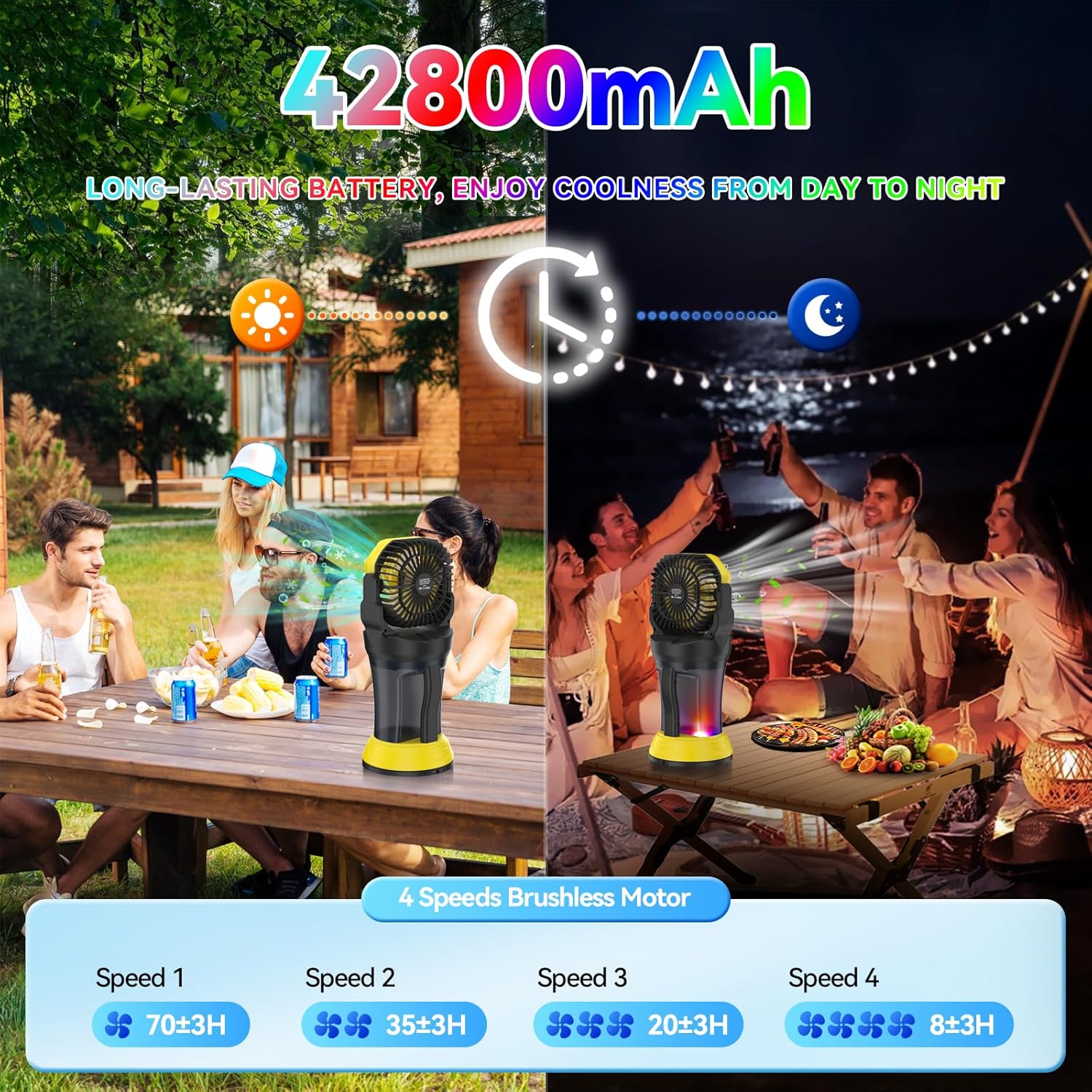
Image: An illustration demonstrating the long-lasting 42800mAh battery of the Wilody Misting Fan, showing estimated operating hours for each of the 4 fan speeds (Speed 1: 70±3H, Speed 2: 35±3H, Speed 3: 20±3H, Speed 4: 8±3H).
6.3 Misting Function
Activate the misting function by pressing the mist button. The fan offers 4 misting modes:
- Continuous Misting
- 2-second interval misting
- 3-second interval misting
- 5-second interval misting
Press the mist button repeatedly to cycle through these modes. The misting function is designed to provide large ice mist for fast cooling, reaching up to 22 feet.

Image: A visual representation of the Wilody Misting Fan's 4-mode cooling misting function, showing continuous mist and misting at 2-second, 3-second, and 5-second intervals. Product dimensions (17.2 inches height, 7.5 inches width) and 2L water tank capacity are also indicated.
6.4 Oscillation
- 120° Auto Horizontal Oscillation: Press the oscillation button on the control panel or remote to activate automatic side-to-side movement.
- 90° Manual Vertical Oscillation: Manually adjust the fan head up or down to direct airflow vertically.
6.5 RGB Ambient Light
Press the light button on the control panel or remote to turn on the RGB ambient light. Press again to cycle through various colors (light blue, red, dark blue, green) and looping modes (slow, fast), or to select a colorful mode. This feature enhances the atmosphere for evening use.
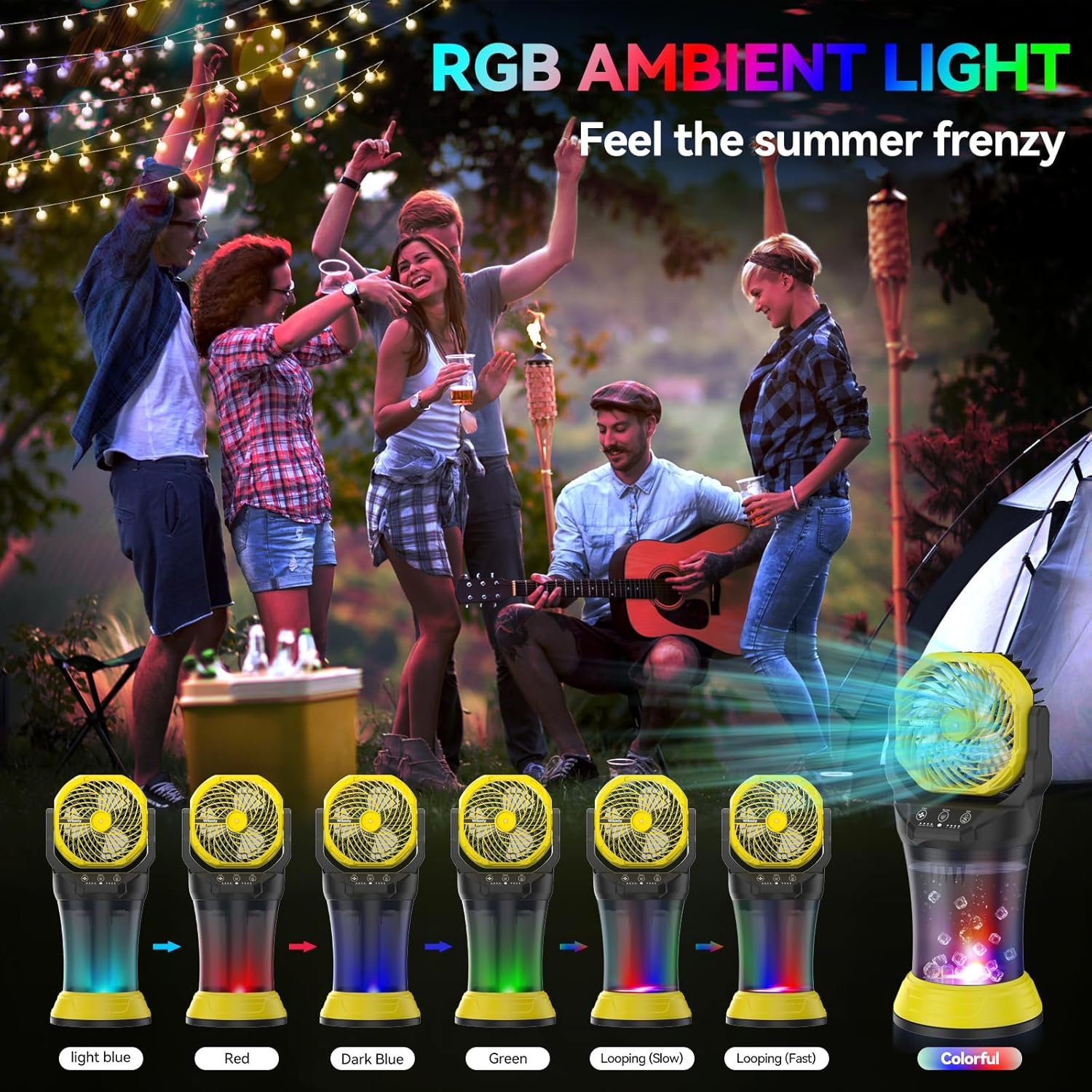
Image: A display of the Wilody Misting Fan's RGB Ambient Light feature, showing the fan emitting light in various colors including light blue, red, dark blue, green, and looping modes (slow and fast), with a colorful option.
6.6 Timing Function
Press the timer button on the remote control to set the fan to automatically turn off after a specified period (2, 4, 6, or 8 hours). The spray mode indicator will respond when timer mode is turned on.
6.7 Using the Remote Control
The remote control allows for convenient operation from up to 22 feet away. It features dedicated buttons for misting, fan speed, LED light, and oscillation. The panel buttons on the fan also provide full control.

Image: An illustration demonstrating the dual control modes of the Wilody Misting Fan, showing both the panel buttons on the fan unit and the remote control, with a 22ft control distance for easy operation from anywhere.
7. Maintenance
7.1 Cleaning the Fan
- Always turn off and unplug the fan before cleaning.
- Wipe the exterior surfaces with a soft, damp cloth. Do not use abrasive cleaners or solvents.
- For the fan blades, use a soft brush or vacuum cleaner to remove dust.
7.2 Cleaning the Water Tank
- Empty any remaining water from the tank.
- Rinse the tank with clean water. For thorough cleaning, use a mild detergent and a soft brush, then rinse thoroughly to remove any residue.
- Allow the tank to air dry completely before refilling or storing.
7.3 Storage
When not in use for extended periods, store the fan in a cool, dry place, away from direct sunlight and extreme temperatures. Ensure the water tank is empty and dry.
8. Troubleshooting
| Problem | Possible Cause | Solution |
|---|---|---|
| Fan does not turn on | Battery is depleted Power button not pressed correctly | Charge the battery Ensure the power button is fully pressed |
| Misting function not working | Water tank is empty Nozzle is clogged Insufficient water pressure | Refill the water tank Clean or replace the nozzle Ensure enough water is in the tank |
| Weak airflow | Fan speed is too low Air inlet/outlet blocked Low battery | Increase fan speed Clear any obstructions Charge the battery |
| Remote control not working | Batteries are dead or incorrectly inserted Obstruction between remote and fan Out of range | Replace batteries; check polarity Remove obstructions Move closer to the fan (within 22ft) |
| Water leakage | Water tank cap not secured Damaged water tank or seal | Ensure cap is tightly closed Contact customer support for replacement parts |
9. Specifications
| Feature | Specification |
|---|---|
| Model Number | HyperMist 10X Plus |
| Product Dimensions | 7.5 x 7.5 x 17.2 inches |
| Item Weight | 5.63 pounds |
| Battery Capacity | 42800mAh |
| Water Tank Capacity | 2 Liters |
| Voltage | 9 Volts (DC) |
| Fan Speeds | 4 |
| Control Method | Remote, Touch Panel |
| Oscillation | 120° Auto Horizontal, 90° Manual Vertical |
| Usage | Indoor/Outdoor |
| First Available Date | February 26, 2025 |
10. Warranty and Support
For warranty information or technical support, please refer to the contact details provided with your purchase or visit the official Wilody website. Keep your purchase receipt as proof of purchase for any warranty claims.