
1. Introduction
This manual provides essential instructions for the safe and effective use of your Peakbatt HHR-P505 / CS-P501HL Ni-MH 1300mAh replacement battery. Please read this manual thoroughly before installation and operation to ensure optimal performance and safety.
This battery is designed as a replacement for various devices, compatible with part numbers HHR-P505, KX-A36, KX-TCA14, P-P501, and P-P504, and suitable for models such as Radio Shack 43-3556, 43-3557, 43-3558, 43-3576, 43-3577, 43-3578, 43-3595, 43-3701.
2. Safety Information and Warnings
Attention: New battery packs must be fully charged before use. To reduce the risk of fire or burns, read all instructions in the operating guide before using the battery.
- Warranty Void: The warranty is void if the label is removed.
- Do Not Disassemble: Do not attempt to disassemble, open, or service the battery pack.
- Proper Replacement: Replace only with the battery pack designated for this product.
- Avoid Damage: Do not crush, puncture, short external contacts, or dispose of in fire or water.
- Temperature Limit: Do not store above 60°C (140°F).
- Certifications: This battery is certificated with ISO9001, RoHS, CE, UN38.3, and MSDS, ensuring safety and quality standards.
3. Product Overview
The Peakbatt HHR-P505 / CS-P501HL is a high-capacity Nickel-Metal Hydride (Ni-MH) replacement battery designed for reliable power. It features a compact design and a standard connector for easy integration into compatible devices.
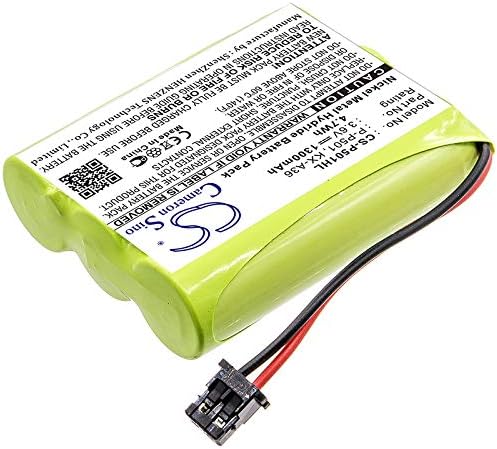
Image 3.1: The Peakbatt HHR-P505 / CS-P501HL replacement battery, showing its label and connector.
Key Features:
- High Capacity: 1300mAh for extended usage.
- Ni-MH Technology: Reliable and rechargeable power source.
- Safety Protections: Built-in over-charge, over-discharge, over-heat, over-current, and short-circuit protection.
- Wide Compatibility: Compatible with multiple part numbers and device models.
4. Setup and Installation
Before installing the new battery, ensure your device is powered off and disconnected from any power source. Refer to your device's original instruction manual for specific battery compartment access.
- Locate Battery Compartment: Identify and open the battery compartment on your device. This usually involves removing a cover or panel.
- Remove Old Battery: Carefully disconnect and remove the old battery. Note the orientation of the connector.
- Connect New Battery: Align the connector of the Peakbatt replacement battery with the corresponding port in your device. Gently push until it clicks into place. Ensure the connection is secure.
- Position Battery: Place the new battery into the compartment, ensuring it fits snugly without forcing.
- Close Compartment: Securely close the battery compartment cover.
- Initial Charge: Fully charge the new battery before its first use. This helps to condition the battery for optimal performance.

Image 4.1: Close-up view of the battery's two-pin connector, illustrating the connection point.
5. Operating Instructions
Once installed and fully charged, your device is ready for use. Ni-MH batteries generally do not suffer from a significant "memory effect" like older Ni-Cd batteries, but proper charging practices are still beneficial.
- First Use: After initial full charge, the battery is ready for normal operation.
- Charging: Use the original or a compatible charger provided with your device. Avoid overcharging by disconnecting the device once it indicates a full charge.
- Discharging: It is generally recommended to allow the battery to discharge significantly before recharging, but not necessarily to full depletion, to maintain battery health over time.
- Temperature: Operate the device with the battery within recommended temperature ranges (typically 0°C to 45°C or 32°F to 113°F) to prevent damage and ensure optimal performance.
6. Maintenance and Storage
Proper maintenance and storage can extend the lifespan of your Ni-MH battery.
- Cleaning: Keep battery contacts clean and dry. Use a clean, dry cloth to wipe off any dust or debris.
- Storage: If storing the battery for an extended period, charge it to approximately 50-70% capacity and store it in a cool, dry place away from direct sunlight and extreme temperatures. Recharge every 3-6 months to prevent deep discharge.
- Disposal: Do not dispose of batteries in household waste. Follow local regulations for proper battery recycling.
7. Troubleshooting
If you experience issues with your battery, consider the following common troubleshooting steps:
| Problem | Possible Cause | Solution |
|---|---|---|
| Battery not charging | Loose connection, faulty charger, or battery not fully inserted. | Check battery connection. Ensure charger is working. Re-insert battery. |
| Short operating time | Battery not fully charged, or battery nearing end of life. | Ensure full charge. If issue persists, battery may need replacement. |
| Device not powering on | Battery not charged, incorrect installation, or device issue. | Verify battery charge and installation. Test with another known-good battery if possible. |
If troubleshooting steps do not resolve the issue, please contact customer support.
8. Specifications
| Parameter | Value |
|---|---|
| Model Number | CS-P501HL |
| Part Numbers (Compatible) | HHR-P505, KX-A36, KX-TCA14, P-P501, P-P504 |
| Battery Type | Ni-MH (Nickel Metal Hydride) |
| Voltage | 3.6V |
| Capacity | 1300mAh |
| Energy Rate | 4.68Wh |
| Dimensions (L x W x H) | 50.57 x 42.47 x 14.35 mm (1.99 x 1.67 x 0.56 inches) |
| Weight | 121.8g (4.3 ounces) |
| Manufacturer | Peakbatt |
9. Warranty and Support
Peakbatt provides the following support for this product:
- Warranty: 12-month warranty from the date of purchase.
- Money Back Guarantee: 30-day money-back guarantee.
- Customer Service: 7*24 hours customer service is available for assistance.
For further information or support, you may visit the manufacturer's website: www.cameronsino.com
Please confirm the compatible model and battery part number carefully before purchase. If you are unsure, contact customer service with your battery details or pictures for professional suggestions.