Introduction
This manual provides essential instructions for the safe and effective use of your Generic 3.7V 1050mAh Li-ion Polymer replacement battery. This battery is specifically designed to be compatible with GHB UU24 and UU24RX baby monitors. Please read this manual thoroughly before installation and use to ensure optimal performance and safety.
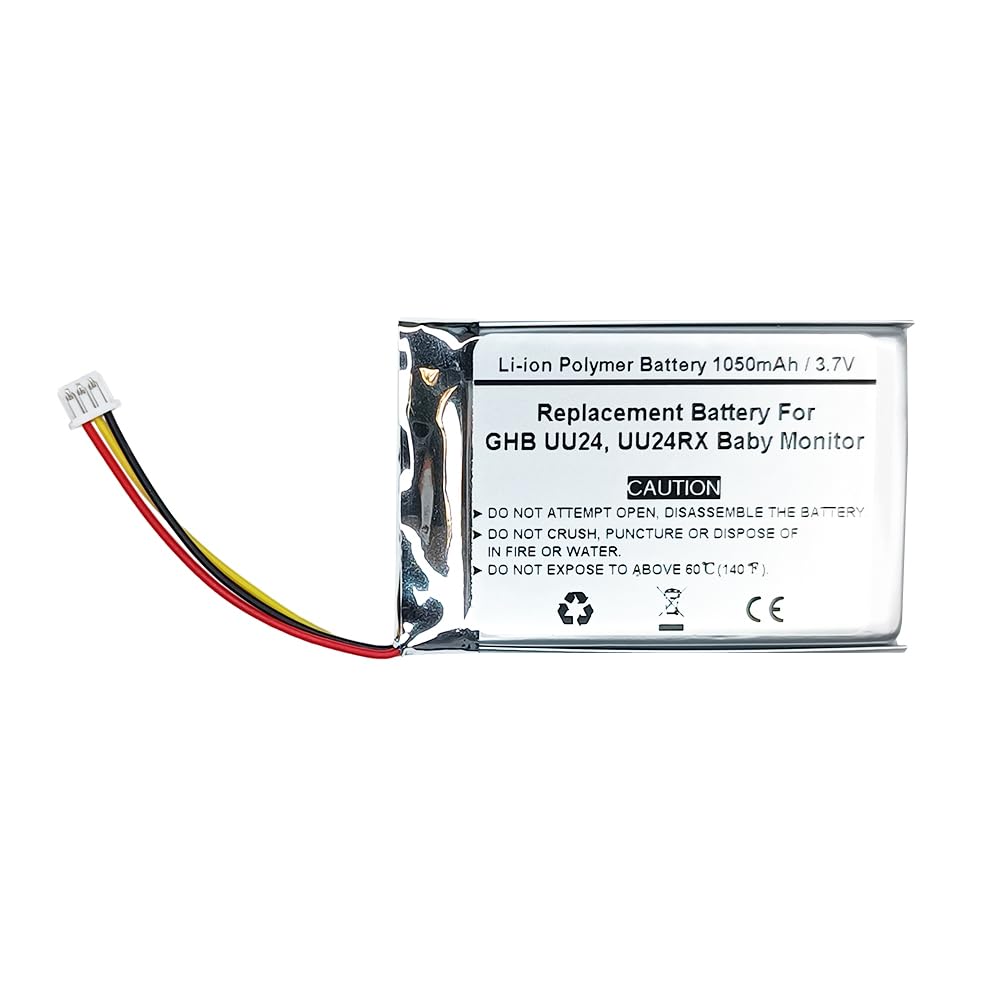
This image shows the Generic 3.7V 1050mAh Li-ion Polymer replacement battery. The battery pack is silver-colored with a label indicating its specifications and safety warnings. Red, yellow, and black wires extend from one end, terminating in a white connector plug. The label clearly states 'Li-ion Polymer Battery 1050mAh / 3.7V Replacement Battery For GHB UU24, UU24RX Baby Monitor' and includes caution warnings against opening, disassembling, crushing, puncturing, disposing in fire or water, or exposing to temperatures above 60°C (140°F).
Setup and Installation
Safety Precautions:
- DO NOT ATTEMPT TO OPEN OR DISASSEMBLE THE BATTERY.
- DO NOT CRUSH, PUNCTURE, OR DISPOSE OF IN FIRE OR WATER.
- DO NOT EXPOSE TO TEMPERATURES ABOVE 60°C (140°F).
- Keep the battery away from children and pets.
- Use only with compatible devices (GHB UU24, UU24RX Baby Monitor).
Installation Steps:
- Power Off Device: Ensure your GHB UU24 or UU24RX baby monitor is completely powered off and disconnected from any power source.
- Locate Battery Compartment: Refer to your baby monitor's original manual to locate and open the battery compartment. This is typically on the back or bottom of the monitor unit.
- Remove Old Battery: Carefully disconnect the old battery's connector from the monitor's port. Remove the old battery from the compartment.
- Insert New Battery: Align the connector of the new Generic 3.7V 1050mAh replacement battery with the port inside the monitor's battery compartment. Gently push the connector until it is securely seated.
- Position Battery: Place the new battery into the compartment, ensuring it fits snugly without forcing.
- Close Compartment: Securely close the battery compartment cover.
- Initial Charge: Connect your baby monitor to its power adapter and allow the new battery to charge fully before its first use. This may take several hours.
Operating Instructions
Charging:
- Always use the original or a certified compatible charger for your GHB baby monitor.
- Charge the battery fully before initial use and whenever the battery indicator shows low power.
- Avoid overcharging by disconnecting the charger once the battery is full, though the battery is designed with protection circuits.
Usage:
- The battery provides a nominal voltage of 3.7V and a capacity of 1050mAh, ensuring long working time for your baby monitor.
- The battery is designed for over 300 charge cycles, offering reliable performance over its lifespan.
- Monitor the battery level indicator on your baby monitor to anticipate when recharging is needed.
Maintenance
Storage:
- If storing the battery for an extended period, charge it to approximately 50% capacity.
- Store the battery in a cool, dry place, away from direct sunlight and extreme temperatures.
- Avoid storing the battery in environments above 60°C (140°F).
Cleaning:
- Keep the battery and its connectors clean and free from dust or debris.
- Use a dry, soft cloth to wipe the battery if necessary. Do not use liquid cleaners.
Disposal:
- Do not dispose of the battery in household waste.
- Li-ion Polymer batteries should be recycled responsibly. Consult your local waste management facility for proper disposal and recycling options.
Troubleshooting
Battery Not Charging:
- Ensure the battery connector is securely plugged into the monitor's port.
- Verify that the baby monitor's power adapter is correctly connected to both the monitor and a working power outlet.
- Check if the power adapter or charging cable is damaged. Try a different compatible charger if available.
Short Battery Life:
- Ensure the battery has been fully charged before use.
- High usage of features like video streaming or night vision on the baby monitor can consume battery faster.
- Battery performance naturally degrades over time and after many charge cycles.
Monitor Not Turning On:
- Confirm the battery is correctly installed and fully charged.
- Connect the monitor to its power adapter directly to see if it powers on without the battery. If it does, the battery might be faulty or not installed correctly.
If troubleshooting steps do not resolve the issue, please refer to the Support section.
Specifications
| Feature | Specification |
|---|---|
| Battery Type | Li-ion Polymer battery |
| Capacity | 1050mAh |
| Nominal Voltage | 3.7V |
| Pack Dimension | 34.00 x 52.00 x 5.20mm |
| Weight | 15g |
| Working Temperature | Less than 60℃ (140℉) |
| Compatible Models | GHB UU24, UU24RX Baby Monitor |
| Cycle Life | Over 300 times |
| Certifications | UL, CE, UN38.3, RoHS |
| Item Model Number | USN-523450PCN-GH |
Warranty Information
This Generic replacement battery comes with a 180-day warranty from the date of purchase. This warranty covers manufacturing defects and ensures the battery is 100% compatible with the original specifications. Please retain your proof of purchase for warranty claims.
The warranty does not cover damage caused by misuse, improper installation, unauthorized repairs, or exposure to conditions outside the specified operating parameters.
Customer Support
If you encounter any issues or have questions regarding the installation, operation, or maintenance of your Generic 3.7V 1050mAh replacement battery that are not addressed in this manual, please contact the seller or manufacturer directly through the platform where the product was purchased.
When contacting support, please provide the following information:
- Product Model Number: USN-523450PCN-GH
- Date of Purchase
- A detailed description of the issue


