
Zuleisy E8A
Zuleisy E8A Android 15 Tablet User Manual
Model: E8A
1. Introduction
This manual provides essential information for setting up, operating, and maintaining your Zuleisy E8A Android 15 Tablet. Please read it thoroughly to ensure optimal performance and longevity of your device.

Image 1.1: The Zuleisy E8A Android 15 Tablet, showcasing its sleek design and vibrant display.
2. What's in the Box
Verify that all items are present in the package:
- Zuleisy E8A Tablet
- User Manual
- Charger
- USB-C Cable
- Protective Leather Case
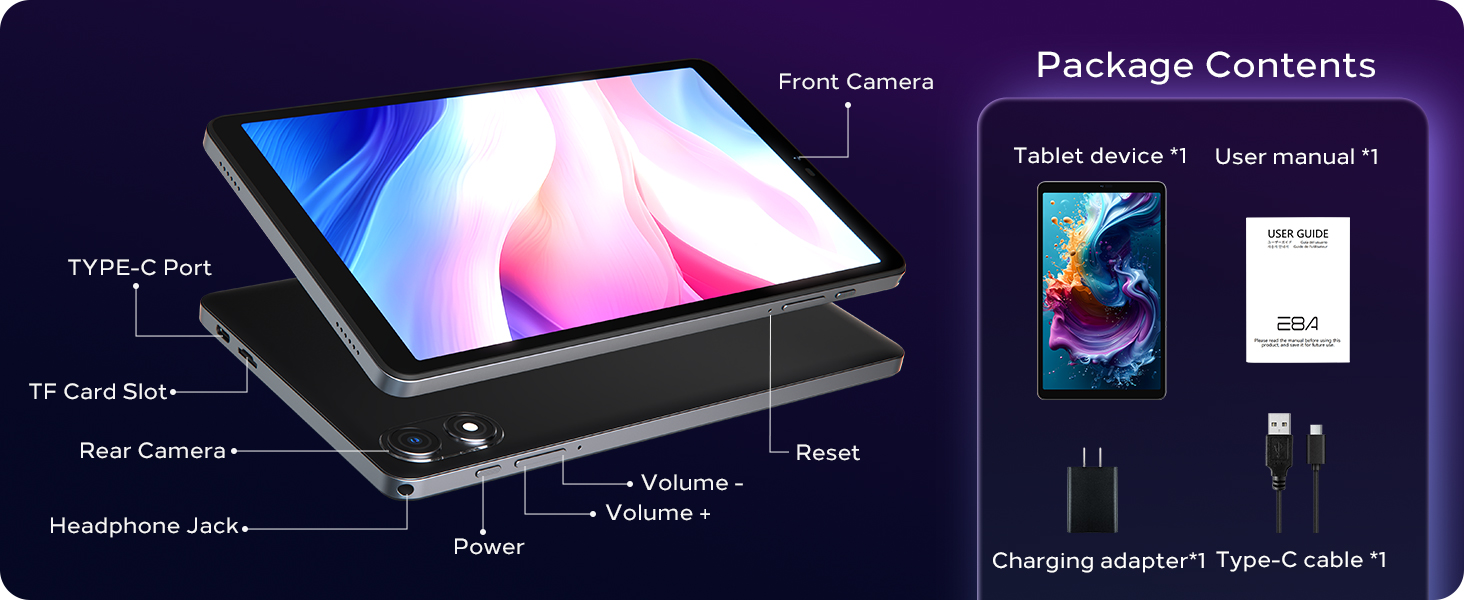
Image 2.1: Illustration of the Zuleisy E8A Tablet and its included accessories: user manual, charger, USB-C cable, and protective case.
3. Physical Features
Familiarize yourself with the tablet's physical components:
- 8.7-inch HD IPS Display: Main screen for interaction.
- Front Camera (5MP): Located above the display, used for video calls and selfies.
- Rear Camera (8MP): Located on the back, used for capturing photos and videos.
- Power Button: Located on the side, used to turn the device on/off or wake/sleep the screen.
- Volume Buttons: Located on the side, used to adjust audio volume.
- USB-C Port: For charging and data transfer.
- 3.5mm Headphone Jack: For connecting wired headphones.
- TF Card Slot: For expandable storage up to 1TB.
- Dual Speakers: For audio output.
Image 3.1: Diagram illustrating the location of the front camera, USB-C port, TF card slot, rear camera, headphone jack, power button, and volume buttons on the Zuleisy E8A Tablet.
4. Initial Setup
4.1. Unboxing and First Power On
Carefully remove the tablet and accessories from the packaging. The tablet may have a protective film on the screen; gently peel it off using the tab provided. Press and hold the Power button to turn on the device. Follow the on-screen prompts to select your language, connect to Wi-Fi, and set up your Google account.
Video 4.1: An unboxing video demonstrating the contents of the Zuleisy E8A package and the initial power-on sequence of the tablet.
4.2. Installing the Protective Case
The included leather case provides protection for your tablet. Align the tablet with the case and gently press it into place, ensuring all corners are securely fitted. The case allows access to all ports and buttons.
5. Operating Your Tablet
5.1. Basic Navigation
The Zuleisy E8A runs on Android 15, offering an intuitive user experience. Use touch gestures for navigation:
- Tap: Select an item or open an app.
- Swipe: Scroll through pages or menus.
- Pinch-to-Zoom: Enlarge or shrink content.
- Long Press: Access contextual menus or move app icons.
5.2. App Management
Download and install applications from the Google Play Store. Android 15 features enhanced multitasking capabilities, including a multitasking bar and split-screen mode for improved productivity.

Image 5.1: Visual representation of Android 15 features, including the multitasking bar, parental control function, and split-screen mode.
6. Display and Audio
The tablet features an 8.7-inch HD IPS display with a resolution of 1340x800 pixels, offering wide viewing angles and vibrant colors. It supports Widevine L1 DRM for high-definition streaming from services like Netflix and Prime Video. Dual speakers provide clear audio output.

Image 6.1: The 8.7-inch HD IPS display of the Zuleisy E8A Tablet, highlighting its Widevine L1 certification for HD streaming.

Image 6.2: Detailed specifications of the HD+ 8.7-inch In-Cell IPS display, including 10-point touch, 350-nit brightness, 1340x800 resolution, 17:10 aspect ratio, and 178° wide view.
7. Performance and Storage
The Zuleisy E8A is powered by an ultra-efficient Unisoc T606 12nm Octa-Core processor (dual Cortex-A75 1.6GHz + hexa A55 1.6GHz CPUs) with a Mali-G57 MP1 GPU. It features 16GB RAM (4GB physical + 12GB virtual expansion) and 128GB internal storage, expandable up to 1TB via a microSD card (sold separately).

Image 7.1: Diagram illustrating the Unisoc T606 8-core processor, highlighting its dual A75 and hexa A55 cores, Mali-G57 GPU, and 12nm low power consumption.

Image 7.2: Visual explanation of the 16GB RAM (4GB physical + 12GB extended virtual RAM) and 128GB internal storage, with support for up to 1TB microSD card expansion.
8. Connectivity
The tablet offers robust connectivity options:
- 5G Wi-Fi: For high-speed internet access (802.11ac, 802.11b, 802.11g, 802.11n).
- Bluetooth 5.0: For connecting wireless accessories.
- Quad-System GPS: Supports GPS, Glonass, Beidou, and Galileo for accurate navigation.
9. Camera
Capture moments with the tablet's dual camera system:
- Rear Camera: 8 Megapixels for clear photos and videos.
- Front Camera: 5 Megapixels for video calls and selfies.

Image 9.1: Visual showcasing the 8MP rear camera and 5MP front camera, demonstrating their use for capturing photos and video calls.
10. Battery and Charging
The Zuleisy E8A is equipped with a 6000mAh battery, providing up to 6+ hours of continuous video playback. Use the included charger and USB-C cable for optimal charging. The charging port is located at the top of the device.

Image 10.1: Illustration of the 6000mAh large-capacity battery, indicating up to 6 hours of continuous video playback.

Image 10.2: Visual detailing the 5V2A charger, Type-C OTG transfer, and 3.5mm headphone jack, alongside the 6000mAh battery.
11. Software (Android 15)
Your tablet comes pre-installed with Android 15, offering enhanced privacy controls, smoother animations, and adaptive battery optimization. Ensure your apps are updated for the best experience.
12. Maintenance
- Cleaning: Use a soft, lint-free cloth to clean the screen and body. Avoid harsh chemicals.
- Software Updates: Regularly check for system updates to ensure your device has the latest security patches and features.
- Storage Management: Periodically clear unnecessary files and apps to maintain optimal performance.
13. Troubleshooting
| Issue | Possible Solution |
|---|---|
| Tablet does not power on | Ensure the battery is charged. Connect to the charger for at least 30 minutes before attempting to power on again. |
| Screen is unresponsive | Perform a forced restart by holding the Power button for 10-15 seconds. |
| Wi-Fi connectivity issues | Restart your tablet and Wi-Fi router. Check Wi-Fi settings on the tablet. |
| Apps crashing or freezing | Clear the app's cache or reinstall the app. Ensure sufficient storage space is available. |
14. Specifications
| Feature | Detail |
|---|---|
| Model | E8A |
| Operating System | Android 15 |
| Display | 8.7-inch HD IPS (1340x800) |
| Processor | Unisoc T606 Octa-Core (1.6 GHz) |
| RAM | 16GB (4GB physical + 12GB virtual) |
| Internal Storage | 128GB |
| Expandable Storage | Up to 1TB via microSD card |
| Rear Camera | 8MP |
| Front Camera | 5MP |
| Wi-Fi | 5G (802.11ac, b, g, n) |
| Bluetooth | 5.0 |
| GPS | GPS+Glonass+Beidou+Galileo |
| Battery | 6000mAh |
| Dimensions | 8.4 x 4.96 x 0.35 inches |
| Weight | 1.76 pounds (tablet only) |
15. Warranty and Support
Your Zuleisy E8A Tablet comes with a 1-year product assurance against manufacturing issues. For troubleshooting, repairs, or replacements, please contact our support team. You can extend your warranty to 2 years by registering your purchase.
How to Contact Us:
Go to your Amazon Account > Order History > Corresponding Order > Contact the Seller. Enter your inquiry details to send a message.
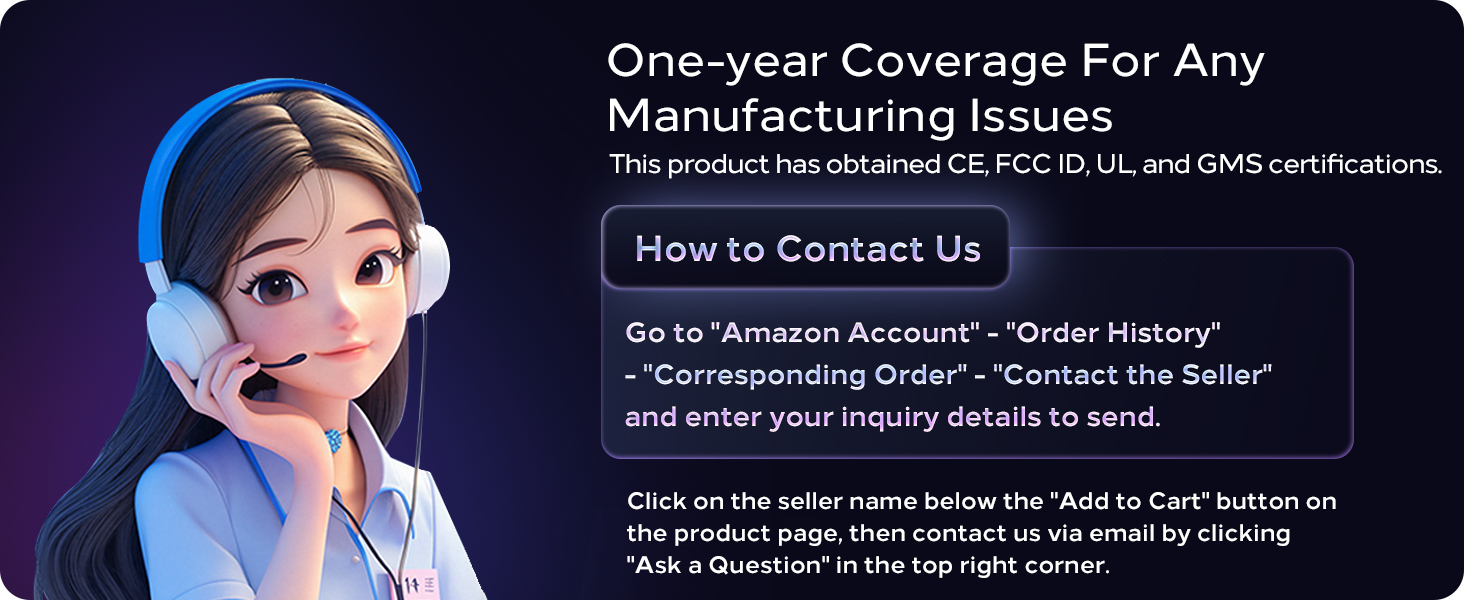
Image 15.1: Visual guide on how to contact customer support for warranty and assistance.
Ask a question about this manual
Ask about setup, troubleshooting, compatibility, parts, safety, or missing instructions. Manuals+ will review the question and use this page’s manual context to help answer it.