1. Introduction
This manual provides detailed instructions for the safe and effective operation of your Generic Ionic Foot Bath Detox Machine, Model H8801A. Please read this manual thoroughly before using the device and retain it for future reference.
The Ionic Foot Bath Detox Machine is designed for personal use to facilitate relaxation and detoxification through an ionic foot spa experience. It includes a heated belt for targeted relief and a digital display for easy control.
2. Package Contents
Verify that all items listed below are present in your package:
- Ionic Detox Foot Spa Machine (Main Unit) - 1 pc
- Wrist Strap - 1 pc
- Infrared Belt - 1 pc
- Ion Array - 1 pc
- Power Cable - 1 pc
- Pulse Patch Set - 1 set
- Aluminum Carrying Case - 1 pc
- User Manual - 1 pc

Figure 2.1: Main unit and accessories. The image shows the main control unit, an ion array, power cable, and other accessories neatly packed in a silver aluminum carrying case.
3. Product Overview
3.1 Main Unit Controls and Ports
Familiarize yourself with the main unit's controls and connection ports before operation.
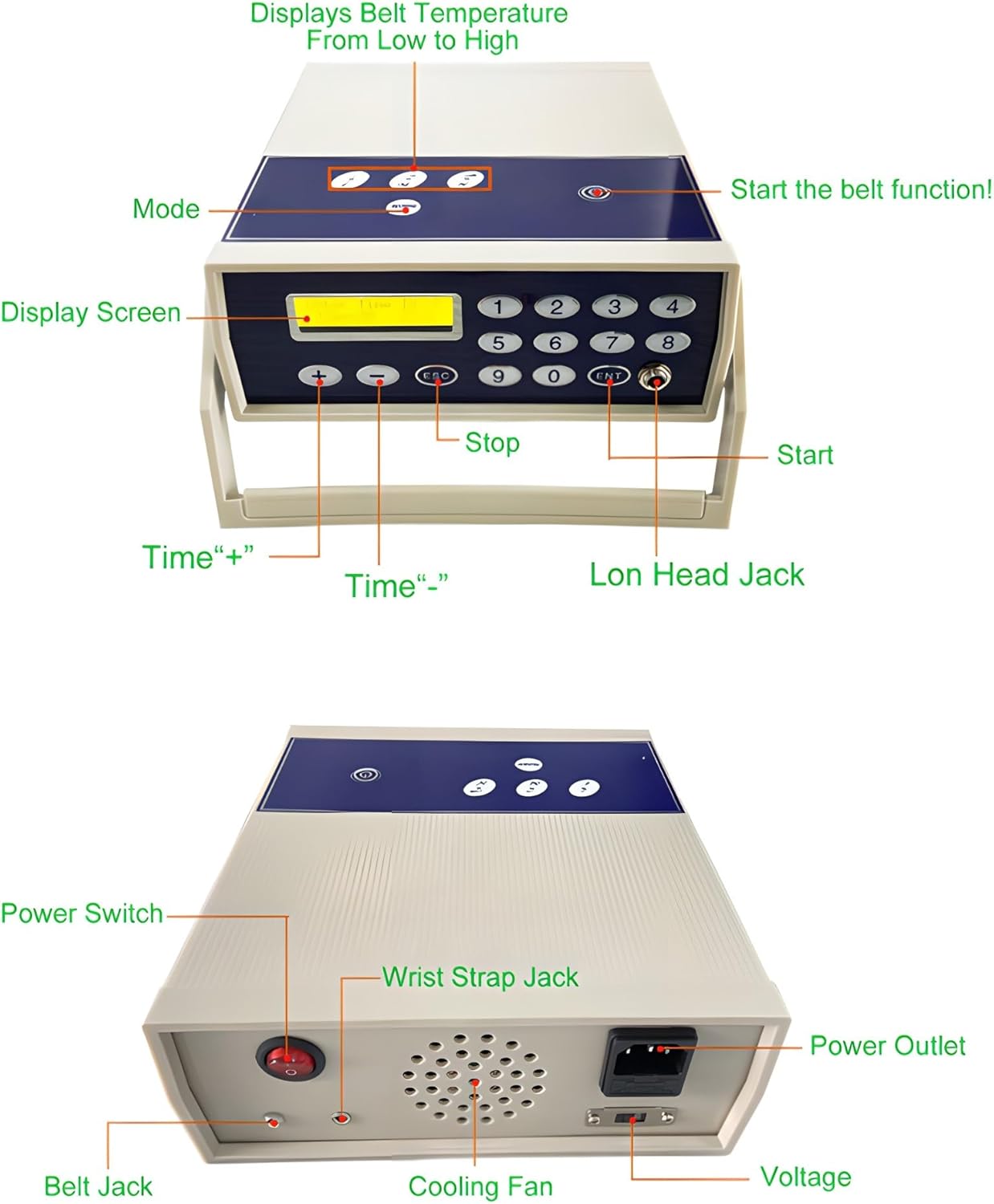
Figure 3.1: Front and rear panel controls. The top panel shows the Mode button, Display Screen, Time adjustment buttons (+/-), ESC (Stop), ENT (Start), and Ion Head Jack. The rear panel shows the Power Switch, Wrist Strap Jack, Power Outlet, Belt Jack, Cooling Fan, and Voltage indicator.
- Mode Button: Selects different operating modes.
- Display Screen: Shows time, temperature, and other operational information.
- Time "+" / "-": Adjusts the session duration.
- ESC (Stop): Stops the current operation.
- ENT (Start): Starts the selected operation.
- Ion Head Jack: Connects the ion array.
- Power Switch: Turns the device ON/OFF.
- Wrist Strap Jack: Connects the wrist strap.
- Power Outlet: Connects the power cable to the main power supply.
- Belt Jack: Connects the infrared heated belt.
- Cooling Fan: Dissipates heat during operation.
- Voltage: Power input indicator.
4. Setup and Operation
Follow these steps to set up and operate your Ionic Foot Bath Detox Machine:
- Prepare the Area: Place the main unit on a stable, flat surface near a power outlet. Ensure you have a foot basin filled with warm water ready.
- Connect Power: Plug the power cable into the Power Outlet on the rear of the main unit, then plug the other end into a suitable electrical outlet.
- Power On: Press the Power Switch to turn on the device. The display screen will illuminate.
- Connect Ion Array: Insert the ion array cable into the Ion Head Jack on the front panel.
- Place Ion Array: Submerge the ion array completely into the foot basin filled with warm water.
- Connect Wrist Strap: Plug the wrist strap into the Wrist Strap Jack on the rear panel.
- Wear Wrist Strap: Securely fasten the wrist strap around your wrist. Ensure good skin contact.
- Connect Infrared Belt (Optional): If using, plug the infrared belt into the Belt Jack on the rear panel. Adjust the belt around your waist or desired area.
- Set Session Time: Use the "Time +" and "Time -" buttons to set your desired session duration (e.g., 30 minutes).
- Select Mode (if applicable): Press the "Mode" button to cycle through available modes if desired.
- Begin Session: Place your feet into the water with the ion array. Press the "ENT" (Start) button to begin the detoxification session.
- Monitor Session: The display will show the remaining time. The water color may change during the session (refer to Section 4.1 for interpretation).
- End Session: The machine will automatically stop when the set time expires. You can also press "ESC" (Stop) to end the session manually.
- Clean Up: After the session, turn off the machine, unplug all components, and clean the ion array and foot basin.

Figure 4.1: Step-by-step usage guide. This image illustrates the process from powering on, connecting the ion head, placing it in water, connecting and wearing the wrist strap, and finally placing feet in the water.
4.1 Water Color Interpretation Chart
During an ionic foot bath session, the water may change color. This chart provides a general guide for interpreting these changes. Note that water color changes can also be influenced by water quality and minerals present.

Figure 4.2: Ionic Foot Detox Color Chart. This chart displays various water colors (e.g., Red Flecks, Blue, Yellow, Green, Orange, Brown, Black, Black Flecks, Oil Floating, White Foam) and their associated interpretations regarding cellular debris, lymphatic system, kidney, bladder, gallbladder, joints, liver, toxic chemicals, heavy metals, fat, and yeast/fungus.
- Red Flecks: Cellular debris, blood clots.
- Blue: Tissue and cellular debris from lymph system.
- Yellow: Detoxifying from Kidney, bladder, urinary tract, reproductive organs.
- Green: Detoxifying from Gallbladder.
- Orange: Detoxifying from Joints.
- Brown: Detoxifying from the liver, pollutants, cellular debris.
- Black: Detoxifying from the liver, toxic chemicals.
- Black Flecks: Heavy metals, strongly charged chemicals.
- Oil Floating: Fat.
- White Foam: Most likely yeast, candida, fungus, lymphatic drainage, mucus.
5. Maintenance
Proper maintenance ensures the longevity and optimal performance of your device.
- Ion Array Cleaning: After each use, clean the ion array thoroughly with a brush and warm water to remove any residue. Ensure it is completely dry before storage.
- Main Unit Cleaning: Wipe the main unit with a soft, damp cloth. Do not use abrasive cleaners or submerge the unit in water.
- Storage: Store the device and all accessories in the aluminum carrying case in a cool, dry place away from direct sunlight.
- Cable Inspection: Regularly inspect all cables for any signs of wear or damage. Replace damaged cables immediately.
6. Troubleshooting
If you encounter any issues, refer to the following troubleshooting guide:
| Problem | Possible Cause | Solution |
|---|---|---|
| Device does not power on. |
|
|
| Ion array not producing bubbles/activity. |
|
|
| Wrist strap not registering. |
|
|
7. Specifications
Technical specifications for the Generic Ionic Foot Bath Detox Machine H8801A:
- Item Type: Massage and Relaxation
- Type: Ion Detoxification/Cleaning Machine
- Model Number: H8801A
- Power: 50 W
- Material: Main unit with aluminum box packaging
- Product Dimensions: 23 x 22.5 x 17 cm (9 x 8.8 x 6.6 inches)
- Product Weight: 4.35 kg (9.5 lbs)
- Package Dimensions: 44 x 16 x 39 cm (17.3 x 6.3 x 15.3 inches)
- Package Weight: 5 kg (11 lbs)
8. Safety Information
Please read and adhere to the following safety precautions:
- Do not use this device if you have a pacemaker, are pregnant, or have epilepsy.
- Consult a healthcare professional before use if you have any medical conditions, open wounds, or are taking medication.
- Keep the main unit away from water and moisture. Do not operate with wet hands.
- Ensure the power cable is not damaged and is properly connected.
- This device is for personal use only and not intended for medical diagnosis or treatment.
- Keep out of reach of children.
- Unplug the device from the power outlet when not in use and before cleaning.
- Do not attempt to open or repair the main unit. Contact qualified personnel for service.