
1. Introduction
This manual provides essential instructions for the safe operation, maintenance, and troubleshooting of your Shartools Emtop Cordless Impact Wrench. Please read this manual thoroughly before using the tool to ensure proper function and to prevent injury or damage.
2. General Safety Instructions
Always follow basic safety precautions to reduce the risk of fire, electric shock, and personal injury.
- Work Area Safety: Keep the work area clean and well-lit. Cluttered or dark areas invite accidents. Do not operate power tools in explosive atmospheres, such as in the presence of flammable liquids, gases, or dust.
- Electrical Safety: Avoid body contact with earthed or grounded surfaces. Do not expose power tools to rain or wet conditions.
- Personal Safety: Always wear eye protection. Use hearing protection when operating the tool for extended periods. Dress properly; avoid loose clothing or jewelry.
- Tool Use and Care: Do not force the power tool. Use the correct power tool for your application. Disconnect the battery pack from the power tool before making any adjustments, changing accessories, or storing power tools.
- Battery Pack Use and Care: Recharge only with the charger specified by the manufacturer. Do not use battery packs with any other power tools.
3. Package Contents
Verify that all items listed below are present and undamaged upon opening the package.
- 1 x Shartools Emtop Cordless Impact Wrench (1/2 inch square drive)
- 2 x 20V 2.0Ah Battery Packs (EBPK20011)
- 1 x 20V Charger (EFCR20200)
- 3 x Sockets (17mm, 19mm, 21mm)
- 1 x Carrying Case
- 1 x User Manual (this document)

Image 3.1: Contents of the Shartools Emtop Cordless Impact Wrench package, including the wrench, two batteries, a charger, and three sockets.
4. Product Overview
Familiarize yourself with the components of your cordless impact wrench.

Image 4.1: Front view of the Shartools Emtop Cordless Impact Wrench, highlighting its brushless motor, 1/2-inch square drive, and integrated LED work light.
- 1/2" Square Drive: For attaching sockets.
- Brushless Motor: Provides efficient power and longer tool life.
- Trigger Switch: Controls tool activation and speed.
- Forward/Reverse Selector: Changes rotation direction.
- Integrated LED Work Light: Illuminates the work area.
- Battery Pack: Provides cordless power.
5. Setup
5.1 Charging the Battery
- Connect the charger (EFCR20200) to a standard 220-240V~50/60Hz power outlet.
- Slide the 20V 2.0Ah battery pack (EBPK20011) onto the charger until it clicks into place.
- Allow the battery to charge fully. The charger indicator light will change to indicate a full charge.
- Once charged, disconnect the charger from the power outlet and remove the battery pack.
5.2 Attaching and Removing Sockets
- Ensure the impact wrench is turned off and the battery pack is removed.
- Align the desired socket (17mm, 19mm, or 21mm) with the 1/2-inch square drive on the tool.
- Push the socket firmly onto the square drive until it locks into place.
- To remove, pull the socket firmly off the square drive.
6. Operation
6.1 Installing the Battery Pack
Slide a charged battery pack into the base of the impact wrench until it clicks securely into place.
6.2 Selecting Rotation Direction (Forward/Reverse)
Use the forward/reverse selector switch located above the trigger to choose the desired rotation direction. Push the switch to the left for forward (tightening) and to the right for reverse (loosening). The center position locks the trigger.
6.3 Starting and Stopping the Tool
To start the tool, squeeze the trigger switch. The integrated LED work light will illuminate. To stop, release the trigger switch. The tool features variable speed control; applying more pressure to the trigger increases the speed.
6.4 Speed and Impact Rate Settings
The impact wrench offers multiple speed and impact rate settings for various applications:
- No-load speed: 0-1600/0-1900/0-2300rpm
- Impact rate: 0-2100/0-2500/0-2900bpm
Adjust the speed setting using the control buttons on the tool (if present, otherwise rely on variable trigger). Select a lower speed for delicate tasks and higher speeds for heavy-duty fastening or loosening.
6.5 Fastening and Loosening
- Select the appropriate socket for the fastener.
- Set the rotation direction (forward for tightening, reverse for loosening).
- Place the socket over the fastener.
- Squeeze the trigger to operate the tool. Apply steady pressure.
- The tool will deliver impacts to tighten or loosen the fastener. The maximum fastening torque is 400Nm, and the nut-busting torque is 550Nm.
7. Maintenance
7.1 Cleaning
Keep the tool's ventilation openings clear and free of debris. Use a soft, damp cloth to clean the exterior of the tool. Do not use harsh chemicals or abrasive cleaners. Never immerse the tool in liquid.
7.2 Storage
Store the impact wrench, batteries, and charger in a cool, dry place, away from direct sunlight and moisture. Store batteries with a partial charge to prolong their lifespan. Use the provided carrying case for organized storage and transport.
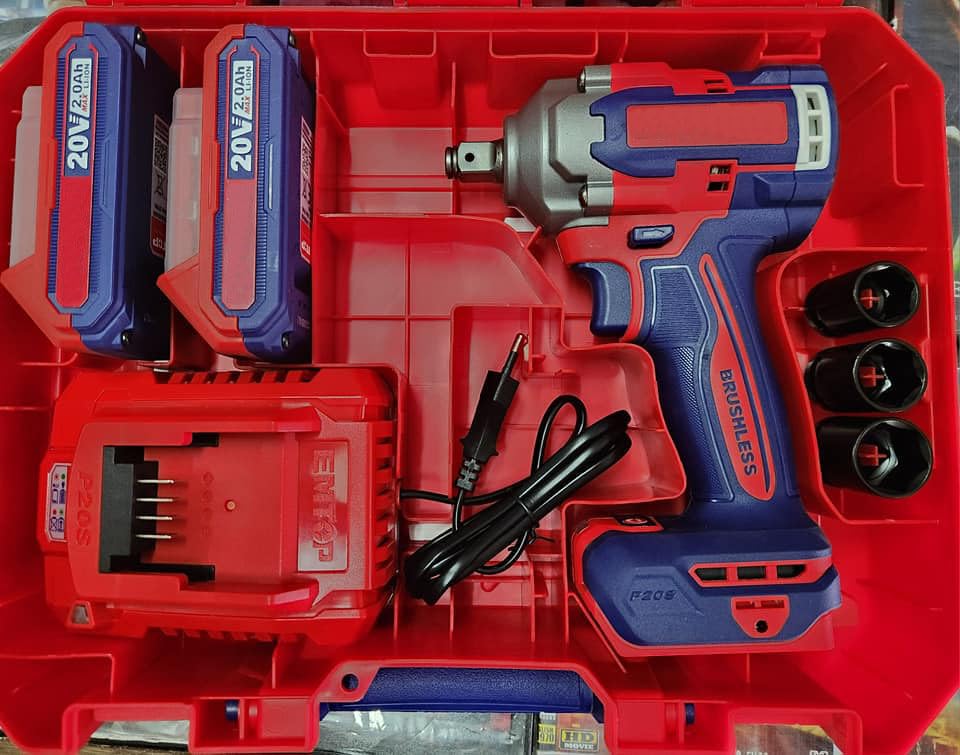
Image 7.1: The Shartools Emtop Cordless Impact Wrench and its components neatly stored within the durable red carrying case.
7.3 Battery Care
Do not store battery packs in discharged condition. For best results, charge batteries fully before storage and recharge every 3-6 months if not in use. Avoid exposing batteries to extreme temperatures.
8. Troubleshooting
| Problem | Possible Cause | Solution |
|---|---|---|
| Tool does not start. | Battery not charged or not properly installed. | Ensure battery is fully charged and securely inserted. |
| Reduced power or performance. | Battery charge is low. | Recharge the battery pack. |
| Socket does not attach securely. | Incorrect socket size or debris in drive. | Use correct 1/2-inch drive sockets. Clean the square drive. |
| Tool overheats. | Prolonged heavy use. | Allow the tool to cool down. Avoid continuous heavy-duty operation. |
9. Specifications
| Feature | Specification |
|---|---|
| Motor Type | Brushless |
| Square Drive | 1/2 inch |
| No-load Speed | 0-1600/0-1900/0-2300 rpm |
| Impact Rate | 0-2100/0-2500/0-2900 bpm |
| Fastening Torque | 400 Nm |
| Nut-Busting Torque | 550 Nm |
| Work Light | Integrated LED |
| Battery Voltage | 20V |
| Battery Capacity | 2.0Ah (Li-ion) |
| Charger Input | 220-240V~50/60Hz |
| Material | Alloy Steel |
| Item Weight | 1 kg (tool only, approximate) |
10. Warranty and Support
For warranty information or technical support, please refer to the documentation provided with your purchase or contact the retailer. Keep your proof of purchase for any warranty claims.