
Introduction
This manual provides detailed instructions for the installation, operation, and maintenance of your Sofiton 7-Inch Motion Sensor LED Ceiling Light. Please read this manual thoroughly before installation and retain it for future reference.

Figure 1: Sofiton 7-Inch Motion Sensor LED Ceiling Light, showcasing its sleek, modern design.
Safety Information
- Always turn off the power at the circuit breaker before beginning installation, maintenance, or troubleshooting.
- Consult a qualified electrician if you are unsure about any part of the installation process.
- This fixture is designed for indoor use only. Do not install in wet or outdoor locations.
- Do not attempt to modify the fixture or use it with incompatible components.
- Ensure all electrical connections are secure and properly insulated to prevent electrical hazards.
Package Contents
Verify that all components are present and undamaged before proceeding with installation:
- 1 x LED Flush Mount Ceiling Light with Night Light
- Installation accessories (mounting bracket, screws, wire nuts)
Specifications

Figure 2: Key specifications and features of the Sofiton LED Ceiling Light, highlighting its compact size and performance metrics.
| Feature | Detail |
|---|---|
| Brand | Sofiton |
| Model Number | MRFMMS-712-5CCT-SF-1PK |
| Size | 7 Inch (6.5"L x 6.5"W x 0.79"H) |
| Wattage | 12 Watts |
| Brightness | 650 Lumens |
| Color Temperature (CCT) | 2700K/3000K/3500K/4000K/5000K Selectable |
| Color Rendering Index (CRI) | 90+ |
| Voltage | 120 Volts |
| Control Method | Motion Sensor, Day-Night Sensor, Manual Switch |
| Motion Sensor Range | 10-16 FT |
| Motion Sensor Angle | 110° beam range, 360° detection |
| Dimmable | No (Non-Dimmable) |
| Average Life | 50,000 Hours |
| Material | Aluminum |
| Mounting Type | Ceiling Mount |
| Usage | Indoor use only |
Installation Instructions
Follow these steps carefully to install your ceiling light. Ensure power is OFF at the circuit breaker before starting any electrical work.
1. Select Color Temperature (CCT)
Before mounting the fixture, select your desired color temperature using the toggle switch located on the back of the light fixture. This switch allows you to choose between 2700K (Soft White), 3000K (Warm White), 3500K (Natural White), 4000K (Cool White), and 5000K (Day Light).
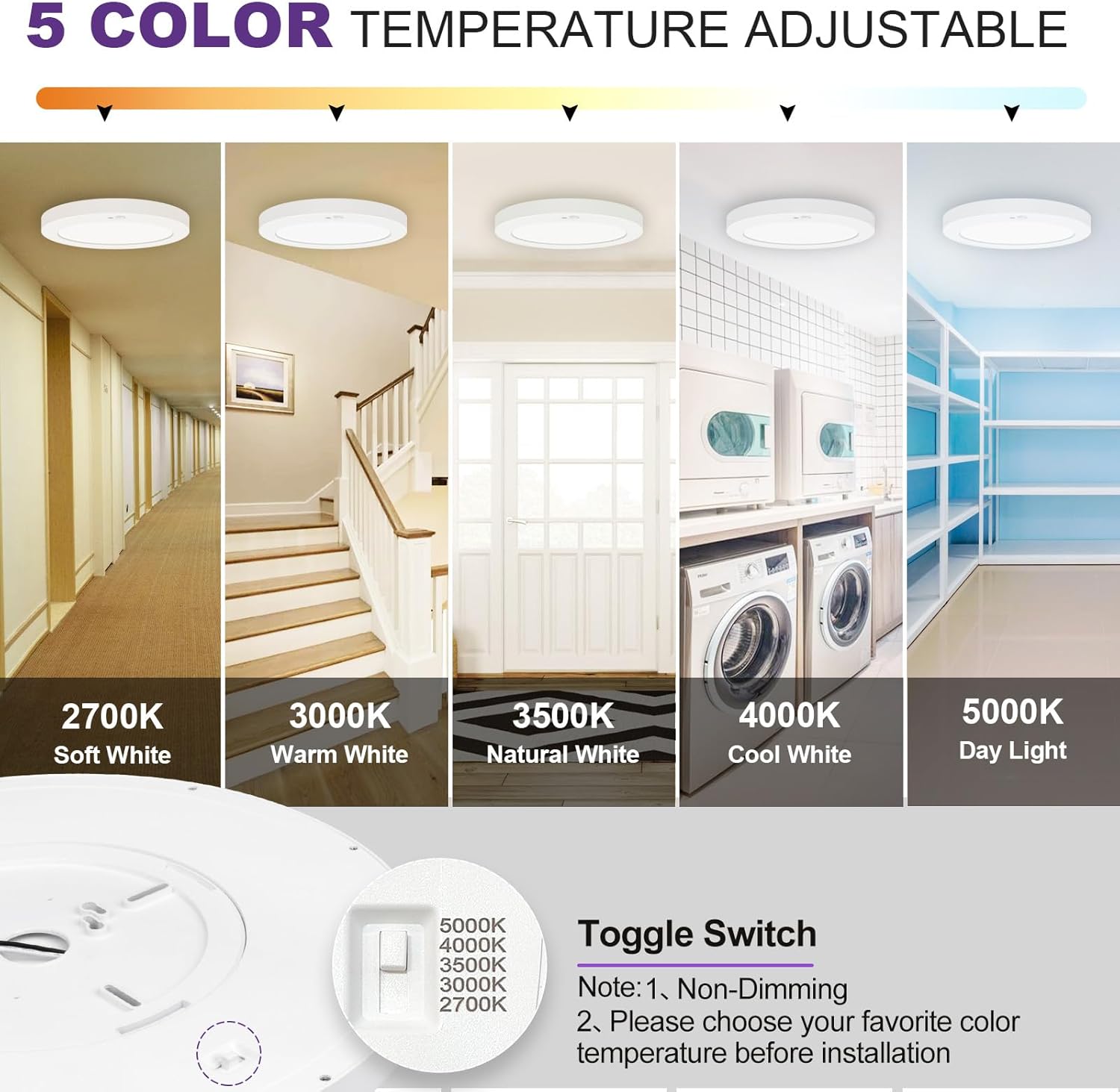
Figure 3: Toggle switch for 5CCT selection. Choose your preferred color temperature before installation, as it cannot be changed easily once mounted.
2. Mounting the Fixture
- Turn off Power: Ensure the power supply to the junction box is turned off at the circuit breaker.
- Remove Mounting Plate: Unscrew the mounting plate from the back of the light fixture.
- Attach Mounting Bracket: Secure the mounting bracket to the junction box using the provided screws.
- Wire Connections: Connect the wires from the fixture to the corresponding wires in the junction box using wire nuts:
- Black wire (Live) to Black wire (Live)
- White wire (Neutral) to White wire (Neutral)
- Green/Bare copper wire (Ground) to Green/Bare copper wire (Ground)
- Attach Fixture Body: Align the light fixture with the mounting bracket and secure it by twisting or screwing it into place, depending on the design.

Figure 4: Visual guide for hardwired installation steps, from removing the mounting plate to securing the fixture.
After installation, restore power at the circuit breaker and test the light.
Operating Instructions
Your Sofiton Motion Sensor LED Ceiling Light features a built-in motion sensor and day-night sensor, offering three distinct working modes for various applications.
Working Modes
The light has a mode selection switch, typically located on the back or inside the fixture. Please refer to the diagram below for mode selection and functionality.

Figure 5: Illustration of the three selectable working modes: Auto, Night, and General.
- Auto Mode: The light will turn on when motion is detected, regardless of ambient light conditions (day or night).
- Night Mode: The light will only turn on when motion is detected AND the ambient light level is below approximately 10 lux (i.e., at night or in a dark environment).
- General Mode (Sensor Off): The motion sensor function is deactivated. The light can be turned on and off manually via a wall switch, functioning as a standard ceiling light.
In Auto or Night mode, if no movement is detected for approximately 60 seconds, the light will automatically turn off and enter standby mode.
Motion Sensor Performance
The integrated motion sensor provides reliable detection within its specified range and angle.
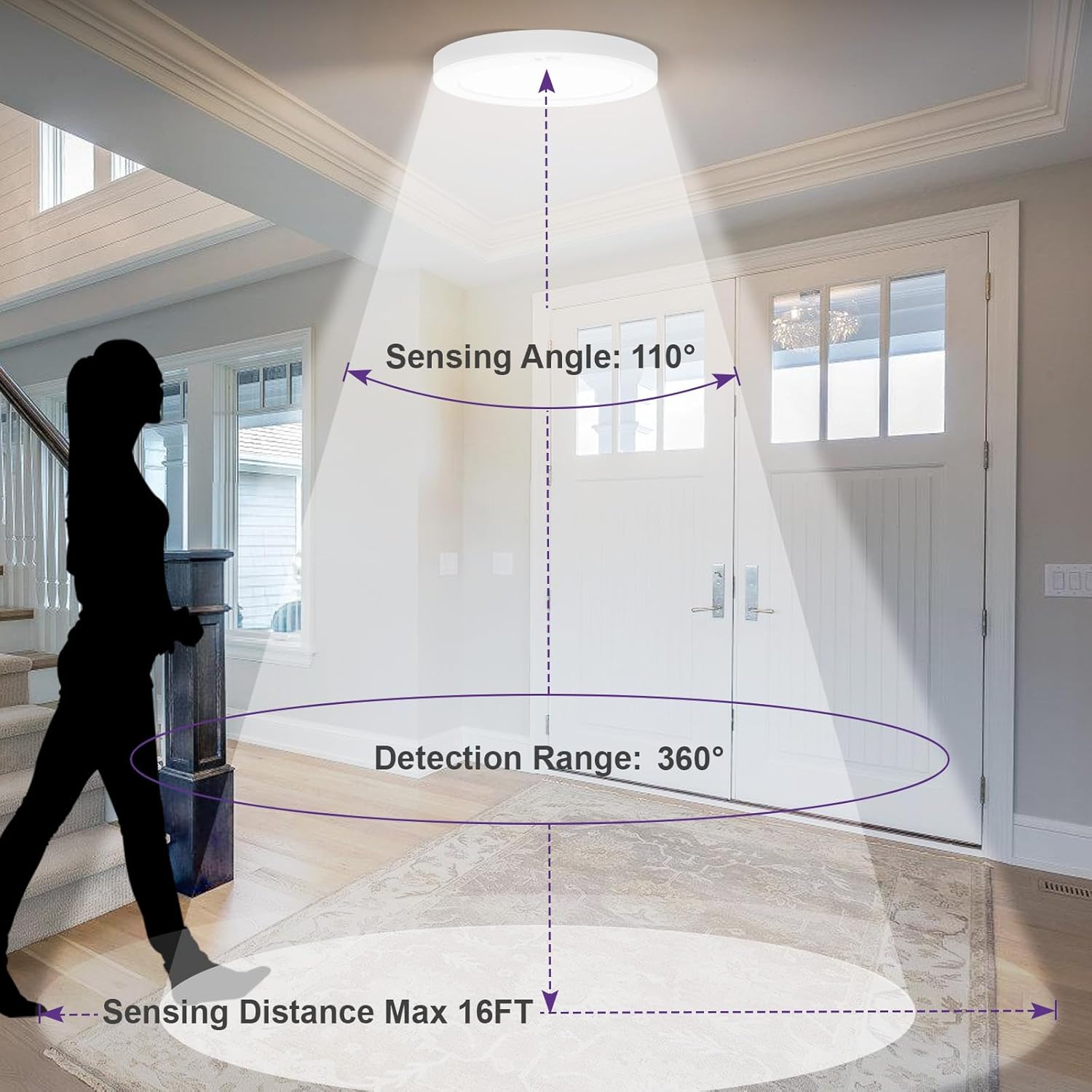
Figure 6: Motion sensor specifications, including a 110° sensing angle and up to 16ft detection range, covering a 360° area.
- Sensing Angle: 110° beam range.
- Detection Range: 10-16 feet (approximately 3-5 meters).
- Detection Coverage: 360° around the fixture.
For optimal performance, ensure the sensor is not obstructed by furniture, walls, or other objects, and is placed in an area where motion is expected.
Maintenance
The Sofiton LED Ceiling Light is designed for durability and requires minimal maintenance.
- Cleaning: Ensure the power is off before cleaning. Wipe the exterior of the fixture with a soft, dry, or slightly damp cloth. Do not use abrasive cleaners, harsh chemicals, or solvents, as these can damage the finish or electronic components.
- LEDs: The integrated LED chips are designed for long-term use (rated for 50,000 hours) and are not user-replaceable. Do not attempt to open the sealed light source.
- Dustproof Design: The fixture features a sealed design to effectively prevent the entry of dust and insects, reducing the need for frequent internal cleaning.

Figure 7: Design features highlighting the ultra-slim profile, eye protection (no flicker, no glare, no blue light), and dustproof construction.
Troubleshooting
If you encounter issues with your Sofiton LED Ceiling Light, refer to the following common problems and solutions:
| Problem | Possible Cause | Solution |
|---|---|---|
| Light does not turn on. |
|
|
| Light stays on constantly. |
|
|
| Light flickers or dims. |
|
|
If the problem persists after trying these solutions, please contact Sofiton customer support for further assistance.
Warranty and Support
Sofiton provides a 5-year manufacturer warranty for this motion sensor indoor light. The product is certified by ETL, assuring a rated 50,000 hours of lighting life (based on an average of 3-5 hours/day usage).
For professional technical guidance, fast replacement service, or any inquiries regarding your product, please contact Sofiton customer service. Refer to your purchase documentation for specific contact details or visit the official Sofiton website.
We are committed to providing quick-response after-sales service to ensure your satisfaction with our products.


