
1. Introduction
The XIBEIKE RP5-TY-101 Canbus Box is designed to facilitate the integration of an aftermarket car radio with your vehicle's existing electronic system. It translates the vehicle's CAN bus signals into a format that an aftermarket head unit can understand, allowing functions such as steering wheel controls, door status, and ignition signals to operate correctly.
2. Product Features
- High Quality: Manufactured from durable materials for reliable performance.
- Easy Installation: Designed for direct replacement, simplifying the installation process.
- System Integration: Enables communication between your new car radio and the vehicle's CAN bus system.
3. Compatibility
This Canbus Box is compatible with various Toyota models. Please verify the original equipment (OE) part numbers and vehicle specifications before installation to ensure proper fitment and function. Compatible models include, but are not limited to:
- Toyota Camry (2012-2017, 2015 American Camry)
- Toyota RAV4 (2013-2018)
- Toyota Corolla (2014-2017)
- Toyota Prius (2013, 2016)
- Toyota Highlander/Kluger (2009-2014, 2010-2014)
- Toyota Prado/120 (2014-2017)
- Toyota REIZ/Mark X (2010-2020)
- Toyota CHR/IZOA (2018)
- Toyota Harrier (2015)
- Toyota Tundra (2014)
- Toyota Sienna (2011-2015)
- Toyota Fortuner/Covert (2016-2018)
- Toyota Levin (2014)
- Toyota Land Cruiser (2007-2015, 2016+)
- Toyota Tacoma (2005-2013)
- Toyota Noah/Esquire/Voxy (2014-2017)
- Toyota Avalon (2013)
4. Setup and Installation
Installation of the Canbus Box involves connecting it between your new car radio and the vehicle's wiring harness. It is designed for direct replacement and easy installation, but professional installation is recommended if you are unfamiliar with car audio wiring.
4.1 Components Overview
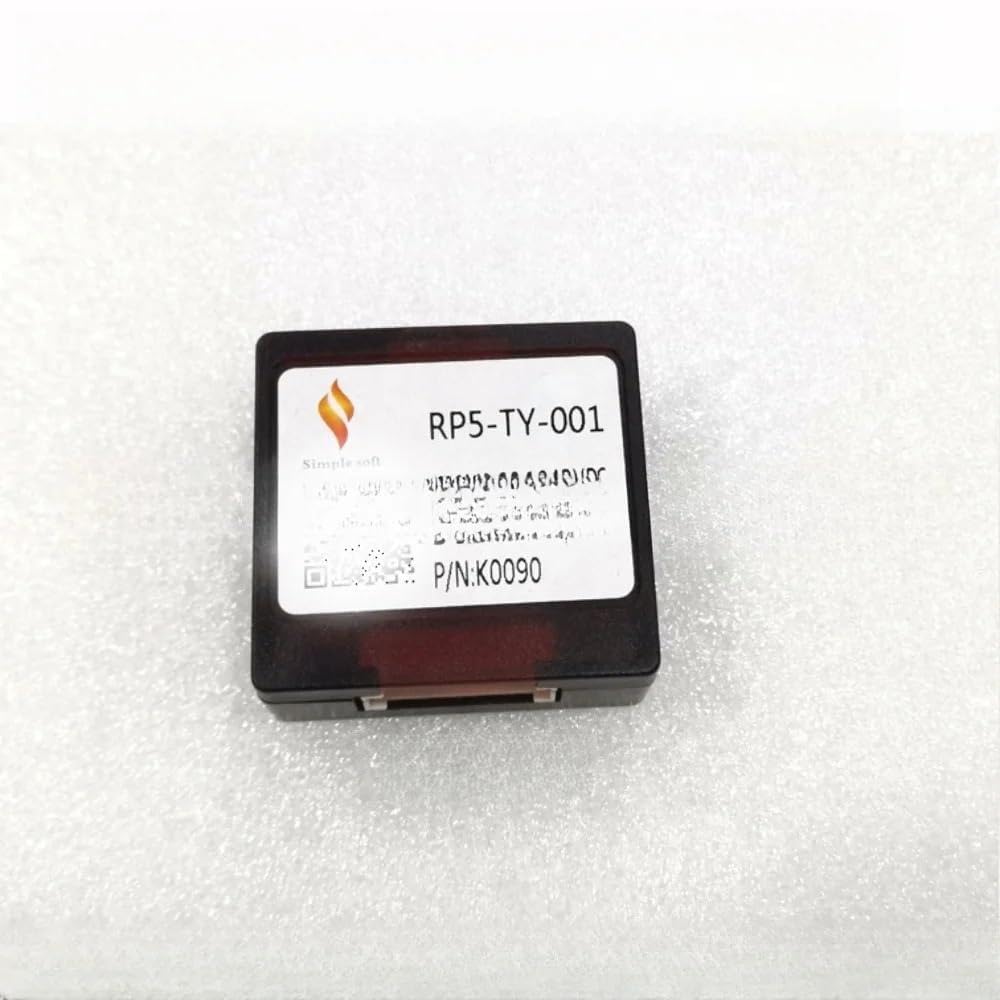
Figure 1: Overall view of the XIBEIKE RP5-TY-101 Canbus Box and its associated wiring harness, including various connectors and an antenna adapter.

Figure 2: Close-up view of several white and black multi-pin connectors, showing the pin configurations for connecting to the vehicle's wiring.

Figure 3: Another close-up view of various white multi-pin connectors, illustrating different pin layouts for specific vehicle interfaces.
4.2 Installation Steps
- Disconnect Battery: Before starting, disconnect the vehicle's negative battery terminal to prevent electrical shorts.
- Remove Old Radio: Carefully remove the existing car radio from the dashboard. Refer to your vehicle's service manual for specific instructions.
- Connect Canbus Box: Connect the vehicle-specific wiring harness to the corresponding ports on the Canbus Box. Ensure all connections are secure.
- Connect to New Radio: Connect the other end of the Canbus Box harness to your new aftermarket car radio. Match the wires according to the radio's wiring diagram.
- Test Connections: Before fully reassembling the dashboard, reconnect the battery and test the basic functions of the new radio, including power, audio, and steering wheel controls (if applicable).
- Secure and Reassemble: Once all functions are verified, secure the Canbus Box and wiring, then reassemble the dashboard components.
5. Operating Instructions
The Canbus Box operates automatically once correctly installed. It acts as an interface, translating digital signals from your vehicle's CAN bus system into analog signals or specific digital protocols required by your aftermarket car radio. This allows features like:
- Steering Wheel Control Retention: Maintain functionality of volume, track skip, and mode buttons on your steering wheel.
- Ignition (ACC) Signal: Provides the correct ignition signal to turn the radio on and off with the vehicle.
- Illumination Signal: Dims the radio's display when headlights are on.
- Reverse Gear Signal: Activates the rearview camera input on compatible radios when the vehicle is in reverse.
- Speed Pulse Signal: Provides vehicle speed data for navigation systems.
No user interaction is required with the Canbus Box itself after installation.
6. Maintenance
The XIBEIKE RP5-TY-101 Canbus Box is a sealed electronic component and requires minimal maintenance. To ensure its longevity and proper function:
- Keep the unit dry and away from excessive moisture.
- Avoid exposing it to extreme temperatures.
- Ensure all connections remain secure and free from corrosion.
- Do not attempt to open or modify the unit, as this may void any applicable warranty and could damage the device or vehicle electronics.
7. Troubleshooting
If you experience issues after installing the Canbus Box, consider the following troubleshooting steps:
- No Power to Radio: Check all power connections, including the main power, ground, and ignition (ACC) wires. Ensure the vehicle's battery is properly connected and charged.
- Steering Wheel Controls Not Working: Verify that the Canbus Box is correctly connected to the vehicle's CAN bus wires and that your aftermarket radio is configured to receive steering wheel control signals. Some radios require manual programming for steering wheel buttons.
- Incorrect Functionality (e.g., radio stays on, no reverse signal): Double-check the wiring harness connections between the Canbus Box, the vehicle, and the radio. Ensure the Canbus Box model is correct for your specific vehicle make, model, and year.
- Audio Issues: If there is no sound or distorted sound, check the speaker wiring connections. This is typically not related to the Canbus Box unless it directly handles audio signals (which is rare for basic Canbus interfaces).
- Vehicle Error Lights: If new warning lights appear on your dashboard, immediately disconnect the Canbus Box and consult a professional installer or vehicle technician.
If problems persist, contact the seller or a qualified car audio technician for assistance.
8. Specifications
| Manufacturer | XIBEIKE |
| Model Number | RP5-TY-101 (Internal: XIBEIKE1019) |
| Item Weight | 1.76 ounces (50 Grams) |
| Package Dimensions | 0.39 x 0.39 x 0.39 inches |
| Installation Type | Direct Replacement |
| Compatibility | Specific Toyota models (refer to Section 3) |
9. Warranty Information
Specific warranty details for the XIBEIKE RP5-TY-101 Canbus Box may vary. Please refer to the purchase documentation or contact the seller directly for information regarding warranty coverage, terms, and conditions.
10. Support
For technical assistance, installation guidance, or any product-related inquiries, please contact the seller or manufacturer through the platform where the product was purchased. Provide your product model number (RP5-TY-101) and details of your vehicle (make, model, year) for efficient support.