
1. Introduction
The XIBEIKE VW-RZ-08 Canbus Box is designed to facilitate seamless integration between an aftermarket Android car player and the existing electronic systems of compatible Volkswagen, Skoda, and Seat vehicles. This device translates vehicle data (such as steering wheel controls, door status, climate information, and reverse gear signals) into a format that your Android head unit can understand and utilize, enhancing the functionality and user experience of your car's infotainment system.
This manual provides essential information for the proper installation, operation, and maintenance of your Canbus box. Please read it thoroughly before installation and keep it for future reference.
2. Safety Information
- Professional Installation Recommended: Installation of automotive electronic components can be complex. It is highly recommended that installation be performed by a qualified professional to prevent damage to the product or your vehicle.
- Disconnect Battery: Always disconnect the vehicle's negative battery terminal before beginning any electrical installation to prevent short circuits and electrical damage.
- Verify Compatibility: Ensure this Canbus box is compatible with your specific vehicle model and Android head unit before installation. Refer to the product specifications and your vehicle's documentation.
- Secure Connections: Ensure all wiring connections are secure and properly insulated to prevent loose connections, short circuits, or interference.
- Avoid Water and Moisture: Do not expose the Canbus box to water or excessive moisture.
3. Package Contents
Please verify that all items are present in your package:
- XIBEIKE VW-RZ-08 Canbus Box
- Wiring Harness (specific to vehicle and Android head unit connection)

Image 1: The XIBEIKE VW-RZ-08 Canbus Box, a compact black module with a label indicating part number VW-RZ-08.
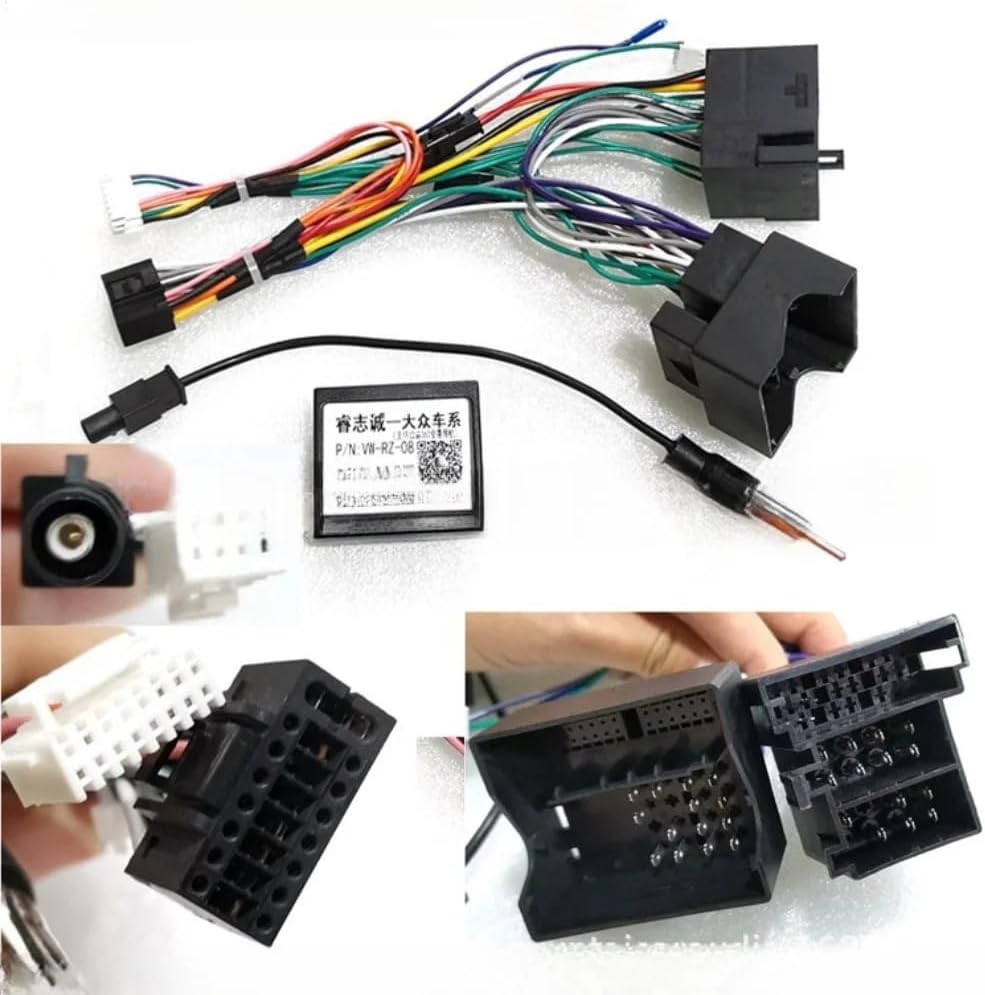
Image 2: The XIBEIKE VW-RZ-08 Canbus Box shown with its complete wiring harness, including various connectors for vehicle and head unit integration. Close-ups of specific connectors are also visible.
4. Setup and Installation
The XIBEIKE VW-RZ-08 Canbus Box is designed for direct replacement or integration with existing vehicle wiring. The installation process typically involves connecting the Canbus box and its associated wiring harness between the vehicle's factory wiring and the aftermarket Android head unit.
4.1 Vehicle Compatibility
This Canbus box is compatible with various Volkswagen, Skoda, and Seat models, including but not limited to:
- Volkswagen: Golf 5, Golf 6, Polo, Passat, Jetta, Tiguan, Touran
- Skoda models (specific models may vary, verify with vehicle's original equipment)
- Seat models (specific models may vary, verify with vehicle's original equipment)
Always verify the OE (Original Equipment) part numbers and wiring configurations of your vehicle to ensure proper fitment and function.
4.2 Installation Steps (General Guide)
- Prepare the Vehicle: Ensure the vehicle is turned off and the negative terminal of the car battery is disconnected.
- Remove Existing Head Unit: Carefully remove the factory or existing aftermarket head unit from the dashboard. Refer to your vehicle's service manual for specific instructions on dashboard disassembly.
- Connect Canbus Harness: Connect the vehicle-specific end of the Canbus wiring harness to the corresponding factory wiring harness in your vehicle. Ensure all connections are firm and correctly seated.
- Integrate Canbus Box: Connect the XIBEIKE VW-RZ-08 Canbus Box to the designated connector on the wiring harness.
- Connect to Android Head Unit: Connect the other end of the Canbus wiring harness (typically ISO or specific Android head unit connectors) to your aftermarket Android car player. Ensure all power, speaker, and data wires are correctly matched.
- Test Connections: Before fully reassembling the dashboard, reconnect the car battery. Turn on the vehicle and the Android head unit. Test basic functions such as power, audio, and steering wheel controls.
- Configure Android Head Unit: Access the 'Car Settings' or 'Factory Settings' menu on your Android head unit. Locate the Canbus settings and select the appropriate vehicle model and Canbus type (e.g., VW-RZ-08 or similar option). This step is crucial for the Canbus box to function correctly.
- Final Assembly: Once all functions are verified, carefully reassemble the dashboard and secure the Android head unit in place.

Image 3: An overview of the XIBEIKE VW-RZ-08 Canbus Box connected to its main wiring harness, illustrating the various connectors that interface with the vehicle and the Android head unit.

Image 4: A closer view of the Canbus box connected to a section of the wiring harness, showing the direct connection point.
5. Operating Instructions
Once correctly installed and configured, the XIBEIKE VW-RZ-08 Canbus Box operates automatically to provide the following functionalities to your Android car player:
- Steering Wheel Controls: Enables the use of factory steering wheel buttons to control media playback, volume, and other functions on the Android head unit.
- Door Open Status: Displays an icon or notification on the head unit screen when a vehicle door is open.
- Climate Control Information: May display climate control settings (temperature, fan speed) on the head unit screen, depending on the vehicle and head unit capabilities.
- Reverse Gear Signal: Provides a reverse signal to the head unit, automatically switching to the rearview camera display when the vehicle is put into reverse.
- Vehicle Speed Signal: Supplies vehicle speed data for navigation systems or other applications requiring this input.
- Illumination Control: Synchronizes head unit illumination with vehicle headlights.
Specific features and their display may vary based on the Android head unit's software and capabilities.
6. Maintenance
The XIBEIKE VW-RZ-08 Canbus Box is a sealed electronic component and requires no routine maintenance. To ensure its longevity and proper function:
- Ensure it is installed in a dry location, away from direct heat sources or extreme cold.
- Verify that all wiring connections remain secure over time.
- Avoid physical impact or excessive vibration to the unit.
7. Troubleshooting
If you encounter issues with your Canbus box, consider the following troubleshooting steps:
- No Functionality (e.g., Steering Wheel Controls not working):
- Check all wiring connections to ensure they are secure and correctly plugged in.
- Verify that the Canbus settings on your Android head unit are correctly configured for your vehicle and the VW-RZ-08 Canbus type. This is often found in 'Car Settings' or 'Factory Settings' (password may be required, consult your head unit manual).
- Ensure the Android head unit itself is functioning correctly.
- Intermittent Functionality:
- Loose connections are a common cause. Re-check all plugs and ensure they are fully seated.
- Check for any signs of damage to the wiring harness or the Canbus box itself.
- Incorrect Data Displayed (e.g., wrong door open, climate info):
- Re-verify the Canbus settings on your Android head unit. Ensure the correct vehicle model and Canbus protocol are selected.
- Some Android head units may require a software update to fully support certain Canbus features. Consult your head unit manufacturer.
- No Power to Head Unit:
- Check the vehicle's fuses related to the radio/infotainment system.
- Ensure the main power (B+ and ACC) wires from the Canbus harness are correctly connected to the head unit and receiving power.
If troubleshooting steps do not resolve the issue, it is recommended to consult a professional automotive electronics technician.
8. Specifications
| Feature | Specification |
|---|---|
| Model Number (Canbus Box) | VW-RZ-08 |
| Item Model Number (Product Listing) | XIBEIKE1019 |
| Package Dimensions | 1.18 x 0.79 x 0.39 inches |
| Item Weight | 1.76 ounces |
| Compatibility | Volkswagen, Skoda, Seat vehicles (verify OE parts) |
| Installation Type | Direct Replacement / Integration |
9. Warranty and Support
This XIBEIKE product is covered by a standard manufacturer's warranty against defects in materials and workmanship. The warranty period and terms may vary depending on your region and retailer. Please retain your proof of purchase for warranty claims.
For technical support, warranty inquiries, or further assistance, please contact the retailer from whom you purchased the product or visit the official XIBEIKE support channels if available.