
1. Introduction
This manual provides detailed instructions for the installation and operation of the XIBEIKE VW-RZ-08 Canbus Box and Wiring Cable. This product is designed to facilitate the integration of an Android car player with various Volkswagen, Skoda, and Seat vehicle models, ensuring proper communication between the vehicle's systems and the aftermarket head unit. Please read this manual thoroughly before installation to ensure correct setup and optimal performance.
2. Product Overview
The XIBEIKE VW-RZ-08 package includes a Canbus decoder box and a specialized wiring harness. The Canbus box translates vehicle data (such as steering wheel controls, door status, reverse gear, etc.) into a format compatible with Android car players, while the wiring harness provides the necessary connections for power, speakers, and data transfer.
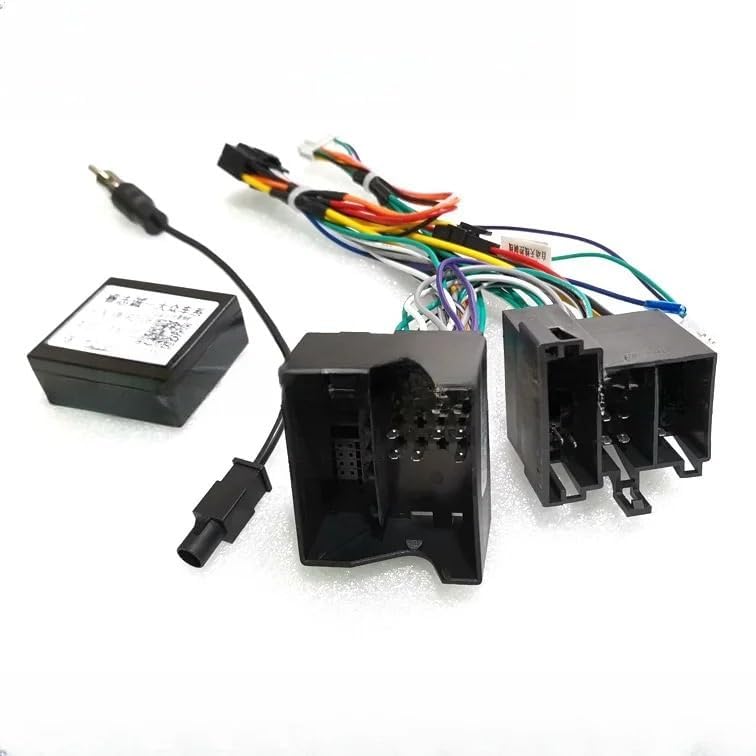
Figure 2.1: Overview of the XIBEIKE VW-RZ-08 Canbus Box and Wiring Cable components.
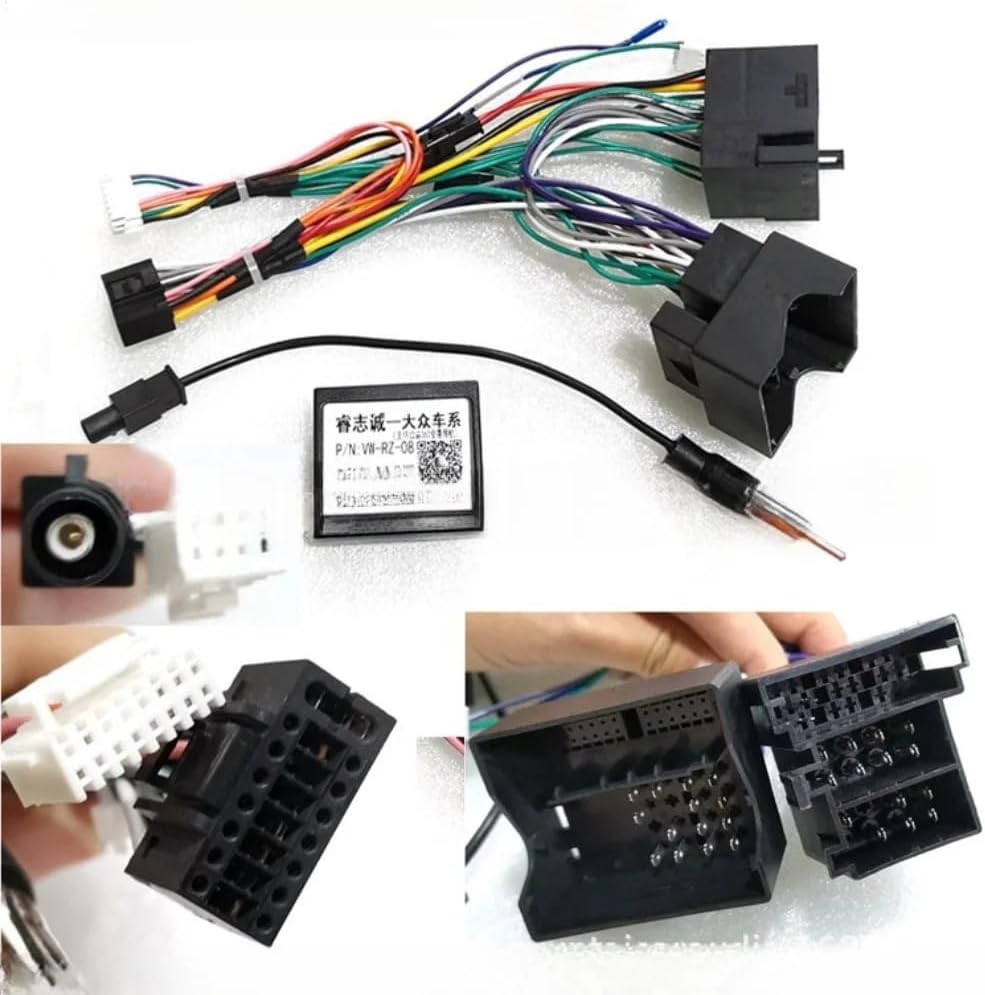
Figure 2.2: Detailed view showing the Canbus box, main wiring harness, and various connectors, including an antenna adapter.

Figure 2.3: The wiring harness features multiple color-coded wires and connectors designed for specific vehicle interfaces and the Android head unit.

Figure 2.4: Close-up of the Canbus box, clearly showing the model number P/N: VW-RZ-08 and a QR code for additional information.
3. Compatibility
This Canbus box and wiring cable are compatible with various Volkswagen, Skoda, and Seat models when installing an Android car player. Specific compatible models include, but are not limited to:
- Volkswagen Golf 5, Golf 6
- Volkswagen Polo
- Volkswagen Passat
- Volkswagen Jetta
- Volkswagen Tiguan
- Volkswagen Touran
- Various Skoda models
- Various Seat models
Important: Always verify compatibility with your specific vehicle's original equipment (OE) parts and the Android head unit before proceeding with installation. The product is designed for direct replacement and integration.
4. Package Contents
The package typically includes the following items:
- 1 x XIBEIKE VW-RZ-08 Canbus Decoder Box
- 1 x Main Wiring Harness (with vehicle-specific connectors and Android head unit connectors)
- 1 x Antenna Adapter Cable (may vary based on specific vehicle requirements)
5. Setup and Installation
Installation of the Canbus box and wiring harness requires basic automotive electrical knowledge. If you are unsure about any steps, it is highly recommended to seek professional installation.
- Preparation: Ensure the vehicle's ignition is off and the battery is disconnected to prevent electrical shorts.
- Remove Existing Head Unit: Carefully remove your vehicle's original or existing head unit. Refer to your vehicle's service manual for specific instructions on dashboard disassembly.
- Connect Canbus Box: Connect the small connector from the main wiring harness to the XIBEIKE VW-RZ-08 Canbus decoder box.
- Connect Vehicle Harness: Connect the vehicle-specific connectors on the main wiring harness to the corresponding ports in your car's dashboard wiring. These are typically ISO connectors or similar multi-pin plugs.
- Connect Android Head Unit: Connect the other end of the main wiring harness (typically with standard ISO or universal Android head unit connectors) to your new Android car player. Ensure all connections are secure.
- Antenna Connection: If provided, connect the antenna adapter cable between your vehicle's antenna cable and the antenna input on the Android head unit.
- Test Connections: Before fully reassembling the dashboard, reconnect the vehicle battery and turn on the ignition. Test the Android head unit's functionality, including power, audio, steering wheel controls, reverse camera input (if applicable), and other Canbus-controlled features.
- Reassemble: Once all functions are verified, carefully reassemble the dashboard and secure the Android head unit in place.
Note: The wiring harness is designed for direct replacement. Do not force any connections. If a connector does not fit, double-check compatibility and consult a professional.
6. Operating Instructions
The XIBEIKE VW-RZ-08 Canbus Box operates automatically once correctly installed. Its primary function is to interpret and transmit vehicle data to your Android car player. This enables features such as:
- Steering Wheel Control Integration: Allows you to control audio functions (volume, track skip, mode) directly from your vehicle's steering wheel buttons.
- Ignition (ACC) Signal: Provides the correct ignition signal to turn the head unit on and off with the vehicle.
- Illumination Signal: Dims the head unit's display when vehicle lights are turned on.
- Reverse Gear Signal: Automatically switches the head unit to a reverse camera display when the vehicle is put into reverse.
- Door Open Status: May display door open warnings on the head unit (feature dependent on Android player).
No user interaction is typically required with the Canbus box itself after installation.
7. Maintenance
The XIBEIKE VW-RZ-08 Canbus Box and Wiring Cable are designed for long-term, maintenance-free operation. No regular maintenance is required. Ensure all connections remain secure and free from moisture or physical damage.
- Keep the Canbus box and wiring away from excessive heat, moisture, and direct sunlight.
- Avoid physical stress on the cables and connectors.
- If cleaning is necessary, use a dry, soft cloth. Do not use liquid cleaners.
8. Troubleshooting
If you encounter issues after installation, consider the following troubleshooting steps:
- No Power to Head Unit:
- Check all power connections from the wiring harness to the head unit and the vehicle.
- Verify vehicle fuses related to the stereo system.
- Ensure the Canbus box is securely connected to the harness.
- Steering Wheel Controls Not Working:
- Confirm the Canbus box is correctly connected and receiving power.
- Check the settings within your Android car player for steering wheel control configuration. Many units require manual mapping of buttons.
- Ensure your Android head unit supports Canbus integration for steering wheel controls.
- Incorrect Vehicle Data (e.g., reverse camera not activating):
- Verify all Canbus-related wires are correctly connected.
- Ensure the Android head unit's software is configured to receive and utilize Canbus data.
- Intermittent Issues:
- Check for loose connections at all points.
- Ensure no wires are pinched or damaged.
If problems persist, consult a professional installer or contact XIBEIKE customer support.
9. Specifications
| Feature | Specification |
|---|---|
| Model Number | VW-RZ-08 |
| Manufacturer Model Number | XIBEIKE1019 |
| Package Dimensions | 1.18 x 0.79 x 0.39 inches (approximate for Canbus box) |
| Item Weight | 1.76 ounces (approximate for Canbus box) |
| Installation Type | Direct Replacement |
| Compatibility | Volkswagen, Skoda, Seat vehicles with Android car players |
10. Warranty and Support
For warranty information or technical support, please refer to the documentation provided with your purchase or contact your retailer. Keep your proof of purchase for any warranty claims.
Disclaimer: XIBEIKE is not responsible for any damage to the vehicle or product due to improper installation or misuse. Professional installation is recommended.