
1. Introduction
The XIBEIKE NS-SS-04A Canbus Box and Wiring Harness is designed to facilitate the installation of an aftermarket 2-Din Android car radio into compatible Nissan vehicles. This system ensures proper communication between the new radio unit and the vehicle's existing electronic systems, including steering wheel controls, door status, and other vehicle data, which are transmitted via the CAN-Bus network. This manual provides essential information for the correct installation, operation, and maintenance of your product.
2. Safety Information
- Professional Installation Recommended: Due to the complexity of vehicle electrical systems, professional installation by a qualified technician is highly recommended.
- Disconnect Battery: Always disconnect the vehicle's negative battery terminal before beginning any electrical installation to prevent short circuits and electrical damage.
- Verify Compatibility: Ensure this product is compatible with your specific Nissan vehicle model and aftermarket radio before installation. Refer to your vehicle's service manual for wiring diagrams.
- Handle with Care: Avoid bending or damaging the wiring harness and connectors.
- Secure Connections: Ensure all connections are secure and properly insulated to prevent loose connections or short circuits.
3. Package Contents
Please verify that all components are present and undamaged upon opening the package.
- 1x XIBEIKE NS-SS-04A Canbus Box
- 1x Wiring Harness with Vehicle-Specific Connectors
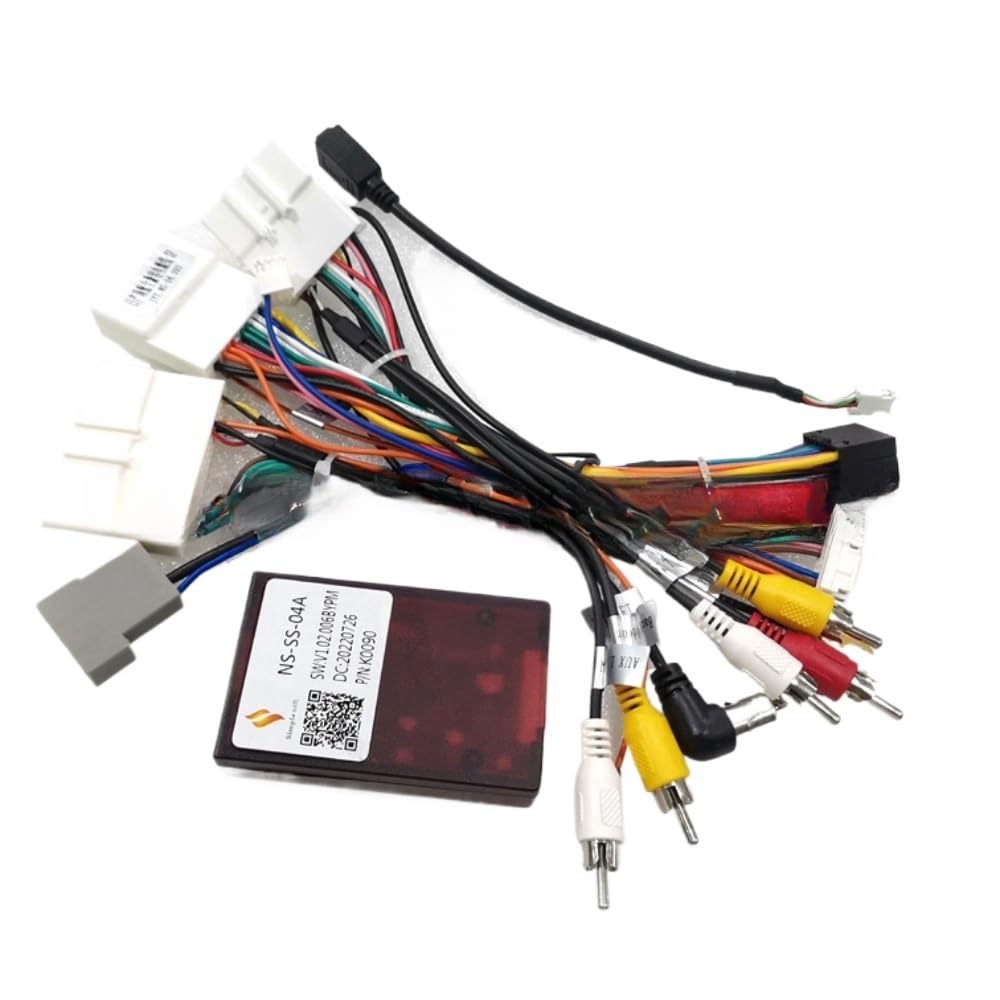
Image 3.1: The XIBEIKE NS-SS-04A Canbus Box connected to its wiring harness. This image shows the main components included in the package.

Image 3.2: A detailed view of the various connectors on the wiring harness, designed for integration with Nissan vehicle systems and aftermarket Android radios.
4. Setup and Installation
Follow these general steps for installing the Canbus box and wiring harness. Specific vehicle wiring may vary.
- Prepare the Vehicle:
- Ensure the vehicle is turned off and the ignition key is removed.
- Disconnect the negative terminal of the vehicle's battery to prevent electrical shorts.
- Carefully remove the factory car radio from the dashboard. Consult your vehicle's service manual for specific removal instructions.
- Identify Vehicle Wiring:
- Locate the factory wiring harnesses that were connected to the original radio.
- Familiarize yourself with the vehicle's wiring diagram, if available, to understand the function of each wire.
- Connect to Aftermarket Radio:
- Connect the appropriate end of the XIBEIKE wiring harness to the corresponding ports on your new 2-Din Android car radio. These connections typically include power, ground, speaker outputs, and signal inputs.
- Ensure all connections are firm and correctly matched according to the radio's wiring diagram.
- Integrate the Canbus Box:
- Connect the Canbus box to the designated connector on the XIBEIKE wiring harness. The Canbus box acts as an interface between the vehicle's CAN-Bus system and the aftermarket radio.
- Ensure the Canbus box is securely seated and its connections are tight.
- Connect to Vehicle:
- Connect the vehicle-specific connectors of the XIBEIKE wiring harness to the factory wiring harnesses in your Nissan vehicle. These connectors are designed to be plug-and-play, but always double-check for a secure fit.
- Initial Testing:
- Before fully reassembling the dashboard, reconnect the vehicle's negative battery terminal.
- Turn on the ignition and test the new Android radio. Verify power, sound, steering wheel controls, and any other integrated features (e.g., reverse camera, door open warnings).
- If any issues arise, refer to the Troubleshooting section.
- Final Assembly:
- Once all functions are verified, carefully secure the Canbus box and excess wiring to prevent rattles or interference.
- Reinstall the new car radio into the dashboard and secure all trim panels.
5. Operation
The XIBEIKE NS-SS-04A Canbus Box operates automatically once installed. Its primary function is to translate vehicle data from the CAN-Bus system into signals that your aftermarket Android radio can understand. This enables features such as:
- Steering Wheel Control Integration: Allows the use of factory steering wheel buttons to control the new radio (volume, track skip, mode, etc.).
- Ignition (ACC) Signal: Provides the correct ignition signal to turn the radio on and off with the vehicle.
- Illumination Signal: Dims the radio display when headlights are turned on.
- Reverse Gear Signal: Activates the reverse camera input on the radio when the vehicle is in reverse.
- Door Open Status: Displays door open warnings on the radio screen (if supported by the radio and vehicle).
There are no user-adjustable settings on the Canbus box itself. All operational adjustments for integrated features will be made through your Android car radio's settings menu.
6. Maintenance
The XIBEIKE NS-SS-04A Canbus Box and Wiring Harness require minimal maintenance.
- Periodic Inspection: If you experience any issues, it is advisable to periodically check the connections of the wiring harness and Canbus box to ensure they remain secure and free from corrosion.
- Keep Dry: Ensure the Canbus box and connections are kept dry and away from moisture.
- Cleaning: If necessary, gently wipe the exterior of the Canbus box with a dry, soft cloth. Do not use harsh chemicals or abrasive cleaners.
7. Troubleshooting
If you encounter problems after installation, refer to the following common issues and solutions:
- No Power to Radio:
- Check the vehicle's battery connection.
- Verify all power and ground wires on the harness are securely connected to the radio and vehicle.
- Inspect vehicle fuses related to the radio and accessory power.
- No Sound:
- Ensure all speaker wires are correctly connected and not shorted.
- Check the radio's volume settings and mute function.
- Verify the amplifier turn-on wire (if applicable) is connected.
- Steering Wheel Controls Not Working:
- Confirm the Canbus box is properly connected to the wiring harness.
- Access the steering wheel control settings in your Android radio's menu and perform the learning function if available.
- Ensure the radio supports external steering wheel control interfaces.
- Canbus Error Messages on Radio:
- Verify the Canbus box is correctly connected and receiving power.
- Ensure the Android radio's Canbus settings are configured for the correct vehicle type (if applicable).
- A factory reset of the radio or Canbus box (if it has a reset button) might resolve software glitches.
- Intermittent Functionality:
- Check all connections for looseness or poor contact.
- Inspect wires for any signs of damage or pinching.
If problems persist, contact XIBEIKE customer support or consult a professional car audio installer.
8. Specifications
| Feature | Detail |
|---|---|
| Model Number | XIBEIKE1019 (NS-SS-04A) |
| Material | Copper (core), PVC (insulation) |
| Item Weight | 1.76 ounces (approx. 50 grams) |
| Package Dimensions | 1.18 x 0.79 x 0.39 inches |
| Compatibility | Nissan vehicles (specific models may vary), 2-Din Android car radios (High Version) |
| Installation Type | Direct replacement / Plug-and-play (with vehicle-specific connectors) |
9. Warranty and Support
For warranty information or technical support, please refer to the documentation provided with your purchase or contact the seller directly. Keep your purchase receipt as proof of purchase.
For further assistance, you may visit the product page on Amazon or contact XIBEIKE customer service.