
Introduction
This manual provides comprehensive instructions for the assembly, operation, and maintenance of your Lamtor Display Cabinet, Model CF0036. Designed for showcasing collectibles, this cabinet features tempered glass doors, adjustable shelves, RGB LED lighting, and integrated storage drawers. Please read this manual thoroughly before assembly and use to ensure proper function and safety.
Important Safety Information
Always assemble the cabinet according to the provided instructions. Ensure the cabinet is securely placed against a wall or use the anti-tipping feature to prevent tipping. Be cautious when handling glass doors and shelves to avoid injury.
- Do not overload shelves. Refer to specifications for weight limits.
- Keep small parts away from children during assembly.
- Use appropriate tools as specified in the assembly guide.
- Ensure all connections for LED lights are secure before plugging into a power source.
Product Features
- Colorful RGB Lights: Features adjustable RGB LED lights with multiple color options, controllable via remote or smartphone application.
- 3-Level Adjustable Shelves: Customize your storage space with three height-adjustable glass shelves to accommodate items of various sizes.
- Pop-Up Glass Doors: Handle-less design with a press-and-pop mechanism for easy opening and a sleek appearance.
- Safety Tempered Glass: Constructed with high-quality tempered glass that is resistant to scratches and breakage, enhancing both safety and display clarity.
- Ample Storage Space: A 4-tier display area combined with two integrated drawers provides extensive storage for your items.

Figure 1: Lamtor Display Cabinet with RGB LED lighting highlighting displayed items.

Figure 2: Customizable RGB LED lights offering a range of color options.

Figure 3: Illustration of the 3-level adjustable shelves for flexible storage.
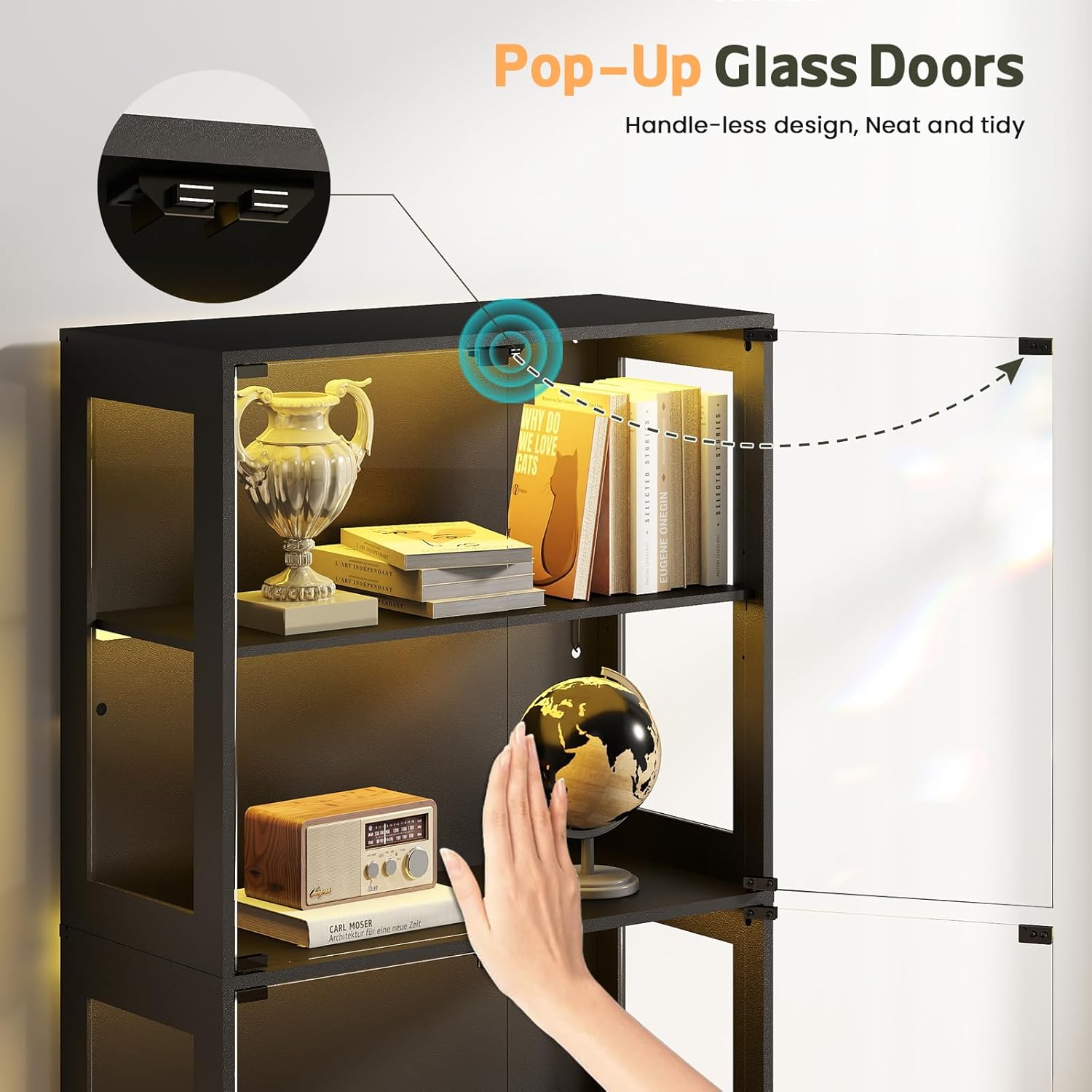
Figure 4: The handle-less, pop-up glass door design for a clean aesthetic.

Figure 5: Tempered glass construction ensures durability and safety.

Figure 6: Convenient drawers provide hidden storage to maintain a tidy display area.
Assembly Instructions
Assembly of the Lamtor Display Cabinet is required. A detailed instruction manual with diagrams is included in the product packaging. Please follow all steps carefully. It is recommended to have two people for certain assembly steps, especially when handling glass components.
For visual guidance, please refer to the official product videos provided by Lamtor Direct, which demonstrate the cabinet's features and may assist with understanding the assembly process.
Video 1: An overview of the Lamtor Display Cabinet, showcasing its design and features. This video may provide visual context for assembly steps.
Video 2: Another perspective on the Lamtor Glass Display Cabinet, highlighting its aesthetic and functional aspects.
Operating Instructions (RGB LED Lights)
Your Lamtor Display Cabinet is equipped with RGB LED lights that can be controlled via a remote control or a smartphone application.
Using the Remote Control:
- Ensure the cabinet is plugged into a power source.
- Point the remote control towards the LED receiver (usually located near the top of the cabinet).
- Press the 'ON' button to activate the lights.
- Use the color buttons (R, G, B, W, and other colored circles) to select a static color.
- Use the 'MODE+' and 'MODE-' buttons to cycle through dynamic lighting effects (e.g., flash, fade, strobe).
- Adjust brightness using the 'Brightness Up' and 'Brightness Down' buttons.
- Set a timer for 1H, 2H, 3H, or 4H using the corresponding buttons.
- Press the 'OFF' button to turn off the lights.
Using the Smartphone Application:
- Download the recommended smartphone application (refer to the included manual for QR code or app name).
- Follow the app's instructions to pair your device with the cabinet's LED lights via Bluetooth or Wi-Fi.
- Once connected, you can control colors, brightness, dynamic modes, and set schedules directly from your phone.
Maintenance
- Cleaning Glass Surfaces: Use a soft, lint-free cloth and a non-abrasive glass cleaner. Spray the cleaner onto the cloth, not directly onto the glass, to avoid streaks and protect internal components.
- Cleaning Wood Surfaces: Wipe with a soft, damp cloth. Avoid harsh chemicals or abrasive cleaners that can damage the finish.
- LED Lights: The LED lights are designed for long-term use and generally do not require maintenance. If issues arise, check power connections. Do not attempt to repair the LED strips yourself.
- General Care: Regularly check all screws and fittings to ensure they remain tight. Avoid placing heavy objects on top of the cabinet or on shelves beyond their specified weight limit.
Troubleshooting
- Lights not turning on: Check if the power adapter is securely plugged into both the cabinet and the wall outlet. Ensure the remote control batteries are functional and pointed correctly.
- Remote control not responding: Replace the remote control batteries. Ensure there are no obstructions between the remote and the LED receiver.
- Doors not closing smoothly: Check for any obstructions in the door tracks or hinges. Ensure the cabinet is on a level surface.
- Cabinet feels unstable: Verify that all assembly screws are tightened. Ensure the anti-tipping hardware is correctly installed and secured to the wall.
Specifications
| Feature | Detail |
|---|---|
| Brand | Lamtor |
| Model Name | Display Cabinet (CF0036) |
| Color | Black |
| Product Dimensions | 13.8"D x 31.5"W x 66.9"H |
| Item Weight | 105.8 Pounds |
| Weight Limit (Total) | 240 Pounds |
| Number of Shelves | 4 (Adjustable) |
| Number of Drawers | 2 |
| Material | Wood, Tempered Glass |
| Special Features | Adjustable Shelf, Anti-Tipping, RGB LED Lights, Pop-Up Glass Doors |
| Assembly Required | Yes |

Figure 7: Detailed product dimensions and maximum weight capacity.
Warranty and Support
For information regarding product warranty, please refer to the documentation included with your purchase or contact Lamtor customer support directly. Protection plans may be available for extended coverage.
For further assistance or inquiries, please visit the Lamtor Store on Amazon.