
Introduction
Thank you for choosing the Casaottima 32-inch Small Office Computer Desk. This manual provides essential information for the safe assembly, operation, and maintenance of your new desk. Please read these instructions carefully before beginning assembly and retain them for future reference.
Safety Information
Important: Ensure the desk is stable and properly anchored to prevent tipping, especially when used with heavier items or by children. Always place the desk on a flat, level surface. Do not overload the desk or drawers beyond their stated weight capacities.
- Keep all small parts and packaging materials away from children and pets to prevent choking hazards.
- Do not stand or sit on the desk.
- Avoid exposing the desk to excessive moisture or direct sunlight for prolonged periods.
- Use caution when moving the assembled desk to prevent damage or injury.
Package Contents
Before assembly, verify that all components listed below are present and undamaged. If any parts are missing or damaged, please contact customer support.
- Desk Top Panel
- Metal Frame Legs (Left and Right)
- Crossbars/Support Beams
- Fabric Drawers (2 units)
- Headphone Hook
- Adjustable Leg Pads (4 units)
- Assembly Hardware (screws, bolts, Allen wrench)
Setup and Assembly
Assembly is required for this product. Please follow the steps carefully. It is recommended to assemble the desk on a soft, clean surface to prevent scratches.

Figure 1: Overview of assembly steps.
- Assemble the Desk Frame: Connect the metal frame legs and crossbars using the provided hardware. Ensure all screws are finger-tightened initially.
- Attach the Desk Top: Carefully place the desk top panel onto the assembled frame. Align the pre-drilled holes and secure the top with the appropriate screws. Fully tighten all screws on the frame and desk top.
- Assemble Fabric Drawers: Fold the fabric drawers into their rectangular shape. Insert the bottom panel for stability. Slide the assembled drawers into the designated slots under the desk top.
- Attach the Headphone Hook: Locate the pre-drilled hole on the side of the desk frame. Secure the headphone hook using the provided screw.
After completing all steps, gently shake the desk to ensure stability. Adjust the leg pads if necessary to level the desk on uneven floors.
Operating Instructions
Using the Workspace
The desk provides a stable surface for various activities such as working, studying, or gaming. Place your computer, monitor, or other items on the desk top. Ensure that the weight distribution is even and does not exceed the maximum load capacity of 110 lbs (50 kg).

Figure 2: Desk in a typical home office setup.
Utilizing Drawers
The two fabric drawers offer convenient storage for office supplies, documents, or personal items. To open, gently pull the handle. To close, push the drawer back into its slot. Avoid forcing the drawers if they encounter resistance.

Figure 3: Fabric drawers providing organized storage.
Headphone Hook
The integrated headphone hook provides a dedicated space to hang your headphones, keeping them easily accessible and off the desk surface. This helps maintain an organized and clutter-free workspace.

Figure 4: Headphone hook and other structural features.
Maintenance
Proper care will extend the life and appearance of your Casaottima desk.
- Cleaning: Wipe with a dry cloth. Avoid using abrasive cleaners, harsh chemicals, or excessive moisture, which can damage the finish.
- Spills: Immediately wipe up any spills to prevent staining or damage to the desk top.
- Inspection: Periodically check all screws and connections to ensure they remain tight. Retighten if necessary.
- Environment: Keep the desk away from direct heat sources, extreme temperatures, and high humidity.
Troubleshooting
If you encounter any issues with your desk, refer to the following common problems and solutions:
- Desk is wobbly:
- Ensure all assembly screws are fully tightened.
- Adjust the leg pads on the bottom of the desk legs to compensate for uneven flooring.
- Drawers do not slide smoothly:
- Verify that the fabric drawers are assembled correctly and that the bottom panel is securely in place.
- Check for any obstructions within the drawer slots.
- Missing parts or damaged components:
- Carefully re-check the packaging for any overlooked items.
- Contact Casaottima customer support or your retailer for assistance.
Specifications
| Brand | Casaottima |
| Model Number | B01011549-1 |
| Product Dimensions (D x W x H) | 15.75"D x 31.5"W x 30.98"H |
| Item Weight | 16 Pounds |
| Material | Engineered Wood (Top), Metal (Base) |
| Color | Black |
| Number of Drawers | 2 (Fabric) |
| Special Features | Compact, Scratch Resistant, Headphone Hook, Adjustable Leg Pads |
| Maximum Weight Capacity | 110 lbs (Desk Top) |
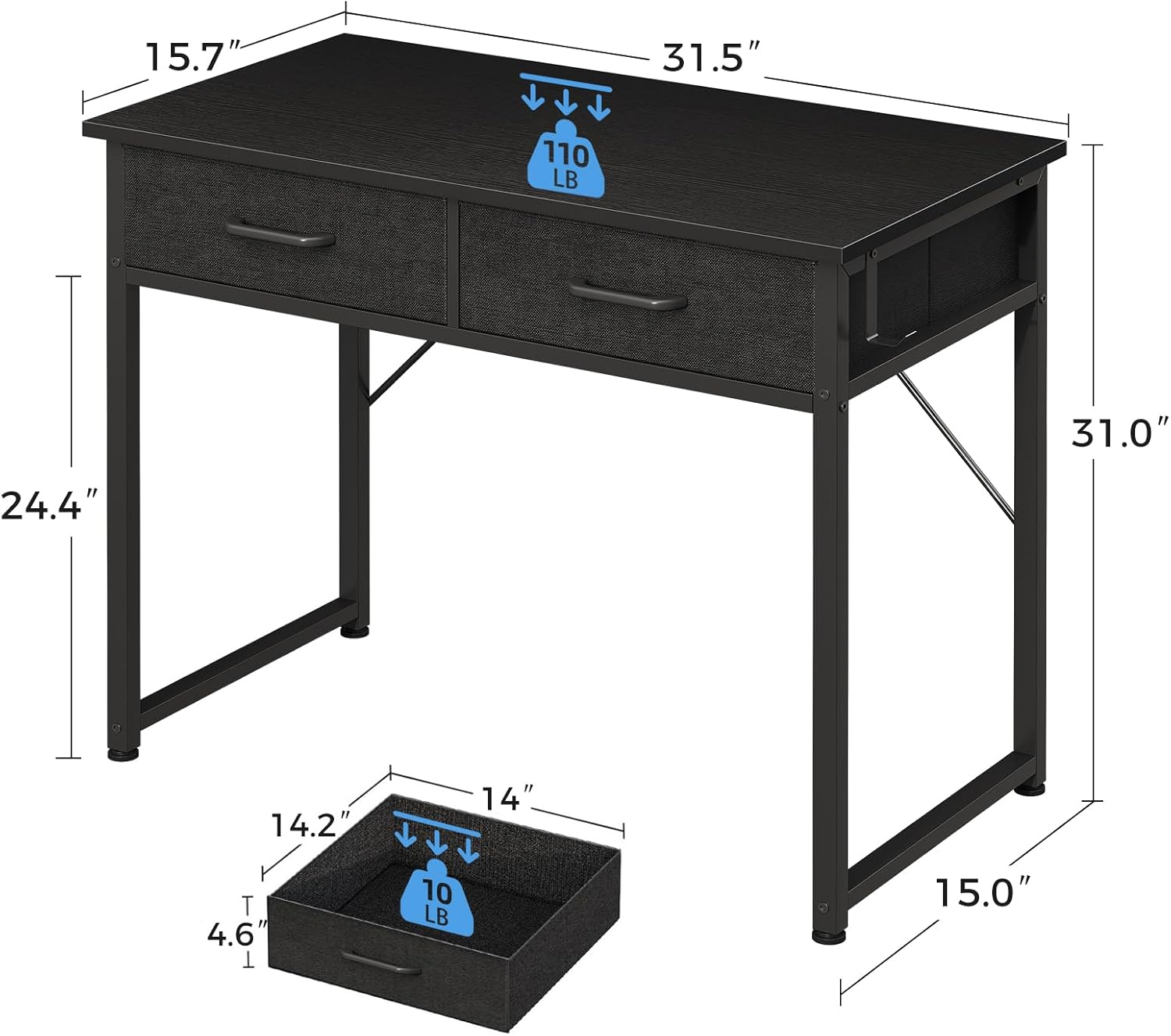
Figure 5: Product dimensions and weight capacities.
Warranty and Support
This Casaottima desk comes with a Limited Warranty. For specific details regarding warranty coverage, terms, and conditions, please refer to the documentation included with your purchase or contact Casaottima customer service.
For technical support, missing parts, or any other inquiries, please contact the retailer where you purchased the product or visit the official Casaottima website for contact information.