
T22
User Manual: T22 2.4G+BT5.1 Dual Mode Vertical Mouse
Model: T22 | Brand: Generic
1. Introduction
Thank you for choosing the T22 2.4G+BT5.1 Dual Mode Vertical Mouse. This ergonomic mouse is designed for comfort and efficiency, featuring dual-mode connectivity (2.4G wireless and Bluetooth 5.1), a rechargeable battery, and adjustable DPI settings. Please read this manual carefully to ensure proper use and maintenance of your device.

Image: The T22 Dual Mode Vertical Mouse in black, showcasing its ergonomic design, red accents, and the included USB charging cable.
2. Package Contents
Please verify that all items listed below are included in your package:
- 1 x T22 2.4G+BT5.1 Dual Mode Vertical Mouse
- 1 x USB Receiver (for 2.4G wireless connection)
- 1 x USB Charging Cable (Type-C, 1 meter)
- 1 x User Manual

Image: A visual representation of the T22 Vertical Mouse, its packaging, USB receiver, and charging cable, along with dimensions.
3. Setup
3.1 Charging the Mouse
The T22 mouse comes with a built-in 600mAh lithium battery. Before first use, it is recommended to fully charge the mouse.
- Connect the supplied USB Type-C charging cable to the charging port on the front of the mouse.
- Connect the other end of the USB cable to a USB power source (e.g., computer USB port, USB wall adapter).
- The mouse's indicator light will show charging status. A full charge typically takes approximately 1.5 hours and provides 1-2 months of usage.

Image: An illustration demonstrating the T22 Vertical Mouse being charged via its Type-C port, highlighting the 600mAh battery capacity and charging time.
3.2 Connecting the Mouse
The T22 mouse supports two connection modes: 2.4G Wireless and Bluetooth 5.1.
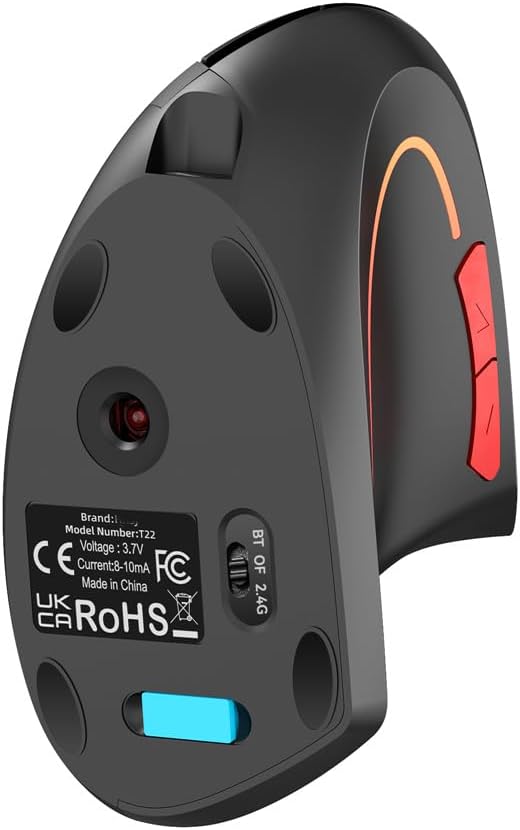
Image: The underside of the T22 Vertical Mouse, showing the optical sensor, product labels, and the switch for selecting between Bluetooth and 2.4G wireless modes.
3.2.1 2.4G Wireless Connection
- Locate the USB receiver, usually stored in a compartment on the bottom of the mouse.
- Plug the USB receiver into an available USB port on your computer.
- Flip the switch on the bottom of the mouse to the "2.4G" position.
- The mouse should automatically connect to your computer.
3.2.2 Bluetooth 5.1 Connection
- Flip the switch on the bottom of the mouse to the "BT" position.
- On your computer or device, open Bluetooth settings.
- Search for new devices. The mouse should appear as "T22 Mouse" or similar.
- Select the mouse to pair. Once paired, the connection is established.
4. Operating Instructions
The T22 Vertical Mouse is designed for intuitive use with standard mouse functions and additional features.
4.1 Button Functions
- Left Click Button: Standard left-click function.
- Right Click Button: Standard right-click function.
- Scroll Wheel: Scroll up/down, and middle-click function.
- Forward/Backward Buttons: Located on the side, typically used for navigating web pages or folders.
- DPI Button: Located near the scroll wheel, used to adjust cursor sensitivity.
4.2 DPI Adjustment
The mouse features four adjustable DPI levels: 800, 1200, 1600, and 2400 DPI. Press the DPI button to cycle through these settings. A higher DPI setting means the cursor moves faster across the screen with less physical mouse movement.
4.3 RGB Lighting
The mouse features seven-color lighting for an enhanced user experience. The lighting is typically active when the mouse is in use or charging.

Image: The T22 Vertical Mouse being used with both a laptop and a desktop computer, demonstrating its universal compatibility and wireless operation.
5. Maintenance
To ensure the longevity and optimal performance of your T22 Vertical Mouse, follow these maintenance guidelines:
- Cleaning: Use a soft, dry cloth to wipe the surface of the mouse. For stubborn dirt, a slightly damp cloth can be used, but ensure no moisture enters the device.
- Storage: Store the mouse in a cool, dry place away from direct sunlight and extreme temperatures.
- Battery Care: Avoid fully discharging the battery frequently. Charge the mouse when the battery indicator suggests low power.
- Avoid Drops: Protect the mouse from drops and impacts, which can damage internal components.
6. Troubleshooting
If you encounter issues with your T22 Vertical Mouse, please refer to the following common solutions:
| Problem | Possible Solution |
|---|---|
| Mouse not responding |
|
| Cursor movement is erratic or slow |
|
| Buttons not working |
|
| Bluetooth pairing fails |
|
7. Specifications
| Parameter | Value |
|---|---|
| Item Type | T22 2.4G+BT5.1 Dual Mode Vertical Mouse |
| Wireless Technology | 2.4G + Bluetooth 5.1 |
| Available Colors | Black, Grey, White |
| Return Rate | 125Hz |
| Moving Speed | 28 IPS |
| Refresh Rate | 3000 FPS |
| Acceleration | 10G |
| Resolution (DPI) | 800 / 1200 / 1600 / 2400 DPI |
| Rated Voltage / Current | 3.7V / 8-10mA |
| Battery Type | 600mAh Lithium Battery |
| Button Click Life | 5 Million times (Mute switch) |
| Mouse Interface | Type-C (for charging) |
| Maximum Operating Range | 10m |
| Material | ABS |
| Product Size | 12.5 * 7.5 * 6.5 cm |
| Net Weight | 92g |

Image: The T22 Vertical Mouse displayed in its three available color options: black, grey, and white.
8. System Requirements
The T22 Vertical Mouse is compatible with a wide range of operating systems:
- Windows 98 / Me / 2000 / XP / Vista / Win 7 / Win8 / Win10 / Win11
- Mac OS
- Linux (latest versions)
9. Warranty and Support
For any questions or issues not covered in this manual, please contact the seller or manufacturer for assistance. Specific warranty details may vary by region and retailer. Please retain your proof of purchase for warranty claims.

Image: Product warning labels indicating "Not for Children under 3 yrs." and various international certifications (CE, UKCA, RoHS).
Related Documents - T22
 |
Motorcycle Handlebar User Manual - T22 Adjustable Brake Master Cylinder User manual for the T22 Adjustable Brake Master Cylinder, covering installation, safety precautions, feature overview, and troubleshooting. |
 |
VASCO Radiateurs : Tarif Technique France 2025 | Catalogue Complet Découvrez la gamme complète de radiateurs VASCO, incluant les radiateurs salle de bain, électriques, et ventilo-convecteurs. Consultez le tarif technique 2025 pour les spécifications, modèles et options de couleur. |
 |
Wilo-Stratos PARA/-Z Installation and Operating Instructions Comprehensive guide for the installation, operation, and maintenance of Wilo-Stratos PARA/-Z circulating pumps, covering safety instructions, technical data, functions, and troubleshooting. |
 |
Russell Hobbs RHT62STN Stone Textured 2 Slice Toaster: Instructions and Warranty User manual and warranty information for the Russell Hobbs RHT62STN Stone Textured 2 Slice Toaster. Learn about important safety precautions, operating instructions, care, and disposal. |
 |
Pod Point Twin V7 Charger Datasheet Datasheet for the Pod Point Twin V7 Charger, a dual Type 2-socketed vehicle charger suitable for commercial and public installations. Details technical specifications, connectivity, physical properties, and compliance standards. |
 |
Radiant RADMEDIA-BLE-T21/T22 Bluetooth Low Energy 4.2 Radio PCBA User Manual User manual for Radiant's RADMEDIA-BLE-T21 and RADMEDIA-BLE-T22 Bluetooth Low Energy 4.2 Radio PCBAs, detailing features, specifications, antenna performance, and FCC compliance information. |
Ask a question about this manual
Ask about setup, troubleshooting, compatibility, parts, safety, or missing instructions. Manuals+ will review the question and use this page’s manual context to help answer it.