Introduction
The NEEWER PA100 Tablet Metal Holder is a versatile accessory designed to securely attach tablets and smartphones to various support systems, including tripod heads, magic arms, and gimbals. Constructed from durable aluminum alloy, this holder is ideal for a range of applications such as tablet monitoring, live streaming, video recording, online conferences, and remote learning. Its foldable design ensures portability and easy storage.

Image Description: This image illustrates the diverse applications of the NEEWER PA100 tablet holder, showcasing its use in remote learning, online meetings, and video recording setups. It highlights the holder's adaptability for different professional and personal needs.
Package Contents
- 1 x NEEWER PA100 Tablet Tripod Mount
- 1 x User Manual

Image Description: This image displays the complete package contents: one NEEWER PA100 Tablet Tripod Mount and its accompanying user manual, confirming what is included with the product.
Product Overview and Features
The NEEWER PA100 is engineered for secure and flexible device mounting. Key features include:
- Robust Construction: Made from aluminum alloy for durability and stability.
- Wide Compatibility: Accommodates tablets and phones with widths from 4.1 inches (10.4 cm) to 9.5 inches (24.1 cm) and thickness up to 0.6 inches.
- Secure Grip: Features a quick-release knob and fine-tuning thumb screw for precise and secure device clamping. The spring-less design prevents accidental damage.
- Versatile Mounting Options:
- Four-way Arca-type base for direct attachment to Arca-compatible tripod heads or gimbals.
- Bottom 1/4" thread for standard tripod connections.
- Rear NATO interface for compatible accessories.
- 3/8" to 1/4" screw adapter for broader compatibility.
- ARRI locating holes for connecting magic arms or handles.
- Top cold shoe mount for attaching lights or microphones.
- Protective Design: Equipped with non-slip rubber pads on clamps to prevent scratches and enhance stability.

Image Description: This image displays the NEEWER PA100 tablet holder in its extended state, clearly marking its minimum clamping width of 4.1 inches (10.4 cm) and maximum width of 9.5 inches (24.1 cm). It also highlights the 1/4 inch thread for mounting.
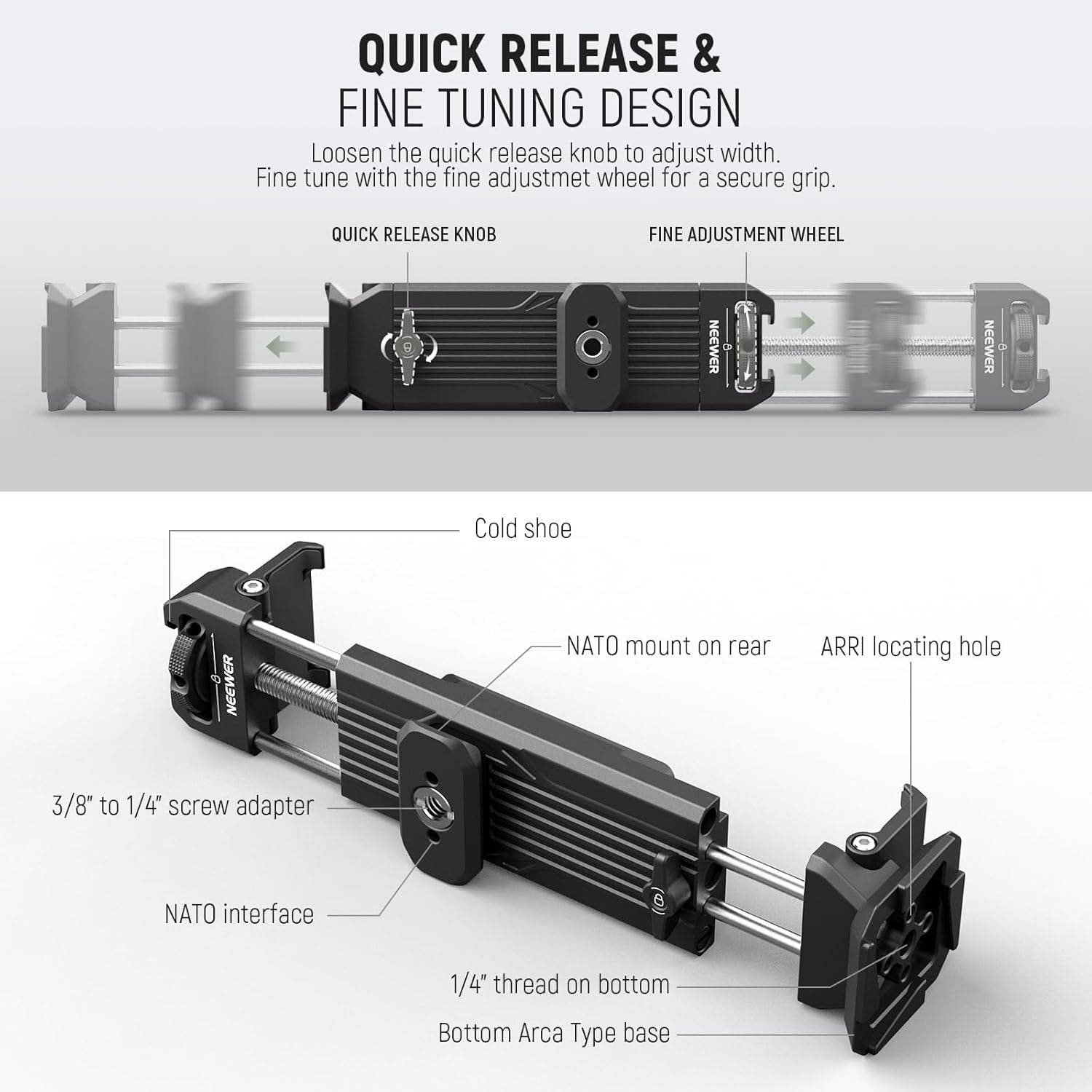
Image Description: This detailed image provides a clear view of the NEEWER PA100 tablet holder's various components and mounting points, including the quick release knob, fine adjustment wheel, cold shoe, NATO mount, 1/4" thread, 3/8" to 1/4" screw adapter, ARRI locating hole, and Arca-type base.
Setup Instructions
- Attaching Your Device:
- Locate the quick release knob on the tablet holder.
- Loosen the quick release knob to expand the clamp width.
- Insert your tablet or smartphone into the holder, ensuring it is centered between the protective non-slip rubber pads.
- Tighten the quick release knob until the device is held securely.
- Use the fine-tuning thumb screw for additional adjustments to ensure a firm grip without over-tightening.

Image Description: This image shows a user in a kitchen setting, demonstrating the setup of a tablet on the NEEWER PA100 holder, which is securely attached to a tripod. The tablet is positioned for viewing, illustrating a typical use case.
- Mounting the Holder:
- Tripod/Gimbal (Arca-Type): The base of the holder features a four-way Arca-type interface. Slide this directly onto an Arca-compatible tripod head or gimbal and secure it.
- Tripod (1/4" Thread): For standard tripods, use the 1/4" thread located at the bottom of the holder to screw it onto your tripod's mounting screw.
- Magic Arms/Handles (NATO/ARRI): Utilize the rear NATO interface or the ARRI locating holes to connect compatible magic arms or handles. A 3/8" to 1/4" screw adapter is included for broader compatibility with various mounting accessories.
Operating Instructions
- Adjusting Orientation: The holder supports both portrait and landscape modes for tablets and vertical monitoring for smartphones. Simply rotate your device within the clamps to achieve the desired orientation.
- Attaching Accessories:
- Cold Shoe Mount: Use the cold shoe mount located at the top of the holder to attach external accessories such as LED fill lights or microphones for enhanced audio and lighting during live streaming or video recording.

Image Description: This image illustrates the flexibility of the NEEWER PA100 holder, showing a tablet mounted in both portrait and landscape orientations. It also highlights the NATO rail and 1/4" threads for additional mounting versatility.

Image Description: This image shows a smartphone securely mounted vertically in the NEEWER PA100 holder, which is attached to a monopod. A person is visible in the background, indicating a typical usage scenario for video calls or content creation.
Maintenance
To ensure the longevity and optimal performance of your NEEWER PA100 Tablet Metal Holder, follow these maintenance guidelines:
- Cleaning: Wipe the holder with a soft, dry cloth to remove dust and debris. For stubborn marks, a slightly damp cloth can be used, followed by immediate drying. Avoid abrasive cleaners or solvents.
- Inspection: Regularly check all screws, knobs, and moving parts for tightness. Ensure the rubber pads are intact and free from damage to maintain a secure grip on your device.
- Storage: When not in use, store the holder in a clean, dry environment. Its foldable design allows for compact storage.
Troubleshooting
If you encounter any issues with your NEEWER PA100 Tablet Metal Holder, refer to the following common troubleshooting tips:
- Device Not Holding Securely:
- Ensure the quick release knob and fine-tuning thumb screw are fully tightened.
- Verify that your device's dimensions (width and thickness) are within the specified clamping range (4.1"-9.5" wide, 0.6" thick).
- Check the non-slip rubber pads for wear or damage.
- Difficulty Attaching to Tripod/Stand:
- Confirm the mounting interface (Arca-type, 1/4" thread, NATO, ARRI) on your tripod or accessory matches the holder's options.
- If using the 1/4" thread, ensure it is properly aligned and not cross-threaded.
- For 3/8" connections, ensure the 3/8" to 1/4" screw adapter is correctly used.
- Scratches on Device:
- Always ensure the non-slip rubber pads are clean and properly positioned before inserting your device.
- Avoid over-tightening the clamp, which can cause excessive pressure.
Specifications
| Model | PA100 |
| Item Type | Tablet Tripod Mount |
| Compatibility | Tablets & Phones (4.1" to 9.5" wide, up to 0.6" thick) |
| Application | Video & Live Stream, Monitoring, Online Meetings, Remote Learning |
| Main Features | Flexible Use & Expansion |
| Mounting Points | 1/4" Thread, NATO Interface, Arca Type Base, Cold Shoe, ARRI Locating Holes |
| Main Material | Aluminum Alloy |
| Dimensions | 1.5" x 1.5" x 5.2" (38 x 38 x 132mm) |
| Weight | 7 oz (198g) |
Warranty and Support
This product comes with a user manual. For specific warranty details and support inquiries, please refer to the documentation included in your package or visit the official NEEWER website. You can also contact NEEWER customer service for assistance.
NEEWER Store: Visit the NEEWER Store on Amazon


