
1. Introduction
This user manual provides detailed instructions for the operation and maintenance of the WANPTEK NPS-W series miniature switching DC power supply, specifically the NPS3010W model (3 Digits 30V 10A). This device is designed to provide a stable and adjustable DC power source for various applications, including laboratory work, electronic production, and DIY projects. Its compact size, high efficiency, and precise control make it an ideal tool for professionals and hobbyists alike.
The NPS-W series features a high-precision three-window digital tube display for voltage, current, and power, allowing users to intuitively monitor the operational status. The output voltage and current can be precisely adjusted using dedicated coarse and fine variable resistors.
2. Key Features
- Complete Operating Protection: Includes over-temperature protection, overload protection, and short-circuit protection to ensure safe operation and longevity of the device and connected equipment.
- Compact and Efficient Design: Small size, low ripple, lightweight, and high power density contribute to its portability and efficiency.
- Stable Performance: Provides stable voltage and current limiting capabilities for reliable power delivery.
- Automatic Constant Voltage/Current Switching: Automatically switches between constant voltage (CV) and constant current (CC) modes based on the load conditions.
- High-Precision Digital Display: Features a three-LED digital display for real-time monitoring of voltage, current, and power with high accuracy.
- Adjustable Output: Output voltage and current are adjustable via coarse and fine regulation knobs for precise control.
3. Product Overview
Familiarize yourself with the components and controls of your DC power supply.

Figure 3.1: Front View of the Power Supply. This image shows the front panel of the WANPTEK NPS3010W DC Power Supply, highlighting the digital displays for voltage, current, and power, along with the coarse and fine adjustment knobs for voltage and current, and the power switch and output terminals.
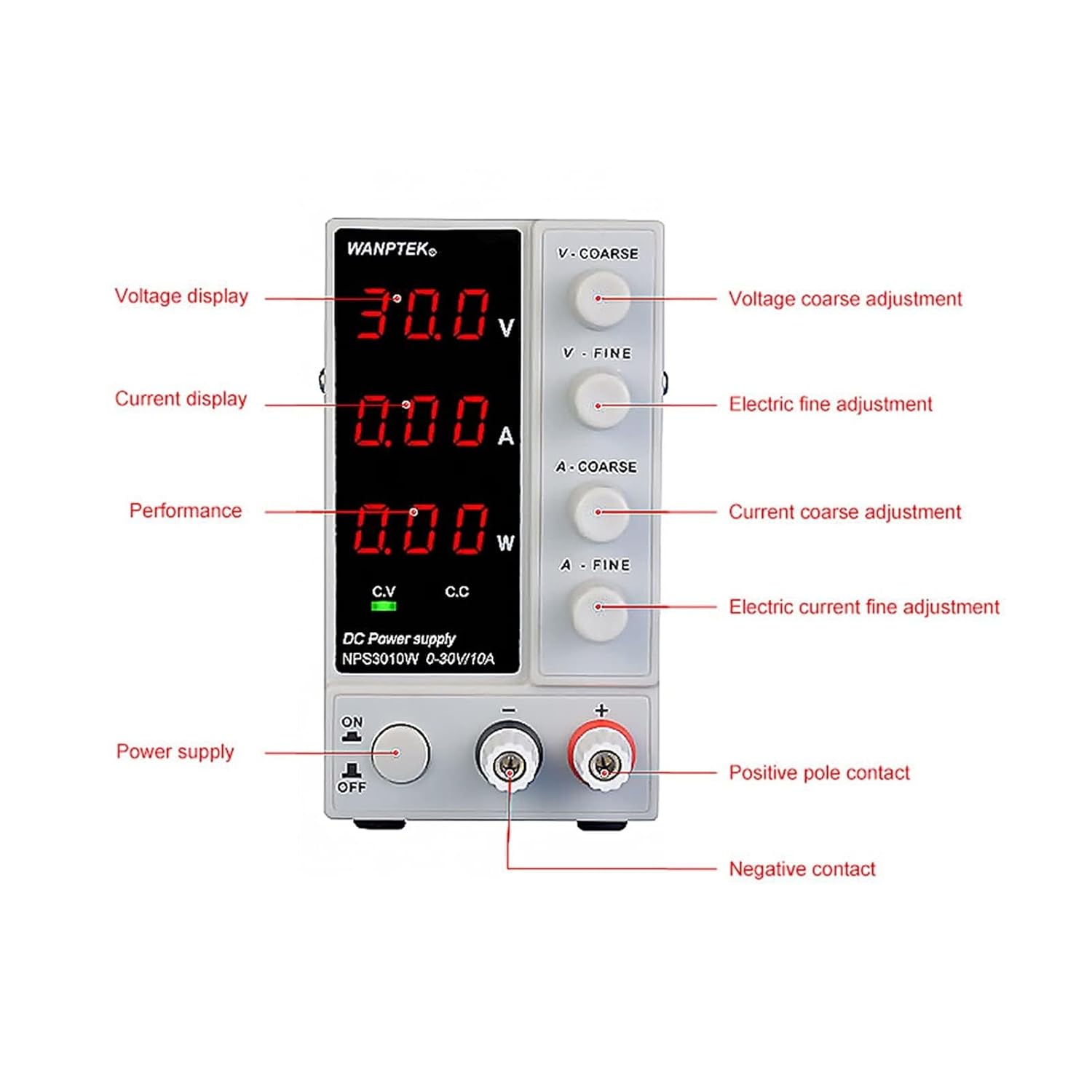
Figure 3.2: Front Panel Controls and Indicators. This image provides a detailed labeled diagram of the front panel. It points out the Voltage display, Current display, Performance (Power) display, Voltage coarse adjustment, Voltage fine adjustment, Current coarse adjustment, Current fine adjustment, Power supply switch (ON/OFF), Positive pole contact (+), and Negative contact (-).

Figure 3.3: Rear Panel and Cooling System. This image illustrates the rear panel of the power supply, showing the cooling fan, AC input socket, fuse holder, and a switch for selecting between 115V and 230V AC input voltage. It also highlights the cooling window on the side for proper ventilation.

Figure 3.4: Product Dimensions. This image displays the physical dimensions of the power supply, indicating a width of 70mm, height of 130mm, and depth of 230mm.

Figure 3.5: Typical Applications. This image shows various applications where the DC power supply can be used, including Circuit Board Repair, Electronic Production, Laboratory Measurements, Computer Repair, School Experiments, Phone Repair, DIY Test, Ageing Test, Battery Charging, and Factory Assembly Line.
4. Setup Instructions
- Unpacking: Carefully remove the power supply and all accessories from the packaging. Verify that all components are present: the power supply unit, power cord, and user manual.
- Placement: Place the power supply on a stable, flat surface with adequate ventilation. Ensure that the cooling fan and ventilation openings are not obstructed. Maintain sufficient clearance around the unit for proper airflow.
- Voltage Selection: Before connecting the power cord, check the AC input voltage selector switch on the rear panel (refer to Figure 3.3). Ensure it is set to match your local mains voltage (115V or 230V). Incorrect voltage selection can damage the unit.
- Power Connection: Connect the provided power cord to the AC input socket on the rear panel of the power supply, then plug the other end into a grounded electrical outlet.
- Initial Check: With no load connected, turn on the power supply using the ON/OFF switch on the front panel. The digital displays should illuminate, showing default voltage and current readings.
5. Operating Instructions
5.1. Setting Voltage and Current
- Power On: Ensure the power supply is turned on.
- Adjust Voltage:
- Use the V-COARSE knob for large adjustments of the output voltage.
- Use the V-FINE knob for precise, small adjustments of the output voltage.
- Observe the voltage display to set the desired output voltage.
- Adjust Current Limit:
- To set the current limit, it is recommended to short-circuit the output terminals (connect the positive and negative terminals with a short wire or use a multimeter in current mode).
- Use the A-COARSE knob for large adjustments of the current limit.
- Use the A-FINE knob for precise, small adjustments of the current limit.
- Observe the current display to set the desired current limit. Remove the short circuit after setting.
- Alternatively, you can set the current limit with no load by turning the voltage down to zero, then adjusting the current knobs. The CC (Constant Current) indicator will light up when the current limit is reached.
- Connect Load: Connect your device or circuit to the output terminals (red for positive, black for negative). Ensure correct polarity.
- Monitor Operation: During operation, the power supply will automatically switch between Constant Voltage (CV) and Constant Current (CC) modes.
- The CV indicator will light up when the output voltage is stable and within the set limit.
- The CC indicator will light up when the output current reaches the set limit, and the power supply operates in constant current mode.
5.2. Safety Precautions
- Do not operate the power supply in wet or damp conditions.
- Ensure proper grounding.
- Do not exceed the maximum rated output voltage or current.
- Always disconnect power before making or changing connections to the output terminals.
- Avoid short-circuiting the output terminals for extended periods, especially at high current settings.
- Do not open the casing of the power supply; there are no user-serviceable parts inside. Refer servicing to qualified personnel.
6. Maintenance
- Cleaning: Disconnect the power supply from the mains before cleaning. Use a soft, dry cloth to wipe the exterior. Do not use abrasive cleaners or solvents.
- Ventilation: Regularly check that the ventilation openings and cooling fan are free from dust and debris. Blocked vents can lead to overheating.
- Storage: When not in use for extended periods, store the power supply in a cool, dry place, away from direct sunlight and extreme temperatures.
- Fuse Replacement: If the power supply does not turn on, check the fuse located in the fuse holder on the rear panel (refer to Figure 3.3). Replace it only with a fuse of the same type and rating. If the fuse blows repeatedly, seek professional assistance.
7. Troubleshooting
| Problem | Possible Cause | Solution |
|---|---|---|
| No power, displays off. | Power cord not connected, power switch off, blown fuse, no mains power. | Check power cord connection, turn on power switch, check and replace fuse, verify wall outlet power. |
| No output voltage/current. | Output terminals not connected, voltage/current knobs set to zero, OVP/OCP activated. | Ensure load is connected correctly, adjust voltage/current knobs, check for overload/overvoltage conditions. |
| Output voltage/current unstable. | Poor connection, unstable input power, faulty load. | Check all connections, ensure stable mains power, test with a different load. |
| Overheating. | Blocked ventilation, excessive load, high ambient temperature. | Ensure clear vents, reduce load, operate in a cooler environment. The unit has over-temperature protection and will shut down if it gets too hot. |
| CC indicator always on. | Load resistance is too low, or current limit is set too low for the load. | Increase the current limit setting or check the load for short circuit/low resistance. |
8. Specifications
| Parameter | Value (NPS3010W) |
|---|---|
| Model | NPS3010W |
| Input Voltage | AC 115V/230V ±10% (Switchable) |
| Output Voltage | 0-30V |
| Output Current | 0-10A |
| Display Type | 3-Digit LED (Voltage, Current, Power) |
| Voltage Display Accuracy | 0.1V |
| Current Display Accuracy | 0.01A |
| Load Regulation (CV) | ≤0.1% + 5mV |
| Load Regulation (CC) | ≤0.2% + 3mA |
| Ripple and Noise (CV) | ≤20mVrms |
| Ripple and Noise (CC) | ≤30mArms |
| Protection | OVP, OCP, OTP, Short Circuit Protection |
| Operating Temperature | 0°C to 40°C (32°F to 104°F) |
| Dimensions (L×W×H) | 230mm × 70mm × 130mm (approx. 9.06 x 2.76 x 5.12 inches) |
| Weight | Approx. 3 kg (6.61 lbs) |
9. Warranty and Support
This product is covered by a manufacturer's warranty against defects in materials and workmanship. Please refer to the warranty card included with your product for specific terms and conditions, or contact your retailer for details.
For technical support, troubleshooting assistance, or service inquiries, please contact the manufacturer or your authorized dealer. When contacting support, please have your product model number (NPS3010W) and purchase information readily available.
Manufacturer: NJBVRS