1. Introduction
Thank you for purchasing the FEKTIK M506 10-in-1 Bluetooth Record Player. This versatile audio system combines vintage aesthetics with modern functionality, allowing you to enjoy music from various sources. Please read this manual thoroughly before use to ensure proper operation and to maximize your listening experience.

Image 1.1: The FEKTIK M506 10-in-1 Bluetooth Record Player, showcasing its elegant mid-century design in a white finish. This unit integrates multiple audio playback options within a single, stylish cabinet.

Image 1.2: A woman relaxing and enjoying music from the FEKTIK M506 record player, highlighting its ability to enhance relaxation with premium audio in a home setting.
2. Safety Instructions
To ensure safe operation and prolong the life of your record player, please observe the following safety precautions:
- Do not expose the unit to rain, moisture, or excessive heat.
- Avoid placing the unit near heat sources such as radiators, heat registers, stoves, or other apparatus that produce heat.
- Use only attachments/accessories specified by the manufacturer.
- Clean only with a dry cloth.
- Do not block any ventilation openings. Install in accordance with the manufacturer's instructions.
- Protect the power cord from being walked on or pinched, particularly at plugs, convenience receptacles, and the point where they exit from the apparatus.
- Unplug this apparatus during lightning storms or when unused for long periods of time.
- Refer all servicing to qualified service personnel. Servicing is required when the apparatus has been damaged in any way, such as power-supply cord or plug is damaged, liquid has been spilled or objects have fallen into the apparatus, the apparatus has been exposed to rain or moisture, does not operate normally, or has been dropped.
3. Package Contents
Please check that all items listed below are included in your package:
- FEKTIK M506 10-in-1 Bluetooth Record Player
- RCA Cables
- Instruction Manual
4. Product Overview
Familiarize yourself with the various components and controls of your FEKTIK M506 record player.

Image 4.1: An overview of the FEKTIK M506 record player, highlighting its 10-in-1 multifunctional features including 3-speed turntable, Bluetooth connectivity, USB compatibility, built-in stereo speakers, analog FM radio with backlit tuner, Aux in, headphone jack, RCA output, CD player, and cassette player.

Image 4.2: The front view of the FEKTIK M506, emphasizing its built-in stereo speakers for integrated audio playback.

Image 4.3: A close-up of the FEKTIK M506, highlighting the built-in stereo speakers and the vintage-style control panel.
Control Panel Features:
- Power Button: Turns the unit on/off.
- Phono/CD/Aux/FM/BT Dial: Selects the audio source.
- FM/BT Switch: Toggles between FM radio and Bluetooth mode.
- Tuning Knob: Adjusts FM/AM radio frequency.
- Volume Knob: Controls the master volume level.
- CD Tray Open/Close Button: Opens and closes the CD tray.
- Play/Pause/Forward/Rewind Buttons: Controls playback for CD, USB/SD, and Cassette.
- REC/DEL Button: Initiates recording or deletes files from USB/SD.
- REP/PROG Button: Repeats tracks or programs playback order.
- USB/SD/MMC Slot: For MP3 recording and playback.
- Aux-in Jack: Connects external audio devices.
- Headphone Jack: For private listening.
Rear Panel Features:
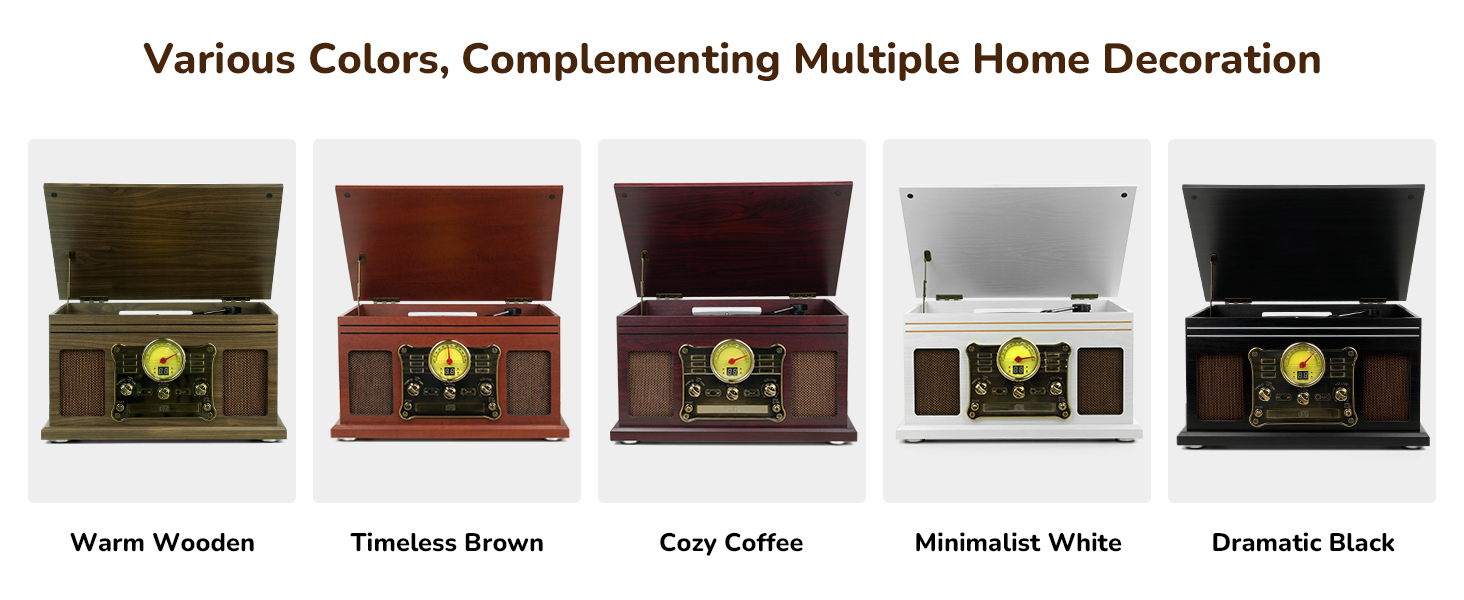
Image 4.4: The rear panel of the FEKTIK M506, showing the RCA Line Out ports for connecting external speakers and ventilation holes for heat dissipation.
- RCA Line Out: Connects to external active speakers or an amplifier for enhanced sound.
- AC Power Cord: Connects the unit to a power outlet.
- FM Antenna: For improved FM radio reception.
- Ventilation Holes: Designed for better heat dissipation.
5. Setup
Follow these steps to set up your record player:
- Unpacking: Carefully remove the unit from its packaging. Ensure all protective foam and plastic coverings are removed.
- Placement: Place the record player on a flat, stable surface away from direct sunlight, heat sources, and excessive dust or moisture.
- Power Connection: Plug the AC power cord into a wall outlet.
- Antenna Setup: Extend the FM antenna wire for optimal radio reception. Position it for the best signal.
6. Operating Instructions
General Operation:
- Power On/Off: Press the Power button to turn the unit on or off.
- Source Selection: Rotate the Phono/CD/Aux/FM/BT dial to select your desired audio source.
- Volume Adjustment: Turn the Volume knob to increase or decrease the sound level.
Vinyl Playback:

Image 6.1: A close-up of the FEKTIK M506's 3-speed turntable, showing the platter, spindle, and tone arm with stylus. The image highlights the belt-drive mechanism for smooth playback.
- Lift the dust cover.
- Place a vinyl record on the turntable platter. For 12-inch records, gently tilt it towards the tone arm to ensure proper playback.
- Select the appropriate speed (33 1/3, 45, or 78 rpm) using the speed selector switch.
- Remove the stylus protector from the needle.
- Gently lift the tone arm using the lift lever and position it over the desired track on the record.
- Lower the tone arm slowly onto the record. Playback will begin automatically.
- To stop playback, lift the tone arm and return it to its rest.
- The Auto Stop feature will automatically stop the record from spinning when it reaches the end. You can toggle this feature on/off.
CD Playback:

Image 6.2: A detailed view of the CD player tray and cassette player slot on the FEKTIK M506, illustrating the unit's multi-format playback capabilities.
- Select 'CD' mode using the source dial.
- Press the Open/Close button to open the CD tray.
- Place a CD onto the tray with the label side facing up.
- Press the Open/Close button again to close the tray. The CD will begin playing automatically.
- Use the Play/Pause, Forward, and Rewind buttons to control playback.
- The Program and Repeat buttons allow for customized playback sequences.
Cassette Playback:
- Select 'Tape' mode using the source dial.
- Insert a cassette tape into the cassette slot on the side of the unit.
- Playback will begin automatically.
- Use the Play/Pause, Forward, and Rewind buttons to control playback.
- To eject the cassette, press the Eject button.
FM Radio:

Image 6.3: The FM radio interface of the FEKTIK M506, featuring an analog tuner with a bright LED screen for clear frequency display.
- Select 'FM' mode using the source dial or the FM/BT switch.
- Rotate the Tuning knob to find your desired radio station.
- Adjust the FM antenna for optimal reception.
Bluetooth Streaming:

Image 6.4: The Bluetooth connectivity feature of the FEKTIK M506, showing how to stream music wirelessly from a smartphone or other Bluetooth-enabled device.
- Select 'BT' mode using the source dial or the FM/BT switch.
- The unit will enter pairing mode, indicated by a flashing Bluetooth icon on the display.
- On your smartphone or other Bluetooth device, search for 'Turntable' in the Bluetooth settings and connect.
- Once connected, you can stream audio wirelessly through the record player's speakers.
Auxiliary Input:
- Select 'Aux' mode using the source dial.
- Connect your external audio device (e.g., MP3 player, tablet) to the Aux-in jack using a 3.5mm audio cable.
- Playback will be controlled from your external device.
LP to MP3 Recording:
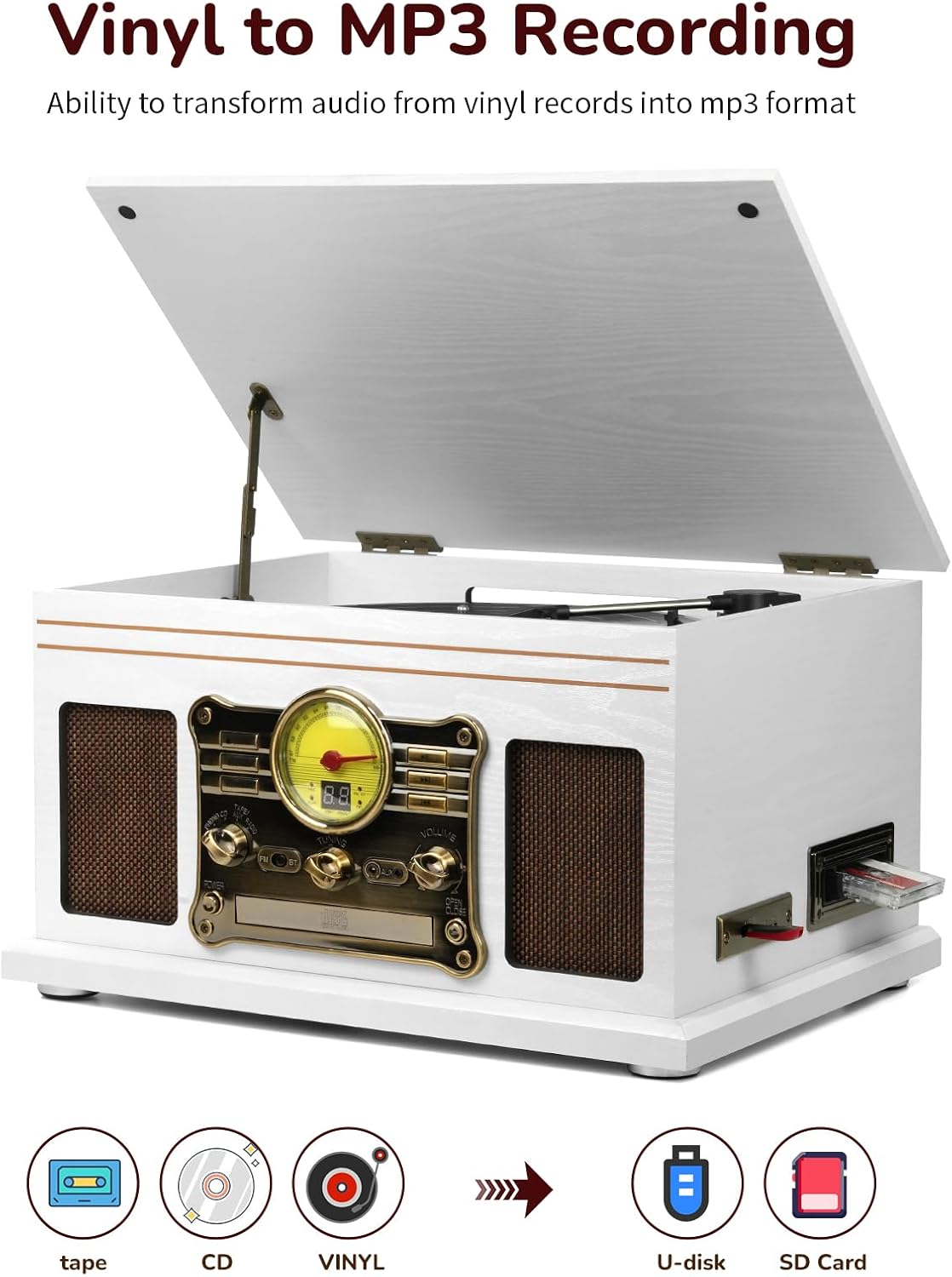
Image 6.5: The FEKTIK M506 demonstrating its vinyl to MP3 recording capability, showing the process of converting audio from tape, CD, or vinyl records into MP3 format on a USB drive or SD card.
Image 6.6: The rear panel of the FEKTIK M506, highlighting the RCA Line Out ports for external speakers and the capability to record vinyl, CD, cassette, or radio directly to MP3 on a USB/SD card.
- Ensure the Auto Stop feature is set to ON for recording.
- Insert a USB flash drive or SD/MMC card (FAT/FAT32 format, 64GB or less) into the appropriate slot.
- Select the desired audio source (Vinyl, CD, Cassette, or FM Radio).
- Begin playback of your chosen audio source.
- Press and hold the REC/DEL button to start recording. The display will indicate recording status.
- Press REC/DEL again to stop recording.
- To delete a recorded file, navigate to the file using the playback controls and press and hold the REC/DEL button.
External Speaker Connection:
You can extend the sound by connecting external speakers or an amplifier via the RCA Line Out ports on the rear panel. Use RCA cables (not included) to connect the record player to your external audio system.
Headphone Use:
For personal listening, plug your headphones into the headphone jack on the front panel.
Video 6.1: An official seller video demonstrating the various functions and features of the FEKTIK 10-in-1 Bluetooth Record Player, including vinyl playback, CD, cassette, radio, and Bluetooth connectivity.
Video 6.2: An official seller video showcasing the all-in-one functionality of the FEKTIK record player, highlighting its ability to play vinyl, CD, and cassette tapes.
7. Maintenance and Care
- Cleaning: Use a soft, dry cloth to clean the unit's exterior. Avoid abrasive cleaners or solvents.
- Stylus Care: Gently clean the stylus regularly with a soft brush to remove dust and debris. Replace the stylus if sound quality deteriorates.
- Record Care: Keep your vinyl records clean and free of dust. Store them vertically in their sleeves to prevent warping.
- CD/Cassette Care: Handle CDs by the edges to avoid fingerprints. Store cassettes in their cases to protect the tape.
8. Troubleshooting
| Problem | Possible Cause | Solution |
|---|---|---|
| No power | Power cord not connected; outlet not working | Ensure power cord is securely plugged in; test outlet with another device. |
| No sound | Volume too low; incorrect source selected; external speakers not connected/powered | Increase volume; select correct source; check external speaker connections and power. |
| Turntable not spinning | Auto Stop set to OFF (for some records); unit not powered | Set Auto Stop to ON; ensure unit is powered on. |
| Poor radio reception | FM antenna not properly positioned | Adjust the FM antenna for better signal. |
| Bluetooth not connecting | Device not in pairing mode; record player not in BT mode | Ensure both devices are in pairing mode; select BT mode on record player. |
9. Specifications
- Product Dimensions: 21 x 16.5 x 12.48 inches
- Item Weight: 16.61 pounds
- Item Model Number: M506
- Material: Wood
- Style: Vintage
- Maximum Rotational Speed: 78 RPM
10. Warranty and Support
For warranty information or technical support, please refer to the manufacturer's official website or contact their customer service department. Contact details can typically be found on the product packaging or the manufacturer's website.