
LOKOOY HT494
LOKOOY Smart Lock HT494 Instruction Manual
Model: HT494 | Brand: LOKOOY
1. Introduction
Thank you for choosing the LOKOOY Smart Lock HT494. This electronic door lock provides advanced security and convenience with multiple unlocking methods. Please read this manual carefully before installation and use to ensure proper operation and maximize the product's lifespan.

Figure 1: LOKOOY Smart Lock HT494 Overview
2. Product Overview
2.1 Key Features
- 5-in-1 Unlocking Methods: Fingerprint, TUYA App, Password, IC Card, and Physical Key.
- Privacy Password Protection: Supports random number input before and after the correct password to prevent peeping.
- High-Sensitivity Fingerprint Sensor: Advanced semiconductor sensor for quick and accurate recognition.
- TUYA App Integration: Remote management, access logs, and temporary password generation.
- Easy Installation: Designed to fit most standard spherical door holes without additional drilling.
- Adjustable Latch: Compatible with door thicknesses from 30mm to 50mm and adjustable backset.
- Emergency Power: USB port for emergency power supply.
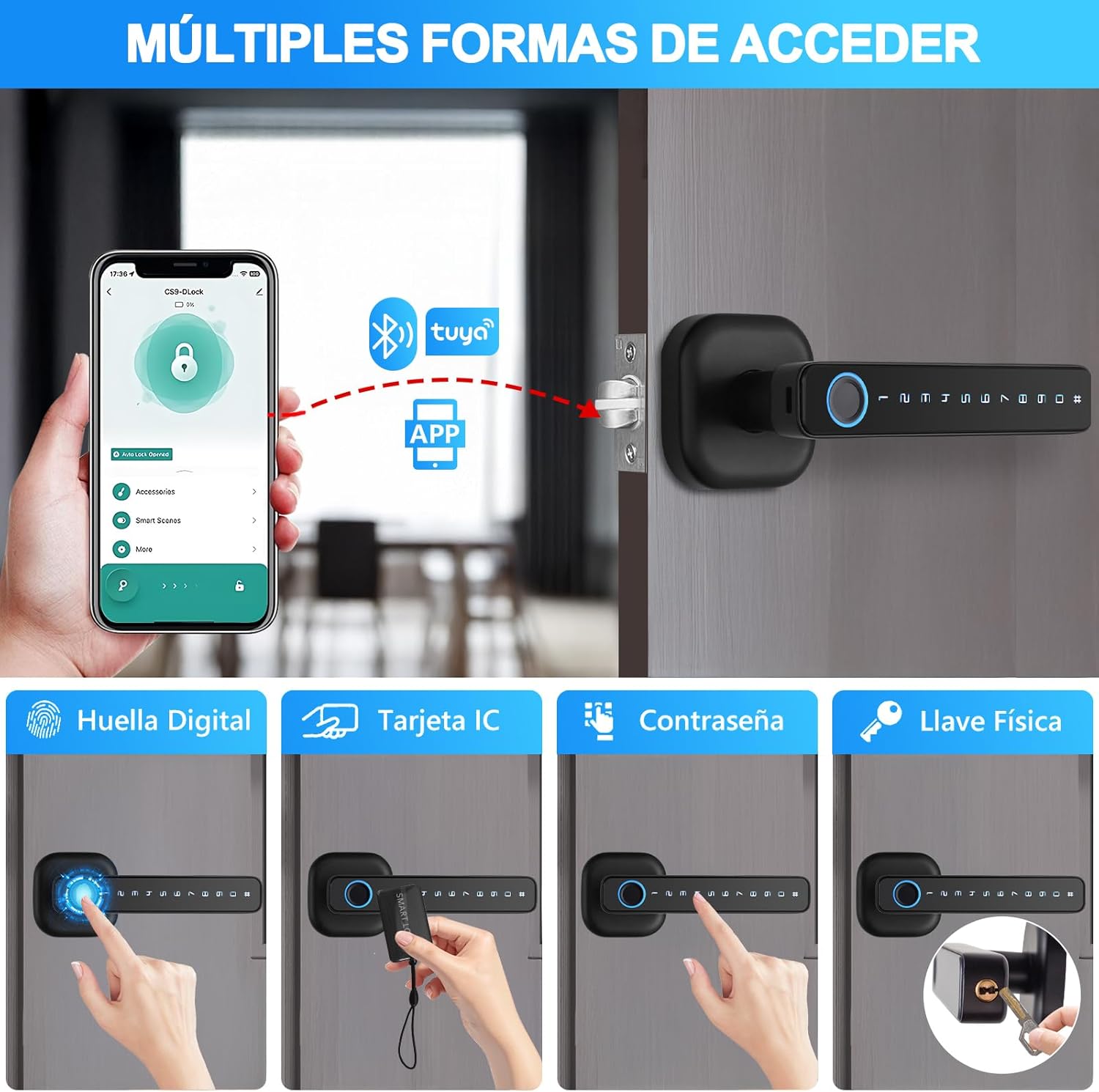
Figure 2: Multiple Access Methods
2.2 Components Included
- LOKOOY Smart Lock B3 (Front and Rear Handles)
- Instruction Manual
- Physical Keys (x2)
- IC Cards (x2)
- Installation Hardware (screws, latch, strike plate)

Figure 3: Product Dimensions and Key Components
3. Setup and Installation
3.1 Door Compatibility
The LOKOOY Smart Lock HT494 is designed for doors with a thickness of 30mm to 50mm. It is compatible with most standard spherical door holes, allowing for direct installation without additional drilling or wiring.

Figure 4: Compatibility with Various Keyhole Types
3.2 Latch Adjustment
The latch backset is adjustable between 60mm and 70mm. Ensure the latch is correctly oriented for your door's opening direction (left or right).

Figure 5: Latch Backset Adjustment
3.3 Changing Door Opening Direction
The lock handles can be rotated 180 degrees to accommodate both left-opening and right-opening doors. Follow the instructions in the included manual for specific steps on how to adjust the handle direction.
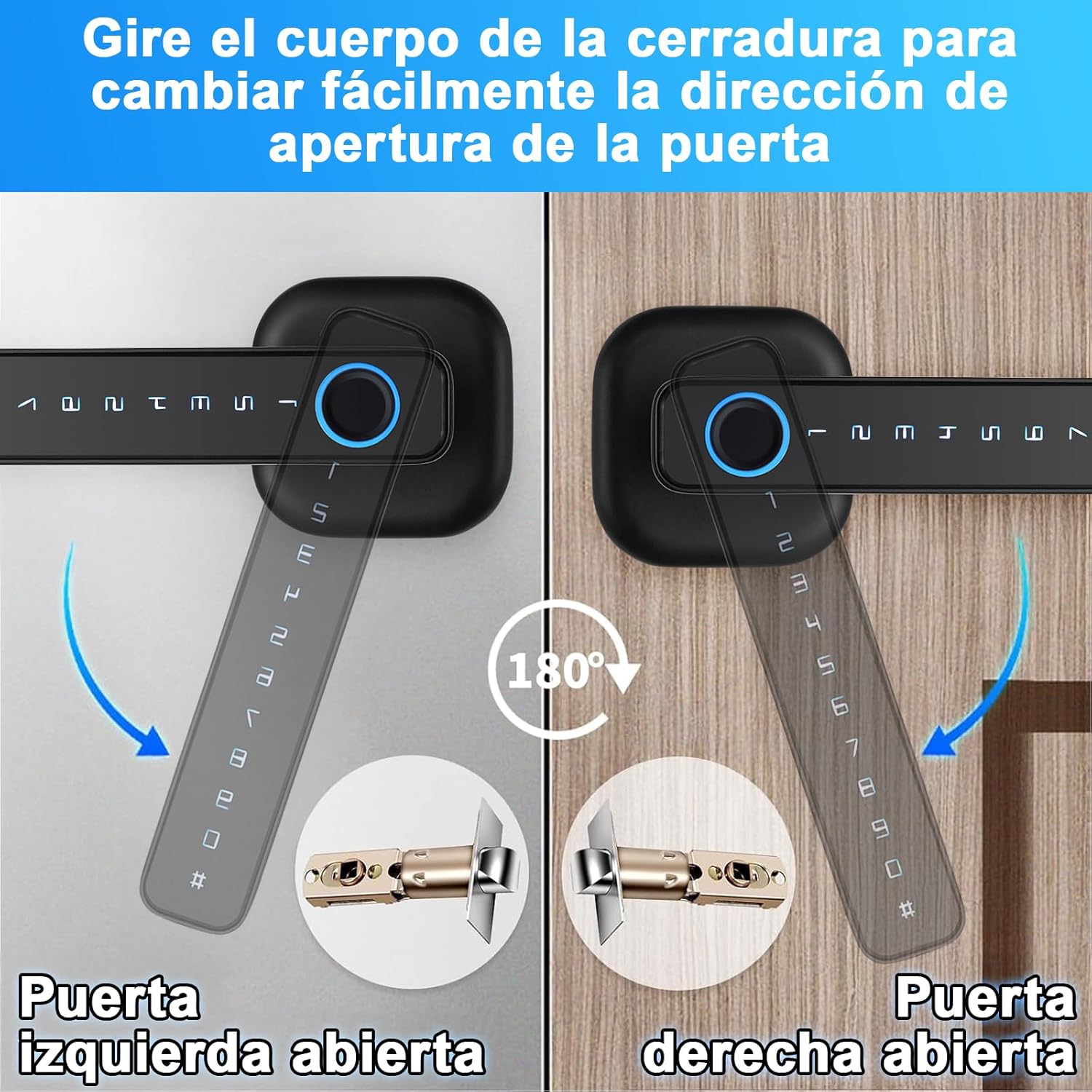
Figure 6: Adjusting Door Opening Direction
3.4 Battery Installation
The lock requires 4 AAA batteries (not included). Install them into the battery compartment located on the interior handle. Ensure correct polarity.

Figure 7: Battery Installation
4. Operating Instructions
4.1 Unlocking Methods
- Fingerprint: Place your registered finger on the fingerprint sensor. A green light indicates successful authentication, while a red light indicates failure.
- Password: Enter your registered password followed by the '#' key. For enhanced security, you can use the privacy password feature by entering random numbers before and after your actual password.
- IC Card: Present the registered IC card to the card reader area on the lock.
- TUYA App: Use the TUYA Smart App on your smartphone to remotely unlock the door via Bluetooth.
- Physical Key: In case of emergency or battery depletion, use the provided physical keys to unlock the door.

Figure 8: Fingerprint Unlocking

Figure 9: Privacy Password Feature

Figure 10: Physical Key Unlocking
4.2 TUYA App Usage
Download the TUYA Smart App from your app store. Follow the in-app instructions to pair your LOKOOY Smart Lock HT494. The app allows you to:
- Register and manage fingerprints, passwords, and IC cards.
- View door opening logs and access history.
- Generate temporary passwords for guests.
- Remotely unlock the door (within Bluetooth range).

Figure 11: Door Opening Logs via TUYA App
4.3 Normally Open Mode and Reset
The lock features a 'Normally Open' button, allowing the door to remain unlocked for continuous access. A reset button is also available for factory reset if needed.

Figure 12: Normally Open and Reset Buttons
5. Maintenance
- Cleaning: Wipe the lock surface with a soft, dry cloth. Avoid using abrasive cleaners or solvents.
- Battery Replacement: Replace batteries promptly when the low battery indicator appears. Use high-quality AAA alkaline batteries.
- Emergency Power: If batteries are completely depleted, connect a power bank via the USB emergency power port to temporarily power the lock.

Figure 13: USB Emergency Power Port
6. Troubleshooting
- Lock not responding: Check battery levels. If low, replace batteries or use the USB emergency power.
- Fingerprint not recognized: Ensure your finger is clean and dry. Re-register your fingerprint if issues persist.
- Password not working: Verify the correct password is being entered. Ensure the '#' key is pressed after the password.
- App connectivity issues: Ensure Bluetooth is enabled on your phone and you are within range of the lock. Restart the app or re-pair the device if necessary.
- Physical key not working: Ensure the key is fully inserted and turned correctly.
7. Specifications
| Feature | Detail |
|---|---|
| Brand | LOKOOY |
| Model Number | HT494 |
| Color | Black |
| Material | Metal |
| Unlocking Methods | APP Bluetooth, Fingerprint, Password, IC Card, Physical Key |
| Door Thickness Compatibility | 30mm - 50mm |
| Latch Backset | Adjustable 60mm - 70mm |
| Power Source | 4 x AAA Batteries (not included) |
| Emergency Power | USB |
| Dimensions (L x W x H) | 7.62 x 19.81 x 19.81 cm |
| Weight | 730 g |
8. Warranty and Support
LOKOOY offers a 1-year free return policy and a 2-year free repair warranty for this product. Additionally, professional lifetime technical support is provided. If you have any questions or require assistance with your smart lock, please contact our after-sales support team. We aim to respond to all inquiries within 24 hours.
Ask a question about this manual
Ask about setup, troubleshooting, compatibility, parts, safety, or missing instructions. Manuals+ will review the question and use this page’s manual context to help answer it.