
1. Introduction
Thank you for choosing the GUCAYOS F30 Portable Air Conditioner Tower Fan. This innovative 4-in-1 device combines the functions of an air cooler, fan, and humidifier, designed to provide efficient cooling and improved air quality in various environments. Its compact and portable design makes it ideal for use in homes, offices, bedrooms, and even during outdoor activities like camping.
This manual provides detailed instructions for the safe and effective operation, setup, maintenance, and troubleshooting of your new device. Please read it thoroughly before use and retain it for future reference.

Figure 1.1: The GUCAYOS F30 Portable Air Conditioner providing comfort in a home setting.
2. Safety Instructions
- Read all instructions before using the appliance.
- Do not operate the appliance with a damaged cord or plug. If the cord or plug is damaged, contact customer support for assistance.
- Always place the appliance on a stable, flat surface.
- Do not immerse the appliance, cord, or plug in water or other liquids.
- Unplug the appliance from the power outlet when not in use, before cleaning, or before performing any maintenance.
- Keep out of reach of children and pets. The bladeless design enhances safety, but supervision is always recommended.
- Use only clean tap water or mineral water in the water tank. Do not add essential oils or other chemicals, as this may damage the unit.
- Ensure the water tank lid is securely closed before operating the mist function.
- Do not block the air inlets or outlets.

Figure 2.1: The improved bladeless design ensures safety for children and pets.
3. Product Overview
3.1 Components
- Main Unit: The primary body housing the fan, motor, and water tank.
- LED Display Screen: Shows current settings and timer.
- Touch Control Panel: Intuitive buttons for direct control.
- 700ml Large Water Tank: Located at the top for easy refilling.
- Double Ice Mist Mouth: Emits cool mist for humidification and enhanced cooling.
- Detachable Dust Screen: For easy cleaning and maintenance.
- Portable Handle: Integrated for convenient carrying.
- Remote Control: Allows for convenient operation from a distance.
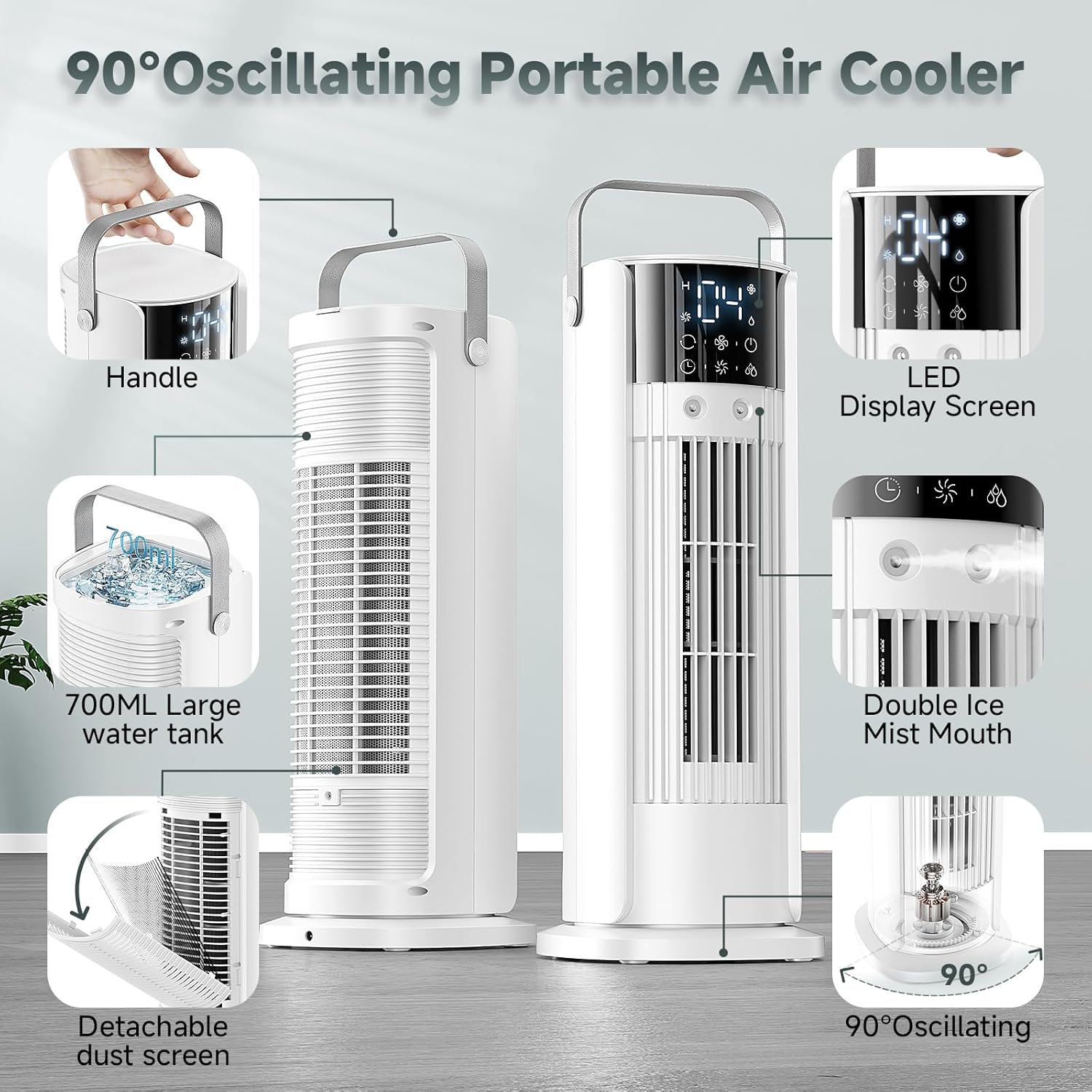
Figure 3.1: Key components of the GUCAYOS F30 Air Cooler.
3.2 Controls
The GUCAYOS F30 can be controlled via its touch screen panel or the included remote control. Both offer full functionality.
- Power Button: Turns the unit On/Off.
- Fan Speed Button: Cycles through 4 adjustable wind speeds (Low, Medium, High, Hurricane/Storm Mode).
- Oscillation Button: Activates or deactivates 90° wide-angle oscillation.
- Mist Button: Turns the cool mist humidification On/Off.
- Timer Button: Sets the automatic shut-off timer (2/4/6/8/10 hours).

Figure 3.2: Dual control options: Touch Screen and Remote Control.
Video 3.1: Demonstration of the Portable Air Conditioner Tower Fan's features and controls.
4. Setup
Follow these simple steps to set up your GUCAYOS F30 Portable Air Conditioner:
- Unpack: Carefully remove the unit and all accessories from the packaging.
- Place: Position the air cooler on a stable, flat surface in your desired location.
- Open Water Tank: Open the lid of the 700ml water tank located at the top of the unit.
- Add Water: Fill the water tank with clean tap water or mineral water. For enhanced cooling, you may add ice cubes directly into the tank.
- Close Lid: Securely close the water tank lid.
- Connect Power: Plug the power adapter into a standard electrical outlet.
- Power On: Press the Power button on the touch screen panel or remote control to turn on the unit.

Figure 4.1: Easy 6-step operation guide for initial setup.
5. Operating Instructions
5.1 Modes and Functions
- Fan Mode (No Water): Operates as a standard fan without humidification. Ideal for general air circulation.
- Air Cooler Mode (Add Water/Ice): Utilizes evaporative cooling to lower ambient temperature. Add water and ice for maximum cooling effect.
- Humidifier Mode (Add Water): Releases cool mist to increase air humidity, beneficial in dry environments.
- Sleep Wind Mode (No Water): Provides a gentle, quiet breeze for comfortable sleep.

Figure 5.1: The 4-in-1 Multifunctionality of the GUCAYOS F30.
5.2 Adjusting Settings
- Fan Speed: Press the fan icon button to cycle through Low, Medium, High, and Hurricane (Storm) speeds. The LED display will show the current speed level.
- Oscillation: Press the oscillation icon button to activate the 90° automatic swing function, distributing cool air across a wider area. Press again to stop.
- Mist Function: Press the water droplet icon button to turn the mist on or off. Ensure the water tank is filled for this function.
- Timer: Press the clock icon button to set the auto-off timer for 2, 4, 6, 8, or 10 hours. The unit will automatically shut down after the set time.

Figure 5.2: Multifunctional Evaporative Air Cooler settings.
Note: The LED display will automatically turn off after a period of inactivity to save energy and prevent light disturbance, especially useful during nighttime. The unit will continue to operate according to the last settings.

Figure 5.3: The GUCAYOS F30 in operation, demonstrating cool air and oscillation.
6. Maintenance
Regular cleaning ensures optimal performance and longevity of your air cooler.
6.1 Cleaning the Water Tank
- Unplug the unit before cleaning.
- Open the water tank lid and empty any remaining water.
- Wipe the inside of the tank with a soft cloth and mild detergent. Rinse thoroughly with clean water.
- Allow the tank to air dry completely before refilling or storing.
6.2 Cleaning the Dust Screen
- The dust screen is detachable for easy cleaning.
- Gently remove the dust screen from the back of the unit.
- Wash the screen under running water to remove dust and debris. A soft brush can be used for stubborn dirt.
- Ensure the dust screen is completely dry before reattaching it to the unit.

Figure 6.1: Hassle-free cleaning of the washable back cover.
7. Troubleshooting
| Problem | Possible Cause | Solution |
|---|---|---|
| Unit does not turn on. | No power supply. | Check if the power cord is securely plugged into the unit and the outlet. Ensure the outlet is functional. |
| No mist/humidification. | Water tank is empty or low. | Refill the water tank. Ensure the mist function is activated. |
| Weak airflow. | Dust screen is dirty. | Clean the detachable dust screen as per maintenance instructions. |
| Unit is not cooling effectively. | Insufficient water or no ice. | Ensure the water tank is full and consider adding ice cubes for maximum cooling. |
| Oscillation not working. | Oscillation function not activated. | Press the oscillation button on the control panel or remote. |
8. Specifications
- Brand: GUCAYOS
- Model Name: F30
- Product Dimensions: 7.7"D x 6.6"W x 15.64"H
- Item Weight: 2.2 pounds
- Color: White
- Mounting Type: Freestanding
- Special Features: Adjustable Speed, Digital Display, Portable, Oscillating Fan, Timer
- Air Flow Capacity: 6 Cubic Feet Per Minute
- Controls Type: Remote, Touch Screen
- Reservoir Capacity: 700 Milliliters
- Noise Level: 36 dB
- Number of Speeds: 4
- Voltage: 12 Volts (DC)
- UPC: 713687230553, 757967486339
9. Warranty and Support
This GUCAYOS F30 Portable Air Conditioner Tower Fan comes with a 3-year warranty from the date of purchase. This warranty covers defects in materials and workmanship under normal use.
For warranty claims, technical support, or any questions regarding your product, please contact GUCAYOS customer service through the retailer where you purchased the product or visit the official GUCAYOS website for contact information.
Please have your purchase receipt and product model number (F30) ready when contacting support.