
Introduction
This manual provides essential instructions for the setup, operation, and maintenance of your Generic C900 Pro Max Smart Watch. Please read this manual thoroughly before using your device to ensure proper function and longevity.
Package Contents
Verify that all items are present in your package:
- C900 Pro Max Smart Watch Unit
- Charging Cable
- Multiple Strap Options (e.g., Silicone Sport Band, NATO-style Strap)
- User Manual (this document)

Image: The C900 Pro Max Smart Watch packaging, displaying the watch unit, charging accessories, and various interchangeable straps.
Product Overview
The C900 Pro Max Smart Watch features a sleek square display and is designed for versatile use. It offers customizable watch faces and interchangeable straps to suit various styles and occasions. Key features include:
- Display: 2.09-inch digital touchscreen for clear visibility.
- Compatibility: Designed to work with smartphones via Bluetooth.
- Customization: Multiple watch faces and easily interchangeable strap options.
- Durability: Robust construction for daily wear.
- Special Features: Includes GPS functionality.

Image: The C900 Pro Max Smart Watch showcasing its digital display with different customizable watch faces.
Setup Guide
1. Charging the Device
Before first use, fully charge your C900 Pro Max Smart Watch. Connect the charging cable to the watch's charging port and a USB power source. A full charge typically takes approximately 1 hour and provides up to 24 hours of average use.
2. Powering On/Off
- To Power On: Press and hold the side button until the screen illuminates.
- To Power Off: Press and hold the side button, then select "Power Off" on the screen.
3. Pairing with Your Smartphone
- Ensure your smartphone's Bluetooth is enabled.
- On your C900 Pro Max Smart Watch, navigate to the Bluetooth settings.
- On your smartphone, search for available Bluetooth devices and select "C900 Pro Max" (or similar device name).
- Confirm the pairing request on both devices.
- Once paired, the watch will synchronize with your smartphone for notifications and data.
4. Changing Straps
The C900 Pro Max Smart Watch features a quick-release mechanism for easy strap interchangeability. To change a strap:
- Locate the quick-release pin on the underside of the strap where it connects to the watch body.
- Slide the pin inwards to detach the strap.
- Align the new strap with the watch body and slide the quick-release pin into the corresponding hole until it clicks into place.
- Gently pull on the strap to ensure it is securely attached.
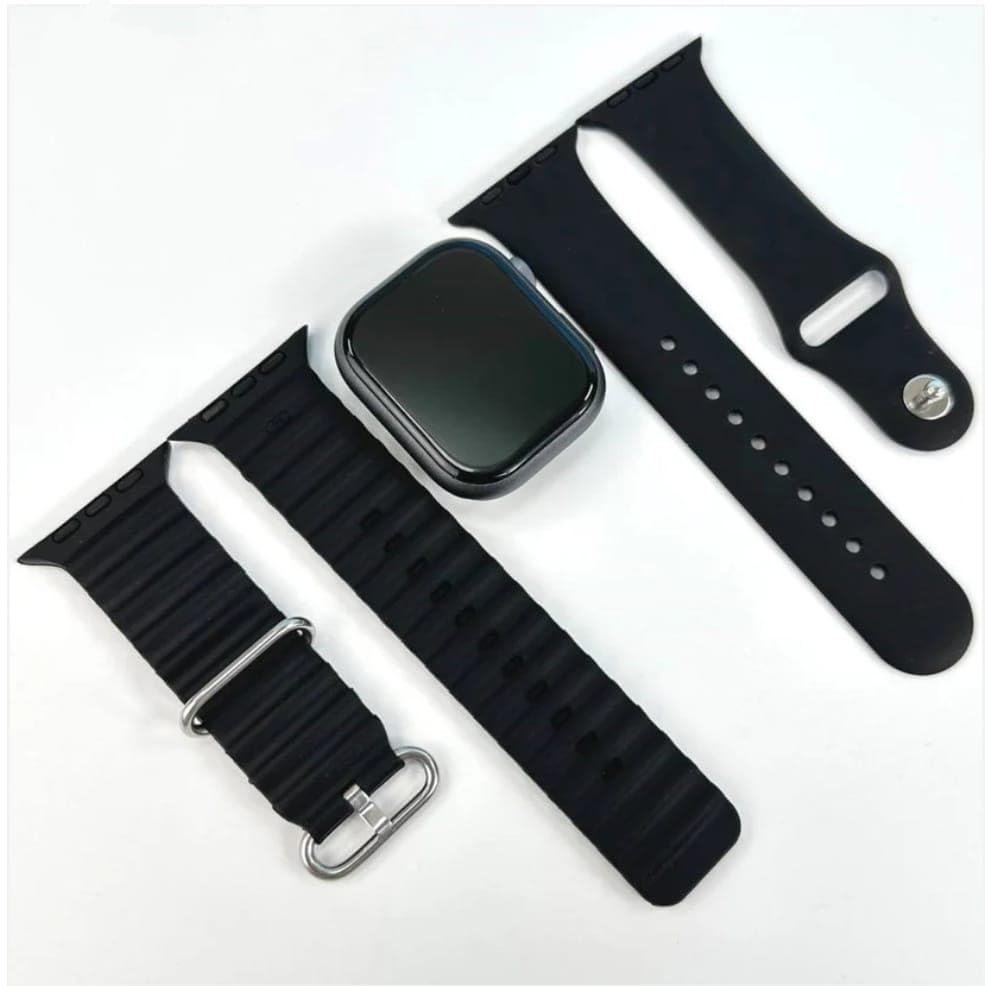
Image: The C900 Pro Max Smart Watch unit shown with two different black strap options, highlighting the interchangeable design.
Operating Instructions
Basic Navigation
- Touchscreen: Swipe left, right, up, or down to navigate through menus and features. Tap to select.
- Side Button: Press to return to the home screen or wake the device. Long press for power options.
Key Features
- Watch Faces: Customize your watch face by long-pressing the home screen or through the settings menu.
- Notifications: Receive alerts for calls, messages, and app notifications from your paired smartphone.
- Fitness Tracking: Monitor daily activities, steps, distance, and calories burned.
- GPS: Utilize the integrated GPS for location-based tracking during outdoor activities.
Maintenance
Cleaning Your Smart Watch
Regularly clean your watch to ensure optimal performance and hygiene.
- Wipe the screen and watch body with a soft, lint-free cloth.
- For stubborn marks, slightly dampen the cloth with water. Avoid harsh chemicals or abrasive materials.
- Clean the charging contacts periodically to ensure efficient charging.
Battery Care
- Avoid exposing the watch to extreme temperatures, which can degrade battery life.
- Do not leave the watch fully discharged for extended periods.
- Use only the provided charging cable or a certified compatible charger.
Troubleshooting
| Problem | Possible Solution |
|---|---|
| Watch does not power on. | Ensure the watch is fully charged. Connect to the charger for at least 15 minutes. |
| Cannot pair with smartphone. |
|
| Notifications are not received. |
|
| Short battery life. |
|
Specifications
| Feature | Detail |
|---|---|
| Model | C900Promax |
| Display Size | 2.09 Inches |
| Display Type | Digital, Touchscreen |
| Operating System | Proprietary OS |
| Memory Storage Capacity | 32 MB |
| RAM Memory Installed Size | 32 MB |
| Connectivity Technology | Bluetooth |
| Compatible Devices | Smartphone |
| Special Features | GPS |
| Battery Capacity | 300 Milliamp Hours |
| Battery Average Life | 24 Hours |
| Charging Time | 1 Hour |
| Item Weight | 150 g |
| Manufacturer | Hryfine |
Warranty and Support
Your C900 Pro Max Smart Watch comes with a 1 Month Warranty from the date of purchase. For warranty claims or technical support, please contact your retailer or the manufacturer, Hryfine.
For further assistance, refer to the contact information provided with your purchase documentation.
Important Safety Information
- Do not attempt to disassemble or modify the device.
- Keep the device away from extreme heat, direct sunlight, and water (unless specified as water-resistant).
- Avoid using the device while driving or engaging in activities that require full attention.
- Consult a medical professional before using the device if you have a pacemaker or other medical implants.
- Dispose of the device and its battery responsibly according to local regulations.