
1. Introduction
Thank you for choosing the Dejasound DJM5 Upgraded Studio Recording Microphone. This comprehensive kit is designed to provide high-quality audio for various applications, including podcasting, vocal recording, music production, and live broadcasting. Featuring a USB output for direct plug-and-play connectivity, a cardioid polar pattern, and an isolation shield, the DJM5 ensures clear and professional-grade sound reproduction.
2. What's Included
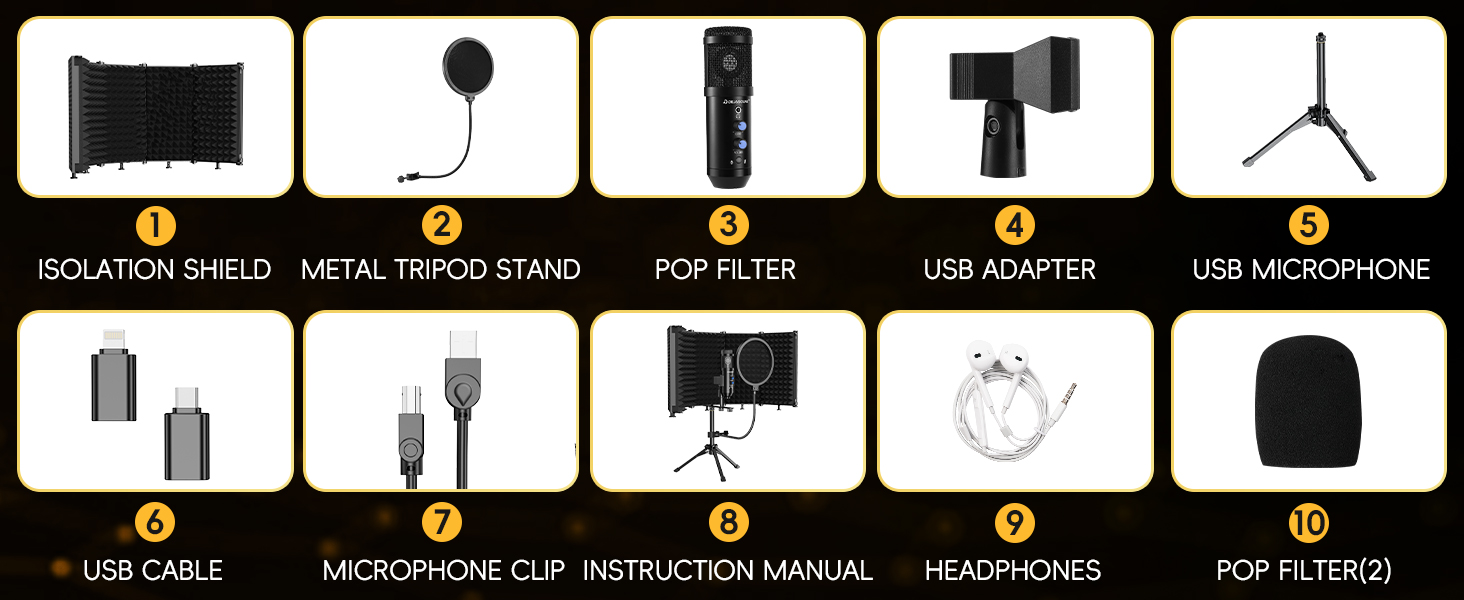
Your Dejasound DJM5 kit includes the following components:
- 1 x Condenser Microphone
- 1 x Pop Filter
- 1 x Five-Door Soundproof Cover (Isolation Shield)
- 1 x Microphone Clip
- 1 x Tripod Stand
- 2 x Adapters (Lightning, Type-C)
- 1 x Microphone Power Cable (3 meters)
- 1 x Pair of Headphones (1.5 meters)
- 1 x Microphone Foam Cover

3. Setup Instructions
The Dejasound DJM5 microphone is designed for easy plug-and-play setup. Follow these steps to assemble and connect your recording studio:
- Assemble the Tripod Stand: Extend the legs of the tripod stand for stability.
- Attach the Microphone Clip: Secure the microphone clip to the top of the tripod stand.
- Mount the Microphone: Gently insert the condenser microphone into the shock mount. Ensure it is securely held to minimize vibrations.
- Position the Isolation Shield: Attach the five-door soundproof cover (isolation shield) to the tripod stand. Adjust its panels to surround the microphone, optimizing noise reduction.
- Install the Pop Filter: Attach the pop filter to the tripod stand or isolation shield, positioning it directly in front of the microphone to reduce plosive sounds.
- Connect the Microphone: Use the provided 3-meter microphone power cable to connect the microphone to your PC, smartphone, or laptop. Utilize the Lightning or Type-C adapters as needed for your device.
- Connect Headphones: Plug the 1.5-meter headphones into the 3.5mm monitor headphone jack on the microphone for real-time audio monitoring.


4. Operating Instructions
Once set up, the DJM5 microphone offers several controls for optimal audio performance:
- Volume Adjustment: Use the volume control knob on the microphone to adjust the input gain. Turn clockwise to increase volume, counter-clockwise to decrease.
- Echo Control: The echo control allows you to add reverberation to your audio. Adjust to achieve desired vocal effects.
- Mute Button: Press the mute button to instantly silence the microphone. The indicator light will change to confirm mute status.
- 3.5mm Monitor Headphone Jack: Connect your headphones here to monitor your audio in real-time without latency.


5. Maintenance
To ensure the longevity and optimal performance of your Dejasound DJM5 microphone, please follow these maintenance guidelines:
- Cleaning: Use a soft, dry cloth to clean the microphone and its components. Avoid using liquid cleaners or abrasive materials.
- Storage: When not in use, store the microphone and its accessories in a clean, dry place away from extreme temperatures and humidity.
- Handle with Care: Avoid dropping or subjecting the microphone to strong impacts, as this can damage internal components.
6. Troubleshooting
If you encounter any issues with your Dejasound DJM5 microphone, please refer to the following common troubleshooting tips:
- No Sound Output:
- Ensure all cables are securely connected to the microphone and your device.
- Check your device's audio input settings to confirm the DJM5 is selected as the primary input device.
- Verify the microphone is not muted (check the mute button indicator light).
- Adjust the volume control on the microphone and your device.
- Poor Sound Quality/Background Noise:
- Ensure the pop filter is correctly positioned in front of the microphone.
- Adjust the isolation shield panels to maximize sound absorption.
- Reduce ambient noise in your recording environment.
- Check for loose connections that might cause interference.
- Device Not Recognizing Microphone:
- Try connecting the microphone to a different USB port on your device.
- Ensure you are using the correct adapter (Lightning or Type-C) for your smartphone.
- Restart your computer or smartphone.
7. Specifications
| Brand | Dejasound |
| Model Name | DJM5 |
| Microphone Form Factor | Large Diaphragm |
| Polar Pattern | Hyper Cardioid |
| Connectivity Technology | USB |
| Connector Type | 3.5 mm Jack, USB Type-B |
| Power Source | Corded Electric |
| Frequency Response | 30 Hz - 16 kHz |
| Hardware Platform | Laptop, PC, Smartphone |
| Material | Metal |
| Item Weight | 4.11 pounds (1.86 kg) |
| Special Features | Echo Control, Mute Function, Noise Reduction, Stand, Volume Control |
8. Official Product Videos
Studio Recording Mic with Isolation Shield & Pop Filter
Video 8.1: This video provides an overview of the Dejasound Studio Recording Microphone, highlighting its isolation shield and pop filter. It demonstrates the product's features and benefits for recording high-quality audio.
9. Warranty and Support
Dejasound products are backed by a manufacturer's warranty. For specific warranty details, technical support, or customer service inquiries, please refer to the contact information provided on the product packaging or visit the official Dejasound website. Keep your purchase receipt for warranty claims.


