
1. Product Overview
The CHOEZON TXG26UBF Console Table is designed to provide a functional and space-saving surface with integrated charging capabilities. This narrow table is suitable for placement behind sofas, in entryways, or hallways, offering convenient access to power outlets and USB ports.

Image 1.1: The CHOEZON 62.99" Console Table with a rustic brown top and black metal frame, shown in a living room setting.
Key Features:
- Space-Saving Design: With a width of 5.9 inches, this slim console table fits well in narrow spaces.
- Integrated Charging Station: Includes 2 standard AC outlets, 1 USB-A port, and 1 Type-C port for convenient device charging.
- Versatile Placement: Functions as a console table, sofa table, entryway table, or display table.
- Durable Construction: Made from particleboard and a metal frame for stability.
- Adjustable Feet: Equipped with 6 adjustable feet to ensure stability on uneven surfaces.
- Anti-Tip Kit: Includes hardware to secure the table to a wall for enhanced safety.
2. Specifications
| Feature | Detail |
|---|---|
| Brand | CHOEZON |
| Model Number | TXG26UBF |
| Product Dimensions (D x W x H) | 62.99" x 5.9" x 32.3" |
| Frame Material | Metal |
| Top Material Type | Particleboard |
| Color | Rustic Brown, Black |
| Charging Station | 2 AC Outlets, 1 USB-A Port, 1 Type-C Port |
| Special Features | Adjustable Legs, Anti-Tip Device, Sturdy Metal Frame |
| Included Components | Assembly Guide, Installation Tool |

Image 2.1: Detailed dimensions of the console table, showing length, width, and height.
3. Assembly Instructions
The CHOEZON Console Table is designed for straightforward assembly. All necessary tools and a detailed illustrated guide are included with your purchase. Please follow the steps below and refer to the provided assembly guide for specific part identification.
- Unpack Components: Carefully unbox all parts and verify against the parts list in your assembly guide. Ensure all pieces are present and undamaged.
- Identify Parts: Each component is labeled with a letter or number. Match these labels with the corresponding steps in the instruction manual.
- Assemble Frame: Connect the metal frame components using the provided screws and tools. Do not fully tighten screws until the entire frame is assembled to allow for minor adjustments.
- Attach Tabletop: Secure the particleboard tabletop to the assembled metal frame.
- Install Charging Station: Place the power strip into its designated slot on the tabletop. The power strip can be installed on the side or in the middle based on your preference.
- Adjust Feet: Screw in the adjustable feet at the bottom of the table legs. Adjust them as needed to ensure the table is level and stable on your floor.
- Secure with Anti-Tip Kit: For safety, especially in households with children or pets, attach the anti-tip kit to the table and secure it to a wall.
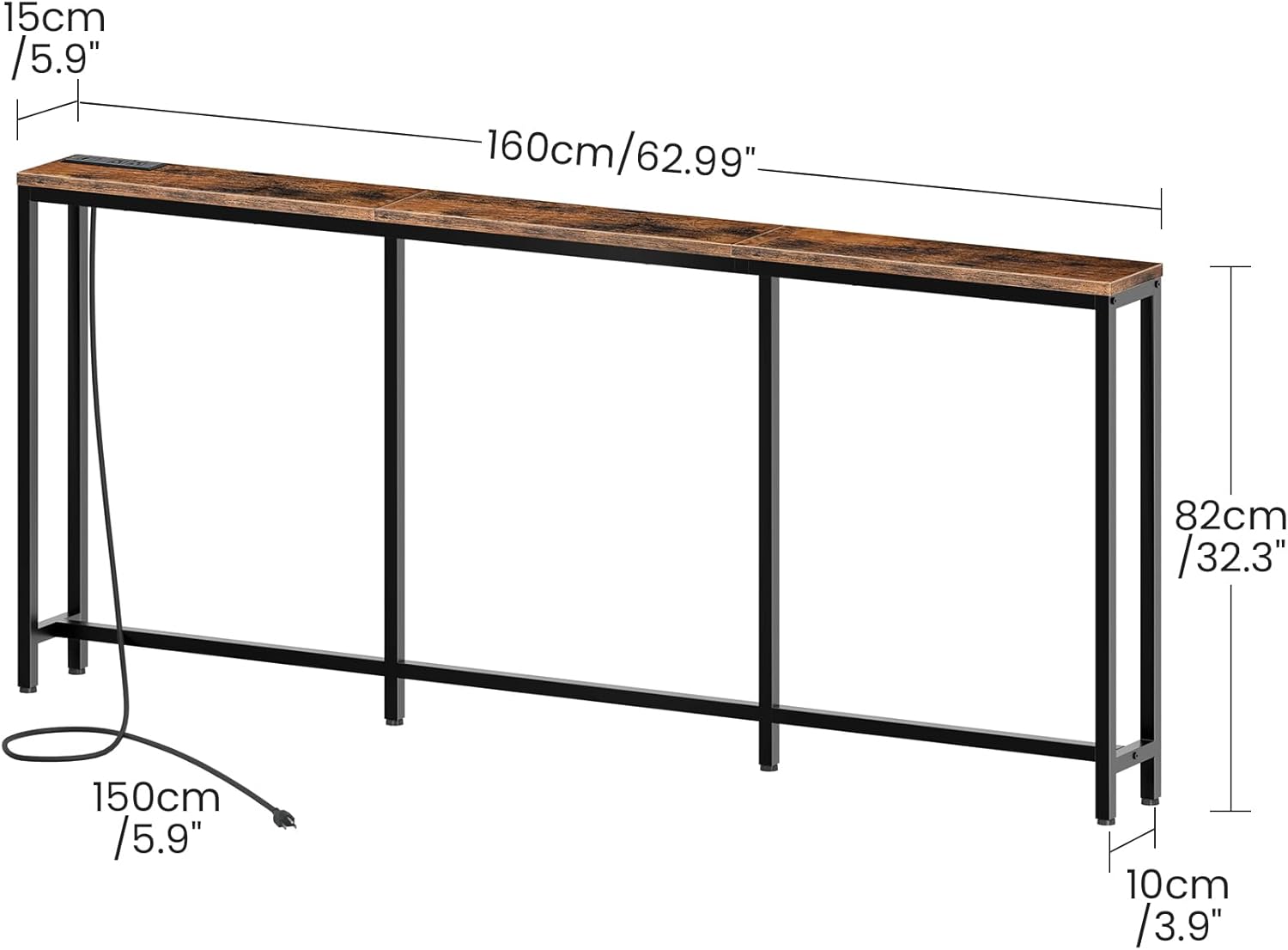
Image 3.1: The charging station can be installed in the middle or on either side of the table.

Image 3.2: Detail showing the anti-tip kit for wall attachment and the adjustable feet for leveling.
Assembly Video:
Video 3.1: A short demonstration of the CHOEZON Narrow Console Table with Power Outlet, highlighting its features and ease of use.
4. Operating Instructions (Charging Station)
The integrated charging station provides convenient power access for your electronic devices.
- Connect to Power: Plug the table's power cord into a standard wall outlet.
- AC Outlets: Use the two standard AC outlets (125V/12A) for devices requiring wall adapters, such as lamps or laptops.
- USB Ports: Utilize the USB-A port (5V/2A) and the Type-C port (5V/2A) to charge compatible smartphones, tablets, and other USB-powered devices.

Image 4.1: Detail of the built-in charging station, showing the two AC outlets, one USB-A port, and one Type-C port.
5. Maintenance
To ensure the longevity and appearance of your console table, follow these simple maintenance guidelines:
- Cleaning: Wipe the table surface and frame with a soft, damp cloth. Avoid abrasive cleaners or harsh chemicals that may damage the finish.
- Spills: Promptly clean any spills to prevent staining, especially on the particleboard surface.
- Inspection: Periodically check all screws and connections to ensure they remain tight. Retighten if necessary.
- Avoid Excessive Weight: Do not place excessively heavy objects on the table to prevent damage or instability.
6. Safety Information
Please read and adhere to the following safety precautions to prevent injury or damage:
- Anti-Tip Kit: Always secure the table to the wall using the provided anti-tip kit to prevent accidental tipping, especially in homes with children or pets.
- Weight Distribution: Distribute weight evenly across the tabletop. Avoid placing heavy objects on one side.
- Electrical Safety: Do not overload the charging station. Ensure that devices plugged into the AC outlets and USB ports do not exceed the specified voltage and amperage limits.
- Indoor Use Only: This table is designed for indoor use. Do not expose it to outdoor elements or excessive moisture.
- Stable Surface: Place the table on a flat, stable surface. Use the adjustable feet to compensate for uneven flooring.
7. Troubleshooting
If you encounter any issues with your CHOEZON Console Table, please refer to the following common solutions:
- Table Wobbles:
- Ensure all screws are tightened securely.
- Adjust the leveling feet at the bottom of each leg until the table is stable.
- Verify the table is placed on a flat surface.
- Charging Station Not Working:
- Check if the main power cord is securely plugged into a functional wall outlet.
- Ensure the power strip is correctly installed and connected within the table.
- Test the outlets/ports with a different device to rule out device-specific issues.
- Avoid overloading the charging station.
- Missing Parts or Damaged Components:
- Refer to the parts list in your assembly guide.
- Contact CHOEZON customer support for assistance (see Section 8).
8. Warranty and Support
For warranty information, replacement parts, or further assistance, please contact CHOEZON customer support. You can find more information and contact details on the official CHOEZON store page: