
HUANUO MSESD202GG-80A-UK
HUANUO 80 cm Electric Standing Desk User Manual
Model: MSESD202GG-80A-UK | Brand: HUANUO
1. Introduction
This manual provides detailed instructions for the assembly, operation, and maintenance of your HUANUO 80 cm Electric Standing Desk. Please read this manual thoroughly before use to ensure proper function and safety.
Key Features:
- Wide Height Adjustment Range: 71-116cm for versatile sitting and standing positions.
- Convenient Memory Presets: Four programmable height settings for quick adjustments.
- Durable Construction: High-quality alloy steel frame tested for 50,000 lift cycles.
- Quiet Operation: Motor operates at a low noise level for a calm workspace.
- Easy Assembly: Streamlined process with minimal lifting required.
2. Safety Information
- Ensure all screws are tightened securely before use.
- Keep children and pets away from the desk during operation.
- Do not overload the desk beyond its specified weight capacity (70 kg).
- Avoid placing liquids directly on the control panel or motor components.
- Disconnect power before cleaning or performing any maintenance.
- Do not attempt to disassemble or repair the motor or control system yourself. Contact qualified personnel for service.
3. Package Contents
Verify that all components are present before beginning assembly. If any parts are missing or damaged, please contact customer support.
| Component | Quantity |
|---|---|
| Desktop Panel (Green 80 x 48 cm) | 1 |
| Leg Columns (Electric) | 2 |
| Foot Pads | 2 |
| Crossbar/Frame Components | Various |
| Control Panel | 1 |
| Power Adapter & Cables | 1 set |
| Hardware (Screws, Allen Key, etc.) | 1 set |
4. Assembly Instructions
Follow these steps carefully to assemble your HUANUO Electric Standing Desk. It is recommended to have a clear, spacious area for assembly.
Assembly Video Guide:
Official assembly video for the HUANUO Electric Standing Desk. This video provides a visual guide to the step-by-step installation process, including attaching the legs, crossbar, and control panel.
Step-by-Step Assembly:
- Attach the Feet to the Leg Columns: Secure the foot pads to the bottom of each leg column using the provided screws. Ensure they are firmly attached for stability.

Image: Fully assembled HUANUO Electric Standing Desk in a home office setting, showcasing its sleek design and green finish.
- Assemble the Crossbar: Connect the two main crossbar sections. This forms the central support structure for the desk.

Image: Diagram illustrating the product dimensions of the HUANUO Electric Standing Desk, including height range (71-116cm), desktop size (80x48cm), and base dimensions.
- Attach Leg Columns to Crossbar: Securely fasten the leg columns to the assembled crossbar. This creates the main frame of the desk.
- Install the Motor and Drive Rod: Carefully install the electric motor and connect the drive rod between the two leg columns. Ensure the rod is properly seated for smooth operation.
- Mount the Control Panel: Attach the control panel to the underside of the desktop, typically on the front edge for easy access.
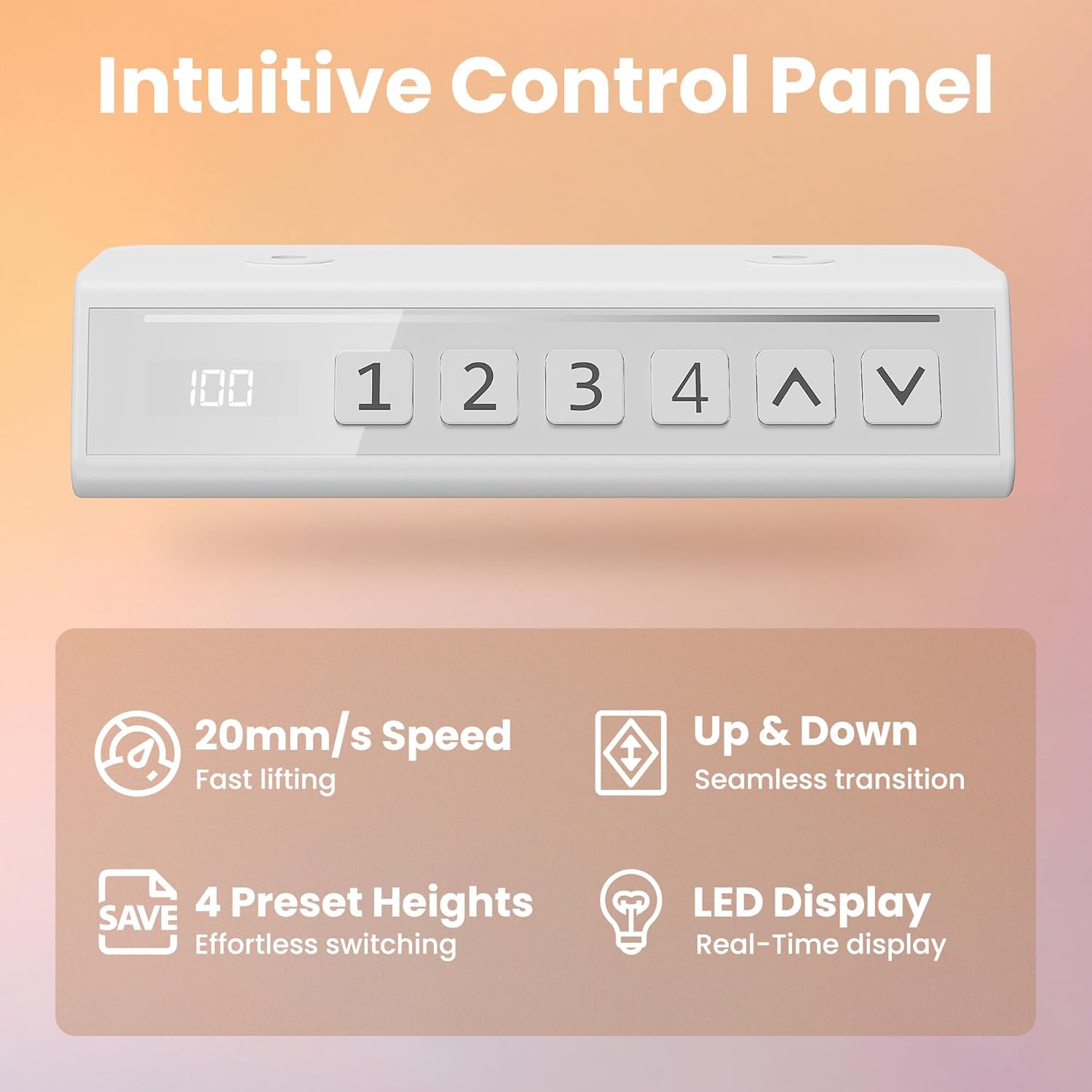
Image: Detailed view of the intuitive control panel, highlighting its LED display, up/down buttons, and four preset height buttons.
- Attach Desktop to Frame: Carefully place the desktop onto the assembled frame. Align the pre-drilled holes and secure the desktop using the provided screws.
- Connect Cables: Connect the motor cables to the control panel and the power adapter. Ensure all connections are snug.
- Final Check: Double-check all screws and connections to ensure the desk is stable and ready for use.
5. Operating Instructions
Your HUANUO Electric Standing Desk is designed for intuitive operation with its smart control panel.
Control Panel Functions:
- Up/Down Arrows (▲ / ▼): Press and hold to manually adjust the desk height. Release to stop at the desired height.
- LED Display: Shows the current height of the desk in centimeters.
- Preset Buttons (1, 2, 3, 4):
- To Save a Preset: Adjust the desk to your desired height. Press the "M" or "SAVE" button (if present, otherwise hold the number button) until the display flashes, then press the desired number button (1, 2, 3, or 4) to save the current height.
- To Use a Preset: Simply press the corresponding number button (1, 2, 3, or 4). The desk will automatically move to the saved height.

Image: Illustration demonstrating the height adjustment range of the desk, showing it can transition smoothly between sitting (71cm) and standing (116cm) positions.

Image: Graphic illustrating the low noise level (45dB) of the desk's operation compared to other common sounds, emphasizing its quiet performance.
6. Maintenance
Regular maintenance ensures the longevity and optimal performance of your standing desk.
- Cleaning: Wipe the desktop and frame with a soft, damp cloth. Avoid abrasive cleaners or harsh chemicals.
- Cable Management: Periodically check that all cables are securely connected and not pinched or tangled. Use cable ties if necessary to keep them tidy.
- Screw Tightness: Every few months, check and re-tighten any loose screws on the frame to maintain stability.
- Motor Care: The motor is largely maintenance-free. Keep the area around the motor and drive rod clear of obstructions.
7. Troubleshooting
If you encounter any issues with your desk, refer to the following common problems and solutions:
| Problem | Possible Cause | Solution |
|---|---|---|
| Desk does not move. | Power cable disconnected, motor error, overload. | Check power connections. Reduce weight on desk. Unplug for 30 seconds and plug back in to reset. |
| Desk moves unevenly or makes unusual noises. | Loose screws, obstruction, damaged component. | Check all screws for tightness. Ensure no obstructions. Contact support if issue persists. |
| Height presets not working. | Presets not saved correctly. | Re-save your desired height presets following the operating instructions. |
| Error code on display. | Specific system error. | Refer to the full troubleshooting guide (if provided separately) or contact customer support with the error code. |
8. Specifications
| Attribute | Detail |
|---|---|
| Brand | HUANUO |
| Model Number | MSESD202GG-80A-UK |
| Colour | Green |
| Product Dimensions | 48D x 80W x 71H cm (Min Height) |
| Adjustable Height Range | 71 cm - 116 cm |
| Material | Alloy Steel (Frame), Engineered Wood (Desktop) |
| Item Weight | 11.1 kg |
| Max Load Capacity | 70 kg |
| Special Features | Adjustable Height, Ergonomic, Electric, Scratch Resistant, 4 Memory Height Settings |
| Noise Level | ~45 dB |

Image: Visual representation of the desk's durability and 70 kg weight capacity, with two individuals sitting on the desktop.
9. Warranty and Support
HUANUO products are designed for durability and performance. For warranty information, product support, or to report any issues, please contact HUANUO customer service through the retailer where you purchased the product or visit the official HUANUO website.
Contact Information: Refer to your purchase documentation or the HUANUO brand store on Amazon for the most current support details.
Online Resources: For additional tips, FAQs, and product registration, please visit the HUANUO official website.