
MECHEN V01
MECHEN 128GB Digital Voice Recorder User Manual
Model: V01
Introduction
Thank you for choosing the MECHEN 128GB Digital Voice Recorder. This device is designed for high-quality audio capture, offering features like voice activation, ample storage, and easy file management. Please read this manual carefully to ensure proper use and optimal performance.

Image: Front and back view of the MECHEN 128GB Digital Voice Recorder, showcasing its sleek black design and control buttons.
Key Features:
- Clear PCM Recording: 1536Kbps high-quality audio capture with an upgraded sensitive microphone.
- 128GB Internal Memory: Stores up to 542 hours of WAV 512kbps recordings.
- Voice-Activated Recording (VAR): Automatically starts and stops recording based on sound detection.
- Timed Recording: Schedule recordings for specific times.
- Simple File Management: Recordings named by date/time, easy transfer to computer via Type-C USB.
- Versatile Playback: AB Repeat, Fast Forward, Rewind, variable speed playback, MP3 player functionality.
- Password Protection: Secure your recordings.
- Built-in Speaker: For convenient playback without headphones.
Package Contents
Upon opening your package, please ensure all items are present:
- 1 x MECHEN Digital Voice Recorder (Model V01)
- 1 x USB Type-C Cable
- 1 x User's Manual (this document)
Product Overview

Image: A hand holding the MECHEN voice recorder, highlighting the main control buttons: REC (Record), PLAY, STOP, and MENU. The screen displays recording information.
The MECHEN V01 recorder features an intuitive layout for ease of use:
- REC Button: Initiates recording.
- PLAY Button: Starts playback of selected audio.
- STOP Button: Stops recording or playback.
- MENU Button: Accesses device settings and options.
- Volume/Navigation Buttons (Side): Adjust volume and navigate through menus/files.
- 3.5mm Headphone Jack: For private listening.
- Type-C USB Port: For charging and data transfer.
- Built-in Microphone: High-sensitivity omnidirectional microphone.
- Built-in Speaker: For direct audio playback.
Setup
1. Charging the Device
Before first use, fully charge the voice recorder. Connect the included Type-C USB cable to the device's USB port and the other end to a USB power adapter (not included) or a computer's USB port. The charging indicator will show progress, and the device typically takes about 2 hours for a full charge.

Image: The MECHEN voice recorder connected to a laptop via its USB-C cable, illustrating the charging and data transfer connection.
2. Powering On/Off
To power on the device, press and hold the POWER button (usually located on the side) for a few seconds until the screen illuminates. To power off, press and hold the same button until the screen turns off.
3. Initial Settings
Upon first power-on, you may be prompted to set the date and time. This is important for proper file naming. Use the navigation buttons to adjust values and the PLAY button to confirm.
Operating Instructions
1. Basic Recording
- Ensure the device is powered on.
- Press the REC button to start recording. The screen will display recording status and time.
- To pause recording, press the PLAY button. Press PLAY again to resume.
- To stop and save the recording, press the STOP button. The recording will be saved automatically with a timestamp filename (YYYY-MM-DD-HH-MM-SS).
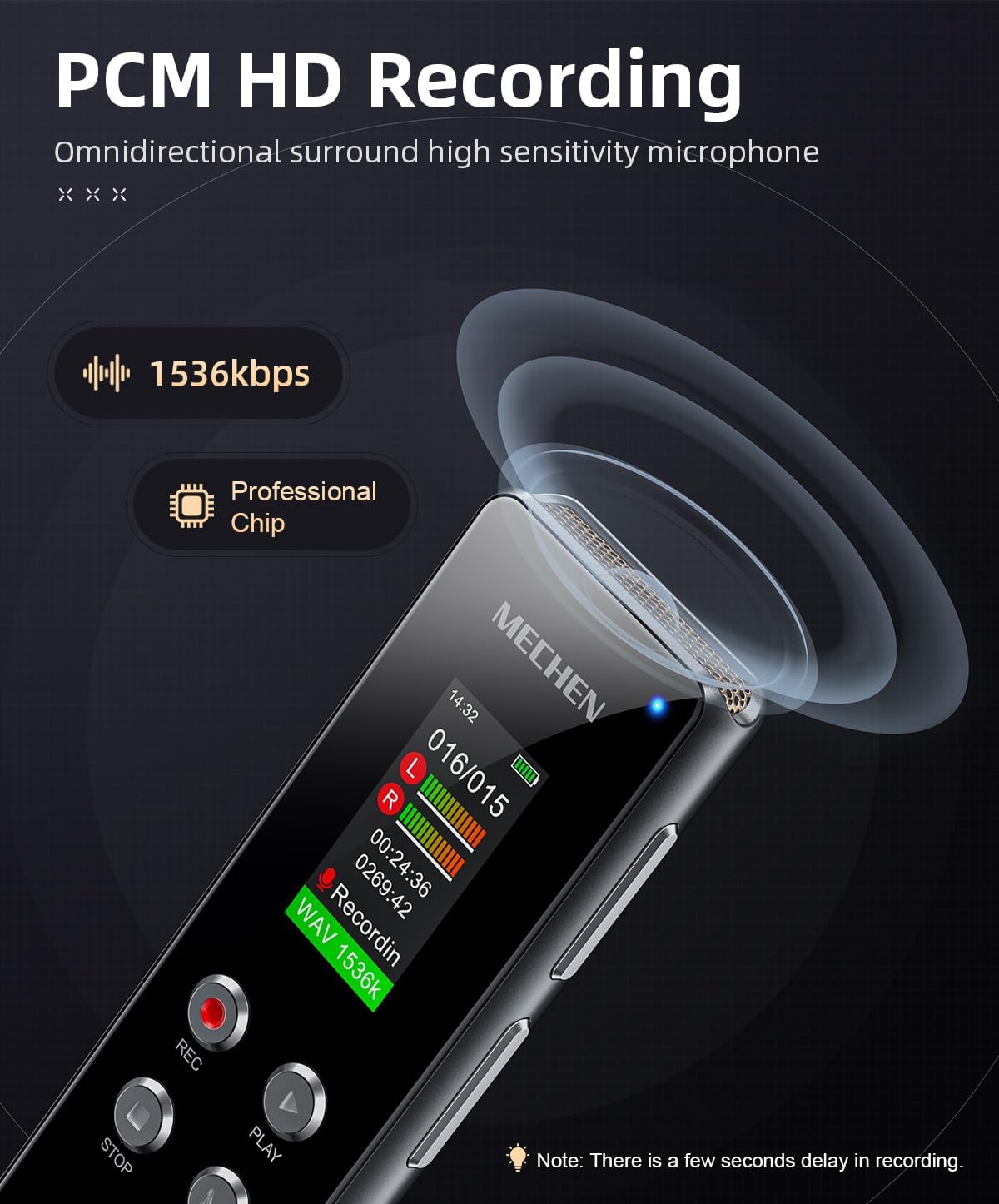
Image: The MECHEN voice recorder with an illustration of sound waves, emphasizing its PCM HD recording capability at 1536kbps.
2. Voice-Activated Recording (VAR)
The VAR feature allows the recorder to automatically start recording when sound is detected and pause when there is silence, conserving memory and battery life.
- Press the MENU button to enter the settings.
- Navigate to "Voice Activated" or "VOR Setting" and select it.
- Choose your desired sensitivity level (e.g., Level 1-5). A higher level means it will activate with quieter sounds.
- Exit the menu. When you press REC, the device will now operate in VAR mode.

Image: The MECHEN voice recorder in a meeting setting, illustrating how voice-activated recording eliminates silent gaps by only recording when sound is present.

Image: A visual comparison showing sound waves for "Normal Recording" (continuous) versus "Voice Activated" recording (only active when sound is detected), highlighting the efficiency of VAR.
3. Timed Recording
This feature allows you to set a specific time for the recorder to start and stop recording automatically.
- Access the MENU and navigate to "Timed Recording" or "Schedule Recording".
- Set the start time, end time, and frequency (e.g., once, daily).
- Confirm your settings. The device will then activate recording at the scheduled time.

Image: A composite image showing various features including a recording indicator, segment recording options (30/60/90/120 minutes), and the timed recording function with a clock icon.
4. Playback
- From the main screen, use the navigation buttons to select the desired recording file.
- Press the PLAY button to start playback.
- Use the volume buttons on the side to adjust the playback volume.
- Press the STOP button to end playback.
Playback Features:
- AB Repeat: During playback, press the MENU button (or designated AB button if available) to mark point A. Press it again to mark point B. The device will then repeatedly play the section between A and B.
- Variable Speed Playback: Access this option through the MENU during playback to adjust the speed (faster or slower) without changing the pitch.
- MP3 Player: The device can also play MP3 and other audio files. Transfer your music files to the device's memory via the USB cable.

Image: A person listening to the MECHEN voice recorder with headphones, illustrating its capability to play music files in multiple formats (MP3, WAV, APE, WMA, FLAC) and offering various playback modes like Shuffle, Sequential, Loop Single, Repeat All, and A-B Repeat.
5. Line-in Recording
The device supports line-in recording, allowing you to record audio directly from external sources like smartphones, MP3 players, or computers using an audio cable (not included).
- Connect one end of a 3.5mm audio cable to the headphone jack of your external audio source.
- Connect the other end to the 3.5mm headphone jack of the MECHEN recorder.
- Start playback on your external device and press REC on the MECHEN recorder to begin line-in recording.

Image: The MECHEN voice recorder connected to a smartphone via an audio cable, demonstrating its line-in recording capability from various devices like smartphones, MP3 players, tablets, laptops, desktops, and CD players.
6. File Management
Recordings are automatically named by date and time (YYYY-MM-DD-HH-MM-SS) for easy identification.
Transferring Files to Computer:
- Connect the recorder to your computer using the provided Type-C USB cable.
- The device will appear as a removable disk (like a USB drive).
- Open the disk, navigate to the "RECORD" folder (or similar), and copy/paste your audio files to your computer.
- Safely eject the device from your computer before disconnecting the cable.
The device is compatible with both Windows and Mac operating systems.
Image: The MECHEN voice recorder connected to a laptop via its USB-C cable, illustrating the ease of file transfer between the device and a computer (Windows and Mac compatible).
7. Password Protection
To protect your recordings, you can set a password for the device.
- Go to the MENU and find the "Password" or "Security" option.
- Follow the on-screen prompts to set your desired password. Remember your password, as there might not be a recovery option.
Maintenance
1. Battery Care
- Avoid fully discharging the battery frequently.
- Charge the device regularly, even if not in use, to maintain battery health.
- Store the device in a cool, dry place when not in use for extended periods.
2. Cleaning
- Use a soft, dry cloth to clean the device's exterior.
- Do not use liquid cleaners or abrasive materials, as they may damage the device.
3. Storage
When storing the device, especially for long periods, ensure it is fully charged and kept in a protective case to prevent dust and physical damage.
Troubleshooting
| Problem | Possible Cause | Solution |
|---|---|---|
| Device does not power on. | Low battery. | Charge the device for at least 2 hours. |
| Cannot record. | Memory full; Device in playback mode; Incorrect settings. | Delete old files to free up space; Stop playback before recording; Check recording format settings in MENU. |
| Poor recording quality. | Microphone too far from source; Low recording bitrate; Environmental noise. | Move closer to the sound source; Increase recording bitrate (e.g., to 1536Kbps) in settings; Record in a quieter environment. |
| Playback issues (e.g., repeats all recordings). | Playback mode set to "Repeat All" or "Loop". | Access the playback menu and change the playback mode to "Sequential" or "Normal". |
| Device not recognized by computer. | Faulty USB cable; Loose connection; Driver issue. | Try a different USB port or cable; Ensure cable is securely connected; Restart computer and device. |
| Screen is blank or frozen. | System error. | Press and hold the power button for 10-15 seconds to force a restart. |
Specifications
| Brand | MECHEN |
| Model Number | V01 |
| Memory Storage Capacity | 128 GB |
| Recording Format | WAV (512kbps, 1024kbps, 1536kbps) |
| Product Dimensions | 4.11 x 0.41 x 1.1 inches (10.44 x 1.04 x 2.79 cm) |
| Item Weight | 2.08 ounces (59 grams) |
| Battery Type | 1 C battery (included) |
| Charging Time | Approx. 2 hours |
| Continuous Recording Time | Up to 22 hours (on full charge) |
| Headphones Jack | 3.5 millimeters |
| Hardware Interface | USB 2.0 (Type-C) |
| Compatible Devices | MP3 Player, PC (Windows & Mac) |

Image: The MECHEN voice recorder highlighting its 128GB internal memory, capable of storing up to 468 hours of recording, and its 2-hour full charge time.
Warranty and Support
Warranty Information:
MECHEN products are designed for reliability and performance. For specific warranty terms and conditions, please refer to the warranty card included with your purchase or visit the official MECHEN website. Please retain your proof of purchase for warranty claims.
Customer Support:
If you encounter any issues or have questions regarding your MECHEN Digital Voice Recorder, please contact our customer support team. You can typically find contact information (email, phone, or support portal) on the MECHEN brand store page on Amazon or on the official MECHEN website.
For the latest support information and FAQs, please visit: MECHEN Official Store on Amazon