Product Overview
This manual provides instructions for the installation and care of the 2-piece replacement Push-to-Talk (PTT) rubber button set. These buttons are designed to restore the functionality and tactile feel of your compatible Motorola two-way radio's PTT mechanism.
Compatible Models:
- Motorola XPR3500e
- Motorola XiR P6600i
- Motorola XiR P6620i
Setup and Installation
Replacing the PTT rubber button requires careful disassembly and reassembly of your radio. It is recommended to consult your radio's specific service manual or a qualified technician if you are unsure about any steps. Ensure the radio is powered off and the battery is removed before beginning.
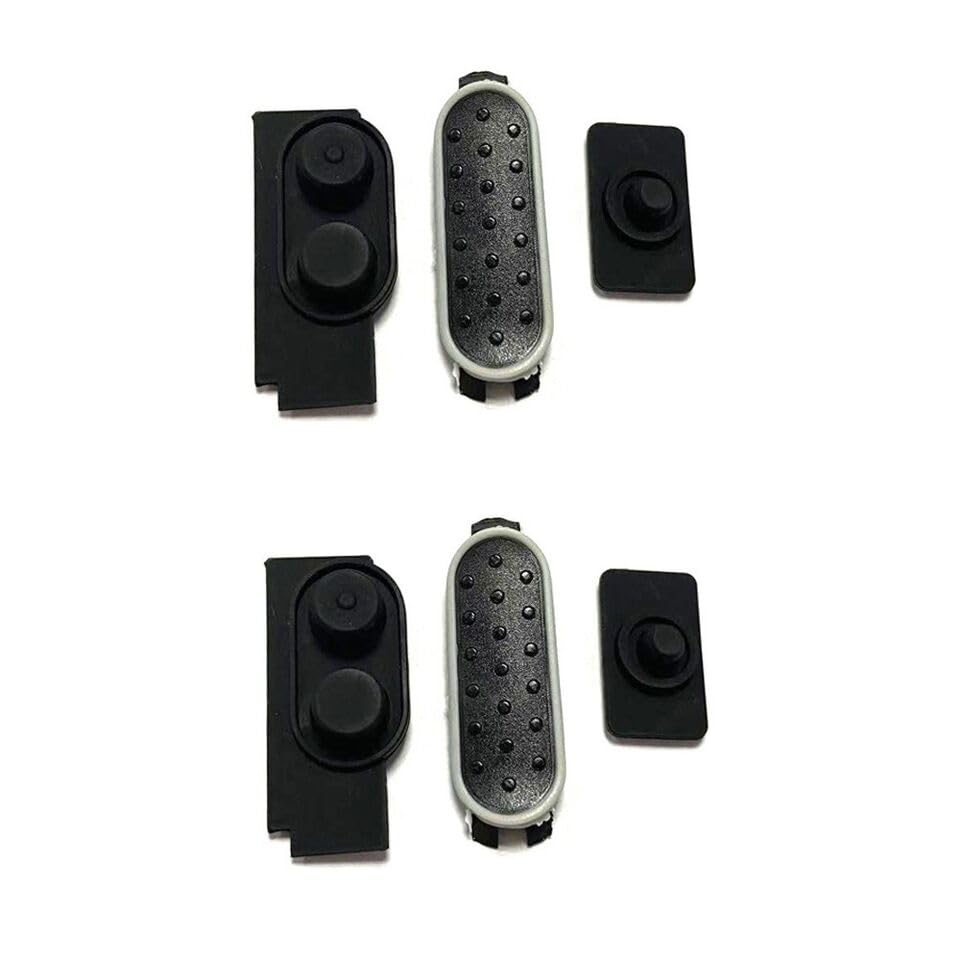
Figure 1: Replacement PTT Rubber Button Set. This image displays two complete sets of replacement Push-to-Talk (PTT) rubber buttons. Each set includes the main PTT button, a smaller auxiliary button, and a long, narrow button with multiple small circular indentations, likely for channel or volume control. These components are designed for specific Motorola radio models.
- Prepare the Radio: Power off your Motorola radio and remove the battery pack.
- Disassemble the Radio Casing: Carefully open the radio casing to access the internal components. This usually involves removing screws and gently prying open the housing. Refer to your radio's service manual for precise instructions on disassembly.
- Locate and Remove Old Button: Identify the existing PTT rubber button assembly. Gently detach it from its mounting points. Note its orientation for correct installation of the new button.
- Install New Button: Position the new PTT rubber button components into their respective slots. Ensure they align correctly with the internal switches and external casing openings. The tactile nubs on the back of the rubber buttons should align with the corresponding contact points on the radio's circuit board.
- Reassemble the Radio: Carefully close the radio casing, ensuring all components are properly seated and no wires are pinched. Secure the casing with the screws removed earlier.
- Test Functionality: Reinsert the battery and power on the radio. Test the PTT button and any other associated buttons to ensure they function correctly and have a proper tactile response.
Operating Instructions
Once installed, the PTT rubber button functions identically to the original. Press and hold the PTT button to transmit your voice, and release it to listen. Ensure the button provides a clear, responsive click or tactile feedback when pressed.
Maintenance
To ensure the longevity and proper function of your PTT rubber button:
- Cleaning: Periodically wipe the button surface with a soft, damp cloth. Avoid using harsh chemicals or abrasive cleaners, which can damage the rubber material.
- Avoid Excessive Force: Do not press the button with excessive force, as this can lead to premature wear or damage to the internal switch mechanism.
- Environmental Protection: Protect your radio from extreme temperatures, direct sunlight, and prolonged exposure to moisture, which can degrade rubber components over time.
Troubleshooting
If you encounter issues after installing the new PTT rubber button, consider the following:
- Button Not Responding:
- Ensure the radio is powered on and the battery is charged.
- Re-open the radio casing and verify that the rubber button's tactile nubs are correctly aligned with the internal switch contacts.
- Check for any debris or obstructions preventing the button from fully depressing.
- Poor Tactile Feedback:
- Confirm the button is seated correctly within the casing and not misaligned.
- Ensure the casing is properly closed and secured, as improper assembly can affect button feel.
- Intermittent Functionality:
- This may indicate a loose connection or improper seating of the button. Re-check the installation steps.
If problems persist, it is advisable to seek assistance from a qualified radio technician or the radio manufacturer's support.
Specifications
| Product Type | Replacement Push-to-Talk (PTT) Rubber Button Set |
| Compatibility | Motorola XPR3500e, XiR P6600i, XiR P6620i |
| Package Contents | 2 sets of PTT rubber buttons (as shown in Figure 1) |
| Material | Rubber |
| Package Dimensions | 3.07 x 2.05 x 0.67 inches |
| Item Weight | 0.35 ounces |
| Manufacturer | QXNASU |
Warranty and Support
For specific warranty information regarding this replacement part, please refer to the terms provided by the seller at the time of purchase. Warranty coverage may vary.
For technical support or further assistance with installation, it is recommended to contact the manufacturer of your Motorola radio or a certified radio service center. For inquiries related to the replacement part itself, please contact the seller, QXNASU.