
1. Product Overview
The BOXPSII Solar Pool Lights are designed to provide versatile and colorful illumination for various pool types. These lights feature a 2-in-1 charging capability (solar and USB), a retractable cord design, and integrated IP68 waterproofing. They offer multiple color modes and brightness levels, controlled by an RF remote, and include an auto light sensor function for convenience.
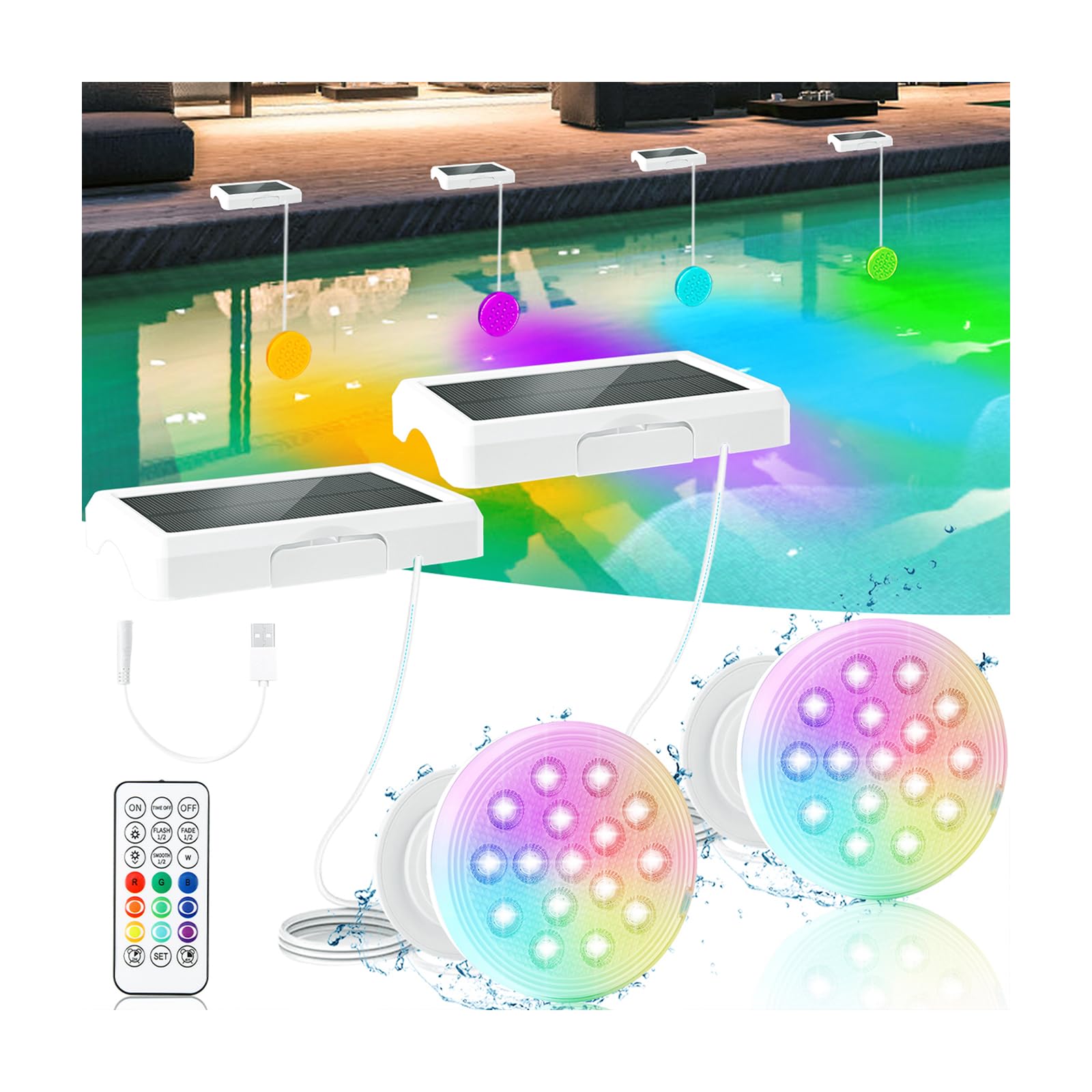
Image 1.1: Overview of the BOXPSII Solar Pool Light with its solar panel and retractable cord.
2. Package Contents
Verify that all items are present in the package:
- BOXPSII Solar Pool Lights (2 units)
- RF Remote Control
- USB-A to USB-C Charging Cable
- Underwater Glue
- Reusable Ties (for above-ground pools)
- Instruction Manual
Video 2.1: Unboxing the BOXPSII Solar Submersible Pool Lights, showing all included components.
3. Charging Instructions
The pool lights can be charged via solar power or USB. Ensure the lights are fully charged before first use.
3.1 Solar Charging
- Place the solar panel in direct sunlight for at least 7-10 hours for optimal charging.
- The light will automatically turn off when charging in sunlight during the daytime if the auto-sensing function is active.
3.2 USB Charging
- Connect the provided USB-A to USB-C charging cable to the light.
- A full charge typically takes 3-4 hours.
- During USB charging, a red light will flash. It will become steady red when charging is complete.
- Note: The power connection port is not waterproof. Keep it dry during charging.

Image 3.1: Detailed view of the USB charging process for the pool light, showing the cable connection and indicator light.
4. Installation
The BOXPSII Solar Pool Lights offer multiple installation options for various pool types.
4.1 Retractable Cord Adjustment
- To extend the cord: Hold the back of the pool light and pull out the cord to the desired length.
- To retract the cord: Turn the front of the pool light clockwise.

Image 4.1: Instructions for adjusting the retractable cord length on the pool light.
4.2 Mounting Options
Choose the appropriate mounting method for your pool:
- Glue Installation: Apply the provided underwater glue to the mounting base plate and press it firmly against a clean, smooth pool surface for 30 seconds. Allow sufficient curing time before submerging the light.
- Magnetic Attachment: Each light contains a super magnet for attachment to ferrous metal surfaces.
- Ties (for Above-Ground Pools): Use the reusable ties to secure the solar panels to the frame of above-ground pools.
- Screw Installation (screws not included): The mounting plate can also be screwed into a surface if preferred.

Image 4.2: Visual guide for different installation methods for the pool lights.
Video 4.3: Demonstration of BOXPSII Solar Pool Lights installation and various lighting effects.
5. Operation
The BOXPSII Solar Pool Lights can be controlled via the included RF remote or a button on the light itself.
5.1 Initial Activation
- Before using the remote control, press the on/off button on the pool light to activate it.
- If the light does not turn on, ensure it is fully charged.
5.2 Remote Control Functions
The RF remote control operates at a range of up to 50ft underwater and 200ft in air. One remote can control multiple lights.
- On/Off: Power the lights on or off.
- Color Selection: Choose from 16 static color modes.
- Dynamic Modes: Select from 6 dynamic light modes (FLASH 1/2, FADE 1/2, SMOOTH 1/2).
- Brightness Adjustment: Adjust between 5 brightness levels.
- Timer Function: Set the lights to turn off after 2 hours or 4 hours. The remote has a memory function for the last selected timer setting.

Image 5.1: Layout and functions of the RF remote control.
5.3 Auto Light Sensor Function
This function allows the lights to automatically turn off during the day (when charging in sunlight) and turn on at night.
- Activate: Short press the "Set" button on the remote control. The light will blink red 3 times to confirm activation.
- Deactivate: Long press the "Set" button on the remote control. All pool lights will turn off the auto-sensing function.
- Note: If the pool light completely runs out of power, after recharging (via USB cable or sun), you need to press the on/off button to turn on the light and then reset the light sensor mode.

Image 5.2: Examples of the 16 different colors and 6 dynamic modes available.
Video 5.3: A light show demonstration of the BOXPSII Solar/Rechargeable Pool Lights, showcasing various colors and dynamic modes.
6. Maintenance
- Regularly clean the solar panel to ensure maximum charging efficiency. Dust or debris can reduce performance.
- Inspect the retractable cord for any signs of wear or damage.
- Ensure the power connection port remains dry to prevent water damage.
- If the remote control stops responding, try replacing its battery.
7. Troubleshooting
| Problem | Possible Cause | Solution |
|---|---|---|
| Lights do not turn on. | Low battery; Not activated; Auto-sensing mode active during daytime. | Charge the lights fully (solar or USB). Press the on/off button on the light. If auto-sensing is desired, ensure it's activated during daytime charging. |
| Remote control not working. | Light not activated; Remote battery low; Obstruction. | Press the button on the light to ensure it's on. Replace the remote control battery. Ensure clear line of sight if possible. |
| Auto-sensing function not working correctly. | Not activated correctly; Light ran out of power. | To activate: In daytime, while lights are charging, turn them on manually, then short press "Set" on remote (red blinks 3 times). If light ran out of power, recharge, turn on manually, then reset auto-sensing mode. |
| Lights do not hold charge. | Insufficient solar exposure; Battery degradation. | Ensure solar panel receives 7-10 hours of direct sunlight. Use USB charging if solar conditions are poor. If issues persist, contact support. |
8. Specifications
| Feature | Detail |
|---|---|
| Brand | BOXPSII |
| Model Number | 2025-BOXPSIIQST |
| Power Source | Solar Powered, USB Rechargeable |
| Battery Capacity | 1500mAh (built-in) |
| Light Source | LED (16 beads) |
| Light Colors | 16 Static Colors, 6 Dynamic Modes |
| Brightness Levels | 5 |
| Control Method | RF Remote Control, On-light Button |
| Remote Range (Air) | 200ft |
| Remote Range (Underwater) | 50ft |
| Water Resistance | IP68 (Integrated Sealed) |
| Diameter | 4.55 inches |
| Material | Plastic |
| Item Weight | 0.67 kg (for 2-pack) |
9. Warranty and Support
This product is covered by a 30-day return/replacement policy. For any questions, concerns, or technical assistance, please contact BOXPSII customer support through the retailer's platform where the product was purchased. Please provide your order number and a detailed description of the issue for prompt service.