
1. Introduction
The SMSL N100 is a versatile Hi-Res streaming player designed to deliver high-fidelity audio from various sources. It features multiple connectivity options, MQA decoding, and support for popular streaming services, making it a central component for a modern audio setup.

Image: Front view of the SMSL N100 Hi-Res Streaming Player, showcasing its minimalist design and front panel indicator light.
2. Key Features
- Multi-Source Interconnection: Equipped with USB 3.0 (compatible with USB 2.0 x 2), Gigabit LAN, and dual-band WiFi for high-speed data transmission. Supports external hard drives, CD/DVD drives (without drive power supply), and mainstream streaming platforms.
- Hi-Res Audio & MQA Decoding: Built-in MQA hard decoding technology supports high-definition streaming media like TIDAL and QOBUZ, and 24bit/192kHz high-resolution audio.
- Cross-Platform Wireless Delivery: Compatible with AirPlay 2, DLNA, and ROON for lossless streaming across mobile phones, computers, and tablets.
- Multi-functional Integrated Design: Combines streaming media playback, external optical drive support, and hard disk direct reading functions. Controlled via an exclusive APP remote.
- Professional Circuit Optimization: Features independent power supply modules and digital/analog isolation technology to ensure pure and stable USB and network input signals.
3. Package Contents
Please verify that all items are present in the package:
- SMSL N100 Streaming Player
- Power cord
- Instruction manual (this document)
- Bluetooth antenna
4. Product Overview
4.1 Front Panel
The front panel features a minimalist design with a single button and an indicator light for operational status.
4.2 Rear Panel
The rear panel provides all necessary input and output connections for the device.

Image: Detailed diagram of the SMSL N100 rear panel, showing all ports and their corresponding labels.
- Button
- Indicator light
- USB input 3 (USB 2.0)
- USB input 2 (USB 2.0)
- Antenna connector
- USB input 1 (USB 3.0)
- LAN input (Gigabit Ethernet)
- Optical output
- Coaxial output
- AES/EBU output
- POWER input (AC IN 100-240V)
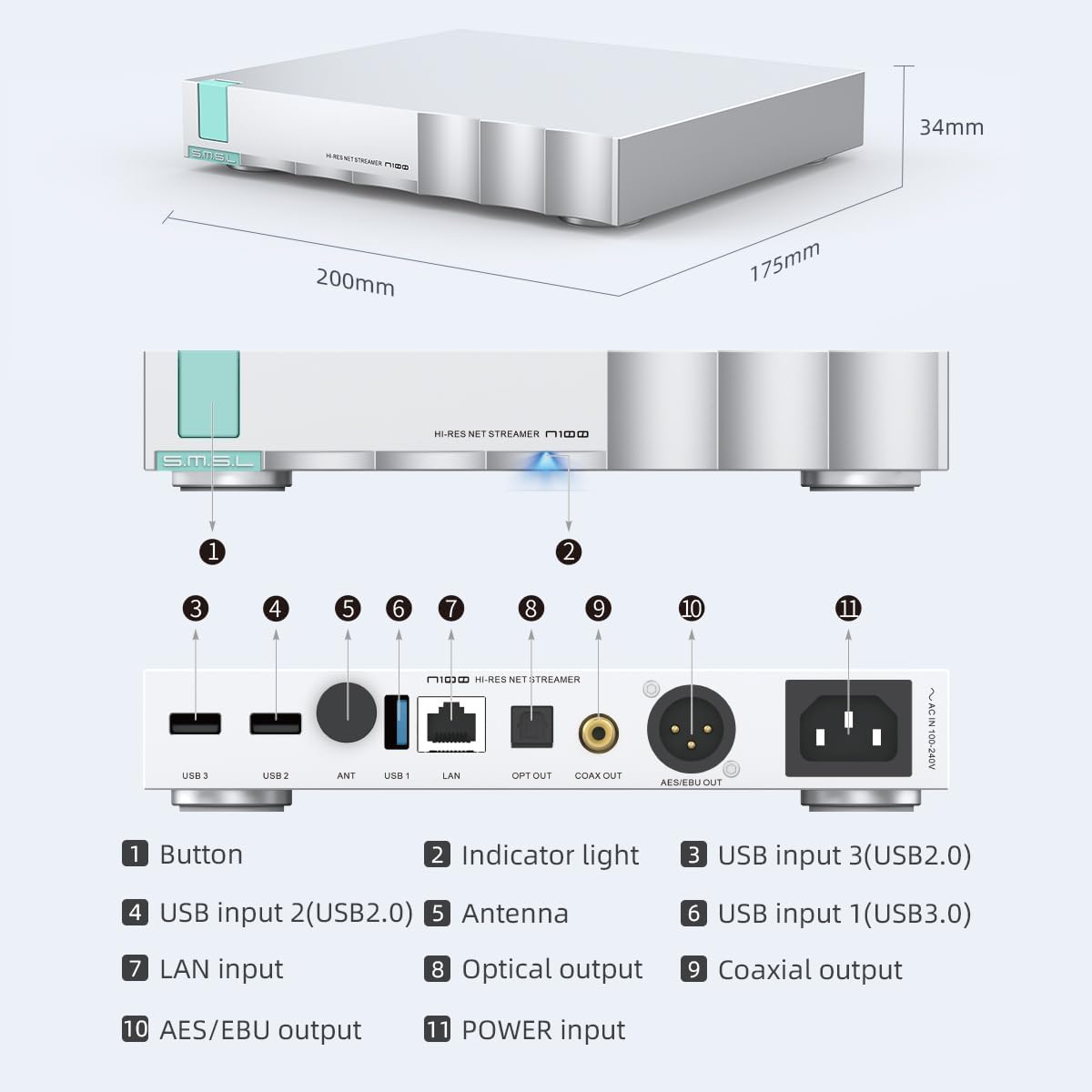
Image: Angled rear view of the SMSL N100, providing a clear perspective of the various input and output ports.
5. Setup
5.1 Initial Connection
- Connect Antenna: Screw the provided Bluetooth antenna into the 'ANT' connector on the rear panel.
- Power Connection: Connect the power cord to the 'POWER input' on the rear panel and then to a suitable AC power outlet (100-240V).
- Audio Output: Connect the N100 to your amplifier, DAC, or active speakers using the Optical, Coaxial, or AES/EBU output ports.
- Network Connection: For wired network access, connect an Ethernet cable to the 'LAN input'. For wireless access, ensure the antenna is connected and configure Wi-Fi settings via the control app.
- USB Devices: Connect external hard drives or CD/DVD drives to the USB 3.0 or USB 2.0 ports as needed.
5.2 System Integration Example

Image: A diagram showing how the SMSL N100 integrates into a home audio system, connecting to a network, external storage, and output devices like amplifiers and DACs.
The N100 can be integrated into various audio setups. It can receive online streaming music via Wi-Fi or Ethernet, access local files from an external hard drive or NAS, and output audio to an Audio DAC, amplifiers, or headphones/speakers.
6. Operating Instructions
6.1 Power On/Off
Press the front panel button to power the device on or off. The indicator light will show the device's status.
6.2 Control via Mobile App
The SMSL N100 is designed to be controlled primarily through a dedicated mobile application, such as the Volumio app. This app allows you to browse music, manage settings, and control playback.

Image: A visual representation of the Volumio official mobile app, demonstrating its interface for controlling the N100 streaming player.
Download the official Volumio app from your device's app store. Ensure your mobile device and the N100 are connected to the same local area network (LAN) for proper communication.
7. Connectivity and Streaming Services
7.1 Supported Streaming Platforms
The N100 supports a wide range of streaming services and protocols:

Image: A graphic illustrating the SMSL N100's collaboration with Volumio and its support for various audio formats and streaming services like Roon, Tidal, Qobuz, DLNA, AirPlay, and more.
- TIDAL: High-fidelity music streaming service.
- QOBUZ: High-resolution music streaming and download service.
- AirPlay 2: Apple's wireless streaming protocol for audio.
- DLNA: Digital Living Network Alliance for media sharing.
- ROON: Advanced music management and playback software.
- TuneIn: Internet radio service.
- Supports various audio formats including MP3, FLAC, DSD.
Image: The SMSL N100 with prominent logos for AirPlay, DLNA, Qobuz, and Tidal, indicating its compatibility with these services.
7.2 USB Connectivity
The N100 features multiple USB ports (one USB 3.0 and two USB 2.0) for connecting external storage devices such as hard drives or CD/DVD drives. This allows for direct playback of local music files.

Image: The SMSL N100 shown with an external hard drive connected via USB, demonstrating its capability to play music directly from local storage.
8. Maintenance
To ensure optimal performance and longevity of your SMSL N100, follow these maintenance guidelines:
- Cleaning: Use a soft, dry cloth to clean the exterior of the device. Avoid using abrasive cleaners or solvents.
- Ventilation: Ensure the device has adequate ventilation. Do not block any vents or place the unit in an enclosed space that could lead to overheating.
- Environment: Operate the N100 in a clean, dry environment, away from direct sunlight, heat sources, and excessive moisture.
- Power: Disconnect the power cord from the wall outlet if the device will not be used for an extended period.
9. Troubleshooting
If you encounter issues with your SMSL N100, refer to the following common problems and solutions:
- No Power:
- Check if the power cord is securely connected to both the N100 and the power outlet.
- Verify that the power outlet is functional.
- No Sound Output:
- Ensure the audio cables (Optical, Coaxial, AES/EBU) are correctly connected between the N100 and your amplifier/DAC.
- Check the input selection on your amplifier/DAC to ensure it matches the output from the N100.
- Verify that the volume on your amplifier/DAC is not set to minimum or muted.
- Cannot Connect to Network (Wi-Fi/LAN):
- For Wi-Fi, ensure the Bluetooth antenna is properly installed.
- Ensure the N100 and your control device (phone/tablet) are on the same local network.
- If using LAN, check the Ethernet cable connection to both the N100 and your router.
- Restart your router and the N100.
- If issues persist with the Volumio app, try performing a factory reset on the N100 and reconnecting via Wi-Fi, as some users have reported this resolves connectivity issues.
- External USB Drive Not Recognized:
- Ensure the USB drive is properly formatted and contains supported audio files.
- Try connecting the USB drive to a different USB port on the N100.
- Some high-power USB devices may require external power.
10. Specifications
Detailed technical specifications for the SMSL N100:
| Feature | Specification |
|---|---|
| Brand | S.M.S.L |
| Model Name | N100 |
| Item Weight | 2.84 pounds |
| Product Dimensions | 7.87 x 6.89 x 1.34 inches |
| Color | Black |
| Connectivity Technology | USB, LAN, Wi-Fi |
| Connector Type | Optical, Coaxial, AES/EBU, USB |
| Special Features | MQA Decoding, 24-bit/192kHz High-Resolution Audio |
| Supported Internet Services | TIDAL, QOBUZ, ROON, AirPlay 2, DLNA, TuneIn |
| Controller Type | Mobile App (e.g., Volumio), Remote Control |
| Resolution | 1080p (for video streaming if applicable, primarily audio) |
11. Warranty and Support
The SMSL N100 comes with a standard manufacturer's warranty. For specific warranty terms, duration, and conditions, please refer to the warranty card included with your product or visit the official S.M.S.L website. For technical support, troubleshooting assistance beyond this manual, or service inquiries, please contact S.M.S.L customer support through their official channels.
Official Website: www.smsl-audio.com