Introduction
Welcome to the user manual for your new KurieTim 15.6" FHD Gaming Laptop. This manual provides essential information on setting up, operating, maintaining, and troubleshooting your device. Please read this manual thoroughly before using your laptop to ensure optimal performance and longevity.
Safety Information
To prevent damage to your laptop or injury to yourself and others, please observe the following safety precautions:
- Do not expose the laptop to extreme temperatures, humidity, or direct sunlight.
- Avoid placing heavy objects on the laptop.
- Use only the original power adapter and cables provided with the laptop.
- Do not attempt to disassemble or repair the laptop yourself. Refer to qualified service personnel.
- Keep liquids away from the laptop to prevent electrical shock or damage.
- Ensure proper ventilation to prevent overheating, especially during intensive use.
What's in the Box
Upon opening the package, please verify that all items listed below are present:
- Laptop
- Charger and Cable
- Transparent and Spanish Keyboard Cover
- Instruction Manual
Product Overview
Key Components
Your KurieTim gaming laptop is engineered for high performance and immersive experiences. Key features include:
- Processor: Equipped with the powerful AMD Ryzen 9 6900HX processor (8 cores/16 threads, up to 4.9GHz), ensuring superior performance and responsiveness for demanding tasks and gaming.
- Memory & Storage: Features 32GB DDR5 RAM and a 1TB M.2 NVMe SSD, providing fast response times, ample storage, and smooth multitasking capabilities.
- Display: A 15.6" Full HD (1920x1080 pixels) IPS screen with a wide color gamut and high refresh rate for sharp details and immersive visuals.
- Cooling System: Integrated dual-fan cooling system designed to dissipate heat effectively, maintaining optimal performance during extended use.
- Keyboard: Backlit keyboard for comfortable typing in various lighting conditions.
- Security: Fingerprint reader for secure and convenient login, and a privacy camera switch for enhanced privacy control.
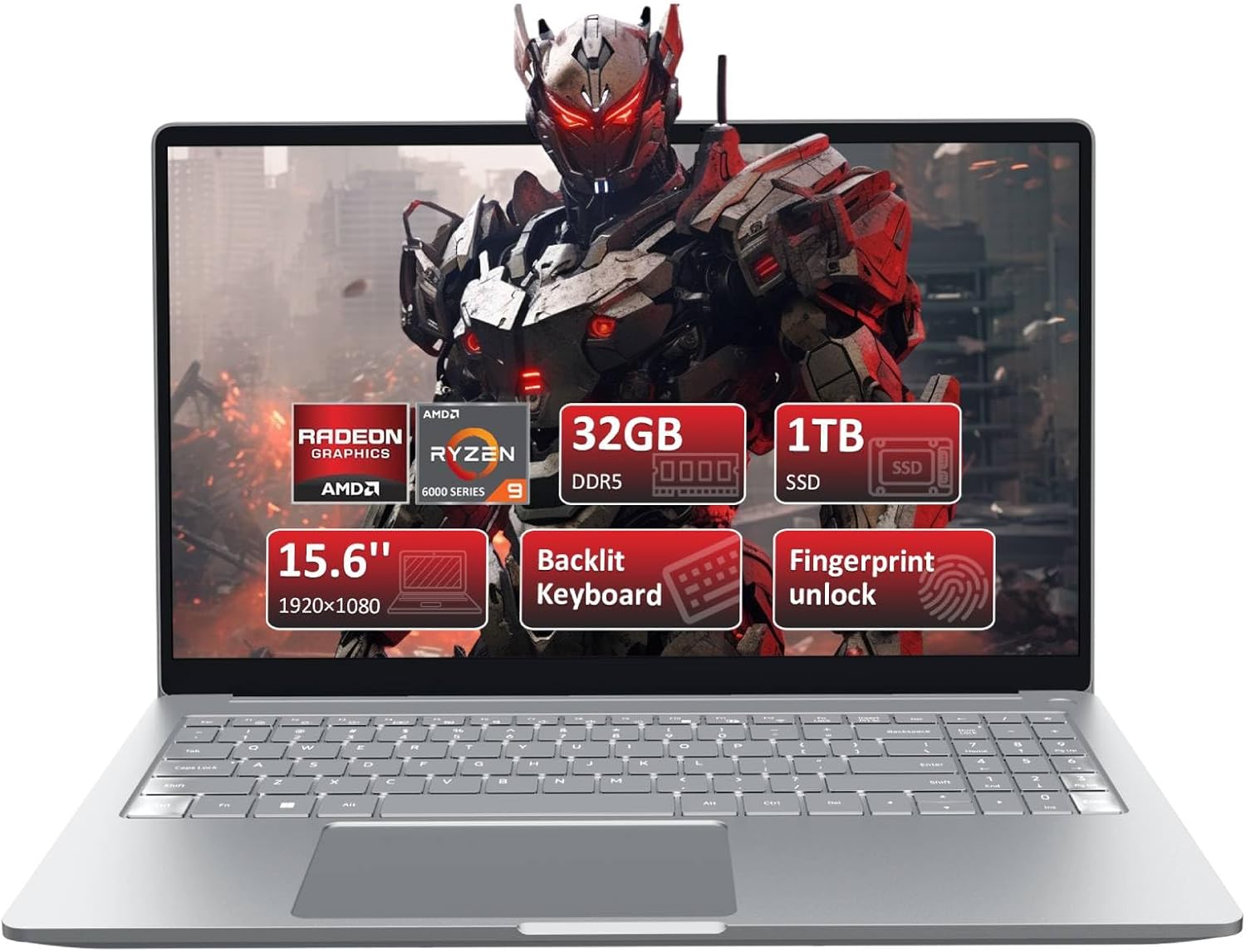
Figure 1: Front view of the KurieTim 15.6" Gaming Laptop, showcasing its display and key specifications like 32GB DDR5, 1TB SSD, 15.6" FHD screen, backlit keyboard, and fingerprint unlock.

Figure 2: Detailed view of the AMD Ryzen 9 6900HX processor, highlighting its central role in the laptop's performance.

Figure 3: Illustration of the laptop's internal components, emphasizing the 32GB DDR5 memory and 1TB NVMe SSD for high-capacity storage and fast data access.

Figure 4: View of the laptop's dual-fan cooling system, designed to prevent overheating and ensure stable performance during intensive use.
Ports and Interfaces
The laptop is equipped with a variety of ports for connectivity and expansion:
- USB 3.0 Ports: Three USB 3.0 ports for high-speed data transfer and connecting peripherals.
- USB-C Ports: Includes a Type-C port for data transfer and another full-function Type-C port for versatile connectivity, including display output and charging.
- HDMI Interface: For connecting to external displays or projectors.
- Headphone Jack: Standard 3.5mm audio jack for headphones or external speakers.
- TF Card Slot: For expanding storage or transferring data from memory cards.
- Charging Port: Dedicated port for the power adapter.
- Safety Lock Slot: For securing the laptop with a compatible lock.

Figure 5: Overview of the laptop's rich interfaces, including USB 3.0, USB-C, HDMI, headphone jack, TF card slot, charging port, and safety lock.

Figure 6: Side profile views of the laptop, illustrating the placement of various ports and connectors for easy access.
Setup
- Unpacking: Carefully remove the laptop and all accessories from the packaging.
- Initial Charge: Before first use, connect the power adapter to the laptop's charging port and plug it into a power outlet. Allow the battery to charge fully. The charging indicator light will typically change color or turn off when fully charged.
- Power On: Open the laptop lid and press the power button, usually located on the keyboard deck or side.
- Windows Setup: Follow the on-screen instructions to complete the Windows 11 Pro setup process. This includes selecting your region, language, connecting to a Wi-Fi network, and creating a user account.
- Fingerprint Setup: During or after Windows setup, you can configure the fingerprint reader for secure login. Navigate to Windows Settings > Accounts > Sign-in options to set up Windows Hello Fingerprint.
Operating Instructions
Basic Operation
- Power On/Off: Press the power button to turn on. To shut down, click the Start button, then Power, and select "Shut down."
- Sleep Mode: Close the lid or press the power button briefly to enter sleep mode.
- Keyboard and Touchpad: Use the integrated keyboard for typing and the touchpad for navigation. The touchpad supports multi-touch gestures for scrolling, zooming, and more.
- Backlit Keyboard: The keyboard backlight can be adjusted or turned off using function keys (Fn + specific F-key, refer to keyboard legends).
- Webcam Privacy Switch: Locate the physical switch near the webcam to enable or disable the camera for privacy.
Connectivity
- Wi-Fi: Click the Wi-Fi icon in the taskbar, select your network, and enter the password to connect.
- Bluetooth: Enable Bluetooth in Windows Settings to pair with wireless devices like headphones or mice.
- External Displays: Connect an external monitor via the HDMI port or a full-function USB-C port. Press Windows key + P to select display mode (Duplicate, Extend, Second screen only). The laptop supports triple-screen displays.

Figure 7: The laptop connected to two external monitors, showcasing its capability to support triple-screen displays for enhanced productivity or gaming setups.
Maintenance
- Cleaning: Use a soft, lint-free cloth to clean the screen and exterior. For stubborn marks, dampen the cloth slightly with water or a screen cleaner. Avoid harsh chemicals.
- Battery Care: To prolong battery life, avoid fully discharging the battery frequently. Store the laptop in a cool, dry place if not used for extended periods.
- Software Updates: Regularly check for and install Windows updates and driver updates to ensure system stability and security.
- Cooling System: Ensure the laptop's vents are not obstructed to allow proper airflow for the dual-fan cooling system. Periodically clean dust from the vents using compressed air.
Troubleshooting
| Problem | Possible Cause | Solution |
|---|---|---|
| Laptop does not power on. | Battery drained, power adapter not connected properly. | Connect the power adapter and ensure it's plugged into a working outlet. Allow some time for charging before attempting to power on. |
| No display on screen. | Screen brightness too low, external display connected, system crash. | Increase screen brightness (Fn keys). Disconnect external displays. Force shut down by holding the power button, then restart. |
| Wi-Fi connection issues. | Wi-Fi disabled, incorrect password, router issue. | Ensure Wi-Fi is enabled in Windows settings. Re-enter Wi-Fi password. Restart your router and modem. |
| Laptop is running slow. | Too many applications open, insufficient free storage, overheating. | Close unnecessary applications. Free up disk space. Ensure vents are clear and cooling system is functioning. |
Specifications
| Feature | Detail |
|---|---|
| Brand | KurieTim |
| Model Name | T159R-laptop-computer |
| Item Model Number | AMD Ryzen 9 6900HX |
| Operating System | Windows 11 Pro |
| Screen Size | 15.6 Inches |
| Screen Resolution | 1920 x 1080 Pixels (FHD) |
| Processor | AMD Ryzen 9 6900HX (8 Cores, 16 Threads, up to 4.9 GHz) |
| RAM | 32 GB DDR5 |
| Hard Drive | 1 TB NVMe SSD |
| Graphics Coprocessor | AMD R9 6900HX (Integrated) |
| Wireless Type | 802.11bgn |
| USB 3.0 Ports | 3 |
| USB-C Ports | 2 (1 Data Transfer, 1 Full Function) |
| HDMI Port | 1 |
| Average Battery Life | 5 Hours |
| Item Weight | 3.96 pounds |
| Product Dimensions | 14.06 x 0.51 x 8.98 inches |
| Color | Gray |
| Special Features | Backlit Keyboard, Numeric Keypad, Fingerprint Reader, Privacy Camera Switch |
Warranty and Support
For warranty information and technical support, please refer to the documentation included with your purchase or contact KurieTim customer service directly. You may also find additional support resources on the official KurieTim website.
For any questions or concerns, the seller KuireTim is available to assist you.


