1. Introduction
Thank you for purchasing the Crexyyo Superbholo F65 Hologram Fan. This 3D Holographic LED Fan Projector is designed to provide a vivid and clear visual experience, creating stunning 3D effects that bring images to life. With its 224 professional high-definition LED lamp beads, it emits amazing light and delicate images, making it ideal for enhancing home decoration, businesses, parties, and bars. This manual provides essential information for the safe and effective use of your new device.
2. Safety Information
Please read all safety warnings and instructions carefully before installation and operation to prevent injury or damage to the device.
- Installation: Ensure the device is securely mounted to a stable surface or wall. Do not install in unstable locations.
- Power: Use only the provided power adapter. Ensure the power supply matches the device's requirements (15W).
- Moving Parts: The fan blades rotate at high speed. Keep hands, hair, and other objects away from the fan when it is operating.
- Ventilation: Do not block the ventilation openings. Ensure adequate airflow around the device to prevent overheating.
- Environment: This device is primarily for indoor use. If used outdoors, ensure good waterproof measures are in place to protect the device from moisture and rain.
- Cleaning: Disconnect power before cleaning. Use a soft, dry cloth. Do not use liquid cleaners or aerosols.
- Children: Keep out of reach of children. This is not a toy.
- Disassembly: Do not attempt to disassemble or repair the device yourself. Refer all servicing to qualified personnel.
3. Package Contents
Verify that all items listed below are included in your package:
- 1x 3D Holographic LED Fan Projector (Main Unit)
- 1x Power Adapter
- 1x User Manual
- 1x TF Card
- 1x Card Reader
- Mounting Screws
- Mounting Base
- Small Screwdriver

Image: All components included in the Superbholo F65 Hologram Fan package, neatly laid out. This includes the main fan unit, its power adapter, a user manual, a TF card for content, a card reader, mounting screws, a mounting base, and a small screwdriver for installation.
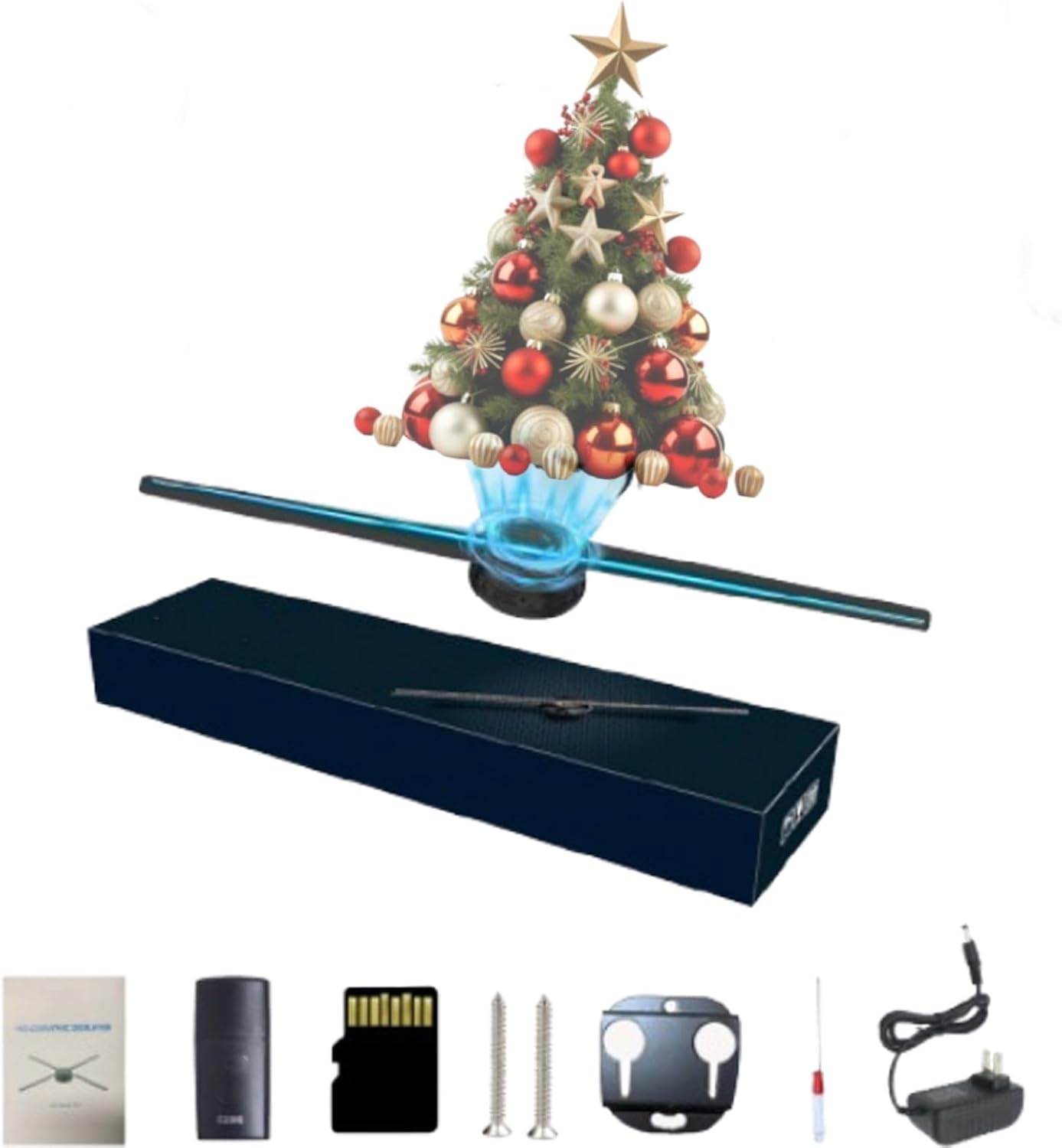
Image: The Superbholo F65 Hologram Fan projecting a vibrant 3D Christmas tree, alongside its compact packaging box and various accessories, illustrating the product's primary function and included items.
4. Setup and Installation
Follow these steps to set up your Superbholo F65 Hologram Fan:
- Choose Location: Select a suitable location for installation. Ensure it is a stable surface or wall capable of supporting the device's weight and providing clear visibility for projections.
- Mount the Base: Use the provided mounting screws to securely attach the mounting base to your chosen surface. Ensure it is level and firm.
- Attach the Fan Unit: Carefully align the main fan unit with the mounted base and secure it in place. Refer to the product details image for proper orientation.
- Insert TF Card: Locate the TF card slot on the fan unit (as shown in product detail images). Insert the provided TF card with your desired holographic content.
- Connect Power: Connect the power adapter to the fan unit's power input port, then plug the adapter into a standard electrical outlet.

Image: A close-up of the Superbholo F65 Hologram Fan highlighting its internal components: the Smart Chip for processing, the RGB LED strip along the blade for vivid projections, and the design of the back panel.

Image: A detailed perspective of the Superbholo F65 Hologram Fan, indicating its 42cm blade length, the location of the TF card slot for content loading, and emphasizing the presence of 224 individual lamp beads along the fan blade, which are crucial for generating the holographic effect.
5. Operation
Once installed and powered, the Superbholo F65 Hologram Fan is ready for operation.
- Power On: The device typically powers on automatically when connected to electricity. The fan blades will begin to rotate, and the LEDs will illuminate to display the holographic content from the TF card.
- Content Management: To change the displayed content, remove the TF card (ensure the device is powered off first), load new video or image files onto it using the provided card reader and a computer, then reinsert the card. The device supports common video, animation, and image formats.
- Adjustable Settings: The Superbholo F65 allows for adjustable light and angle settings to optimize the visual experience. Refer to the specific controls on the device or accompanying software (if applicable) for these adjustments.
- Multi-Sync Function: For larger displays, multiple Superbholo F65 units can be synchronized to create an impressive, cohesive holographic presentation. Consult the advanced user guide or manufacturer's website for detailed instructions on multi-sync setup.
- Visual Experience: The 224 professional high-definition LED lamp beads work together to create a realistic and clear visual experience with a three-dimensional 3D effect, providing an immersive feeling.

Image: The Superbholo F65 Hologram Fan in operation, vividly displaying a 3D holographic Christmas tree, demonstrating its capability to create immersive visual effects in an indoor environment.

Image: The Superbholo F65 Hologram Fan actively projecting a dynamic 3D image of a rocket launching from a globe, illustrating the clarity and impact of its display, powered by its 224 professional high-definition LED beads.

Image: A collage of diverse 3D holographic projections, including a hamburger, flower, robot head, jellyfish, ring, and coral, all rendered by the Superbholo F65 Hologram Fan. This image showcases the device's 2000x224 resolution and its ability to display a wide range of common video, animation, and image content clearly, even in ambient lighting.
6. Maintenance
Proper maintenance ensures the longevity and optimal performance of your hologram fan.
- Cleaning: Regularly wipe the fan blades and housing with a soft, dry, lint-free cloth to remove dust. Do not use abrasive cleaners, solvents, or wet cloths, as these can damage the LEDs or electronic components.
- Power Off Before Cleaning: Always disconnect the power adapter from the wall outlet before performing any cleaning or maintenance.
- Storage: If storing the device for an extended period, disconnect it from power, clean it thoroughly, and store it in its original packaging or a protective case in a cool, dry place away from direct sunlight and extreme temperatures.
- Blade Inspection: Periodically inspect the fan blades for any signs of damage or obstruction. Do not operate the device if the blades are bent or damaged.
7. Troubleshooting
If you encounter issues with your Superbholo F65 Hologram Fan, refer to the following common problems and solutions:
| Problem | Possible Cause | Solution |
|---|---|---|
| Fan does not power on. | No power, loose connection, faulty adapter. | Check if the power adapter is securely plugged into both the device and the wall outlet. Try a different outlet. Ensure the adapter is not damaged. |
| No holographic image displayed. | TF card not inserted correctly, no content on TF card, unsupported file format. | Ensure the TF card is fully inserted. Verify that the TF card contains valid video or image files. Check if the file formats are supported. |
| Image is dim or unclear. | High ambient light, dirty LEDs, incorrect angle settings. | Reduce ambient light in the viewing area. Gently clean the LED blades with a dry cloth. Adjust the device's angle for optimal viewing. |
| Fan makes unusual noise. | Obstruction, loose part, internal issue. | Immediately power off the device. Check for any obstructions around the fan blades. If the noise persists after removing obstructions, contact customer support. Do not attempt to open the device. |
If the problem persists after trying these solutions, please contact customer support for further assistance.
8. Specifications
| Feature | Detail |
|---|---|
| Product Name | 3D Holographic LED Fan Projector |
| Model | F65 |
| Brand | Crexyyo |
| Material | ABS, PC |
| Viewable Angle | 176 Degrees |
| Power | 15W |
| LED Lamp Beads | 224 professional high-definition LEDs |
| Resolution | 2000x224 (approximate, based on visual information) |
| Blade Length | 42 cm (approximate) |
| Use Site | Indoor, Outdoor (with good waterproof measures) |
9. Warranty and Support
This product is covered by a standard manufacturer's warranty. For specific warranty terms and conditions, please refer to the documentation provided with your purchase or contact the seller directly.
For technical support, troubleshooting assistance, or inquiries regarding parts and service, please contact Crexyyo customer support through the retailer where you purchased the product or visit the official Crexyyo website for contact information.
Please retain your proof of purchase for warranty claims.


