
1. Introduction
This manual provides detailed instructions for the installation, operation, and maintenance of your Hodozzy 9-inch Android Car Stereo. Please read this manual thoroughly before using the product to ensure proper function and safety.
2. Compatibility
This car stereo is designed for specific vehicle models:
- Nissan Juke J15: 2010-2019 models
- Infiniti ESQ YF15: 2011-2017 models
Important Note: Before purchasing and installation, verify that your vehicle's original center console and CD backplates are compatible. This product does not support certain center console configurations or vehicles equipped with a 360-degree camera system. Refer to the image below for visual guidance on compatible and incompatible console types.
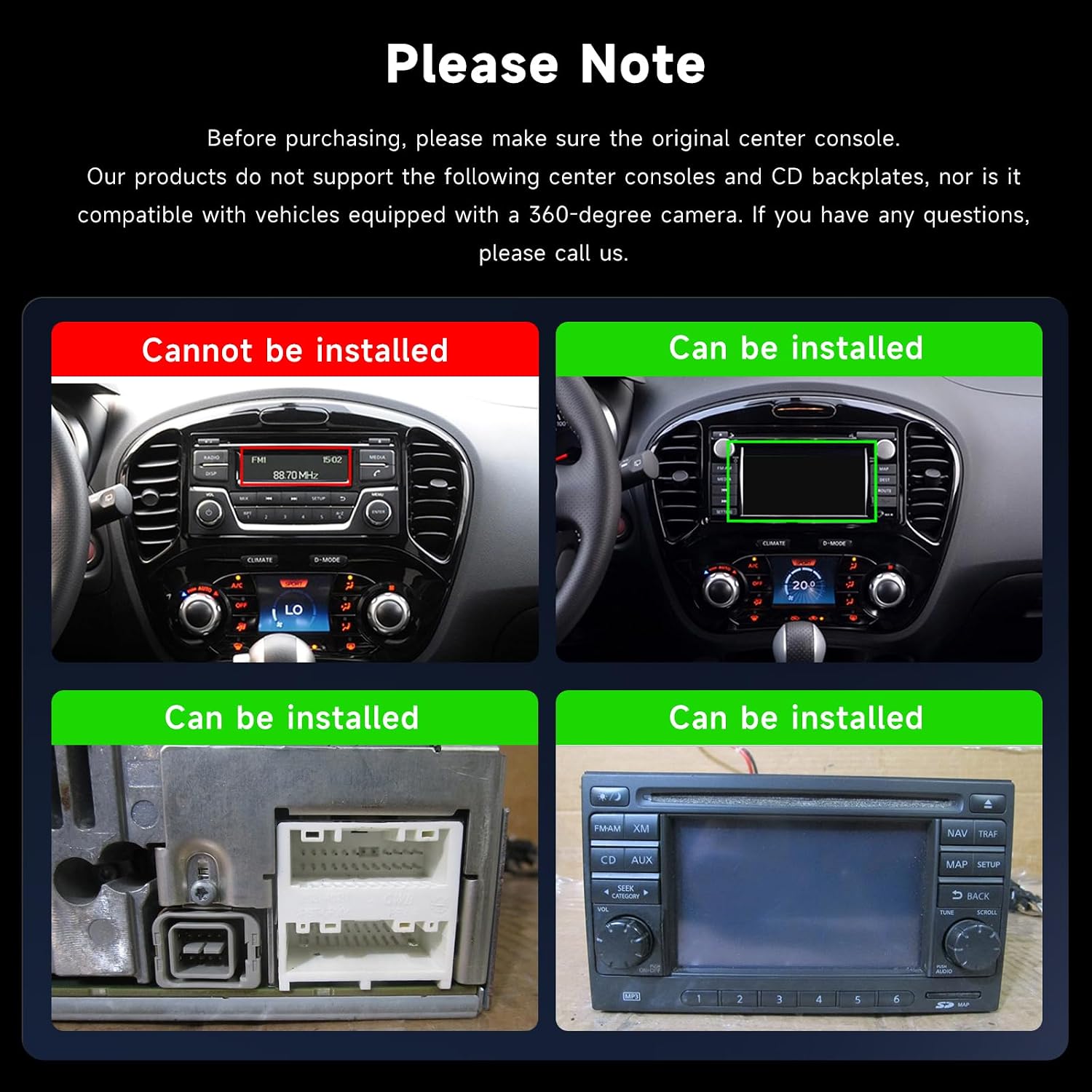
Image: Compatibility guide. Top-left shows an incompatible console, top-right shows a compatible console. Bottom-left shows a compatible wiring harness, bottom-right shows a compatible original radio unit.
3. Package Contents
Please check the package for the following items:
- Car Stereo Player x 1
- Dashboard Kit x 1
- Power Cable x 1
- GPS Antenna x 1
- Rear Camera Input Cable x 1
- RCA Cable x 1
- USB Cable x 2
- Mounting Bracket x 2
- Screws x 4
- Microphone x 1
- AHD Rear View Camera x 1
- User Manual x 1
- Installation Tool x 1
- Reverse Line x 1
- Canbus x 1

Image: Packing List. This image displays the car stereo unit with its dimensions (340mm x 180mm x 70mm) and all included accessories: Power Cable, RCA cable, GPS antenna, USB cable, User Manual, MIC & Rear Camera, Installation Tool, Reverse Line, and Canbus.
4. Specifications
| Feature | Specification |
|---|---|
| System | Android 13 |
| Processor | 8-Core (Chipset: 8257) |
| Screen Size | 9 inches |
| Memory (RAM+ROM) | 6GB RAM + 128GB ROM |
| Screen Resolution | 1280*720 IPS Touchscreen |
| Radio Chip | 8035 |
| Output Power | 4*45W (Total 180W) |
| Bluetooth Version | 5.0 |
| Operating Temperature | -20℃ to 75℃ |
| Steering Wheel Control | Supported |
| Power Amplifier Chip | YD7388 |
| Radio Band | FM/RDS |
| Video Output | Supported |
| Reversing Input | AHD/CVBS |
| DSP | Supported (32 EQ settings) |
| Wireless Carplay | Supported |
| Wireless Android Auto | Supported |
| Mirror Link | Supported |
| GPS Navigation | Supported (Built-in offline maps, requires internet for data download) |
| External Microphone/DAB+/OBD2/Driving Recorder | Supported |
| Split Screen | Supported |
| Voice Control | Supported |
| WIFI | Supported |
| USB Interface | Dual USB |
| Audio Format Support | APE/FLAC/WAV/MP3/WMA, etc. |
| Video Format Support | MKV/RMVB/AVI/MP4/MDV etc. (H.264, H.265/HEVC, MPEG-4, MJPEG, SWF, MOV, AVI, HEVC Main 10, 3GP, RMVB, XVID) |
| Image Format Support | PNG/JPEG/JPG/GIF/WBMP/BNP etc. |
| Factory Keyword | 1234 |
5. Setup and Installation
Installation of the Hodozzy car stereo requires technical knowledge. It is recommended to have the unit installed by a qualified professional. Ensure the vehicle's power is disconnected before beginning installation.
5.1 Pre-Installation Check
- Verify vehicle compatibility as described in Section 2.
- Confirm all package contents are present (refer to Section 3).
- Ensure you have the necessary tools for your specific vehicle model.
5.2 Wiring Connections
Connect the provided cables according to your vehicle's wiring diagram and the stereo's ports. Key connections include:
- Power Cable: Connect to the vehicle's power supply.
- Canbus: Integrate for steering wheel controls and vehicle data if applicable.
- GPS Antenna: Mount in a location with a clear view of the sky for optimal signal reception.
- USB Cables: Connect for external devices or data transfer.
- RCA Cable: For audio/video input/output, including external amplifiers or monitors.
- Rear Camera Input Cable: Connect the AHD rear view camera for parking assistance.
- Microphone: Connect the external microphone for improved call quality and voice commands.
5.3 Mounting the Unit
Use the provided mounting brackets and screws to secure the car stereo into the dashboard opening. Ensure a snug fit without excessive force.
6. Operating Instructions
This section details the primary functions and features of your Hodozzy Android Car Stereo.
6.1 Initial Power On and System Overview
Upon first power-on, the system will boot into the Android 13 operating system. The 9-inch IPS touchscreen with 1280*720 resolution provides a clear and responsive interface. The 8-core processor with 6GB RAM and 128GB ROM ensures smooth operation.

Image: WiFi Connection and Android 8-Core System. This image illustrates the stereo's ability to connect to WiFi for internet access and app usage, alongside a diagram highlighting the 8-core processor, 6GB RAM, and 128GB ROM for fast performance.

Image: Customizable Interface and Display Features. This image showcases the 59 available UI desktop themes, the split-screen function allowing multiple applications simultaneously, and the high-definition 1280x720 IPS touchscreen.
6.2 Connectivity: Carplay, Android Auto, Mirror Link, Bluetooth, WiFi
The unit offers extensive connectivity options:
- Wireless Carplay & Android Auto: Connect your compatible smartphone wirelessly to access navigation, music, messages, and more directly on the stereo's screen.
- Mirror Link: Display your smartphone's screen content directly onto the car stereo.
- Bluetooth 5.0: For hands-free calling and wireless audio streaming. Pair your phone via the Bluetooth settings menu.
- WiFi: Connect to a mobile hotspot or home WiFi network to access online services, download apps, and update maps.

Image: Apple CarPlay, Android Auto, and Mirror Link. This image demonstrates the seamless integration of smartphones via wireless CarPlay and Android Auto, allowing access to navigation, music, and communication apps. It also shows the Mirror Link function.

Image: Bluetooth, FM/RDS Radio, and DSP. This image highlights the Bluetooth hands-free calling feature, the FM/RDS radio interface for tuning into stations, and the 32-band Digital Sound Processor (DSP) for audio customization.
6.3 Navigation (GPS)
The unit comes with built-in offline maps. For updated map data, an internet connection is required for download. Use the GPS antenna for accurate positioning.
6.4 Audio Features: FM/RDS Radio and DSP
- FM/RDS Radio: Tune into your favorite radio stations. RDS (Radio Data System) provides additional information like station name and song title.
- 32-Band DSP: The integrated Digital Sound Processor allows for precise audio customization with 32 equalizer settings to match your preferences.
6.5 Rear View Camera and Steering Wheel Control (SWC)
- Rear View Camera: The included AHD wide-angle rear view camera automatically displays the rear view when reversing, aiding in parking and safety.
- Steering Wheel Control: If your vehicle supports it, connect the Canbus to integrate your steering wheel controls for safe operation of the stereo without taking your hands off the wheel.

Image: Rear View Camera and Steering Wheel Control. This image illustrates the automatic display of the rear view camera feed when reversing, complete with parking guidelines. It also shows how the car's steering wheel buttons can control the stereo functions.
6.6 Other Features
- Split Screen: Run two applications simultaneously on the screen, such as navigation and music.
- Voice Control: Use voice commands for various functions, enhancing convenience and safety.
- Customizable UI: Choose from 59 desktop themes and 19 wallpapers to personalize your interface.
- Dual USB Ports: Connect USB drives for media playback or charging devices.
7. Maintenance
To ensure the longevity and optimal performance of your car stereo, follow these maintenance guidelines:
- Screen Cleaning: Use a soft, lint-free cloth to gently wipe the touchscreen. Avoid abrasive cleaners or solvents that may damage the screen.
- Software Updates: Periodically check for system software updates via WiFi to ensure you have the latest features and bug fixes.
- Temperature Control: Avoid exposing the unit to extreme temperatures for extended periods. The operating temperature range is -20℃ to 75℃.
- Cable Connections: Ensure all cables are securely connected. Loose connections can lead to intermittent issues.
8. Troubleshooting
If you encounter issues with your Hodozzy car stereo, refer to the following common problems and solutions:
| Problem | Possible Cause / Solution |
|---|---|
| Unit does not power on. | Check power cable connections. Ensure vehicle ignition is on. Check vehicle's fuse box. |
| No sound. | Verify speaker connections. Check volume level and mute settings. Ensure correct audio source is selected. |
| GPS signal is weak or inaccurate. | Ensure GPS antenna is mounted in a clear, unobstructed location. Check antenna connection. |
| Bluetooth connection issues. | Ensure Bluetooth is enabled on both the stereo and your phone. Delete previous pairings and re-pair. Restart both devices. |
| Carplay/Android Auto not connecting. | Ensure your phone is compatible and the feature is enabled on both devices. Check USB cable if using wired connection. Restart phone and stereo. |
| Rear camera not displaying. | Check camera power and video input connections. Ensure the vehicle is in reverse gear. |
| Steering Wheel Controls not working. | Verify Canbus connection and configuration in system settings. Ensure your vehicle model supports SWC integration with this unit. |
| System is slow or unresponsive. | Close unnecessary background applications. Clear cache. Perform a factory reset if issues persist (note: this will erase all user data). |
If the problem persists after trying these solutions, please contact Hodozzy customer support for further assistance.
9. Warranty and Support
The product comes with a warranty as per local regulations. Please refer to your purchase documentation for specific warranty terms and conditions. For technical support, troubleshooting assistance, or warranty claims, please contact your retailer or Hodozzy customer service.
Manufacturer: Hodozzy
Model Number: A7455A3533H1MI2
ASIN: B0DXDYP77J