
WICOLO FK2306Y
WICOLO FK2306Y Portable Evaporative Air Cooler
Instruction Manual
Introduction
This manual provides detailed instructions for the safe and efficient operation of your WICOLO FK2306Y Portable Evaporative Air Cooler. Please read thoroughly before first use and retain for future reference.
Key Features
- 3-in-1 Functionality: Cooling, Natural, and Sleep modes.
- Adjustable Airflow: Three fan speeds (Low/Medium/High) and 75° automatic oscillation with 120° manual vertical tilt.
- Extended Cooling: Large 2-gallon (7.5L) water tank provides up to 20 hours of continuous operation.
- Quiet Operation: Operates at an ultra-quiet 46dB, ideal for bedrooms and offices.
- User-Friendly Controls: Intuitive digital display and touch control panel, plus a 16-foot range remote control.
- Enhanced Portability: Lightweight design with built-in handle and 360° swivel casters for easy movement. No hose or window installation required.
- Safety Features: Child lock function and automatic fan mode activation when water tank is empty.
- Maintenance: Removable and washable filter for easy cleaning.
Package Contents
- 1 x WICOLO FK2306Y Portable Evaporative Air Cooler
- 6 x Ice Boxes
- 1 x Remote Control
- 1 x User Manual
Setup Guide
Initial Placement
Place the unit on a flat, stable surface. Ensure there is adequate air circulation around the unit. For optimal performance, ensure a window or door is slightly open to allow for air exchange, as this is an evaporative cooler and not a sealed air conditioner.

The WICOLO FK2306Y unit is designed for easy placement in various room settings.
Water Tank Filling
The unit features a 2-gallon (7.5L) water tank located at the rear. To fill, pull out the water tank drawer. Fill with clean water up to the 'MAX' line indicated on the tank. For enhanced cooling, you may add ice cubes or the provided ice boxes into the top ice bin.

The unit features a 2-gallon water tank for extended cooling. Water can be added from the top or directly into the pull-out tank.
Video: Demonstrates the water filling process and the unit's internal water circulation system.

For colder air, place frozen ice boxes or ice cubes into the top compartment. The unit will then circulate colder water for enhanced cooling.
Operating Instructions
Control Panel and Remote
The unit can be operated using the touch control panel on top or the included remote control.
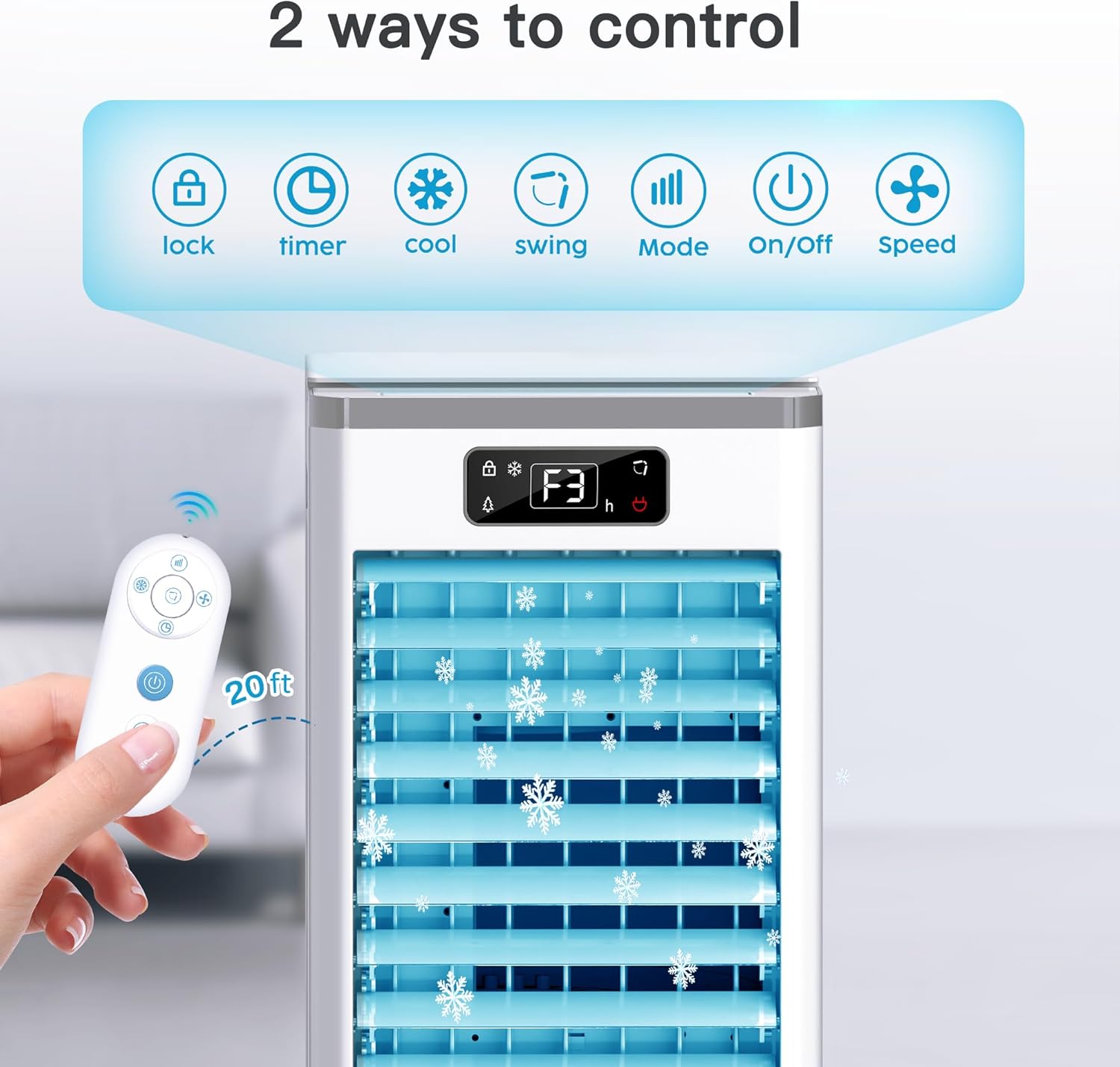
The control panel features touch buttons for Lock, Cool, Swing, Timer, Mode, Speed, and On/Off. A remote control is also included for convenient operation from a distance.
Video: Overview of the unit's control panel functions and remote control usage.
Modes and Speeds
Press the 'Mode' button to cycle through Cooling, Natural, and Sleep modes. Use the 'Speed' button to adjust fan intensity (Low, Medium, High).

The unit operates quietly at 46dB, making it suitable for use during sleep or work.
Oscillation and Timer
Activate the 'Swing' function for automatic 75° horizontal oscillation. Manually adjust the vertical louvers for desired airflow direction. Set the 'Timer' for automatic shut-off from 1 to 12 hours.

The unit provides wide coverage cooling with automatic oscillation and adjustable vertical airflow.
Maintenance and Care
Cleaning the Filter
The unit features a removable and washable filter. Regularly clean the filter to ensure optimal performance and air quality. Refer to the user manual for detailed instructions on removing and cleaning the filter paperboard.

The water tank is designed to be easily detached for thorough cleaning.
Water Tank Cleaning
Periodically clean the water tank to prevent mold or mildew buildup. Ensure the unit is unplugged before cleaning.
Troubleshooting
| Problem | Possible Cause | Solution |
|---|---|---|
| Unit does not turn on | Not plugged in; Power outage; Child lock activated | Check power connection; Restore power; Deactivate child lock |
| Air is not cool enough | Insufficient water; No ice added; High room humidity | Fill water tank; Add ice/ice boxes; Ensure proper ventilation (open window/door) |
| Unit is noisy | Unit not on a flat surface; Filter is dirty | Place on a stable surface; Clean the filter |
| Water leakage | Water tank overfilled; Water tank not properly inserted | Do not exceed MAX fill line; Reinsert water tank correctly |
Technical Specifications
| Attribute | Detail |
|---|---|
| Brand | WICOLO |
| Model Name | FK2306Y |
| Dimensions (D x W x H) | 11.8" x 11" x 24.4" |
| Item Weight | 9.5 pounds |
| Power Consumption | 65 Watts |
| Noise Level | 46 dB |
| Water Tank Capacity | 2 Gallons (7.5 Liters) |
| Air Flow Capacity | 32 Feet Per Second |
| Number of Speeds | 3 |
| Controls Type | Remote, Touch Panel |
| Special Features | Removable Washable Filter, Digital Display, Child Lock, Timer, Built-In Wheel |
| UPC | 199284723719 |
| Part Number | FK-2306Y |
Warranty and Support
For warranty information and customer support, please refer to the contact details provided in your product packaging or visit the official WICOLO website.