
Introduction
This manual provides detailed instructions for the setup, operation, and maintenance of your ONIKUMA GAMING CW902 Wired PC Gaming Mouse and M830 Gaming Microphone. Please read this manual thoroughly to ensure optimal performance and longevity of your devices.

The ONIKUMA GAMING CW902 Wired PC Gaming Mouse and M830 Gaming Microphone.
Safety Information
To prevent damage or malfunction, please observe the following safety guidelines:
- Keep the devices away from liquids, humidity, and moisture.
- Do not attempt to disassemble or modify the devices.
- Avoid extreme temperatures and direct sunlight.
- Use only the provided cables and accessories.
Package Contents
Verify that all items are present in your package:
- ONIKUMA GAMING CW902 Wired PC Gaming Mouse
- ONIKUMA GAMING M830 Gaming Microphone
- USB-A to USB-C Cable (for M830 Microphone)
- User Manual
Product Overview
CW902 Wired PC Gaming Mouse
The CW902 mouse is designed for gaming with customizable features and ergonomic design.
Mouse Features
- E-sports Level RGB Light Effect System: 360° surround streamer overflow light effect changes with game rhythm, enhancing the gaming atmosphere.
- Intelligent DPI Battlefield Mode: Equipped with PMW3389 e-sports level sensor, offering 4-speed DPI settings (1200/2400/3600) for precise tracking. Features FPS mode automatic sensitization anti-shake and MOBA mode intelligent acceleration.
- 7-Key Tactical Layout: Includes 20 million click life switches and 0.3ms career-level trigger feedback. Features double sniping keys in the thumb area with nano non-slip texture for increased blind operation accuracy.

The CW902 mouse features dynamic RGB lighting and a comfortable design.
Mouse Controls
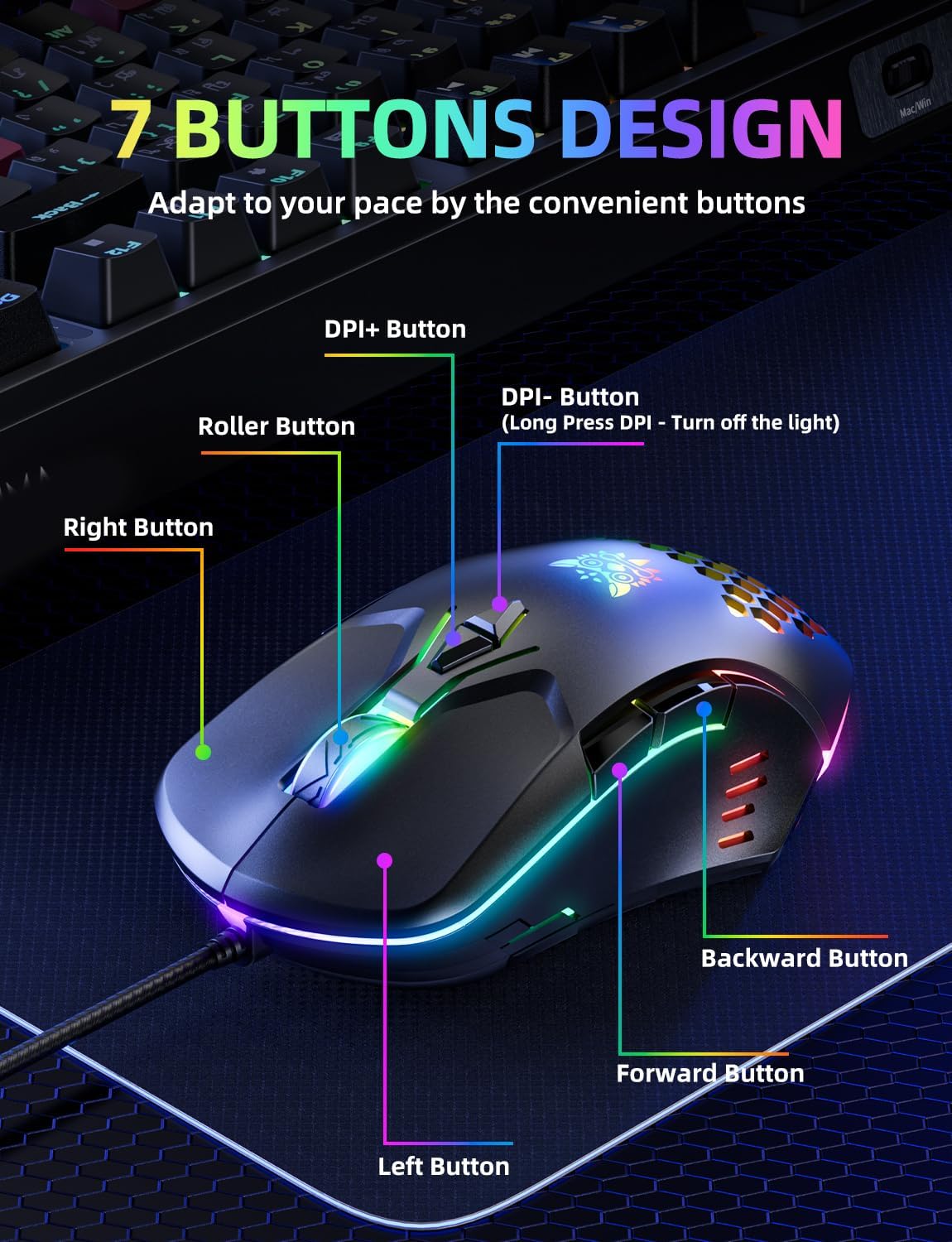
The CW902 mouse features a 7-button design for tactical control.
- DPI+ Button: Increases DPI sensitivity.
- DPI- Button: Decreases DPI sensitivity. Long press to turn off lighting.
- Roller Button: Scroll wheel with click function.
- Right Button: Standard right-click function.
- Left Button: Standard left-click function.
- Backward Button: Navigates back in web browsers or applications.
- Forward Button: Navigates forward in web browsers or applications.
M830 Gaming Microphone
The M830 microphone is designed for clear voice capture in gaming and streaming environments.
Microphone Features
- Vivid Voice Enjoyment: USB microphone captures voices clearly for multiplayer online games, cooperative games, or competitive games, enhancing collaboration.
- Cardioid Pickup: Focuses on capturing sound from the mic front, providing better sound quality and accuracy for gaming streaming or voice.
- Quick Mute Button: Condenser gaming mic has a touch-sensitive mute button at the top. Muting turns the RGB light off, unmuting turns it on, indicating status at a glance.
- RGB with Automatic Changing: Creates an immersive gaming atmosphere.

The M830 microphone features a 14mm diaphragm, condenser, and professional chipset for clear sound.

Optimal microphone placement for natural-sounding voice, 6-12 inches from the user.
Microphone Controls

The M830 microphone features a touch-sensitive mute button with LED indicator for working status.
- Mute Button: Located on the top of the microphone. Press to mute/unmute. The RGB light indicates the microphone's active (light on) or muted (light off) status.
Setup
CW902 Gaming Mouse Setup
- Connect the USB-A connector of the mouse cable to an available USB port on your PC.
- The mouse is plug-and-play and should be automatically recognized by your operating system.
- The RGB lighting will activate upon connection.
M830 Gaming Microphone Setup
- Connect the USB-C end of the provided cable to the USB-C port on the M830 microphone.
- Connect the USB-A end of the cable to an available USB port on your PC.
- The microphone is plug-and-play and should be automatically recognized by your operating system.
- The RGB lighting on the microphone will activate, indicating it is powered on and ready for use.
- Adjust your system's sound settings to select the M830 microphone as the input device.
Operating Instructions
CW902 Gaming Mouse Operation
- DPI Adjustment: Use the DPI+ and DPI- buttons to cycle through the available DPI settings (1200/2400/3600) to match your preference and game requirements.
- RGB Lighting Control: Long press the DPI- button to toggle the RGB lighting on or off.
- Programmable Buttons: The 7-key layout allows for various commands, macros, and shortcuts. Refer to your game or operating system's settings for custom key assignments.
M830 Gaming Microphone Operation
- Mute/Unmute: Press the touch-sensitive mute button on the top of the microphone to instantly mute or unmute your audio. The RGB light will turn off when muted and on when active.
- Optimal Usage: For best sound quality, position the microphone 6-12 inches from your mouth.
Maintenance
To maintain the performance and appearance of your devices:
- Clean the devices regularly with a soft, dry cloth.
- Avoid using harsh chemicals or abrasive cleaners.
- Keep the microphone grille free from dust and debris.
Troubleshooting
If you encounter issues, try the following solutions:
- Device Not Recognized: Ensure the USB cable is securely connected to both the device and the PC. Try a different USB port. Restart your computer.
- No Audio Input (Microphone): Check your PC's sound settings to confirm the M830 microphone is selected as the default input device. Ensure the microphone is not muted (RGB light should be on).
- Mouse Not Responding: Check the USB connection. Try a different USB port. Ensure the mouse cable is not damaged.
- RGB Lights Not Working: For the mouse, ensure the lighting hasn't been turned off by long-pressing the DPI- button. For the microphone, ensure it is powered on and not muted.
Specifications
CW902 Wired PC Gaming Mouse
- Sensor: PMW3389 e-sports level sensor
- DPI Settings: 1200/2400/3600 (4-speed adjustable)
- Buttons: 7-key tactical layout
- Switch Life: 20 million clicks
- Trigger Feedback: 0.3ms career level
- Lighting: E-sports level RGB light effect system
M830 Gaming Microphone
- Pickup Pattern: Cardioid
- Diaphragm: 14mm condenser
- Connectivity: USB
- Controls: Quick mute touch button
- Lighting: RGB light indicator for status
Warranty and Support
For warranty information and technical support, please refer to the official ONIKUMA GAMING website or contact their customer service directly. Keep your purchase receipt for warranty claims.