
2955-20
Milwaukee 2955-20 M12 PACKOUT Jobsite Speaker User Manual
Model: 2955-20 | Brand: Generic
Introduction
The M12 Bluetooth Jobsite Speaker with PACKOUT Compatibility is designed to deliver clear, portable sound and versatile jobsite functionality. Featuring a 3.5-inch woofer and high-frequency tweeter, it provides optimized audio for various work environments. Bluetooth 5.3 ensures a stable connection up to 200 feet, while the AUDIO-LINK feature allows for synchronized playback across multiple compatible Milwaukee devices for an expanded sound experience.
This speaker is built to withstand demanding jobsite conditions with an IP64 rating and offers convenient USB-C 3.0A device charging. Its twist-to-lock PACKOUT connectivity ensures secure transport and storage.
Setup
Unpacking and Initial Inspection
Carefully remove all components from the packaging. Verify that all included items are present:
- 1x 2955-20 M12 12V PACKOUT Cordless Bluetooth Jobsite Speaker - Bare Tool
- PACKOUT Twist to Lock Mount
- (3) Set Screws

Figure 1: Included Components - Speaker and PACKOUT Mount.
Powering the Speaker
The speaker is powered by an M12 REDLITHIUM XC4.0 Battery (not included). Insert a charged M12 battery into the designated battery compartment on the speaker.
Attaching the PACKOUT Mount
The kitted PACKOUT Mount allows for secure attachment to other PACKOUT solutions. Align the mount with the speaker's base and twist to lock it into place. Use the provided set screws for a more permanent attachment if desired.
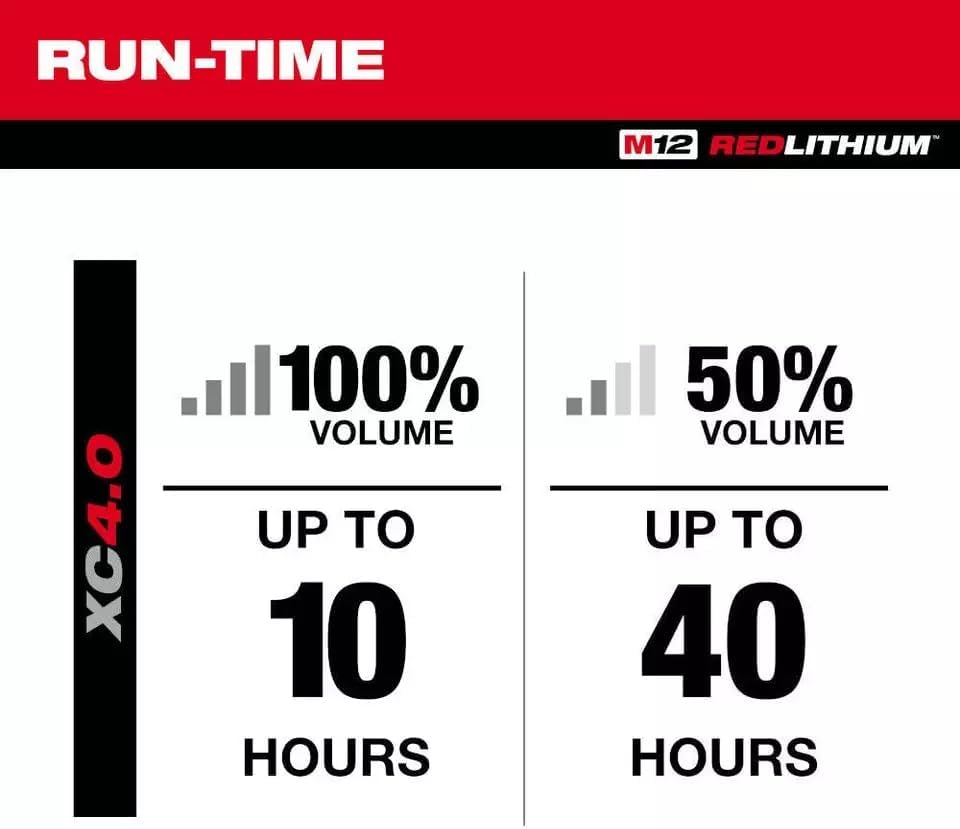
Figure 2: Speaker with PACKOUT Mount and dimensions.
Operating Instructions
Power On/Off
Press and hold the power button located on the control panel to turn the speaker on or off.
Bluetooth Pairing
- Ensure the speaker is powered on.
- Press the Bluetooth button on the speaker's control panel to enter pairing mode. The Bluetooth indicator light will flash.
- On your mobile device (smartphone, tablet, laptop), enable Bluetooth and search for available devices.
- Select "Milwaukee Speaker" (or similar name) from the list of devices.
- Once paired, the Bluetooth indicator light will become solid, and you will hear a confirmation tone.

Figure 3: Speaker Control Panel with Bluetooth and Audio-Link buttons.
Volume Control
Use the '+' and '-' buttons on the speaker's control panel to adjust the volume. You can also control the volume from your connected Bluetooth device.
AUDIO-LINK Feature
The AUDIO-LINK feature allows you to connect multiple compatible Milwaukee devices to create a larger sound experience.
- Connect your phone to the primary speaker via Bluetooth.
- Press the AUDIO-LINK button on the primary speaker.
- Press the AUDIO-LINK button on any other compatible Milwaukee speaker you wish to link.
- The speakers will synchronize, playing the same audio.

Figure 4: AUDIO-LINK Connection Diagram.
Equalizer Settings
The built-in equalizer settings allow you to customize the bass and treble to your preferred sound. Refer to the speaker's interface or companion app (if available) for specific adjustment methods.
USB-C Device Charging
The speaker features a USB-C 3.0A port for charging personal devices. Connect your device to this port using a compatible USB-C cable.
Battery Runtime
The speaker provides up to 10 hours of runtime at 100% volume when using an M12 REDLITHIUM XC4.0 Battery. Runtime can extend significantly at lower volumes.

Figure 5: Battery Runtime with M12 REDLITHIUM XC4.0 Battery.
Maintenance
Cleaning
Wipe the speaker with a soft, damp cloth to remove dust and dirt. Do not use harsh chemicals or abrasive cleaners. Ensure all ports are dry before use.
Battery Care
Always use genuine M12 REDLITHIUM batteries. Store batteries in a cool, dry place. Avoid fully discharging batteries for extended periods to prolong their lifespan.
Durability
The speaker has an IP64 rating, meaning it is protected from dust ingress and splashing water from any direction. While durable, avoid submerging the speaker in water or exposing it to extreme conditions beyond its rating.
Troubleshooting
| Problem | Possible Cause | Solution |
|---|---|---|
| Speaker does not power on. | Battery is not inserted correctly or is discharged. | Ensure battery is fully inserted. Charge or replace the battery. |
| No sound from speaker. | Volume is too low; device not connected; audio source issue. | Increase speaker and device volume. Re-pair Bluetooth. Check audio source on device. |
| Bluetooth connection unstable or fails. | Device too far; interference; pairing issue. | Move device closer (within 200 ft). Avoid obstacles. Forget device on phone and re-pair. |
| USB-C charging not working. | Cable issue; speaker not powered; device not compatible. | Try a different USB-C cable. Ensure speaker is on. Check device compatibility. |
If you encounter issues not listed here or if the problem persists, please refer to your purchase documentation or contact the seller for further assistance.
Specifications
| Feature | Detail |
|---|---|
| Model Name | 2955-20 |
| Speaker Type | Portable Speaker |
| Sound Hardware | (1) 3.5" Woofer, (1) Tweeter |
| Connectivity Technology | Bluetooth 5.3 |
| Maximum Range | 200 Feet |
| Power Source | Battery Powered (M12 REDLITHIUM) |
| Battery Life | Up to 10 Hours (at 100% volume with XC4.0 Battery) |
| Ingress Protection (IP) Rating | IP64 |
| USB-C Charging Output | 3.0A |
| Product Dimensions | 1"D x 1"W x 1"H (Note: Other sources indicate Width: 4.1", Height: 9.8", Depth: 3.9") |
| Weight (Tool-Only) | 1.8 lbs |
| Included Components | Speaker, PACKOUT Twist to Lock Mount, (3) Set Screws |
Warranty and Support
As this product is listed under a 'Generic' brand, specific warranty details may vary. Please refer to the warranty information provided at the time of purchase or contact the seller directly for details regarding warranty coverage, returns, and technical support.
It is recommended to retain your proof of purchase for any warranty claims.
Ask a question about this manual
Ask about setup, troubleshooting, compatibility, parts, safety, or missing instructions. Manuals+ will review the question and use this page’s manual context to help answer it.