
1. Introduction
This user manual provides comprehensive instructions for the operation and maintenance of your new GENERIC NS-RMTSAM21 Replacement Remote Control. Please read this manual carefully before using the remote control to ensure proper functionality and to maximize its lifespan. This remote is designed as a replacement for certain Samsung TVs and Insignia devices.
2. Product Overview
The NS-RMTSAM21 is a replacement remote control designed to operate compatible televisions. It features a standard layout with numerical keys, navigation buttons, volume and channel controls, and dedicated function buttons.
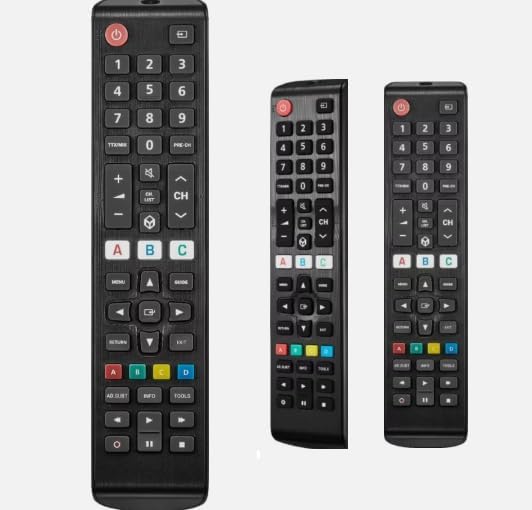
Figure 2.1: Front view of the NS-RMTSAM21 Replacement Remote Control. This image displays the full button layout, including the power button, number pad, volume and channel controls, navigation keys, and colored function buttons.
Key Features:
- Replacement remote control for compatible TV/Projector/Audio/Insignia and Samsung TVs.
- No programming or setup required; ready to use after battery installation.
- Constructed from durable ABS material for comfortable handling and longevity.
- Designed for ease of use with a familiar button layout.
- Features a digital display (where applicable, depending on specific model variant).
3. Setup
3.1 Battery Installation
- Locate the battery compartment on the back of the remote control.
- Slide the battery compartment cover downwards or outwards to open it.
- Insert two AAA batteries (not included), ensuring the positive (+) and negative (-) terminals align correctly with the markings inside the compartment.
- Close the battery compartment cover by sliding it back into place until it clicks securely.
Note: This remote control does not require any programming or complex setup. Once batteries are installed, it is ready for use with compatible devices.
4. Operating Instructions
Point the remote control directly at the infrared receiver on your television or compatible device. Ensure there are no obstructions between the remote and the device.
4.1 Basic Functions
- Power Button (●): Press to turn the TV/device on or off.
- Number Pad (0-9): Use to directly enter channel numbers or other numerical inputs.
- Volume Up/Down (+/-): Adjust the audio volume.
- Channel Up/Down (CH +/-): Change TV channels sequentially.
- Mute Button (🔇): Mute or unmute the audio.
- Navigation Buttons (Up, Down, Left, Right, Enter): Used to navigate menus and select options.
- Menu Button: Access the TV's main menu.
- Return/Exit Button: Go back to the previous screen or exit a menu.
- Colored Buttons (A, B, C, D): These buttons (Red, Green, Yellow, Blue) are typically used for specific functions within smart TV applications or teletext, depending on the TV model.
Note: As a replacement remote, some advanced or specific functions found on your original remote may not be supported or may operate differently. This is not indicative of a defective product.
5. Maintenance
5.1 Cleaning
To clean the remote control, gently wipe it with a soft, dry cloth. Do not use abrasive cleaners, solvents, or chemical sprays, as these can damage the remote's surface or internal components.
5.2 Battery Care
- Replace batteries when the remote's response becomes sluggish or inconsistent.
- Remove batteries if the remote control will not be used for an extended period to prevent leakage.
- Dispose of used batteries responsibly according to local regulations.
6. Troubleshooting
| Problem | Possible Cause | Solution |
|---|---|---|
| Remote not responding. | Dead or incorrectly installed batteries. Obstruction between remote and device. | Replace batteries, ensuring correct polarity. Remove any obstructions. Ensure remote is pointed directly at the device's IR sensor. |
| Some functions do not work. | This is a replacement remote; some advanced functions may not be supported. | Verify if the function is critical. If it's a basic function (e.g., volume, channel), check batteries and line of sight. Understand that not all original remote functions are replicated. |
| Remote works intermittently. | Low battery power. Weak IR signal. | Replace batteries. Ensure clear line of sight and proper aiming. |
If you continue to experience issues, please refer to the "Warranty and Support" section for further assistance.
7. Specifications
- Model Number: NS-RMTSAM21
- Compatible Devices: Television (specifically for Samsung TVs and Insignia devices as a replacement)
- Max Number of Supported Devices: 1
- Color: Black or White (depending on variant)
- Material: ABS
- Special Feature: Digital Display (where applicable)
- Power Source: 2 x AAA Batteries (not included)
8. Warranty and Support
This product is a replacement remote control. It is tested before delivery to ensure proper functionality. If you encounter any issues or have questions regarding its compatibility or operation, it is recommended to contact the seller directly. Providing your original remote's part number or your unit's model number can assist in resolving inquiries more efficiently.
Please note the return policy allows for a refund/replacement within 30 days of purchase, as per standard terms.


