
1. Introduction
The EVAWGIB Mini Fixed Mounted Embedded Barcode Scanner Module is a compact and efficient device designed for fast and accurate decoding of 1D and 2D barcodes. Utilizing intelligent image recognition algorithms, it can read codes from both paper and digital screens. Its small form factor and versatile RS232 interface make it suitable for integration into various systems and devices, such as kiosks, logistics cabinets, and self-service machines.
2. Key Features
- Easy Integration: Plug and play functionality with RS232 interface, requiring no complex software installation.
- High Compatibility: Designed for seamless embedding into various terminal devices including lockers, KIOSKs, logistics express cabinets, and self-service machines.
- Auto Induction Trigger: Automatically scans codes without the need for manual button presses, enhancing operational efficiency.
- Wide Barcode Support: Decodes a broad range of 1D and 2D codes, including QR Code, PDF417, Code128, EAN-13, Code39, UPC-A, and Data Matrix.
- Intelligent Image Recognition: Accurately decodes barcodes on paper or screens using advanced algorithms.
- Durable Design: Industrial-grade scanning head with infrared self-sensing technology for reliable performance.
- Visual Indicators: Equipped with siren and LED light indicators for operational feedback.
3. Package Contents
Please verify that all items are present upon unpacking:
- EVAWGIB Barcode Scanner Module
- RS232 Connectivity Cable
- User Manual (this document)
4. Setup
Follow these steps to set up your barcode scanner module:
- Connect the Cable: Plug the RS232 cable into the designated port on the barcode scanner module.
- Connect to Host Device: Connect the other end of the RS232 cable to the RS232 port on your computer or host system.
- Power On: Ensure the host device provides the necessary 5V operating voltage to the scanner module. The scanner will power on automatically.
- System Recognition: The scanner is recognized as a keyboard device, inputting barcode characters directly into any active text field. No special drivers are typically required for basic operation.

Figure 1: The EVAWGIB barcode scanner module connected via its RS232 cable. The image shows the compact black scanner unit with a red laser line emanating from its scanning window, and a detached RS232 connector cable.
5. Operating Instructions
The scanner module is designed for straightforward operation:
- Positioning: Place the barcode or QR code within the scanner's field of view. The scanner features an industrial-grade 2D scanning head with infrared self-sensing technology.
- Automatic Scanning: The scanner will automatically detect and decode the barcode or 2D code. There is no need to press a trigger button.
- Feedback: Upon successful scan, the scanner may emit a siren sound and/or an LED light will flash, indicating a successful read. The decoded data will be transmitted to the connected host device.
- Reading Performance: The intelligent image recognition algorithm allows for quick and accurate identification of multiple 1D/2D codes, even dirty, reversed, or fine barcodes. It can also sense quickly through a transparent lens in front of the scanning window.

Figure 2: The scanner module highlighting its industrial-grade 2D scanning head and infrared self-sensing technology, capable of quickly identifying various 1D/2D codes.
6. Supported Barcode Types
The EVAWGIB scanner module supports a comprehensive range of 1D and 2D barcode symbologies:
1D Codes:
- Codebar
- Code 11
- Code 39 / Code 93
- UPC / EAN (UPC-A, UPC-E, EAN-8, EAN-13)
- Code 128 / EAN128
- Interleaved 2 of 5
- Matrix 2 of 5
- MSI Code
- Industrial 2 of 5
- GS1 Databar (RSS)
2D Codes:
- QR Code
- Data Matrix
- PDF417

Figure 3: Visual examples of various 1D (Code128, Code39, Code93, UPC-E, UPC-A) and 2D (QR Code, PDF417, Data Matrix) barcodes that the scanner can easily read from paper or monitor screens.
7. Typical Applications
The compact size and robust performance of this barcode scanner module make it ideal for integration into a wide array of self-service and automated systems:
- Logistics and Express Cabinets: For package tracking and retrieval.
- Kiosks and Vending Machines: For payment processing or product identification.
- Self-Service Ticket Machines: For scanning tickets or boarding passes.
- Access Control Systems: Such as brake machines or parking systems for entry/exit verification.
- Garbage Sorters: For automated waste management systems.
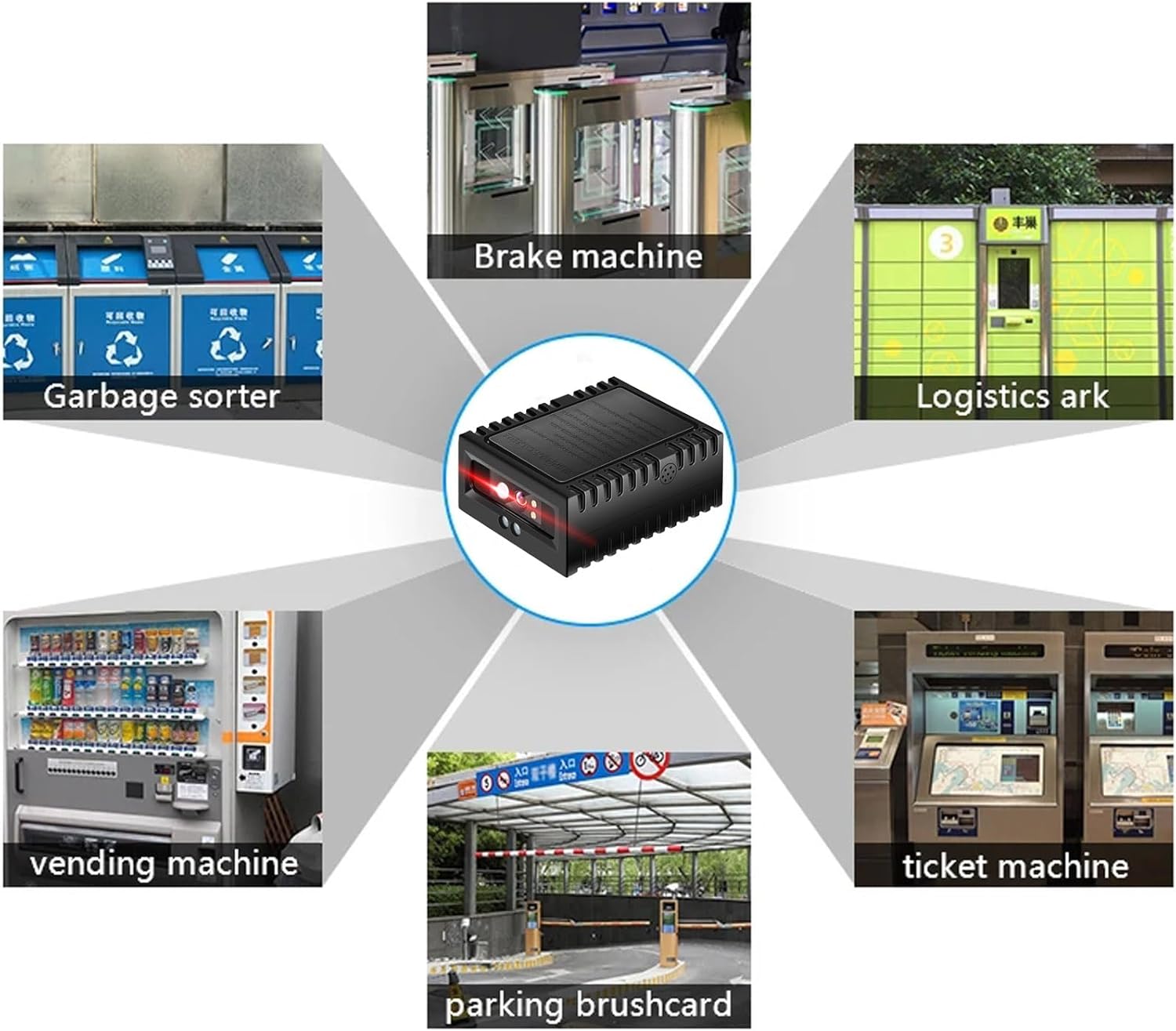
Figure 4: Illustrates diverse applications where the embedded barcode scanner module can be utilized, including garbage sorters, brake machines, logistics arks, vending machines, ticket machines, and parking systems.
8. Technical Specifications
| Specification | Value |
|---|---|
| Operating Voltage | 5V |
| Operating Current (Scanning) | 135mA |
| Operating Current (Standby) | 58mA |
| Operating Current (Sleep) | 2mA |
| Operating Temperature | 0°C ~ 60°C |
| Operating Humidity | 5% ~ 95% (Non-condensing) |
| Communication Interface | RS232 |
| Light Source | White LED |
| Scan Angles (Roll) | 360° |
| Scan Angles (Skew) | ±65° |
| Scan Angles (Pitch) | ±60° |
| Field of View (Horizontal) | 28° |
| Field of View (Vertical) | 21.5° |
| Package Dimensions | 4.7 x 3.5 x 1.65 inches |
| Item Weight | 5.3 ounces |
9. Product Dimensions
The scanner module features a compact design for easy integration:
- Length: 52.8 mm
- Width: 42.5 mm
- Height: 22 mm

Figure 5: Detailed dimensions of the barcode scanner module, showing its length (52.8mm), width (42.5mm), and height (22mm).
10. Maintenance
To ensure optimal performance and longevity of your barcode scanner module, follow these maintenance guidelines:
- Cleaning: Gently wipe the scanning window and exterior casing with a soft, dry, lint-free cloth. For stubborn dirt, slightly dampen the cloth with water or a mild, non-abrasive cleaner. Avoid using harsh chemicals, solvents, or abrasive materials.
- Environmental Conditions: Operate and store the scanner within the specified temperature and humidity ranges to prevent damage. Avoid exposure to extreme temperatures, direct sunlight, or high moisture environments.
- Cable Care: Handle the RS232 cable with care. Avoid bending, twisting, or pulling it excessively, which can damage the internal wires or connectors.
- Protection: While the scanner is designed for embedded use, ensure it is protected from physical impact or excessive vibration during installation and operation.
11. Troubleshooting
If you encounter issues with your barcode scanner module, refer to the following common problems and solutions:
- Scanner Not Responding:
- Ensure the RS232 cable is securely connected to both the scanner and the host device.
- Verify that the host device is powered on and providing the necessary 5V power to the scanner.
- Check the host device's port settings to ensure proper communication.
- Unable to Read Barcodes:
- Ensure the barcode is clean, undamaged, and within the scanner's field of view.
- Check if the barcode type is supported by the scanner (refer to Section 6).
- Clean the scanning window if it is dirty or obstructed.
- Adjust the distance between the scanner and the barcode.
- Incorrect Data Output:
- Verify the host system's input settings are configured correctly for RS232 data reception.
- Ensure the correct keyboard layout is selected on the host device if the scanner is emulating a keyboard.
- Intermittent Scanning:
- Check for loose cable connections.
- Ensure there are no strong light sources or reflective surfaces interfering with the scanner's operation.
12. Warranty and Support
This EVAWGIB product is covered by a standard manufacturer's warranty against defects in materials and workmanship. For specific warranty terms, duration, and to obtain technical support or service, please refer to the documentation provided with your purchase or contact your vendor. Keep your proof of purchase for warranty claims.


