1. Product Overview
The Le Veil 7th Gen iCigar Humidifier System DCH-12V7 is an advanced electronic humidifier designed to maintain optimal humidity levels for cigars in humidors up to 6 cubic feet or 600 count. Featuring a commercial capacitive humidity sensor, a powerful brushless fan, and dual water tanks, this system ensures consistent and reliable humidity control. This model includes Bluetooth connectivity for convenient monitoring and control via a mobile application.

Figure 1.1: The Le Veil iCigar Humidifier System, showcasing its commercial capacitive humidity sensor, dual water tanks, powerful brushless fan, and one-year USA warranty service.
Key Features:
- Commercial Capacitive Humidity Sensor for precise readings.
- Flat Power Cable designed to pass easily through humidor doors and lids.
- Powerful Brushless Fan for efficient air circulation.
- Dual Water Tanks (small and large) for versatile use.
- Bluetooth Connectivity for remote monitoring and control (iCigar 7 + Bluetooth model).
- Supports humidors from 25CT to 600CT, up to 6 CBFT.
2. Package Contents
Please verify that all items listed below are included in your package. If any items are missing or damaged, please contact customer support.

Figure 2.1: All components included in the Le Veil iCigar Humidifier System package, including the controller, water tanks, power adapter, gel, and flat cable.
Included Components:
- iCigar Humidifier Controller Unit
- Large Water Tank
- Small Water Tank
- Bag of Humidification Gel Beads
- EU/US Power Adapter (AC 110V~240V, DC 12V)
- 19-inch Flat Cable and Connector
- Hygrometer (integrated or separate, depending on model variant)
Optional Accessories (Sold Separately):

Figure 2.2: Optional accessories such as an external fan and a Bluetooth adapter, which can enhance the humidifier's functionality.
- External Fan
- Bluetooth Adapter (for models without integrated Bluetooth)
- Free Mobile Application (available for download)
3. Setup Instructions
Follow these steps to set up your Le Veil iCigar Humidifier System.
- Prepare the Water Tank: Choose either the large or small water tank based on your humidor size. Carefully open the bag of humidification gel beads and pour them into the chosen water tank. Add distilled water to the tank up to the 'MAX' fill line. Allow the gel beads to fully absorb the water and expand. This may take a few hours.
- Assemble the Unit: Place the humidifier controller unit onto the filled water tank. Ensure the unit is securely seated. Important: If the unit does not fit properly, ensure that any pre-installed rubber airflow covers on the water tank are removed. These covers are for shipping protection and must be taken off for proper assembly and airflow.
- Connect Power: Connect the 19-inch flat cable to the humidifier controller unit. Route the flat cable through the humidor door or lid, ensuring it does not get pinched. Connect the other end of the flat cable to the power adapter, then plug the power adapter into a standard electrical outlet (110V-240V).
- Placement in Humidor: Place the assembled humidifier unit inside your humidor. Ensure it is positioned to allow for optimal air circulation.
- Initial Calibration (Optional): Your unit comes pre-calibrated. However, if you wish to perform a manual calibration, refer to the detailed instructions in the full user manual or the mobile application.
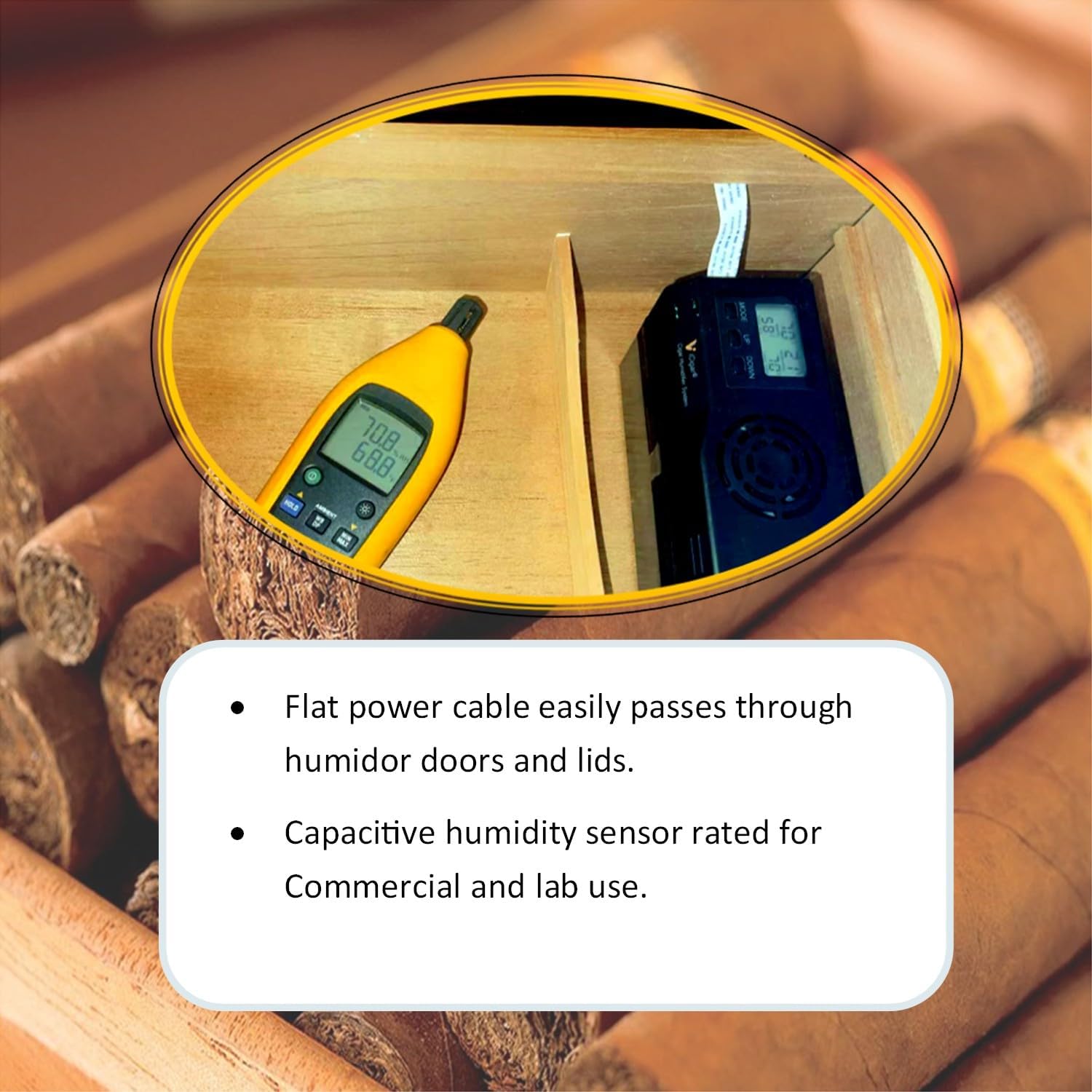
Figure 3.1: The flat power cable allows for easy routing without compromising the humidor's seal, and the capacitive humidity sensor ensures accurate readings.

Figure 3.2: Detail of the Air Boost Cap for additional airflow in larger humidors and the silicone Airflow Flaps that close when the fan is inactive to prevent excess humidity from entering.
4. Operating Instructions
Once set up, the iCigar Humidifier System will begin to regulate the humidity in your humidor.
- Power On: The unit will power on automatically when connected to an electrical outlet. The display will show the current temperature and humidity.
- Set Desired Humidity: Use the 'UP' and 'DOWN' buttons on the control panel to adjust the desired humidity percentage. The unit will automatically work to achieve and maintain this level.
- Bluetooth Connectivity (Optional): If your model includes Bluetooth, download the official Le Veil iCigar app from your device's app store. Follow the in-app instructions to pair your device with the humidifier. This allows for remote monitoring, setting adjustments, and access to additional features.
- Monitoring: The display provides real-time readings of temperature and humidity. The fan will activate periodically to circulate air and adjust humidity as needed.
5. Maintenance
Regular maintenance ensures the longevity and optimal performance of your iCigar Humidifier System.
- Water Refill: Check the water level in the tank regularly. It is recommended to refill with distilled water approximately every three days, or as indicated by the unit's low water warning. Always use distilled water to prevent mineral buildup.
- Gel Bead Replacement: The humidification gel beads are designed to be replaced on a yearly basis to maintain their effectiveness. Replacement gel bead kits are available from Le Veil.
- Cleaning: Periodically clean the water tank and the humidifier unit with a soft, damp cloth. Do not submerge the electronic components in water. Ensure all parts are dry before reassembly.
6. Troubleshooting
If you encounter issues with your iCigar Humidifier System, refer to the table below for common problems and solutions.
| Problem | Possible Cause | Solution |
|---|---|---|
| Humidity not stable or incorrect reading. | Low water level; old gel beads; humidor not sealed properly; unit not positioned correctly. | Refill water tank with distilled water; replace gel beads if over a year old; check humidor seal; ensure unit has adequate airflow. |
| Unit not powering on. | Power cable not connected; power outlet issue. | Ensure flat cable is securely connected to both the unit and the power adapter. Verify the power adapter is plugged into a working outlet. |
| Difficulty assembling the unit. | Rubber airflow covers still in place on the water tank. | Remove the protective rubber airflow covers from the water tank before attempting to attach the controller unit. |
| Bluetooth connection issues. | App not installed; device out of range; humidifier not in pairing mode. | Download the official Le Veil iCigar app; ensure your mobile device is within range; restart the humidifier and try pairing again. |
7. Technical Specifications
Detailed specifications for the Le Veil 7th Gen iCigar Humidifier System DCH-12V7.

Figure 7.1: The Le Veil iCigar Humidifier System with its approximate dimensions: 2.2"D x 6"W x 3.5"H (5.2cm D x 15cm W x 9cm H).
| Feature | Specification |
|---|---|
| Brand | Le Veil |
| Model Name | 7th Gen iCigar (DCH-12V7) |
| Product Dimensions | 2.2"D x 6"W x 3.5"H (approx. 5.2cm D x 15cm W x 9cm H) |
| Item Weight | 1 Pound (approx. 0.45 kg) |
| Voltage | 120 Volts (AC 110V~240V, DC 12V adapter) |
| Operation Mode | Vaporizer |
| Capacity | Up to 6 Cubic Feet (or 600 cigars) |
| Special Features | Bluetooth (option), Commercial Capacitive humidity sensor, Removable Tank, Powerful Brushless Fan |
| Included Components | Hygrometer, Dual Water Tanks, Humidification Gel, Power Adapter, Flat Cable |

Figure 7.2: The iCigar Humidifier is compatible with a wide range of humidors, from small 25-count boxes to large 600-count cabinets, or up to 6 cubic feet.
8. Warranty and Support
Warranty Information:
The Le Veil 7th Gen iCigar Humidifier System DCH-12V7 comes with a One-Year USA Warranty Service. This warranty covers defects in materials and workmanship under normal use. Please retain your proof of purchase for warranty claims.
Customer Support:
For technical assistance, troubleshooting, or warranty inquiries, please contact Le Veil customer support through the retailer where the product was purchased or visit the official Le Veil website for contact information.


