DIGITMON Right-Angle 2-Prong AC Power Cable Instruction Manual
Model: DIGI2PRONG6RIGHT805
1. Overview
This manual provides essential instructions for the safe and effective use of your DIGITMON Right-Angle 2-Prong AC Power Cable, model DIGI2PRONG6RIGHT805. This 6-foot non-polarized power cord is designed for various electronic devices, including TVs and home appliances, requiring a C7 connector. Its right-angle design is ideal for installations in tight spaces.
Image 1.1: The DIGITMON Right-Angle 2-Prong AC Power Cable. This image shows the full length of the black power cable, featuring a NEMA 1-15P plug on one end and an IEC320 C7 connector on the other, both designed with a right-angle orientation.
2. Setup
Follow these steps to properly set up your power cable:
Identify Connectors: Ensure the device you intend to power requires a 2-prong non-polarized C7 connector. The cable features a NEMA 1-15P plug for the wall outlet and a 90-degree angled C7 connector for your device.
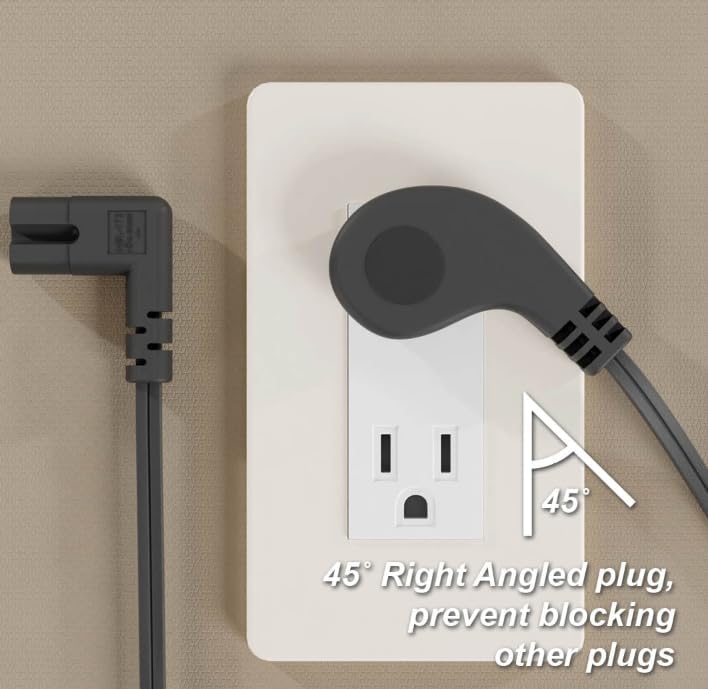
Image 2.1: Diagram illustrating the NEMA 1-15P and IEC320 C7 connectors. The NEMA 1-15P is shown with its 45-degree angled, low-profile design, while the IEC320 C7 is depicted with its 90-degree right-angled configuration, highlighting the non-polarized nature of both ends.
Connect to Device: Insert the 90-degree angled C7 connector firmly into the power input port of your electronic device.
Connect to Power Outlet: Plug the NEMA 1-15P end of the cable into a standard 2-prong wall outlet. The right-angle design of both connectors helps prevent obstruction of adjacent outlets and allows for flush placement against walls.
Image 2.2: The right-angle NEMA 1-15P plug connected to a wall outlet. This image demonstrates how the 45-degree angled plug sits flush against the wall, preventing it from blocking the second outlet.
Verify Connection: Ensure both ends are securely connected. The device should now receive power.
Important Safety Note: This cable is designed for indoor use only and is rated for 125 Volts. Do not exceed the specified voltage or current ratings of your device or the cable itself. Always ensure the power outlet is easily accessible for quick disconnection if needed.
3. Operation
The DIGITMON Right-Angle 2-Prong AC Power Cable functions as a direct power supply for compatible electronic devices. Once properly connected to a power source and your device, it will provide the necessary electrical current. No further operational steps are required for the cable itself.
Ensure the cable is not kinked, pinched, or placed under heavy objects.
Avoid using the cable in wet or damp conditions.
Do not attempt to modify the cable or its connectors.
4. Maintenance
Proper maintenance ensures the longevity and safe operation of your power cable:
Cleaning: Disconnect the cable from both the power outlet and the device before cleaning. Wipe the cable and connectors with a dry, soft cloth. Do not use liquid cleaners or abrasive materials.
Inspection: Regularly inspect the cable for any signs of damage, such as cuts, fraying, exposed wires, or bent/corroded prongs. If any damage is observed, discontinue use immediately and replace the cable.
Storage: When not in use, store the cable in a cool, dry place, away from direct sunlight and extreme temperatures. Avoid tightly coiling the cable, which can stress the internal wires.
5. Troubleshooting
If your device is not receiving power after connecting the DIGITMON power cable, consider the following:
No Power to Device:
Ensure both ends of the power cable are fully and securely inserted into the wall outlet and the device's power port.
Check if the wall outlet is functional by plugging in another known working appliance.
Verify that the device itself is turned on and functioning correctly.
Inspect the cable for any visible damage (cuts, kinks, bent prongs). If damaged, replace the cable.
Loose Connection:
If the connection feels loose, gently re-insert the connectors. Avoid forcing them.
If troubleshooting steps do not resolve the issue, contact DIGITMON customer support for further assistance.
6. Specifications
Detailed technical specifications for the DIGITMON Right-Angle 2-Prong AC Power Cable:
Feature
Detail
Model Number
DIGI2PRONG6RIGHT805
Connector A
NEMA 1-15P (45° Angled, Low Profile)
Connector B
IEC320 C7 (90° Right Angled)
Cable Length
6 Feet (approx. 1.8 meters)
Conductor
18AWG x 2C
Voltage Rating
Max 300V (Cable), 125V (NEMA 1-15P)
Current Rating
10A (NEMA 1-15P), 7A (C7)
Jacket Material
SPT-2, VW-1 (Enhanced durability and flame resistance)
Temperature Rating
VW-1 105°C (221°F), SPT-2 60°C (140°F)
Certifications
UL Listed (E210037), cUL Listed (E204978), RoHS Compliant
Color
Black
Item Weight
0.3 ounces
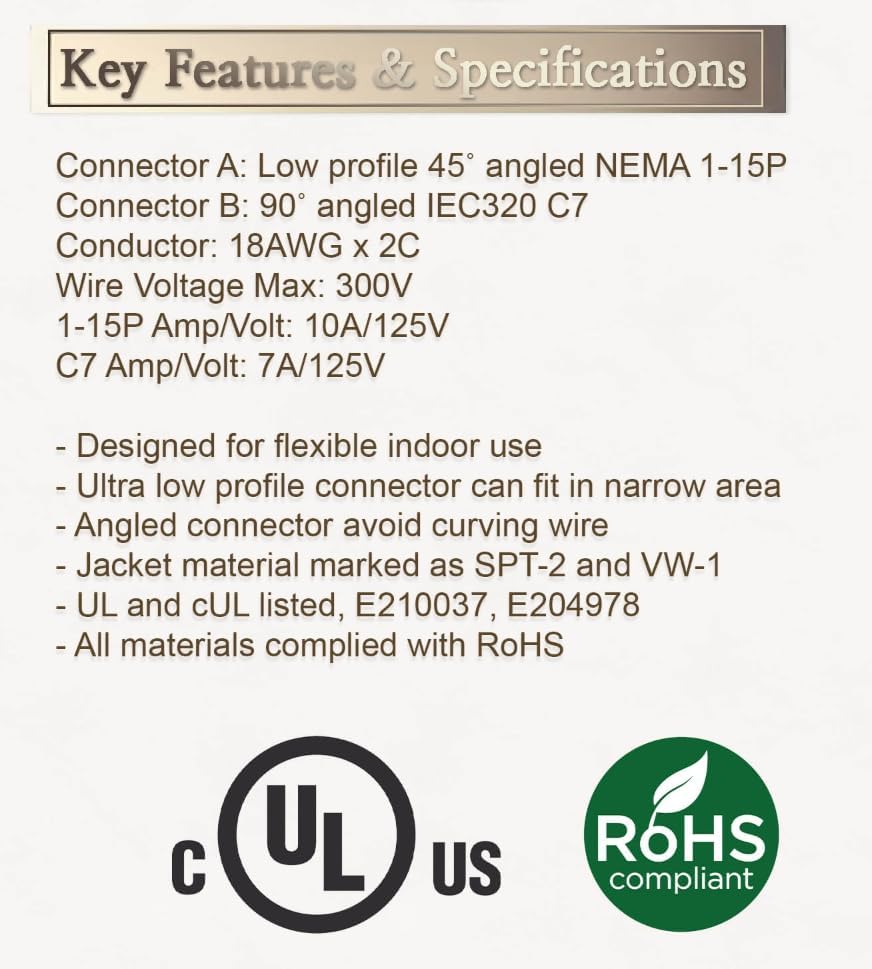
Image 6.1: Visual summary of key features and specifications. This image displays a graphic detailing the connector types (NEMA 1-15P and IEC320 C7), conductor gauge, voltage/amp ratings, jacket material, temperature ratings, and UL/cUL/RoHS compliance.
7. Warranty Information
For specific warranty details regarding your DIGITMON Right-Angle 2-Prong AC Power Cable, please refer to the product packaging or contact DIGITMON customer support directly. Typically, power cables are covered against manufacturing defects for a limited period from the date of purchase.
8. Customer Support
If you have any questions, require technical assistance, or need to report an issue with your DIGITMON Right-Angle 2-Prong AC Power Cable, please contact our customer support team:
Please have your model number (DIGI2PRONG6RIGHT805) and purchase details ready when contacting support.
Ask a question about this manual
Ask about setup, troubleshooting, compatibility, parts, safety, or missing instructions. Manuals+ will review the question and use this page’s manual context to help answer it.