
Introduction
Welcome to the QISHENKOLA R36S Retro Handheld Game Console user manual. This guide provides detailed instructions on how to set up, operate, maintain, and troubleshoot your device. Please read this manual thoroughly to ensure optimal performance and longevity of your console.
Package Contents
Upon unboxing, please verify that all the following items are included:
- R36S Retro Handheld Game Console
- Type-C Charging Cable
- TF Card (pre-installed with games and operating system)
- User Manual (this document)
Device Overview
Familiarize yourself with the layout and functions of your R36S console.

Figure 1: QISHENKOLA R36S Key Functions Diagram. This image illustrates the location of the Power button, Reset button, TF1 (OS) and TF2 (Game) card slots, FN (Function) button, Select and Start buttons, Left and Right Joysticks (L3/R3), D-pad, DC charging port, OTG port, 3.5mm interforce (headphone jack), Volume Keys, and shoulder buttons (R1, R2, L1, L2).
The console features a 3.5-inch IPS screen, dual 3D joysticks, a cross-shaped directional pad, and ergonomic L/R shoulder buttons for comfortable gameplay. It is designed to be portable and lightweight.
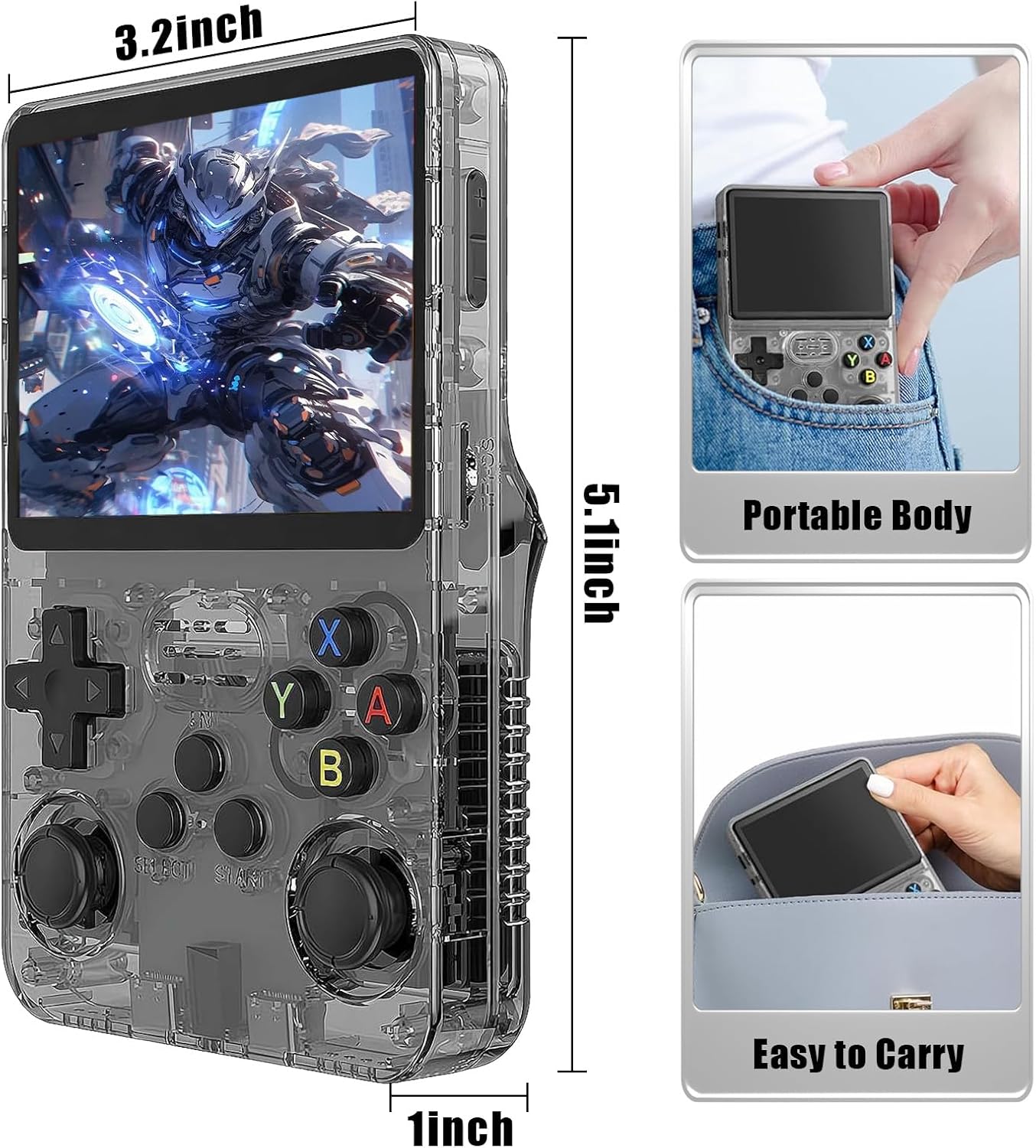
Figure 2: QISHENKOLA R36S Dimensions and Portability. The console measures approximately 5.1 inches in height, 3.2 inches in width, and 1 inch in thickness, making it easy to carry in a pocket or bag.
Setup
Initial Charging
Before first use, fully charge your R36S console. Connect the provided Type-C charging cable to the DC port on the console and plug the other end into a compatible USB power adapter (Max 5V 1.5-2A). The console is equipped with a 3500mAh battery, providing up to 8 hours of gameplay on a full charge.
Inserting TF Cards
Your R36S console comes with two TF card slots:
- TF1 (OS): This slot typically contains the operating system card. Do not remove this card during operation.
- TF2 (Game): This slot contains the game card with over 20,000 pre-installed games. You can insert additional game cards here if desired.
Ensure both TF cards are securely inserted before powering on the device.
Operating Instructions
Power On/Off
- To Power On: Press and hold the Power button located on the top left side of the console until the screen illuminates.
- To Power Off: Press and hold the Power button until a shutdown menu appears, then select 'Shutdown'. Alternatively, a quick press of the Reset button will restart the device.
Navigating the System
Use the Left Joystick or the D-pad to navigate through menus and game lists. The A button typically confirms selections, while the B button usually cancels or goes back.
Playing Games
The console supports 21 different emulators and comes with a vast library of over 20,000 games. Navigate to the desired emulator or game list, select a game using the A button, and it will launch automatically.
Saving and Loading Games
During gameplay, you can save and load your progress:
- Save Game: Press Select Button + L1/R1 simultaneously.
- Load Game: Press Select Button + A-Taste simultaneously.
Exiting Games
To exit a game and return to the main menu, press Select Button + Start Button simultaneously.
Adjusting Brightness
To adjust the screen brightness, press Select Button + Up/Down on the D-pad.
Connecting External Devices
The R36S console supports external connections for enhanced gaming experiences.

Figure 3: External Device Connectivity. The console can connect to a large screen output and external gamepads via an OTG adapter.
- OTG Port: Use the OTG port with an appropriate adapter to connect external gamepads for multiplayer gaming or to output video to a larger screen.
- 3.5mm Headphone Jack: Connect headphones for private audio.
Wi-Fi Connection
The R36S supports Wi-Fi connectivity. To enable this feature, you may need to use an external Type-C Wi-Fi receiver (not included). Once connected, you can access online features or transfer files.

Figure 4: Wi-Fi Connection Support. The console supports Wi-Fi connectivity, potentially allowing for multiplayer gaming or online features with a Type-C Wi-Fi receiver.
Maintenance
Cleaning
Keep the console clean by using a soft, dry cloth. Avoid using harsh chemicals, abrasive cleaners, or solvents, as these may damage the screen or the body of the console.
Battery Care
To prolong battery life:
- Use only the original USB Type-C cable or a high-quality compatible cable for charging.
- Avoid fully discharging the battery frequently.
- Do not expose the console to extreme temperatures (hot or cold) as this can degrade battery performance.
Storage
When not in use for extended periods, store the console in a cool, dry place away from direct sunlight. Avoid exposing the console to extreme temperatures or high humidity.
Troubleshooting
If you encounter issues with your R36S console, please refer to the following common problems and solutions:
- Console does not power on:
Ensure the battery is sufficiently charged. Connect the console to a power source using the Type-C cable and allow it to charge for at least 30 minutes before attempting to power on again. Check that the TF1 (OS) card is properly inserted. - Games are not loading or system is slow:
Ensure both TF cards are correctly inserted. The console features a high-performance RK3326 chip, but if performance issues persist, try restarting the device using the Reset button. - Screen issues (no display, flickering):
Check the screen brightness settings (Select + D-pad Up/Down). If the issue persists, try restarting the console. - Controls are unresponsive:
Restart the console. If using an external gamepad, ensure it is properly connected via the OTG port.
If these steps do not resolve your issue, please contact customer support.
Specifications
| Feature | Specification |
|---|---|
| Model Number | R36S |
| Screen Size | 3.5 Inches |
| Display Type | IPS OCA Full MIPI Screen, 640x480 Resolution |
| Processor | RK3326 Chip, ARM 64-bit Quad-core Cortex-A35 CPU (up to 1.5GHz) |
| GPU | Mali-G31MP2 (520MHz) |
| Memory Storage Capacity | 64 GB (via TF card) |
| Battery Capacity | 3500mAh Lithium-Ion |
| Battery Life | Up to 8 Hours |
| Power Source | Battery Powered (USB Type-C charging) |
| Controller Type | Joystick, D-pad, Buttons |
| Material | Plastic |
| Product Dimensions | 4.13 x 1.77 x 6.5 inches |
| Item Weight | 12.5 ounces |
Warranty and Support
QISHENKOLA offers a one-year return service for the R36S Retro Handheld Game Console. You may request a refund at any time if you are not satisfied. A lifetime worry-free warranty is also provided. For any problems encountered during use, please contact customer support. We aim to respond and resolve issues within 12 hours.
For further assistance or inquiries, please refer to the contact information provided with your purchase or visit the official QISHENKOLA support channels.