
1. Introduction
Thank you for choosing the HUANUO Electric Standing Desk. This manual provides detailed instructions for assembly, operation, and maintenance to ensure optimal performance and longevity of your desk. Designed for both home office and computer workstation use, this adjustable height desk offers a versatile solution for a healthier and more productive work environment.
The HUANUO Electric Standing Desk allows you to easily switch between sitting and standing positions, promoting better posture and reducing discomfort during long work sessions. With its robust construction and smart features, it is built to enhance your daily work experience.
2. Product Features
- Wide Height Adjustment Range: Easily switch between sitting and standing with a height range of 28.3" to 46.5", accommodating various work preferences and postures.
- Convenient Memory Presets: Featuring four programmable height settings, the smart control panel lets you switch to your preferred height with a single touch.
- Multiple Sizes & Colors: Available in various sizes and colors to fit any workspace and match your style.
- Built for Durability: Constructed with high-quality steel, offering exceptional stability and durability. Rigorously tested to withstand 50,000 lift cycles at full capacity.
- Quick & Easy Assembly: Streamlined assembly process with fewer steps and minimal lifting required.
- Ultra-Quiet Performance: Operates at less than 50dB, ensuring a quiet work environment.

Image: The HUANUO Electric Standing Desk, showcasing its sleek design and integration into a modern workspace.

Image: Visual representation of the desk's dimensions, including its width, depth, and adjustable height range.

Image: Detail highlighting the desk's reliable lifting mechanism, tested for 50,000 cycles and supporting up to 176 lbs.
3. Package Contents
Please verify that all components are present before beginning assembly. If any parts are missing or damaged, please contact customer support.
- High-performance carbon steel frame
- Environmentally friendly spliced table top (Black Walnut, 43" x 24")
- Control panel with memory presets
- Power adapter and cables
- All necessary assembly tools (including a screwdriver)
- Instruction Manual
4. Setup and Assembly
The HUANUO Electric Standing Desk is designed for quick and straightforward assembly. Please follow these steps carefully.
- Unpack Components: Carefully remove all parts from the packaging and lay them out on a clean, flat surface. Verify against the package contents list.
- Assemble Frame: Attach the desk legs to the crossbar, ensuring all screws are securely tightened. The included tools will assist in this process.
- Attach Desktop: Carefully place the spliced table top onto the assembled frame. Align the pre-drilled holes and secure the desktop to the frame using the provided screws.
- Install Control Panel: Mount the control panel to the underside of the desktop in the designated area. Connect the motor and power cables to the control panel as indicated in the diagrams.
- Connect Power: Plug the power adapter into the control panel and then into a wall outlet.
- Initial Test: After assembly, perform an initial test by pressing the up and down arrows on the control panel to ensure smooth operation.
Note: While assembly is designed to be easy, ensure all connections are firm. If you encounter any difficulty with screw alignment, gently adjust the components to ensure a proper fit. All necessary tools are included.
5. Operating Instructions
5.1. Adjusting Height
- Manual Adjustment: Use the Up (▲) and Down (▼) arrows on the control panel to raise or lower the desk to your desired height. The LED display will show the current height.
- Memory Presets: The desk features four programmable memory height settings (1, 2, 3, 4).
5.2. Setting Memory Presets
- Adjust the desk to your desired height using the Up/Down arrows.
- Press the "M" button (or "SAVE" if indicated) on the control panel. The display may flash or beep.
- Within 3 seconds, press the desired memory button (1, 2, 3, or 4) to save the current height to that preset. The display will confirm the setting.
- To recall a saved height, simply press the corresponding memory button (1, 2, 3, or 4). The desk will automatically move to the saved position.

Image: Detail of the smart control panel, highlighting the LED display, four memory height settings, and smooth up/down controls.
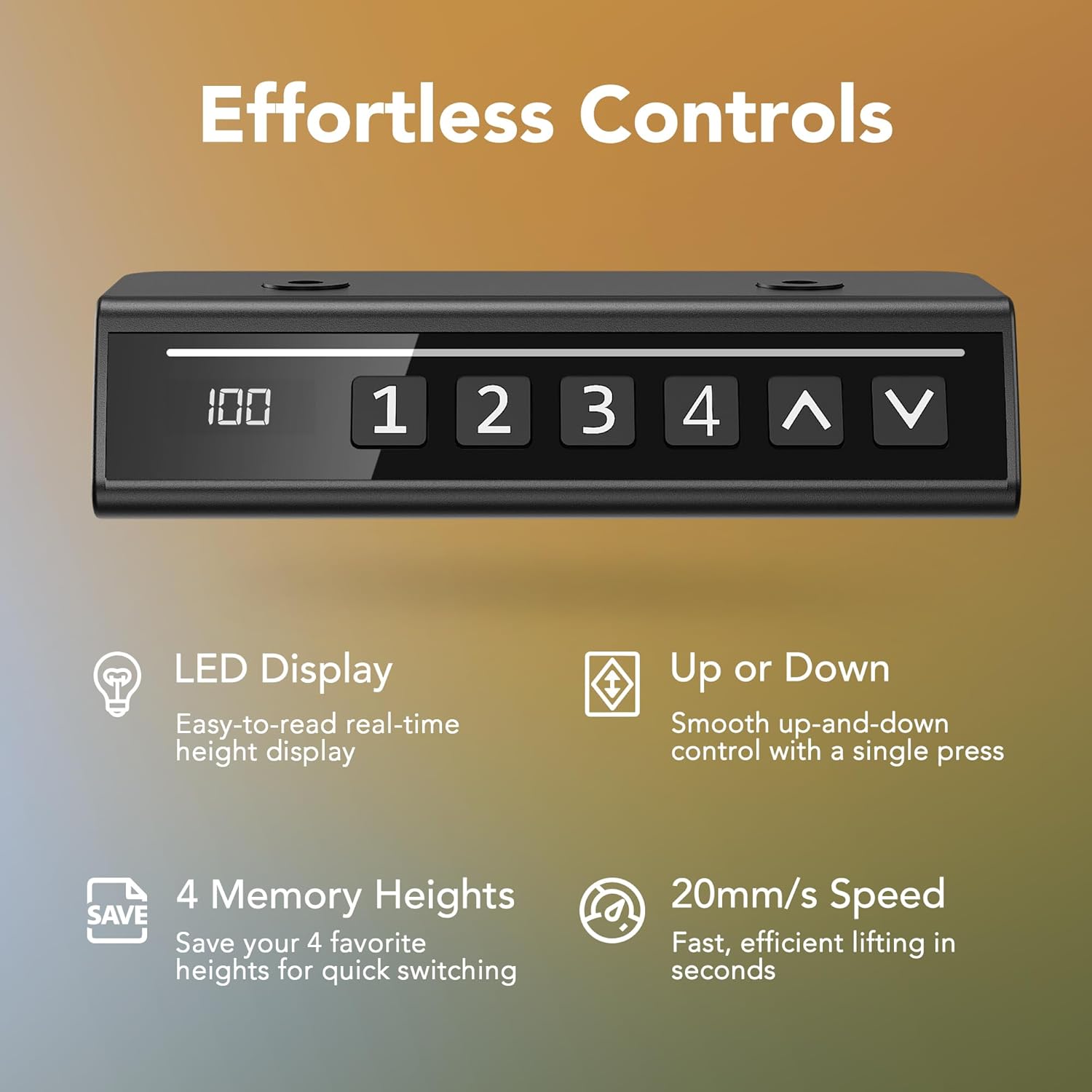
Image: Visual representation of the desk's quiet operation, demonstrating that its noise level is below 50dB, quieter than typical city traffic or talking.
6. Maintenance
Regular maintenance ensures the longevity and smooth operation of your HUANUO Electric Standing Desk.
- Cleaning: Wipe the desk surface and frame with a soft, damp cloth. Avoid abrasive cleaners or harsh chemicals that could damage the finish.
- Cable Management: Periodically check that all cables are securely connected and not pinched or tangled. Utilize the cable management section at the back of the desk to keep wires tidy.
- Screw Tightness: Over time, screws may loosen. Periodically check and tighten all assembly screws to maintain stability.
- Weight Capacity: Do not exceed the maximum weight capacity of 176 lbs to prevent damage to the motor and frame.
7. Troubleshooting
If you encounter any issues with your desk, please refer to the following common troubleshooting steps:
| Problem | Possible Cause | Solution |
|---|---|---|
| Desk does not move | Power cable disconnected; Overload; Motor error | Check power connections; Reduce weight on desk; Unplug for 10 seconds and plug back in to reset. |
| Uneven movement or wobbling | Loose screws; Uneven floor; Obstruction | Tighten all assembly screws; Ensure desk is on a level surface; Remove any obstructions under or around the desk. |
| Memory presets not working | Presets not saved correctly | Re-save the memory presets following the operating instructions. |
If the problem persists after trying these solutions, please contact HUANUO customer support for further assistance.
8. Specifications
| Attribute | Detail |
|---|---|
| Brand | HUANUO |
| Model Number | MSESD202WN-110A-US |
| Model Name | MSESD202B |
| Product Dimensions | 24"D x 43"W x 28.3"H |
| Color | Black Walnut |
| Style | Modern |
| Base Material | Alloy Steel |
| Top Material Type | Engineered Wood |
| Finish Type | Laminated |
| Special Features | Adjustable Height, Ergonomic, Electric, Scratch Resistant |
| Recommended Uses | Working, Drafting, Writing, Studying, Gaming |
| Included Components | High-performance carbon steel frame, environmentally friendly spliced table |
| Item Weight | 37.7 Pounds |
| Minimum Height | 28.3 Inches |
| Maximum Height | 46.5 Inches |
| Number of Height Positions | 4 (Memory Presets) |
| Lifting Mechanism | Electric |
| Required Assembly | Yes |
| Includes All Assembly Tools | Yes |
| UPC | 840478806946 |
9. Warranty and Support
Your HUANUO Electric Standing Desk comes with a Limited Warranty. For specific details regarding warranty coverage and duration, please refer to the warranty card included with your product or contact customer support.
For any questions, technical assistance, or warranty claims, please contact HUANUO US-Based Customer Support. You can find more information and contact details on the official HUANUO brand store:

Image: HUANUO offers dedicated US-Based Customer Support for assistance.


