
HOMCOM 83A-068V80WT
HOMCOM 71" Tall Pantry Cabinet with Microwave Stand
Model: 83A-068V80WT
Introduction
This manual provides essential information for the assembly, operation, and maintenance of your HOMCOM 71" Tall Pantry Cabinet with Microwave Stand. Please read these instructions carefully before assembly and use to ensure safe and proper functionality of your new furniture.
Safety Information
WARNING: Failure to follow these safety instructions could result in injury or damage to the product.
To ensure safety, secure the cabinet to the wall using the provided anti-tipping hardware to prevent accidental falls. Do not exceed the weight capacity of 55 lbs on the countertop. Handle the shelves carefully to avoid damage. Always assemble the unit on a soft, clean surface to prevent scratches. Keep small parts away from children during assembly.

Figure 1: Anti-Tipping Hardware Installation. This image illustrates the anti-tipping hardware and how it should be secured to the wall to prevent the cabinet from tipping over, ensuring safety.
Product Features and Overview
The HOMCOM 71" Tall Pantry Cabinet is designed for versatile storage and a dedicated space for kitchen appliances. Key features include:
- Versatile Storage: Eight compartments for dishes, pots, and dry goods, plus two drawers for napkins, towels, and silverware.
- Spacious Countertop: Features a cable hole, ideal for appliances like a microwave or coffee maker.
- Customizable Storage: Adjustable shelves in both upper and lower sections accommodate items of various sizes.
- Stylish Design: Sleek, modern design with glass and recessed doors, complemented by metal knobs.
- Safety Features: Includes anti-tipping design for wall securing.
- Easy Maintenance: Melamine-coated shelves are easy to clean.

Figure 2: Front View of the Pantry Cabinet. This image displays the overall appearance of the HOMCOM 71" Tall Pantry Cabinet, highlighting its design and various storage sections.

Figure 3: Large Storage Space and Cable Management. This image shows the interior compartments of the cabinet, emphasizing the ample storage capacity and the integrated cable management hole on the countertop for appliances.
Specifications
| Attribute | Detail |
|---|---|
| Overall Dimensions | 39.4" W x 15.7" D x 70.9" H |
| Weight Capacity (Total) | 302 lbs. |
| Weight Capacity (Countertop) | 55 lbs. |
| Weight Capacity (Drawer) | 8.8 lbs. |
| Material | Engineered Wood |
| Color | White |
| Assembly Required | Yes |
| Model Number | 83A-068V80WT |

Figure 4: Product Dimensions. This diagram provides precise measurements for all sections of the pantry cabinet, including overall height, width, depth, and internal compartment sizes.
Setup and Assembly
Assembly is required for this product. It is recommended to have two people for assembly. Please ensure all parts are present before beginning. A detailed assembly manual with step-by-step instructions and diagrams is included in the product packaging. Follow the numbered steps carefully.
Key Assembly Considerations:
- Unpacking: Carefully unpack all components and hardware. Lay them out on a clean, soft surface to prevent scratches.
- Hardware Identification: Refer to the parts list in your assembly manual to identify all screws, dowels, and other hardware.
- Panel Orientation: Pay close attention to the orientation of panels as indicated in the diagrams.
- Adjustable Shelves: The shelves are designed to be adjustable. Insert the shelf pins into the desired holes before placing the shelves.
- Door Hinge Adjustment: After installing the doors, adjust the hinges to ensure proper alignment and flush closure.
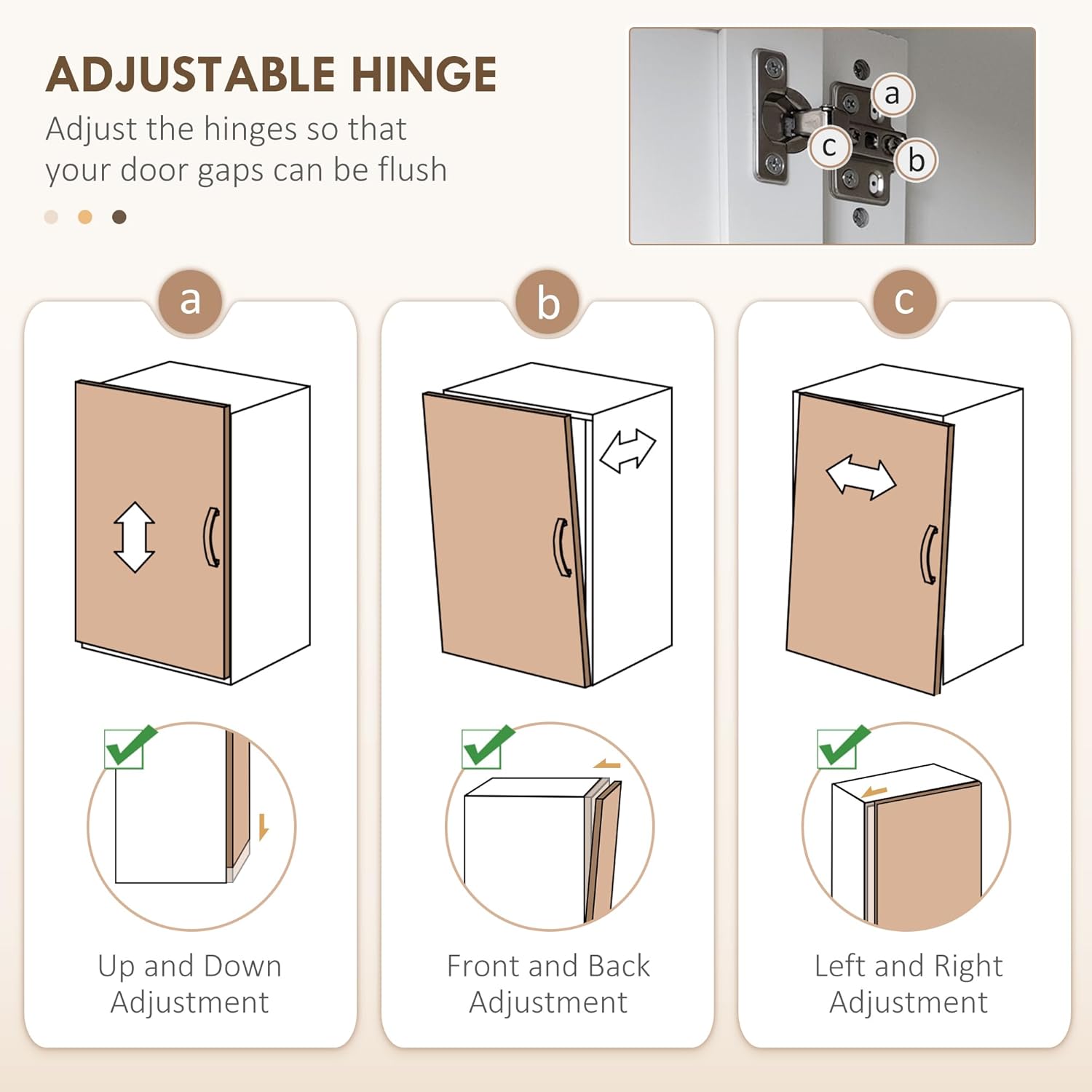
Figure 5: Adjustable Hinge Mechanism. This image illustrates how to adjust the cabinet door hinges for vertical, horizontal, and depth alignment, ensuring doors close properly and are flush with the cabinet frame.

Figure 6: Adjustable Shelves. This image demonstrates the adjustable nature of the shelves, allowing users to reposition them to accommodate items of different heights, with an indication of the adjustment increment.
Operating and Usage
Your HOMCOM pantry cabinet is designed for versatile use in various rooms, including the kitchen, living room, dining room, or entryway.
- Storage: Utilize the upper glass-fronted cabinets for display items or frequently accessed goods. The lower cabinets and drawers are suitable for larger items, cookware, or silverware.
- Microwave Stand: Place your microwave or other small kitchen appliances on the spacious countertop. Ensure the appliance's dimensions fit within the designated area (refer to Figure 4 for dimensions). Use the cable hole for neat wire management.
- Weight Limits: Adhere to the specified weight capacities for the countertop (55 lbs) and drawers (8.8 lbs) to prevent damage and ensure stability.
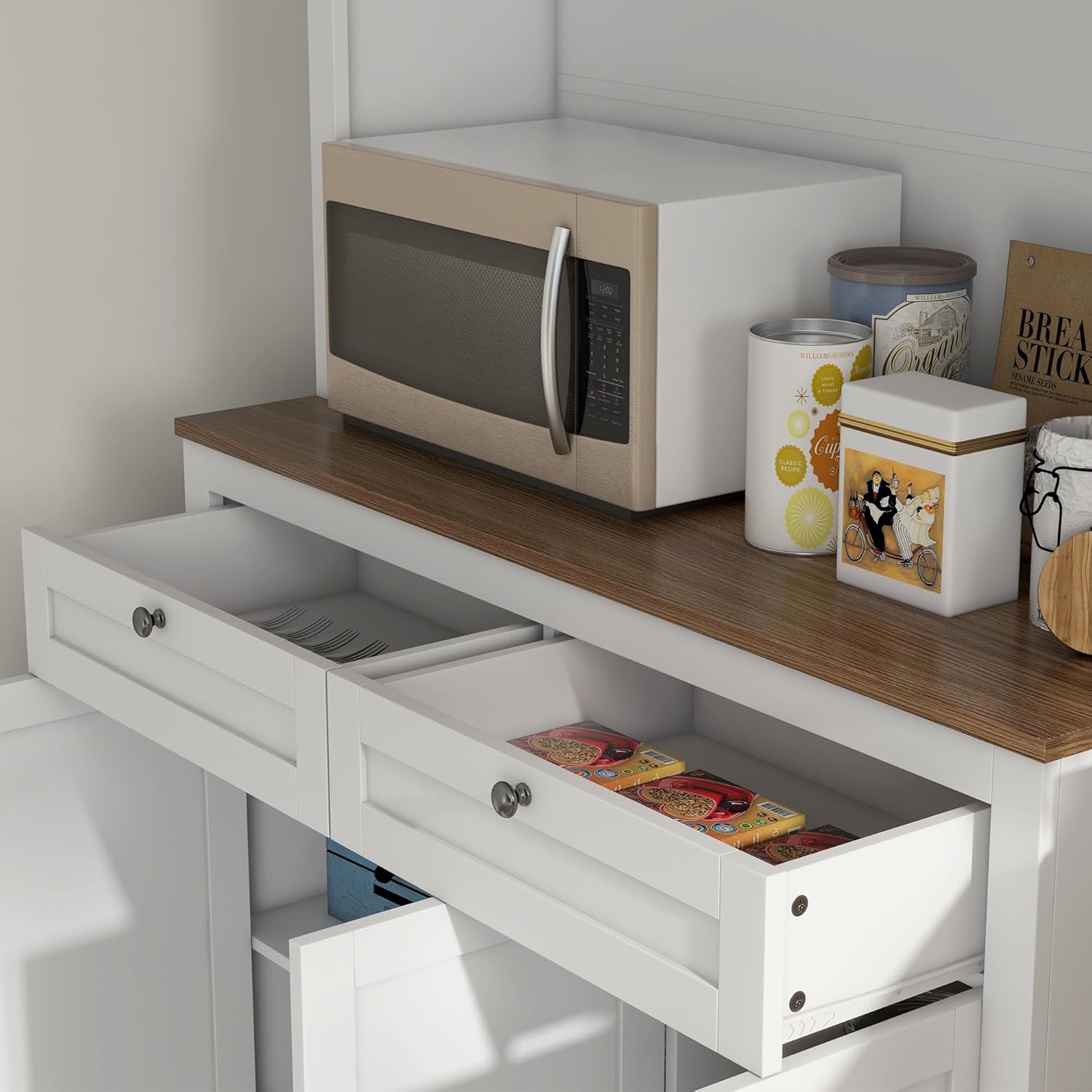
Figure 7: Functional Drawers. This image provides a close-up view of the two pull-out drawers, demonstrating their capacity for storing smaller kitchen items like utensils or napkins.
Maintenance and Care
Proper care will extend the life and appearance of your pantry cabinet.
- Cleaning: Wipe surfaces with a soft, damp cloth. Avoid abrasive cleaners or harsh chemicals that can damage the finish. The melamine-coated shelves are particularly easy to clean.
- Spills: Clean up spills immediately to prevent staining or damage to the wood.
- Hardware: Periodically check all screws and fasteners to ensure they are tight. Re-tighten if necessary to maintain structural integrity.
- Sunlight Exposure: Avoid prolonged exposure to direct sunlight, which can cause fading or discoloration.
Troubleshooting
Common Issues and Solutions:
- Issue: Cabinet feels wobbly or unstable.
- Solution: Ensure all assembly screws are fully tightened. Verify that the anti-tipping hardware is correctly installed and securely anchored to a wall stud or appropriate wall anchor. Ensure the cabinet is placed on a level surface.
- Issue: Doors are not aligning or closing properly.
- Solution: Adjust the door hinges using the adjustment screws (refer to Figure 5). There are typically screws for vertical, horizontal, and depth adjustments. Make small adjustments until the doors are flush and close smoothly.
- Issue: Drawers are sticking or not sliding smoothly.
- Solution: Check that the drawer slides are correctly installed and aligned. Ensure no debris is obstructing the slides. Lightly lubricate the slides with a silicone-based lubricant if needed.
- Issue: Missing or damaged parts during assembly.
- Solution: Do not proceed with assembly if parts are missing or damaged. Contact HOMCOM customer support immediately for replacement parts. Refer to the "Customer Support" section for contact information.
Warranty and Customer Support
For warranty information, please refer to the documentation included with your purchase or visit the official HOMCOM website. For any questions regarding assembly, parts, or product functionality, please contact HOMCOM customer support.
Customer Support: Refer to the contact information provided on the HOMCOM store page or your purchase receipt. You can typically find support details on the HOMCOM Store on Amazon.
Ask a question about this manual
Ask about setup, troubleshooting, compatibility, parts, safety, or missing instructions. Manuals+ will review the question and use this page’s manual context to help answer it.