
1. Product Overview
The Generic C7 Wireless Earwax Removal Tool is designed for visual inspection and gentle removal of earwax. It features a 1296P HD camera and LED lights for clear real-time viewing, connecting wirelessly to your smartphone or tablet.
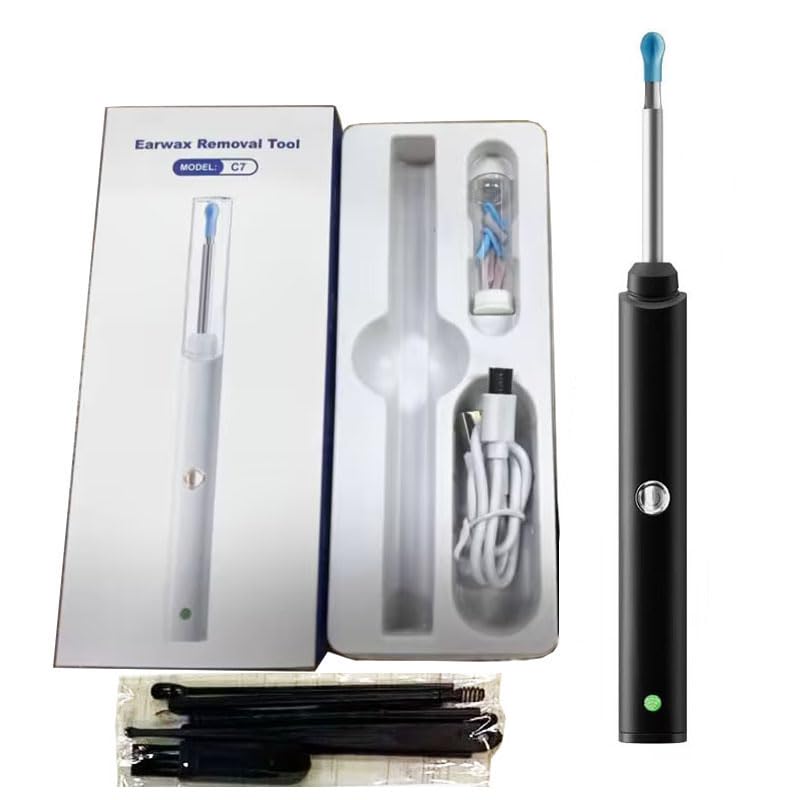
Figure 1: The Earwax Removal Tool and its packaging, showing the device, charging cable, and various ear cleaning accessories.
Key Features:
- 1296P HD Camera: Provides high-definition real-time video of the ear canal.
- 6 LED Lights: Illuminates the ear canal for clear visibility.
- Wireless Connectivity: Connects to Android and iOS devices via Wi-Fi using the 'Kakimi' app.
- All-In-One Ear Spoon Design: Features a firmly fixed camera and soft silicone-covered stainless steel ear scoop.
- Rechargeable Battery: Offers approximately 90 minutes of battery life.
- Multi-purpose Use: Suitable for adults to inspect ears, teeth, nasal cavities, throat, and scalp.
- IP65 Waterproof: Dust-proof and fog-proof lens for durability.
2. Package Contents
Ensure all items are present in your package:
- Wireless Visible Earpick (C7) x 1
- Type-C Charging Cable x 1
- Silicone Ear Spoons x 7
- User Manual x 1
- Traditional Wax Removal Tools x 8 pcs
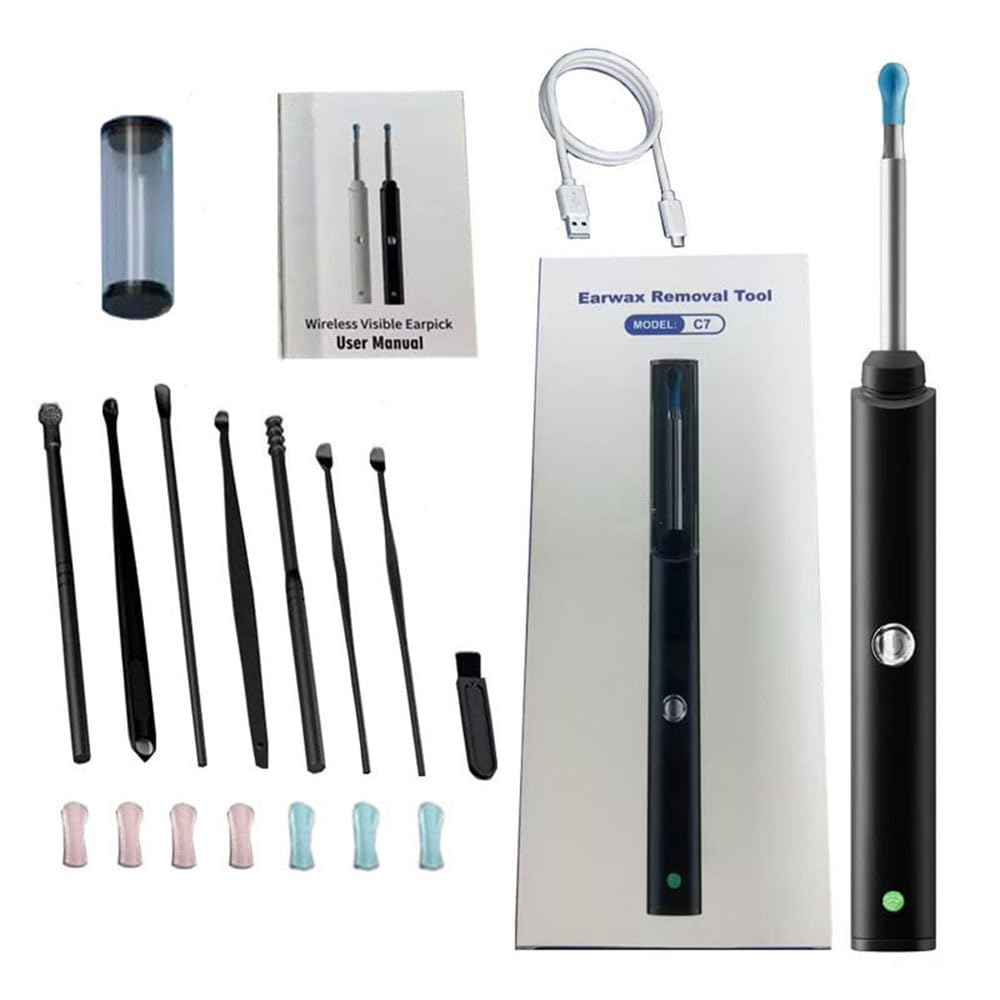
Figure 2: All components included in the Earwax Removal Tool kit, including the device, charging cable, various ear tips, and additional cleaning tools.

Figure 3: A closer look at the various traditional earwax removal tools provided, designed for different types of earwax and ear canal shapes.
3. Setup Guide
3.1 Charging the Device
- Locate the Type-C charging port on the device.
- Connect the provided Type-C charging cable to the device and a suitable USB power source.
- The LED light will be red while charging and turn off when fully charged.

Figure 4: Diagram illustrating the key components of the device, including the silicone ear spoons, 6 LEDs & Camera, Power Button, LED indicator, and Type-C charge port.
3.2 App Installation and Connection
- Scan the QR code provided in the manual or on the packaging to download the 'Kakimi' app.
- Press and hold the device's On/Off button for 1-2 seconds to power it on. The blue indicator light will illuminate.
- On your smartphone or tablet, go to Wi-Fi settings and connect to the Wi-Fi network named 'Kakimi-xxxx' (where 'xxxx' is a unique identifier).
- Open the 'Kakimi' app. The live camera feed from the device should now be visible.
- Note: It is normal for a 'Network unavailable' prompt to appear when connecting, as the device's Wi-Fi does not support internet access.
4. Operating Instructions
4.1 Attaching and Changing Ear Spoons
- Gently slide a silicone ear spoon onto the tip of the device, ensuring it is securely in place over the camera and LED lights.
- To change, carefully remove the current ear spoon and replace it with a clean one.
4.2 Using the Earwax Removal Tool
- With the device powered on and connected to the app, carefully insert the tip into your ear canal.
- Observe the live feed on your device's screen to guide your movements.
- Move the tool gently and slowly. Use the soft silicone ear spoon to carefully dislodge and remove earwax.
- Familiarize yourself with the sensation of the otoscope in the ear canal during initial use.
- The device's 3-axis, 360-degree universal gyroscope helps maintain a stable image orientation.

Figure 5: An individual demonstrating the use of the earwax removal tool, observing the live camera feed on a connected smartphone for precise and safe operation.

Figure 6: An anatomical diagram illustrating the earwax removal tool's tip within the ear canal, highlighting its precise reach and visibility.
4.3 Taking Photos and Videos
The 'Kakimi' app allows you to capture photos and record videos of your ear canal for later review or consultation with a healthcare professional. Refer to the app's interface for specific photo and video capture buttons.
5. Maintenance and Care
5.1 Cleaning the Device and Accessories
- After each use, remove the silicone ear spoon and clean it thoroughly with soap and water or an alcohol wipe.
- Use the provided cleaning brush to gently clean the camera lens and the area around the LED lights.
- The device's lens is IP65 waterproof, allowing for gentle cleaning with a damp cloth, but avoid submerging the main body.
- Clean the traditional wax removal tools with soap and water or an alcohol wipe after each use.
- Store the device and all accessories in a clean, dry place.
6. Troubleshooting
6.1 Common Issues and Solutions
- Device not turning on: Ensure the device is fully charged. Connect it to the Type-C charging cable and allow it to charge for at least 30 minutes.
- No image on app: Verify that the device is powered on and your smartphone/tablet is connected to the 'Kakimi-xxxx' Wi-Fi network. Restart both the device and the app if necessary.
- 'Network unavailable' prompt: This is normal. The device's Wi-Fi is for direct connection to the app only and does not provide internet access.
- Image blurry or unclear: Gently clean the camera lens with the provided brush or a soft, dry cloth. Ensure the silicone ear spoon is correctly attached and not obstructing the lens.
7. Specifications
| Parameter | Value |
|---|---|
| Product Name | Wireless Visible Earwax Removal Tool with Dust Cover |
| Product Size | 160*15*7mm |
| Network Standard | IEEE 802.11b/g/n |
| Signal Line | Built-in Antenna |
| Work Frequency | 2.4G Hz |
| Transmission Speed | 30fps |
| Battery Capacity | 130mAh |
| Input Voltage | DC 5V/300mA |
| Lens Inner Diameter | 3.6mm |
| Work Mode | Press 2 seconds power on/off |
| Charging Mode | LED light is red when charging, off when fully charged |
| Charger Port | Type-C |
| Pixel | 1296P |
| Gravity Sensor | 3-axis, 360 degree universal gyroscope |
| Waterproof Rating | IP65 (waterproof, dust-proof, fog-proof lens) |

Figure 7: Exploded view illustrating the advanced lens system and internal components of the earwax removal tool, highlighting its precision and clarity.

Figure 8: Visual representation of the product's dimensions, including the device itself and its packaging, for reference.
8. Safety Information
- FOR ADULT USE ONLY: This device is not recommended for use with children or pets.
- Always use the device gently and slowly to avoid injury to the ear canal or eardrum.
- Do not insert the tool too deeply into the ear canal.
- If you experience any discomfort, pain, or bleeding, discontinue use immediately and consult a medical professional.
- Ensure the ear spoon is securely attached before insertion.
- Clean the device and all accessories thoroughly before and after each use to maintain hygiene.
- Keep the device out of reach of children.

Figure 9: This image depicts various scenarios of individuals using the earwax removal tool. Important Safety Note: While the image may show diverse users, the manufacturer explicitly states that this device is not recommended for use with children or pets. Please adhere strictly to the safety guidelines provided in this manual.