
68226575AB
Instruction Manual
2014 Compatible With DODGE CHARGER BODY STABILITY CONTROL BCM CBX OEM
Model: 68226575AB
1. Product Overview
This document provides essential information for the installation, operation, and maintenance of the 2014 Compatible With DODGE CHARGER Body Stability Control (BCM) module, OEM part number 68226575AB. This BCM is a critical electronic component responsible for managing various vehicle functions, including stability control, anti-lock braking system (ABS), and other body electronics.
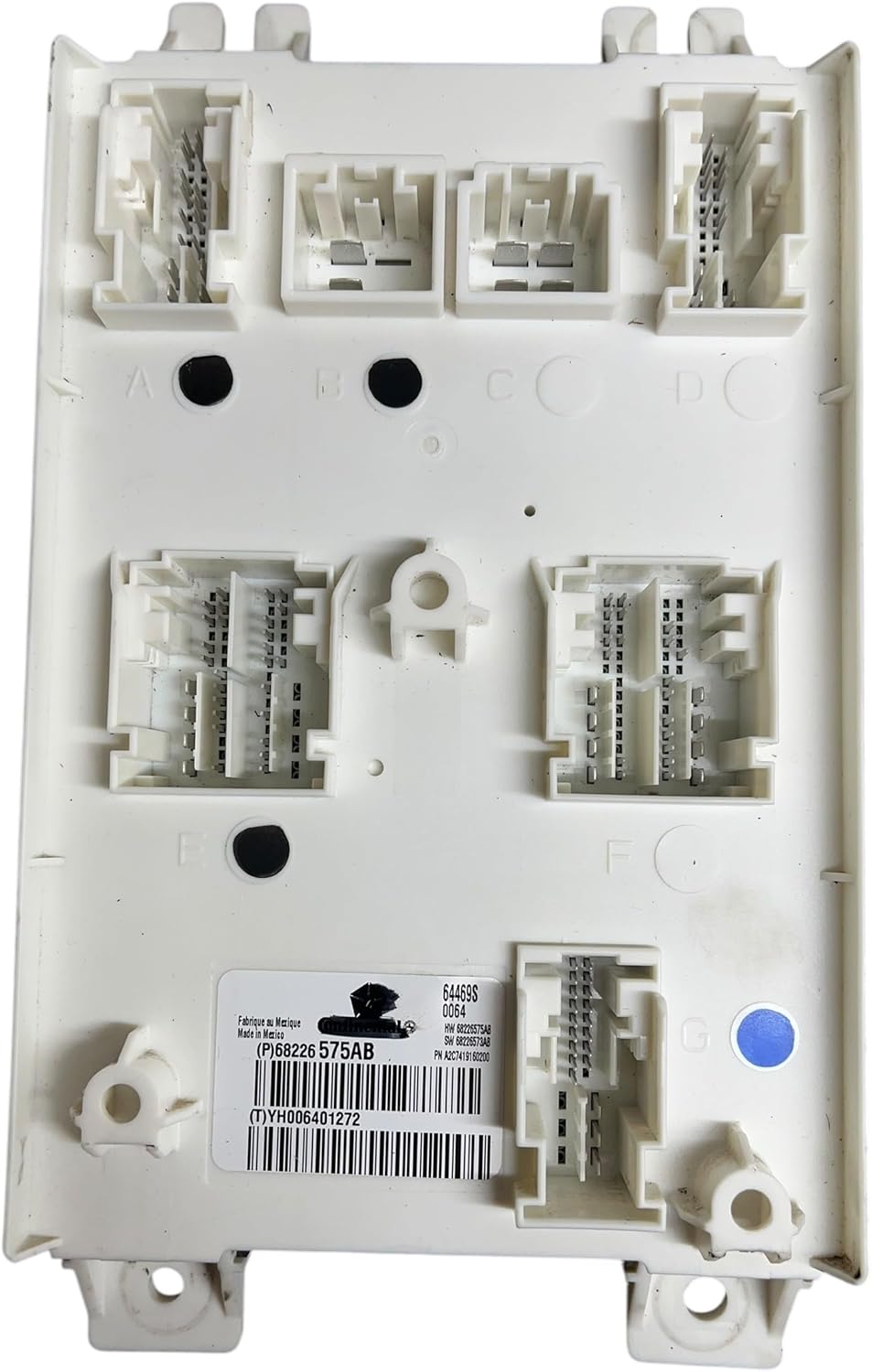
Figure 1: Top-down view of the BCM module, highlighting the various connector ports and the product identification label.
2. Safety Information
Always observe the following safety precautions when handling or installing the BCM module:
- Disconnect the vehicle's battery before beginning any electrical work to prevent short circuits or damage to electronic components.
- Wear appropriate personal protective equipment (PPE), such as safety glasses and gloves.
- Handle the BCM module with care to avoid static discharge, which can damage internal electronics. Use anti-static precautions if available.
- Ensure the vehicle is parked on a level surface with the parking brake engaged.
3. Setup and Installation
The BCM module is typically located within the vehicle's interior, often under the dashboard or behind a trim panel. Consult your vehicle's specific service manual for the exact location and removal procedures.
3.1. Pre-Installation Steps
- Ensure the replacement BCM module (part number 68226575AB) is compatible with your 2014 Dodge Charger.
- Disconnect the negative terminal of the vehicle's battery. Wait at least 5 minutes to allow all electrical systems to power down.
- Locate the existing BCM module in your vehicle.
3.2. Removal of Old BCM
- Carefully disconnect all electrical connectors from the old BCM module. Note their positions for reinstallation.
- Unfasten any mounting bolts or clips securing the old BCM.
- Gently remove the old BCM from its mounting location.
3.3. Installation of New BCM
- Position the new BCM module (68226575AB) into the mounting location.
- Secure the BCM with its mounting bolts or clips.
- Reconnect all electrical connectors to the new BCM. Ensure each connector is fully seated and locked into place.
- Reconnect the negative terminal of the vehicle's battery.

Figure 2: Angled view of the BCM module, illustrating the various connector types and the overall form factor.

Figure 3: Close-up of the BCM module's label, showing the part number P68226575AB and serial number TYH006401272.
Important Note: After installation, the new BCM module may require programming or configuration using a specialized diagnostic tool to synchronize it with the vehicle's other electronic control units (ECUs). This procedure is typically performed by a qualified automotive technician or dealership. Failure to program the BCM may result in various warning lights or system malfunctions.
4. Operating Principles
The Body Stability Control Module (BCM) is a central control unit that manages and monitors numerous electrical systems within the vehicle. Its functions include, but are not limited to:
- Vehicle Stability Control (VSC) / Electronic Stability Program (ESP): Works in conjunction with the ABS to prevent skidding and maintain vehicle control during adverse driving conditions.
- Anti-lock Braking System (ABS): Prevents wheel lock-up during braking, allowing the driver to maintain steering control.
- Lighting Control: Manages interior and exterior lighting, including headlights, taillights, turn signals, and dome lights.
- Power Windows and Locks: Controls the operation of power windows, door locks, and potentially the remote keyless entry system.
- Wiper and Washer Systems: Regulates the front and rear windshield wipers and washer fluid pumps.
- Instrument Cluster Communication: Communicates with the dashboard instrument cluster to display various warnings and indicators.
The BCM receives inputs from various sensors throughout the vehicle and sends commands to actuators to control these systems. Proper operation of the BCM is crucial for vehicle safety and functionality.
5. Maintenance
The BCM module itself is a sealed electronic component and does not require routine maintenance. However, to ensure its longevity and proper function, consider the following:
- Keep the area around the BCM clean and free from moisture or debris.
- Ensure all electrical connections to the BCM are secure and free from corrosion.
- Avoid exposing the BCM to extreme temperatures or excessive vibrations.
- If performing other vehicle maintenance, ensure no fluids or chemicals come into contact with the BCM.
6. Troubleshooting
If you experience issues after installing the BCM module, consider the following troubleshooting steps. Note that many BCM-related issues require professional diagnostic equipment.
6.1. Common Symptoms of BCM Malfunction
- Warning lights on the dashboard (e.g., ABS, ESP, airbag, check engine).
- Malfunctioning power windows, door locks, or interior/exterior lights.
- Issues with the vehicle's security system or remote keyless entry.
- Intermittent electrical problems.
- Vehicle failing to start (in some cases, if the BCM controls ignition interlock).
6.2. Basic Troubleshooting Steps
- Check Connections: Ensure all electrical connectors to the BCM are securely seated.
- Battery Check: Verify the vehicle's battery is fully charged and in good condition. A low battery can cause various electrical issues.
- Fuse Inspection: Check all relevant fuses in the vehicle's fuse box(es) that are associated with the BCM or the affected systems. Refer to your vehicle's owner's manual for fuse locations and diagrams.
- Diagnostic Scan: Use an OBD-II scanner to retrieve any diagnostic trouble codes (DTCs) stored in the vehicle's computer. These codes can provide valuable clues about the nature of the problem.
- Professional Diagnosis: If basic troubleshooting does not resolve the issue, it is highly recommended to seek assistance from a qualified automotive technician. BCM programming and advanced diagnostics often require specialized tools and expertise.
7. Specifications
| Attribute | Specification |
|---|---|
| Part Number | 68226575AB |
| Compatibility | 2014 Dodge Charger (Verify fitment with VIN) |
| Type | Body Stability Control Module (BCM) |
| Condition | Used OEM Part |
| Manufacturer | OEM (Original Equipment Manufacturer) |
| Model Number (Internal) | repair kit |
| ASIN | B0DX4D2NQG |
8. Warranty and Support
As this is a used OEM part, warranty coverage may vary. Please refer to the seller's specific warranty policy at the time of purchase. For technical support or further assistance with installation and programming, it is recommended to consult a certified automotive technician or a Dodge dealership.
For general inquiries regarding this specific part, you may reference the part number P68226575AB or the serial number TYH006401272 found on the module's label.
Ask a question about this manual
Ask about setup, troubleshooting, compatibility, parts, safety, or missing instructions. Manuals+ will review the question and use this page’s manual context to help answer it.