
1. Introduction
The celestaura Sleep Tracker Ring with Heart Rate, Model A9, is a sophisticated wearable device designed to monitor various health and fitness metrics. This manual provides essential information for setting up, operating, and maintaining your smart ring to ensure optimal performance and accurate data collection.
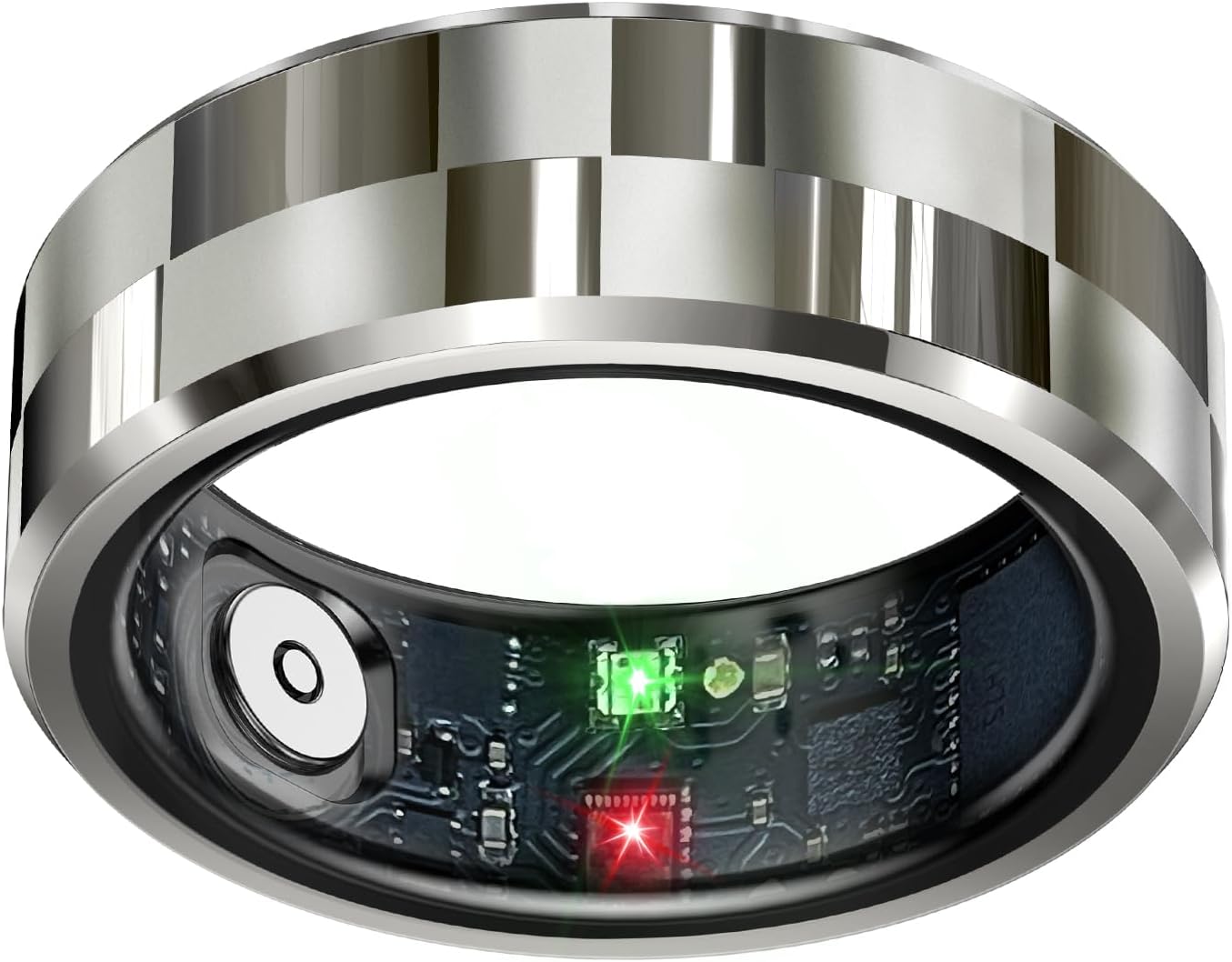
Image 1.1: The celestaura Smart Ring, highlighting its sleek design and internal sensors for health monitoring.
2. Product Features
- Comprehensive Health Monitoring: Tracks sleep patterns, activity levels, heart rate, oximetry, and calories burned.
- Advanced Sleep Tracking: Provides detailed reports on deep sleep, light sleep, eye movement time, and awakenings for improved rest patterns.
- Fitness Activity Tracker: Monitors various activities, calories burned, and overall activity levels to support fitness goals.
- Intuitive Air Gestures and Hands-Free Control: Allows control of devices for actions like scrolling, taking photos/videos, playing music, and turning e-book pages.
- Waterproof, Stylish, and Comfortable Design: Crafted from high-quality materials, waterproof, sleek, and comfortable for continuous wear.

Image 2.1: Visual representation of the ring's health tracking capabilities, including sleep, activity, heart rate, and blood oxygen.
3. Setup & Installation
3.1. Ring Sizing
Accurate ring sizing is crucial for comfortable wear and precise data collection. Follow these steps to determine your correct size:
- Prepare a long strip of paper or a non-stretchable string.
- Wrap it around the base of your finger, ensuring it fits comfortably without being too tight. Mark where the two ends meet.
- Measure the length with a ruler and choose the right size according to the size chart provided below.
Tip: Wearing on the index finger, middle finger, or ring finger is recommended. Too loose or too tight will affect data collection accuracy.

Image 3.1: Ring sizing guide and measurement steps to ensure a proper fit.
3.2. Wearing Method
To ensure accurate readings, position the sensors on the inside of the ring against the pad of your index or middle finger when wearing it.

Image 3.2: Proper wearing technique for the smart ring to optimize sensor contact and data accuracy.
3.3. App Download & Connection
To utilize the full functionality of your celestaura Smart Ring, you must download and connect it to the companion application.
- Read the manual to find the software name/QR code, or search for "ECTRI" in your device's app store. Scan the QR code or download the app.
- After registering an account, log in to the app.
- Open the app, click on the symbol "+" in the upper right corner to search and add the ring model you are wearing.
- Click on 'Allow' in the interface for necessary permissions.
- Click on 'Connect' in the interface.
- Connection successful, start using.

Image 3.3: Step-by-step guide for downloading the app and connecting your smart ring.
3.4. Initial Activation & Charging
For initial connection, please place the ring on the charging case to activate it. The ring charges via a magnetic charging cable.
Video 3.1: A user guide video demonstrating how to measure ring size, connect the app, and activate the ring by placing it on the charging case.
4. Operating Instructions
4.1. Health Monitoring
The celestaura Smart Ring continuously monitors various health metrics. Access detailed data through the connected app.
- Heart Rate: Real-time heart rate monitoring.
- Blood Oxygen: All-day blood oxygen saturation monitoring.
- Sleep Tracking: Records sleep duration, identifies sleep status, and analyzes sleep quality.
- Activity Tracking: Tracks steps, distance, calories burned, and active time.
- Stress Monitoring: Identifies unique stress triggers and recovery strategies.
- Women's Health: Accurately predicts period and ovulation dates based on menstrual data.

Image 4.1: Sleep tracking feature, showing how the ring monitors and analyzes sleep quality.

Image 4.2: Fitness activity tracking, displaying data such as mileage, calories, and heart rate during exercise.
4.2. Air Gestures & Hands-Free Control
The ring supports intuitive air gestures for controlling your devices. You can touch the surface of the ring and slide to control applications like TikTok (page up/down), take photos and videos remotely, play music, or turn pages of e-books.

Image 4.3: Air gesture control feature, demonstrating how the ring can be used to interact with a smartphone.
5. Charging & Battery Life
The celestaura Smart Ring offers a long battery life, typically lasting 5-7 days on a single charge for continuous use. It comes with a compact charging case for convenience.
5.1. Charging Reminder
- The red light will flash when the ring is charging.
- The green light will flash once fully charged.

Image 5.1: The smart ring and its charging case, illustrating the two charging options.
6. Waterproofing
The celestaura Smart Ring is 5ATM waterproof, capable of withstanding depths up to 100m (328ft). This means you do not need to remove it during water-related activities such as washing, showering, or outdoor sports, allowing for continuous health monitoring.

Image 6.1: The smart ring demonstrating its 5ATM waterproof capability.
7. Specifications
| Feature | Detail |
|---|---|
| Model Name | A9 |
| Brand | celestaura |
| Screen Size | 0.5 Inches |
| Shape | Round |
| GPS | No GPS |
| Battery Cell Composition | Lithium Polymer |
| Wireless Communication Standard | Bluetooth |
| Connectivity Technology | Bluetooth |
| Special Feature | Gesture Control, Lightweight |
| Operating System | Android Wear 2.9 |
| Item Weight | 0.13 Kilograms (4.6 ounces) |
| Manufacturer | celestaura |
| Package Dimensions | 3.58 x 3.46 x 1.85 inches |
8. Troubleshooting & Important Tips
8.1. Important Notice
- Please ensure to download the app for connection first. Do not directly connect to the device via Bluetooth on your phone, otherwise the ring will not be able to synchronize health data to the app or even connect.
- If unable to connect, please charge the ring and try again.
8.2. Important Tips
- To ensure normal connection and data transmission between the smart ring and the app, please follow the prompts in the app and open the corresponding permissions in the phone settings.
- For heart rate timed monitoring function: Please open the heart rate monitoring interface, then click on the symbol "3 dots" in the upper right corner, select "Heart rate setting", and then click on "30 minutes" to choose the automatic heart rate monitoring time you need to set. Finally, please click and open the green button next to it.
- The display content of the function cards in the APP can be added or deleted by clicking the "Edit card" button at the bottom of the Health interface according to your preferences.
- The APP will continue to be upgraded and optimized. Please pay attention to your APP upgrade requests and keep the APP at the latest version for a better user experience.
- When you haven't entered the app for a long time, the ring will temporarily disconnect from the app to optimize battery usage. Don't worry, after you re-enter the app, the two will automatically connect, which will only take 2-3 seconds. You just need to wait.

Image 8.1: Important notices and tips for optimal use and troubleshooting.
9. Warranty & Support
For warranty information, technical support, or further assistance, please refer to the contact information provided with your product packaging or visit the official celestaura website. Keep your purchase receipt for warranty claims.