
SPORTARC MMP25 (4U6F5VJP29VFU1G07NY1Z23B0FIDBH)
MMP25 Touch Probe User Manual
Model: MMP25 (4U6F5VJP29VFU1G07NY1Z23B0FIDBH) | Brand: SPORTARC
1. Product Overview
The SPORTARC MMP25 3D Photoelectric Edge Detector is a high-precision measurement tool designed for accurate edge detection and Z-axis measurement in various industrial applications. It offers superior alignment precision and repeatability, making it suitable for demanding machining processes.

Figure 1.1: The MMP25 Touch Probe, showcasing its compact design and main body with the "MMP 25" label.
2. Key Features
- High Precision: Achieves a measurement accuracy of 0.001 mm and a repeated positioning accuracy of 0.001 mm.
- Enhanced Z-axis Measurement: Provides comprehensive Z-axis measurement capabilities for complex machining operations.
- Durability: Designed for greater probe oscillation without damage, ensuring consistent performance and longevity.
- Non-Conductive Material Compatibility: Operates without relying on conductive principles, allowing measurement of non-conductive materials like bakelite, wood, and plastic.
- Wide Application Range: Suitable for metal, bakelite, wood, and plastic materials.
3. Specifications
| Parameter | Value |
|---|---|
| Part Name | 3D Photoelectric Edge Detector |
| Model | MMP25 |
| Material | Stainless Steel |
| Measurement Accuracy | 0.001 mm |
| Repeated Positioning Accuracy | 0.001 mm |
| Probe Direction | ±X, ±Y, +Z |
| Probe Safety Oscillation | XY ±15°, Z +5 mm |
| Power Supply | 14250 3.6V Lithium Battery |
| Trigger Life | 5,000,000 times |
| Application Scope | Metal, Bakelite, Wood, Plastic, etc. |
| Dimensions (L x W x H) | 16 x 8 x 4 cm |
4. Setup
The MMP25 Touch Probe is designed for straightforward integration into compatible machining systems. Ensure the probe is securely mounted and properly aligned with the machine's spindle or tool holder.
4.1. Battery Installation
The probe is powered by a 14250 3.6V Lithium Battery. To install or replace the battery:
- Carefully unscrew the battery compartment cap, usually located at the top or rear of the probe body.
- Insert the 14250 3.6V Lithium Battery, ensuring correct polarity.
- Securely screw the battery compartment cap back into place.
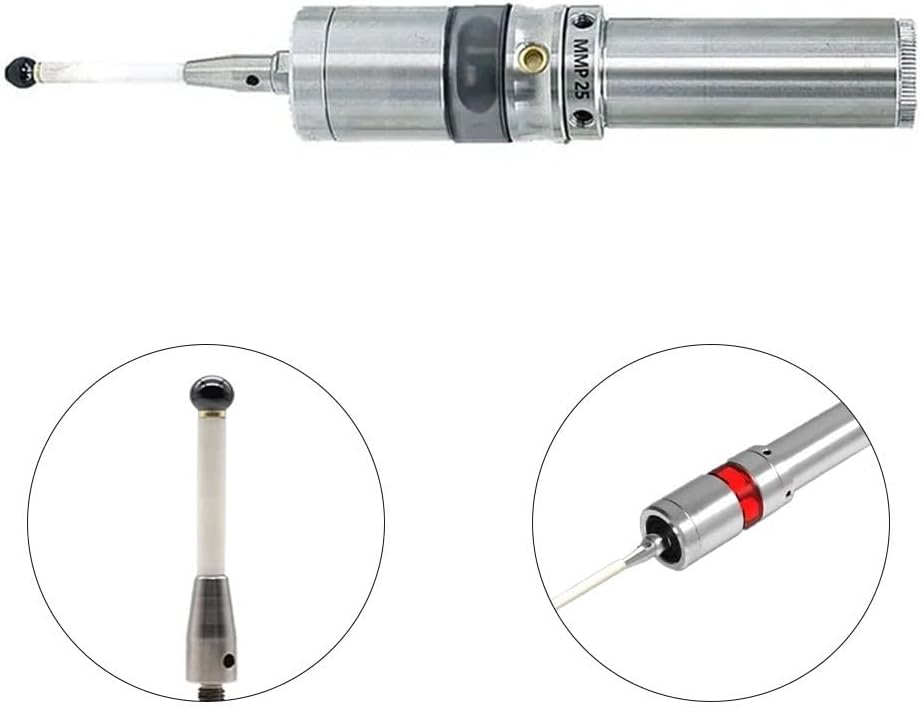
Figure 4.1: The MMP25 Touch Probe with its internal indicator lights illuminated, indicating power or trigger status.
4.2. Mounting the Probe
Mount the MMP25 probe into your machine's spindle or tool holder. Ensure a firm and stable connection to prevent any movement during operation that could affect measurement accuracy.
5. Operating Instructions
The MMP25 3D Photoelectric Edge Detector is used to precisely locate workpiece edges and surfaces. Its operation relies on detecting contact with the workpiece.
5.1. Basic Usage
- Preparation: Ensure the workpiece is securely clamped on the machine table.
- Probe Positioning: Based on the position of the workpiece to be measured, move the probe towards the workpiece.
- Approach: Approach the workpiece in a step-by-step manner. The probe will trigger upon contact, signaling the exact position.
- Measurement: The machine's control system will register the contact point, allowing for precise edge detection, center finding, or Z-axis height measurement.

Figure 5.1: A close-up view of the MMP25 probe's tip, which makes contact with the workpiece during measurement.
5.2. Z-axis Measurement
The MMP25 offers enhanced Z-axis measurement capabilities. When performing Z-axis measurements, carefully lower the probe until it makes contact with the surface. The precise trigger mechanism ensures accurate height detection.
5.3. Material Compatibility
Unlike traditional conductive probes, the MMP25 can measure non-conductive materials such as bakelite, wood, and various plastics, in addition to metals. This broadens its application range significantly.
6. Maintenance
Proper maintenance ensures the longevity and accuracy of your MMP25 Touch Probe.
- Cleaning: Regularly clean the probe tip and body with a soft, lint-free cloth. Avoid abrasive cleaners or solvents that could damage the probe's surface or internal components.
- Storage: When not in use, store the probe in a clean, dry environment, preferably in its original packaging or a protective case, to prevent dust accumulation and physical damage.
- Battery Replacement: Replace the 14250 3.6V Lithium Battery as needed to ensure consistent performance. Low battery can affect trigger reliability.
- Inspection: Periodically inspect the probe for any signs of wear, damage, or loose connections. Address any issues promptly.

Figure 6.1: The MMP25 Touch Probe held in a hand, demonstrating its size and ease of handling for maintenance or inspection.
7. Troubleshooting
This section addresses common issues you might encounter with your MMP25 Touch Probe.
| Problem | Possible Cause | Solution |
|---|---|---|
| Probe not triggering | Low or dead battery; dirty probe tip; internal malfunction. | Replace battery; clean probe tip; contact support if issue persists. |
| Inaccurate measurements | Loose mounting; damaged probe tip; environmental factors (vibration, temperature). | Ensure secure mounting; inspect probe tip for damage; check operating environment. |
| Probe lights not illuminating | Battery issue; internal wiring problem. | Check battery installation and charge; contact support. |
If you encounter issues not listed here or if the suggested solutions do not resolve the problem, please contact customer support.
8. Warranty and Support
8.1. Warranty Information
Specific warranty details for the SPORTARC MMP25 Touch Probe are typically provided at the point of purchase or within the product packaging. Please refer to your purchase documentation for information regarding warranty period and coverage. Generally, products are covered against manufacturing defects for a specified period from the date of purchase.
8.2. Customer Support
For technical assistance, troubleshooting, or inquiries regarding your MMP25 Touch Probe, please contact SPORTARC customer support through the retailer where the product was purchased or visit the official SPORTARC website for contact information.
When contacting support, please have your product model number (MMP25) and any relevant purchase details ready.
Ask a question about this manual
Ask about setup, troubleshooting, compatibility, parts, safety, or missing instructions. Manuals+ will review the question and use this page’s manual context to help answer it.