
1. Introduction
Thank you for choosing the FGBHFH AIXUN T3A-245 Soldering Station. This intelligent soldering station is designed for precision welding tasks, offering rapid heating, stable temperature control, and advanced features for efficient operation. This manual provides essential information for the safe and effective use, setup, operation, and maintenance of your device.
2. Safety Information
Please read and understand all safety instructions before operating the soldering station. Failure to follow these instructions may result in electric shock, fire, or serious injury.
- Always operate the soldering station in a well-ventilated area to avoid inhaling fumes.
- The soldering iron tip can reach very high temperatures. Avoid direct contact with skin or flammable materials.
- Use appropriate personal protective equipment, including safety glasses and heat-resistant gloves.
- Ensure the power cord is in good condition and properly grounded.
- Do not use the soldering station near water or in damp conditions.
- Unplug the unit from the power outlet when not in use or before performing maintenance.
- Keep out of reach of children.
3. Package Contents
Verify that all items listed below are present in your package:
- AIXUN T3A-245 Soldering Station Main Unit
- Soldering Iron Handle (T245 type)
- Soldering Iron Stand with Cleaning Sponge
- Power Cord
- User Manual (This document)

Figure 3.1: Complete FGBHFH AIXUN T3A-245 Soldering Station setup, including the main unit, soldering iron, and iron stand.
4. Product Overview
The AIXUN T3A-245 Soldering Station features a compact design with an intuitive interface. Key components include:
- Main Unit: Houses the control circuitry, power supply, and display.
- LCD/LED Display: Shows current temperature, set temperature, power output, and other operational parameters.
- Temperature Adjustment Knob: Used to set the desired soldering temperature.
- Channel (CH) Button: For switching between preset temperature channels.
- Set Button: For accessing menu options or confirming settings.
- Soldering Iron Port: Connector for the soldering iron handle.
- Soldering Iron Handle: Ergonomically designed for comfortable use, compatible with T245 series tips.
- Soldering Iron Stand: Provides a safe resting place for the hot iron and includes a cleaning sponge.
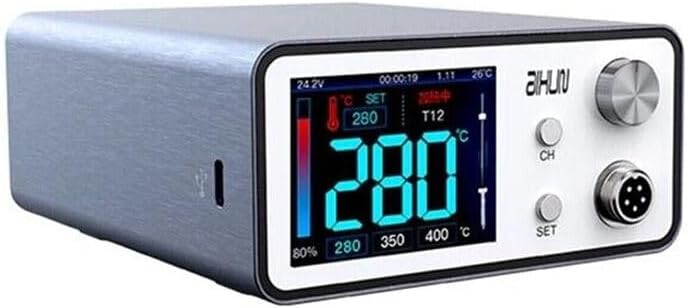
Figure 4.1: Detailed view of the soldering station's display, showing temperature readings, power percentage, and control buttons (CH, SET) and the adjustment knob.
5. Setup
- Placement: Place the soldering station on a stable, heat-resistant, and non-flammable surface. Ensure adequate ventilation.
- Connect Soldering Iron: Carefully connect the soldering iron handle cable to the designated port on the front of the main unit. Ensure a secure connection.
- Position Iron Stand: Place the soldering iron stand in a convenient and safe location, ensuring the hot iron tip will not come into contact with anything flammable when resting. Dampen the cleaning sponge with water.
- Power Connection: Connect the power cord to the back of the soldering station and then plug it into a grounded electrical outlet.
- Initial Power On: Press the power button (if available, otherwise the unit powers on when plugged in). The display should illuminate.
6. Operating Instructions
6.1. Powering On and Off
The unit typically powers on automatically when connected to a power source. To power off, disconnect the power cord from the electrical outlet.
6.2. Temperature Adjustment
Rotate the large knob on the right side of the main unit to adjust the desired soldering temperature. The display will show both the set temperature and the current tip temperature. The station features rapid heating, capable of reaching 380 °C in approximately 4 seconds with a C245 soldering iron.
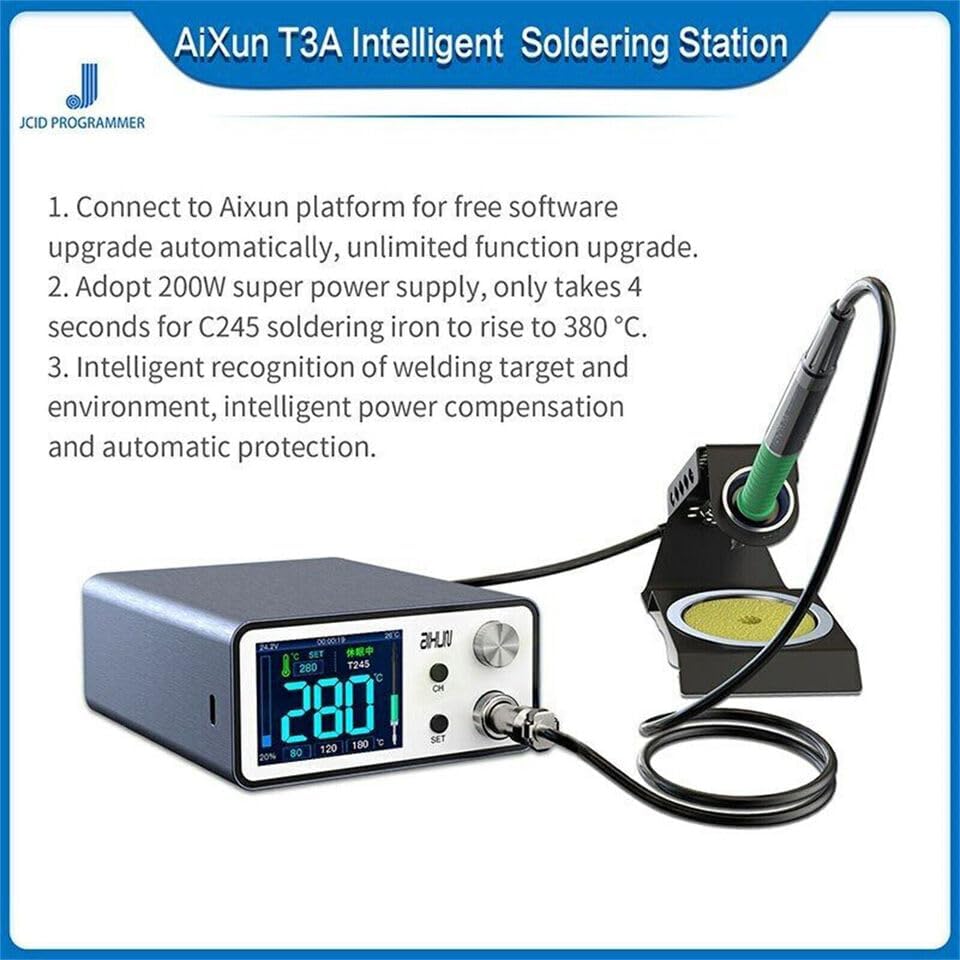
Figure 6.1: The AIXUN T3A Soldering Station highlighting its intelligent features, including rapid heating and automatic software upgrades.
6.3. Using Preset Channels
Press the "CH" button to cycle through preset temperature channels. This allows for quick switching between frequently used temperatures for different soldering tasks.
6.4. Intelligent Features
The AIXUN T3A-245 incorporates intelligent recognition of the welding target and environment. It provides intelligent power compensation and automatic protection mechanisms to ensure stable performance and safety during operation.
6.5. Software Upgrades
The soldering station can connect to the AIXUN platform for free software upgrades. This allows for automatic updates and unlimited function enhancements, ensuring your station remains up-to-date with the latest features and improvements.
7. Maintenance
- Tip Cleaning: Regularly clean the soldering iron tip using the damp sponge provided in the stand. This helps remove oxidation and ensures efficient heat transfer.
- Tip Tinning: After cleaning and before storing, tin the tip with a small amount of solder to prevent oxidation and prolong its lifespan.
- Unit Cleaning: Wipe the main unit with a soft, dry cloth. Do not use abrasive cleaners or solvents.
- Tip Replacement: When the soldering tip wears out or becomes damaged, replace it with a compatible T245 series soldering tip. Ensure the unit is unplugged and cooled before changing tips.
8. Troubleshooting
| Problem | Possible Cause | Solution |
|---|---|---|
| Station does not power on. | No power supply; faulty power cord. | Check power outlet and cord connection. Ensure the outlet is functional. |
| Soldering iron not heating. | Iron not properly connected; faulty heating element/tip. | Ensure the iron cable is securely connected. Try replacing the soldering tip. |
| Temperature fluctuates significantly. | Poor tip contact; environmental factors. | Ensure the tip is correctly seated. Operate in a stable environment. |
| Display shows an error code. | Internal malfunction. | Refer to the AIXUN platform for specific error code meanings or contact support. |
9. Specifications
- Model: AIXUN T3A-245
- Brand: FGBHFH
- Power Output: 245 Watts
- Display Type: LCD/LED
- Compatible Iron Tips: T245 Series
- Rapid Heating: Approx. 4 seconds to 380 °C (with C245 iron)
- Manufacturer Part Number: FC0893NEW
- UPC: 690313485382
10. Warranty and Support
For warranty information, technical support, or service inquiries, please contact your retailer or the manufacturer directly. Keep your purchase receipt as proof of purchase.
For software updates and additional resources, please visit the official AIXUN platform.